
1. Introduktion
This manual provides essential information for the proper installation, operation, and maintenance of your ENDORFY Arx 500 ARGB ATX Computer Case. Please read this manual thoroughly before beginning installation to ensure optimal performance and safety.
The ENDORFY Arx 500 ARGB is a high-performance ATX computer case designed for efficient cooling and spacious component compatibility. Key features include:
- Hærdet glas sidepanel til udstillingasing interne komponenter.
- Spacious interior for easy component installation and cable management.
- Compatibility with various radiator sizes for advanced cooling solutions.
- Airy and easily accessible front panel for optimal airflow.
- Efficient cooling design to maintain low component temperatures.
- Convenient cable management features for a clean build.
2. Sikkerhedsoplysninger
Please observe the following safety precautions to prevent damage to the product or injury to yourself.
- Strømafbrydelse: Always disconnect the power supply from the wall outlet before installing or removing any components inside the computer case.
- Statisk elektricitet: Wear an anti-static wrist strap or frequently touch a grounded metal object to discharge static electricity before handling internal components.
- Skarpe kanter: Be cautious of sharp edges inside the case during installation.
- Hærdet glas: Handle the tempered glass side panel with care. It is fragile and can break if dropped or subjected to impact. Place it on a soft, flat surface when removed.
- Ventilation: Ensure adequate ventilation around the case to prevent overheating. Do not block air vents.
- Væskekontakt: Keep the computer case away from liquids and moisture.
3. Pakkens indhold
Kontroller, at alle varer er til stede i din pakke. Hvis der mangler eller er beskadigede varer, skal du kontakte din forhandler.
- ENDORFY Arx 500 ARGB ATX Computer Case
- 4 x 140 mm ARGB Fans (pre-installed)
- Accessory Box (containing screws, cable ties, and other mounting hardware)
- Brugervejledning (dette dokument)

Figur 3.1: Eksploderet view showing the computer case, fans, and various panels.
4. Opsætning og installation
Follow these steps to install your components into the ENDORFY Arx 500 ARGB case.
4.1 Forberedelse af sagen
- Fjern sidepaneler: Carefully remove the tempered glass side panel and the solid metal side panel. Place them on a soft, non-abrasive surface to prevent scratches.
- Tilbehørsboks: Find tilbehørsæsken inde i kabinettet, som indeholder alle nødvendige skruer og monteringsdele.
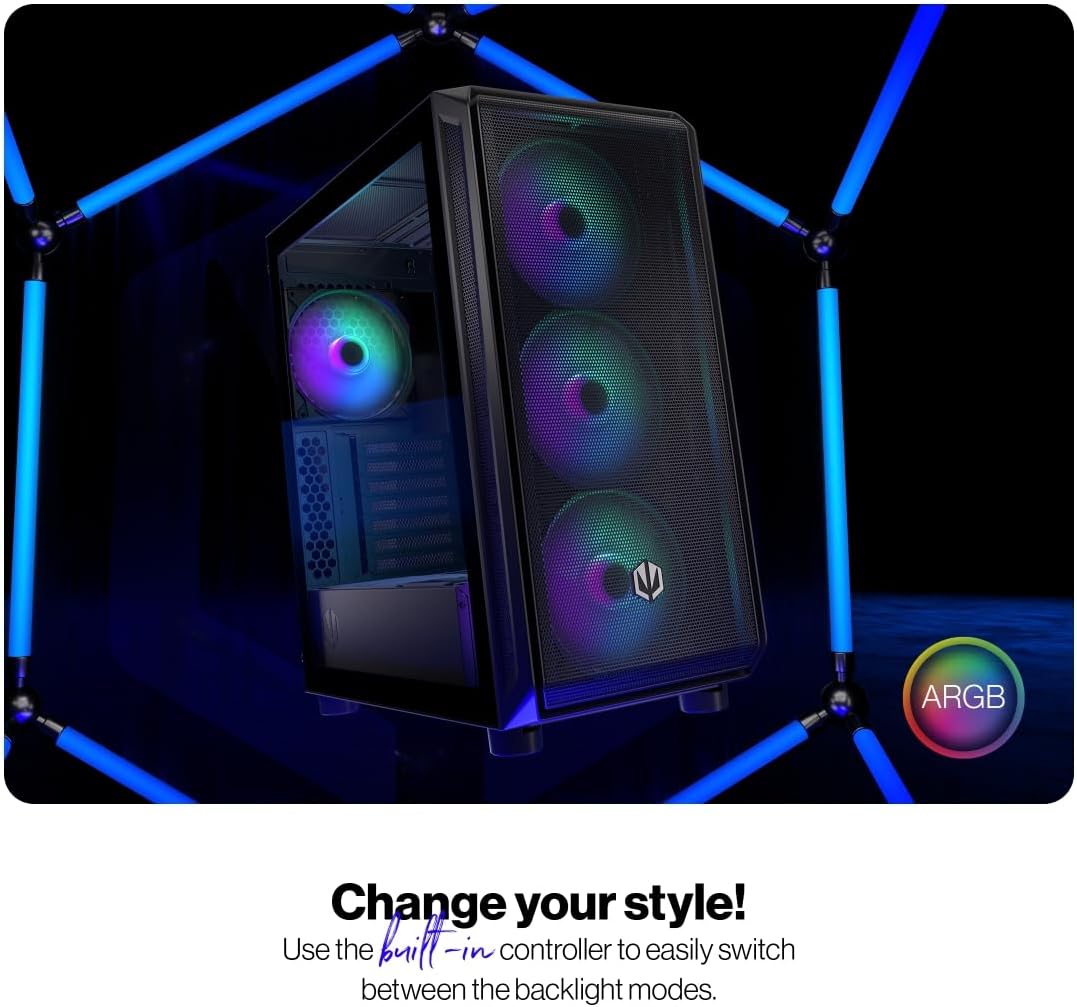
Figure 4.1: The tempered glass side panel allows for a clear view af interne komponenter.
4.2 Installation af bundkort
- Installer standoffs: Ensure the correct standoffs are installed for your ATX motherboard. The case supports ATX motherboards.
- Monter bundkort: Carefully place your motherboard onto the standoffs and secure it with the provided screws.

Figur 4.2: Det rummelige interiør giver ample room for motherboard and other component installation.
4.3 Installation af strømforsyning og lagring
- Strømforsyning: Install your power supply unit (PSU) into the dedicated bottom mount area. Secure it with screws from the rear of the case.
- Lagringsdrev: Install your 2.5" SSDs or 3.5" HDDs into the designated drive bays. Refer to the case's internal structure for specific mounting points.
4.4 Grafikkort og Udvidelseskort
- Fjern dæksler til slots: Fjern de nødvendige PCI-E-slotdæksler fra bagsiden af kabinettet.
- Installer kort: Insert your graphics card and other expansion cards into the motherboard's PCI-E slots and secure them with screws.
4.5 Cooling System (Fans and Radiators)
The case comes with 4 pre-installed 140mm ARGB fans. Additional fans or radiators can be installed for enhanced cooling.
- Ventilatorkapacitet: The case accommodates up to 7 fans.
- Radiator kompatibilitet: The design supports various radiator sizes for liquid cooling solutions.

Figure 4.3: The case features pre-installed 140mm ARGB fans for optimal airflow.

Figure 4.4: Perforated front and top panels ensure maximum airflow and dust protection.
4.6 Kabelstyring
Utilize the dedicated cable management space and tie-down points behind the motherboard tray to route and secure cables for a clean build and improved airflow.
4.7 Forbindelser til frontpanel I/O
Connect the front panel cables (USB, audio, power, reset, LEDs) to the corresponding headers on your motherboard. Refer to your motherboard manual for header locations.

Figure 4.5: Front I/O panel with USB-C, USB-A, headphone, microphone, reset, and power buttons/LEDs.
- USB-C-port: Connects to a USB 3.x Type-C header on your motherboard.
- USB-A porte: Connects to USB 3.x and USB 2.0 headers on your motherboard.
- Headphones Port: Connects to the audio header on your motherboard.
- Mikrofonport: Connects to the audio header on your motherboard.
- Nulstil knap: Connects to the reset header on your motherboard.
- Power LED: Connects to the power LED header on your motherboard.
- Storage Activity LED: Connects to the HDD LED header on your motherboard.
- Power knap: Connects to the power switch header on your motherboard.
5. Betjeningsvejledning
Når alle komponenter er installeret og tilsluttet, kan du tænde dit system.
- Tænd: Press the Power Button on the front I/O panel to turn on your computer. The Power LED will illuminate.
- ARGB-blæserstyring: The pre-installed ARGB fans can be controlled via a built-in controller or synchronized with compatible motherboard software. Use the built-in controller to switch between various backlight modes.

Figure 5.1: The ARGB fans offer customizable lighting effects, controlled via the built-in controller.
6. Vedligeholdelse
Regular maintenance helps ensure optimal performance and longevity of your computer case and components.
- Støvfiltre: Periodically remove and clean the dust filters located on the front, top, and bottom of the case. Use compressed air or a soft brush to remove accumulated dust.
- Udvendig rengøring: Tør de ydre overflader af kabinettet af med en blød, tør klud.amp klud. Undgå slibende rengøringsmidler eller opløsningsmidler.
- Indvendig rengøring: With the system powered off and unplugged, use compressed air to gently remove dust from internal components and fan blades.
- Hærdet glas: Rengør det hærdede glaspanel med en mikrofiberklud og et glasrensemiddel beregnet til elektronik.
7. Fejlfinding
If you encounter issues with your computer case, refer to the following common troubleshooting steps.
- Systemet tænder ikke:
- Sørg for, at strømforsyningen er korrekt tilsluttet stikkontakten og tændt.
- Kontroller, at alle strømkabler fra strømforsyningen er korrekt tilsluttet til bundkortet og komponenterne.
- Kontroller, at kablet til tænd/sluk-knappen på frontpanelet er korrekt tilsluttet bundkortets strømstik.
- Fans Not Spinning/ARGB Not Lighting Up:
- Ensure fan power cables are securely connected to the fan hub or motherboard headers.
- Verify ARGB cables are connected to the built-in controller or motherboard ARGB header.
- Check the built-in controller or motherboard software for fan speed and lighting settings.
- Front USB/Audio Ports Not Working:
- Confirm that the front panel USB and audio cables are correctly connected to the corresponding headers on your motherboard.
- Ensure motherboard drivers for USB and audio are installed.
If problems persist, consult your motherboard manual or contact ENDORFY customer support.
8. Specifikationer
| Feature | Detalje |
|---|---|
| Mærke | ENDORFY |
| Serie | Arx 500 ARGB |
| Modelnummer | EY2A011 |
| Sagstype | Midi-tårnet |
| Bundkort kompatibilitet | ATX |
| Dimensioner (LxBxH) | 16.89 x 8.98 x 19.13 tommer (429 x 228 x 486 mm) |
| Varens vægt | 16.5 pund |
| Materiale | Tempered Glass (side panel) |
| Afkølingsmetode | Luft |
| Inkluderet fans | 4 x 140 mm ARGB fans |
| Fan størrelse | 140 millimeter |
| Strømforsyningsmonteringstype | Bundmontering |
| Front I / O-porte | 2x USB 2.0, 1x USB-C, 1x Headphone, 1x Microphone, Reset Button, Power Button |

Figure 8.1: Front dimensions (228 mm width).

Figure 8.2: Side dimensions (429 mm depth, 486 mm height).
9. Garanti og support
For warranty information, technical support, or further assistance, please visit the official ENDORFY webwebstedet eller kontakt din lokale forhandler.