
QDSYLQ 4D
QDSYLQ Stylus Pen for iPad User Manual
Model: 4D
Indledning
Thank you for choosing the QDSYLQ Stylus Pen for iPad. This stylus is designed to provide a precise and natural writing and drawing experience on compatible Apple iPad models. It features fast charging, long battery life, tilt sensitivity, and palm rejection for enhanced usability. Please read this manual carefully to ensure proper use and maintenance of your device.

Figure 1: The QDSYLQ Stylus Pen, showcasing its sleek design and integrated power indicator lights.
Kompatibilitet
The QDSYLQ Stylus Pen is fully compatible with all Apple iPad models released between 2018 and 2023. This includes:
- iPad (6., 7., 8., 9., 10. generation)
- iPad Mini (5., 6. generation)
- iPad Air (3rd, 4th, 5th Generation)
- iPad Pro 11-tommer (1., 2., 3., 4. generation)
- iPad Pro 12.9 tommer (3., 4., 5., 6. generation)
Important Note: Please confirm your iPad model before purchasing or attempting to use the stylus to ensure compatibility.

Figure 2: Visual guide to compatible iPad models and generations.
Opsætning
Indledende opladning
Before first use, it is recommended to fully charge the stylus pen. The pen achieves a full charge in approximately 30 minutes.
Tænd/sluk
To power on the stylus, double-tap the top cap button. Double-tap again to power it off. The stylus will automatically shut down after 15 minutes of inactivity to conserve battery life.

Figure 3: Instructions for powering on/off and replacing nibs.
Betjeningsvejledning
At skrive og tegne
Once powered on and connected to your iPad, simply touch the stylus tip to the screen to begin writing, drawing, or navigating. The stylus offers a smooth and responsive experience.
Palmafvisning
The stylus features palm rejection technology, allowing you to rest your hand comfortably on the iPad screen while writing or drawing without causing accidental marks or interference. This provides a natural, paper-like writing experience.

Figure 4: Demonstration of the palm rejection feature, allowing comfortable hand placement on the screen.
Tilt følsomhed
The stylus is equipped with a tilt sensitivity sensor. This feature allows you to adjust the thickness of your lines by simply changing the angle at which you hold the stylus. This is ideal for sketching, shading, and creating varied strokes.
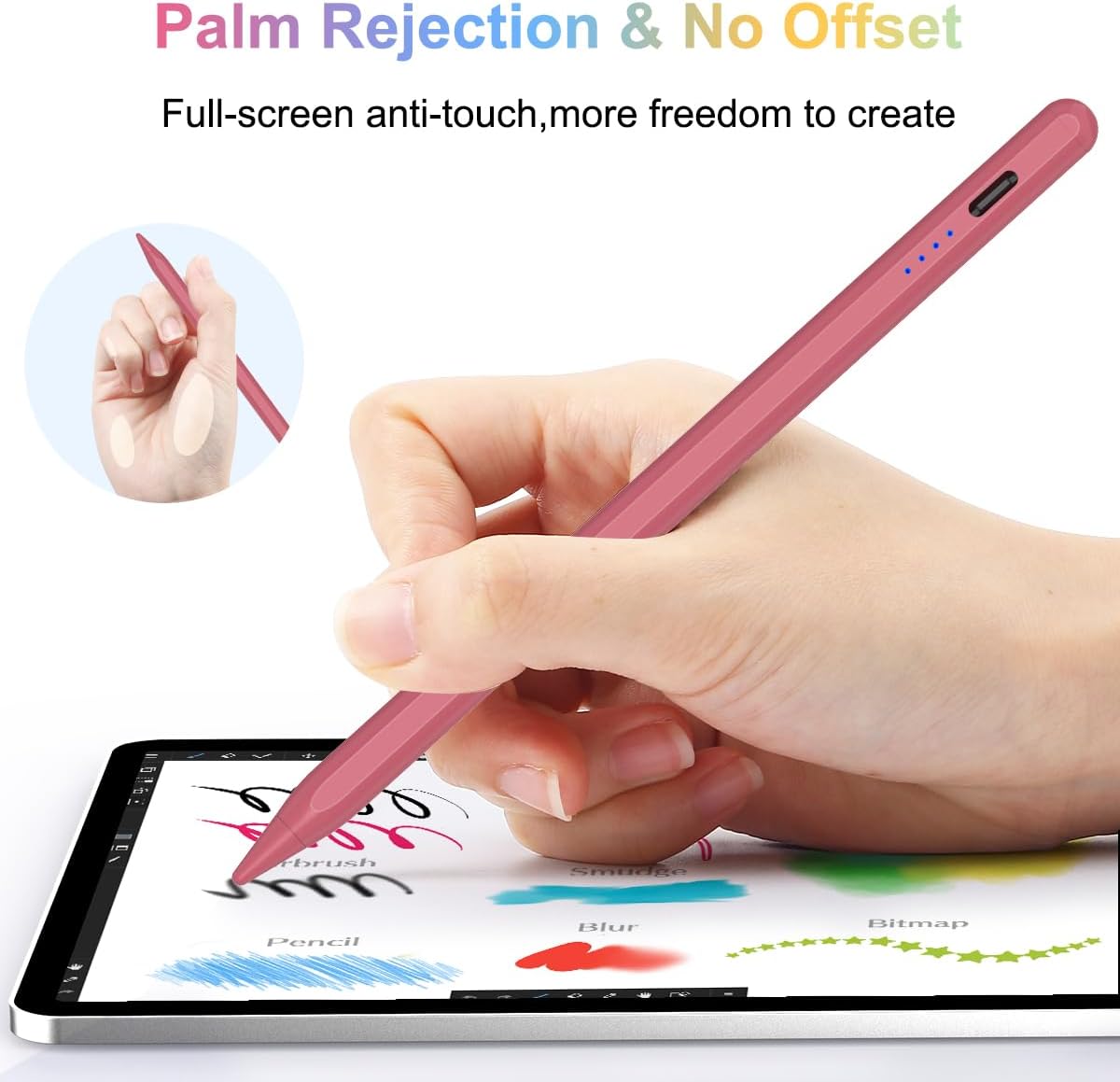
Figure 5: Illustrating how tilt sensitivity affects line thickness.
Magnetisk adsorption
The stylus pen contains a strong magnet, allowing it to securely attach to the side of your compatible iPad. This provides convenient storage and easy access when you need to use it.

Figure 6: The stylus magnetically attached to an iPad for easy storage.
Opretholdelse
Opladning af stylus
To charge the stylus, connect it to a power source using the provided USB-C cable. A full charge takes approximately 30 minutes and provides up to 10 hours of continuous use. The stylus has a standby time of up to 365 days.

Figure 7: Fast charging and long use time capabilities.
Strømindikator
The stylus features four LED power indicator lights to show the remaining battery level:
- Fire lys: 75%-100% effekt
- Tre lys: 50%-75% effekt
- To lys: 25%-50% effekt
- Et lys: Mindre end 25 % effekt
- Blinkende lys: Less than 5% power, indicating it's time to recharge.

Figure 8: Understanding the power indicator lights.
Udskiftning af nib
The stylus comes with high-quality original Apple pen tips. If the nib becomes worn or damaged, it can be replaced. Gently twist the old nib counter-clockwise to remove it, then twist a new nib clockwise until secure.
Rensning
Wipe the stylus with a soft, dry cloth. Do not use abrasive cleaners or immerse the stylus in water.
Fejlfinding
| Problem | Mulig årsag | Løsning |
|---|---|---|
| Stylus reagerer ikke | Low battery; Not powered on; Incompatible iPad model; Bluetooth interference (if applicable) | Charge the stylus; Double-tap the cap button to power on; Verify iPad model compatibility; Disable other Bluetooth pens/devices. |
| Line thickness not changing with tilt | Application does not support tilt sensitivity; Feature not enabled in app settings | Ensure the drawing/note-taking application supports tilt sensitivity; Check app settings for stylus features. |
| Accidental touches from palm | Palm rejection not active or conflicting settings | Ensure no other stylus or Apple Pencil is connected; Some apps may require specific settings for palm rejection. |
| Stylus oplader ikke | Faulty cable or power adapter; Charging port obstruction | Try a different USB-C cable and power adapter; Check charging port for debris. |
Specifikationer
- Model: 4D
- Farve: Rød
- Dimensioner: 16 x 0.8 x 0.8 cm
- Vægt: 14 gram
- Batteri: 1 Lithium Metal batteri (medfølger)
- Opladningstid: Cirka 30 minutter til fuld opladning
- Kontinuerlig brugstid: Op til 10 timer
- Standby tid: Op til 365 dage
- Funktioner: Palm Rejection, Tilt Sensitivity, Magnetic Adsorption, Power Indicator LEDs
- Kompatible enheder: Tablet (specifically Apple iPad models 2018-2023)
Garanti og support
For garantioplysninger og kundesupport henvises til produktemballagen eller kontakt sælgeren direkte via din købsplatform. Gem din købsbevis til eventuelle garantikrav.
Ask a question about this manual
Ask about setup, troubleshooting, compatibility, parts, safety, or missing instructions. Manuals+ will review the question and use this page’s manual context to help answer it.