
Indledning
This manual provides detailed instructions for the operation and maintenance of your Oilsky V08 64GB Digital Voice Recorder. Please read this manual thoroughly before using the device to ensure proper functionality and to maximize its features.
Produkt overview
The Oilsky V08 is a compact digital voice recorder designed for clear audio capture. It features a built-in 64GB memory, noise reduction technology, and various recording and playback options.

Image: The Oilsky V08 digital voice recorder displaying its screen and key features such as 1536kbps recording, noise cancellation chip, 7 levels recording gain, omni-directional microphone, and built-in speaker. It also lists supported WAV and MP3 recording bitrates.
Nøglefunktioner:
- Optagelse af høj kvalitet: Up to 1536kbps WAV format for clear audio.
- Støjreduktion: Integrated noise cancellation chip for improved sound clarity.
- Stort lager: Built-in 64GB memory.
- Lang batterilevetid: Up to 20 hours of continuous recording or 35 hours of continuous playback.
- Alsidig optagelse: Supports external microphone and line-in recording.
- Flere funktioner: Voice Activated Recording, Password Protection, Variable Speed Playback, A-B Repeat, Equalizer, MP3 Player, File Overførsel.
Opsætning
Opladning af enheden:
The device comes with a built-in rechargeable Lithium Polymer battery. Before first use, fully charge the recorder.
- Connect the recorder to a computer's USB port or a USB wall adapter (not included) using the provided USB cable.
- Batteriindikatoren på LCD-skærmen viser opladningsstatus.
- En fuld opladning tager typisk cirka 2 timer.
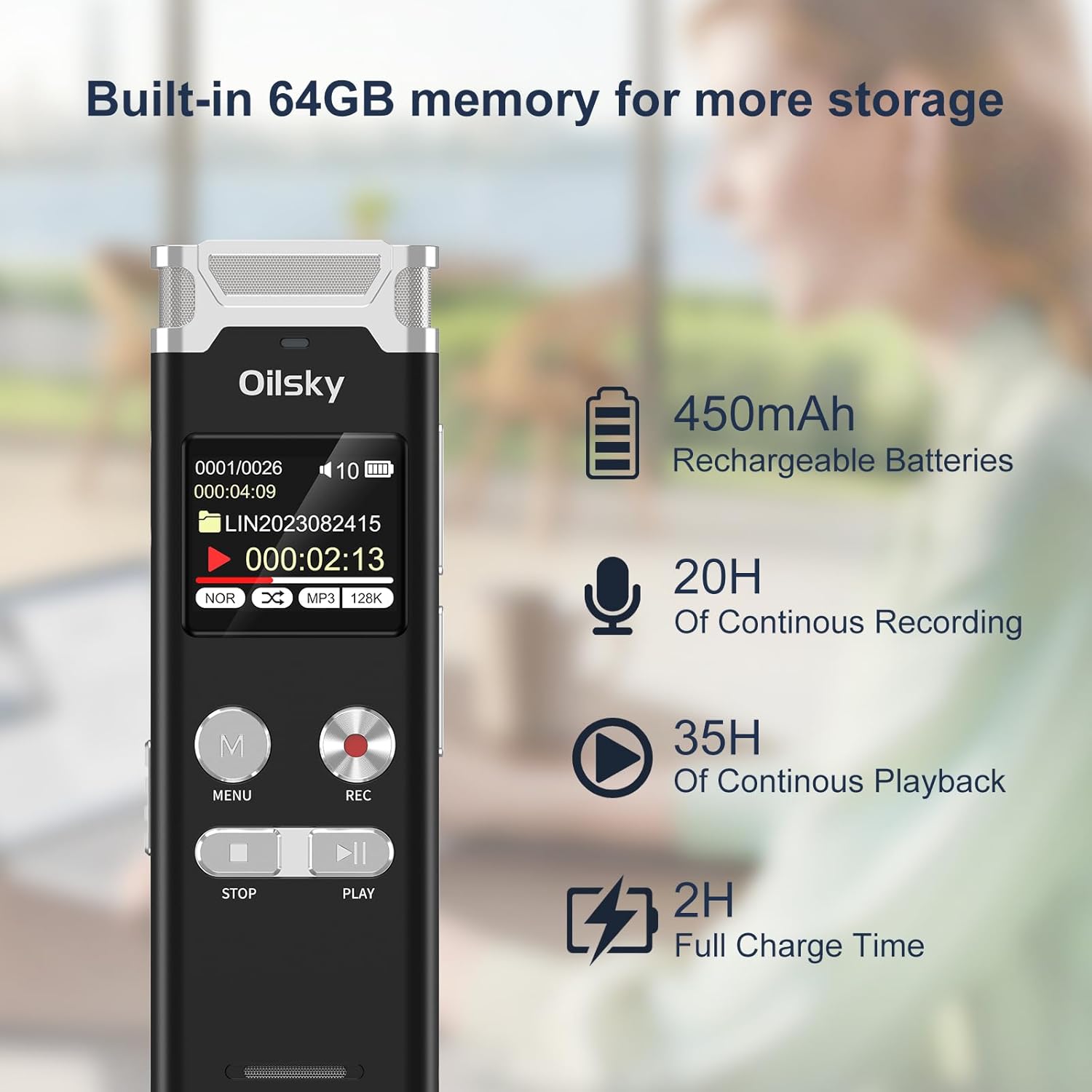
Image: The Oilsky V08 digital voice recorder displaying its screen with battery icon and text indicating 64GB memory, 450mAh rechargeable batteries, 20 hours of continuous recording, 35 hours of continuous playback, and 2 hours full charge time.
Tænd/sluk:
To power on the device, slide the power switch to the ON position. To power off, slide it to the OFF position.
Betjeningsvejledning
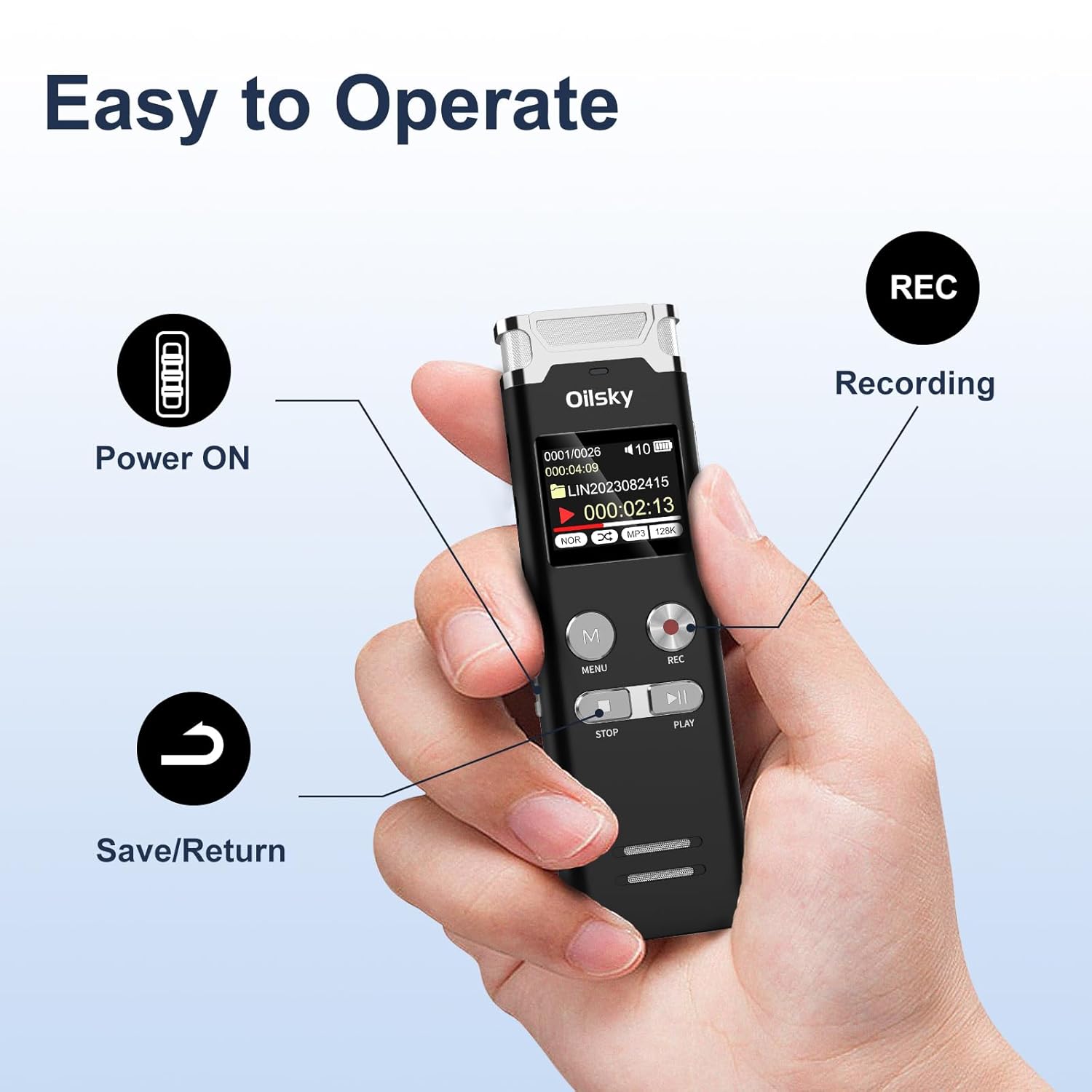
Image: A hand holding the Oilsky V08 digital voice recorder, with arrows pointing to the Power ON switch, REC button for recording, and the Save/Return button (likely the STOP button).
Grundlæggende optagelse:
- Sørg for, at enheden er tændt.
- Tryk på REC button to start recording. The screen will display recording status.
- Tryk på for at sætte optagelsen på pause REC knappen igen. Tryk én gang til for at genoptage.
- For at stoppe og gemme optagelsen skal du trykke på STOP knap.
Afspilning:
- From the main menu or file list, select the desired audio file.
- Tryk på SPIL knappen for at starte afspilning.
- Brug FORRIGE NÆSTE buttons (often integrated with volume or fast-forward/rewind) to navigate through files or within a file.
- Tryk på STOP knappen for at afslutte afspilningen.
Menu navigation:
Tryk på MENU button to access the device settings and options. Use the navigation buttons (usually FORRIGE NÆSTE) to scroll through options and the SPIL knappen for at bekræfte valgene. Tryk på STOP to exit menus.
Avancerede funktioner:

Image: The Oilsky V08 digital voice recorder placed on a keyboard, with an overlay highlighting its multifunction capabilities: Voice Activated Recording, Password Protection, Variable Speed Playback (±8X), Line in Recording, A-B Repeat, Equalizer, MP3 Player, and File Overførsel.
- Stemmeaktiveret optagelse (VOR): Enable this feature in the settings. The recorder will automatically start recording when sound is detected and pause when silence occurs, saving memory and battery.
- Adgangskodebeskyttelse: Set a password through the menu to protect your recordings from unauthorized access.
- Variable Speed Playback (±8X): Adjust the playback speed of your recordings without altering the pitch. Access this option during playback via the menu.
- AB Gentag: During playback, mark a start point (A) and an end point (B) to repeatedly play a specific section of an audio file.
- Equalizer: Adjust audio playback settings (e.g., bass, treble) for different sound profiles.
- Mp3 afspiller: The device can also play MP3 audio files stored on its internal memory.
- File Overførsel: Connect the recorder to a computer via USB to transfer recorded files eller anden lyd files to and from the device. It will appear as a removable disk.
External Recording Options:

Image: The Oilsky V08 digital voice recorder demonstrating two recording methods: one with an external microphone connected, and another showing a line-in connection to a smartphone for recording audio directly from the phone.
- Ekstern mikrofon: Connect a compatible external microphone to the designated port for enhanced recording flexibility.
- Line-in-optagelse: Use a 3.5mm audio cable to connect the recorder to other audio sources like phones, computers, or MP3 players to record audio directly.
Opretholdelse
- Rensning: Brug en blød, tør klud til at rengøre enheden. Brug ikke flydende rengøringsmidler eller opløsningsmidler.
- Opbevaring: Opbevar optageren et køligt, tørt sted væk fra direkte sollys og ekstreme temperaturer.
- Batteripleje: For at forlænge batteriets levetid bør du undgå at aflade batteriet helt ofte. Oplad enheden regelmæssigt, selvom den ikke er i brug i længere perioder.
- Datastyring: Sikkerhedskopier regelmæssigt vigtige optagelser til en computer for at forhindre datatab.
Fejlfinding
| Problem | Mulig løsning |
|---|---|
| Enheden tænder ikke. | Sørg for, at batteriet er opladet. Tilslut til en strømkilde, og prøv igen. Kontroller tænd/sluk-knappens position. |
| Kan ikke optage. | Check if the memory is full. Delete unnecessary files or transfer them to a computer. Ensure the device is not in playback mode. |
| Dårlig optagekvalitet. | Ensure the microphone is not obstructed. Record in a quieter environment. Adjust recording gain settings if available. Check recording format settings. |
| "Disk Error" message. | This indicates a potential issue with the internal memory. Try connecting the device to a computer to see if it's recognized. If not, a factory reset might be necessary (this will erase all data). If the problem persists, contact customer support. |
| Computeren genkender ikke enheden. | Ensure the USB cable is securely connected. Try a different USB port or cable. Restart your computer. The device should appear as a removable storage drive. |
Specifikationer
| Feature | Detalje |
|---|---|
| Mærke | Oilsky |
| Model | V08 |
| Hukommelseslagringskapacitet | 64 GB |
| Optagelsesformater | WAV (up to 1536kbps), MP3 (up to 128kbps) |
| Batteritype | 1 Lithium Polymer (inkluderet) |
| Batterikapacitet | 450mAh |
| Kontinuerlig optagelsestid | Op til 20 timer |
| Kontinuerlig afspilningstid | Op til 35 timer |
| Fuld opladningstid | Cirka 2 timer |
| Produktdimensioner | 10.15 x 3.2 x 1.25 cm |
| Varens vægt | 204 g |
| Hardware-interface | USB |
| Kompatible enheder | Personlig computer |
| Displayteknologi | LCD |
| Stående skærm displaystørrelse | 1 tommer |
Garanti og support
Specific warranty information is typically provided with your purchase documentation or on the manufacturer's official website. For technical support, troubleshooting assistance, or warranty claims, please refer to the contact information provided by Oilsky at the time of purchase or visit their official support channels.
Gem din købskvittering som købsbevis af garantihensyn.