
RC-401-0A, LC-42LT46, DX-32L-151A11, DX-L37-10A, DX-L42-10A, LC-15KT46, DX-37L-130A11
Instruction Manual for Generic Replacement Remote Control
Model: RC-401-0A and compatible models
1. Introduktion
This manual provides essential information for the proper setup, operation, and maintenance of your new Generic replacement infrared (IR) remote control. This remote is designed to function as a direct replacement for specific Dynex and other compatible television models. Please read this manual thoroughly before use to ensure optimal performance and longevity of your device.

Figur 1: Forfra vinklet view af den nye fjernbetjening.
2. Kompatibilitet
This replacement remote control is specifically designed to be compatible with the following television models. Please verify your television's model number against this list to ensure compatibility.
- Dynex LC-42LT46
- Dynex DX-32L-151A11
- Dynex DX-L37-10A
- Dynex DX-L42-10A
- Dynex LC-15KT46
- Dynex DX-37L-130A11
- RC-401-0A (original remote model)
- Other Smart LCD LED DVD TV Television models as specified by the manufacturer.
Important: If your television model number is not included in this list, this remote control may not be compatible. Refer to the product images for the actual remote's appearance.
3. Opsætning
3.1 Batteriinstallation
The remote control requires two (2) AAA batteries for operation. Batteries are not included with the remote control and must be purchased separately.
- Find batterirummets dæksel på bagsiden af fjernbetjeningen.
- Tryk ned på tappen, og skub dækslet nedad for at åbne rummet.
- Isæt to nye AAA-batterier, og sørg for, at de positive (+) og negative (-) poler er justeret korrekt med markeringerne inde i batterirummet.
- Skub batteridækslet tilbage på plads, indtil det klikker sikkert.
Once the batteries are correctly inserted, the remote control is ready for use. No additional programming or setup is typically required for compatible models; simply insert new brand batteries to get it to work.

Figur 2: Batterirum på bagsiden af fjernbetjeningen.
4. Betjeningsvejledning
This remote control operates using infrared (IR) technology. Ensure there is a clear line of sight between the remote control and the television's IR receiver for proper functionality. Point the remote directly at the television when pressing buttons.
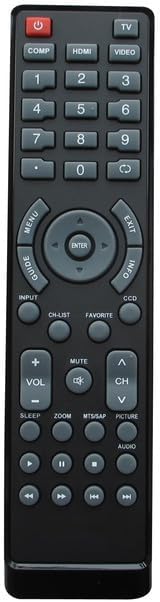
Figure 3: Layout of the remote control buttons.
4.1 Knapfunktioner ovenforview
| Knap | Fungere |
|---|---|
| MAGT | Turns the television On or Off. |
| TV / VIDEO / HDMI / COMP | Selects input sources (e.g., TV tuner, external video devices, HDMI inputs, Component video). |
| 0-9 Nummerplade | Indtaster kanalnumre direkte. |
| VOL +/- | Justerer lydstyrken op eller ned. |
| CH +/- | Ændrer tv-kanalen op eller ned. |
| STUM | Slår fjernsynets lyd fra eller til. |
| MENU | Giver adgang til fjernsynets hovedmenu. |
| Navigation (Up/Down/Left/Right) & ENTER | Navigerer gennem menupunkter og bekræfter valg. |
| EXIT | Afslutter den aktuelle menu eller skærmvisningen. |
| INFO | Viser oplysninger om det aktuelle program eller input. |
| GUIDE / CH-LIST | Accesses the electronic program guide or channel list. |
| FAVORIT | Giver adgang til foretrukne kanaler eller indstillinger. |
| CCD | Aktiverer eller deaktiverer undertekster. |
| SOVE | Indstiller en sleep-timer til fjernsynet. |
| ZOOM | Justerer skærmens zoomniveau. |
| MTS/SAP | Selects Multi-channel Television Sound (MTS) or Secondary Audio Program (SAP) options. |
| BILLEDE | Giver adgang til billedindstillinger. |
| LYD | Giver adgang til lydindstillinger. |
| Playback Controls (e.g., Play, Pause, Stop, Rewind, Fast Forward) | Controls playback for integrated DVD players or media functions (if supported by TV). |
Note: Not all buttons may be functional on every compatible television model, as functionality depends on the original remote's capabilities and the television's features.
5. Vedligeholdelse
For at sikre din fjernbetjenings levetid og korrekte funktion, skal du følge disse vedligeholdelsesretningslinjer:
- Rensning: Tør fjernbetjeningen regelmæssigt af med en blød, tør klud. Ved genstridigt snavs, tør let afampRengør kluden med vand eller et mildt, ikke-slibende rengøringsmiddel. Undgå at bruge skrappe kemikalier eller slibende materialer.
- Udskiftning af batteri: Replace batteries when the remote's response becomes sluggish or it stops functioning. Always replace both batteries at the same time with new ones. Do not mix old and new batteries, or different types of batteries.
- Opbevaring: Opbevar fjernbetjeningen på et køligt, tørt sted væk fra direkte sollys og ekstreme temperaturer.
- Undgå væsker: Udsæt ikke fjernbetjeningen for vand eller andre væsker.
- Dropning: Undgå at tabe fjernbetjeningen, da dette kan beskadige de indvendige komponenter.
6. Fejlfinding
Hvis du oplever problemer med din fjernbetjening, kan du følge disse almindelige fejlfindingstrin:
| Problem | Mulig årsag/løsning |
|---|---|
| Fjernbetjeningen virker slet ikke. |
|
| Nogle knapper virker ikke. |
|
| Fjernbetjeningen virker periodisk. |
|
| "Replacement may not work as Original" | This remote is a replacement and may not replicate every single function or the exact responsiveness of the original manufacturer's remote. Its primary function is to provide basic and common controls for the listed compatible models. |
7. Specifikationer
| Feature | Detalje |
|---|---|
| Mærke | Generisk |
| Kompatible enheder | Television (Specific Dynex models listed in Compatibility section) |
| Forbindelsesteknologi | Infrarød (IR) |
| Controller type | Knap kontrol |
| Strømkilde | 2 x AAA batterier (medfølger ikke) |
| Fabrikant | SZHKHXD |
| Oprindelsesland | Kina |
| ASIN | B0C7VF4P31 |
| Dato først tilgængelig | 13. juni 2023 |
8. Garanti og support
Specific warranty details for this Generic replacement remote control are not provided in the product information. For any questions regarding product functionality, compatibility, or potential defects, please contact the seller directly through the platform where the purchase was made.
Manufacturer: SZHKHXD
Seller: SZHKHXD
Gem venligst din købskvittering som købsbevis, hvis du har spørgsmål vedrørende support.