
TEYES CC3 2K
TEYES CC3 2K Car Radio Multimedia Navigation System User Manual
Model: CC3 2K | Mærke: TØJER | Compatible with: Mazda 3 II (BL) 2009-2013
Indledning
This manual provides detailed instructions for the installation, operation, and maintenance of your TEYES CC3 2K Car Radio Multimedia Navigation System. Designed specifically for Mazda 3 II (BL) models from 2009 to 2013, this head unit offers advanced features including a 2K in-cell display, Android 10 operating system, GPS navigation, and comprehensive multimedia capabilities. Please read this manual thoroughly before installation and use to ensure proper function and safety.
Pakkens indhold
Bekræft, at alle nedenstående varer er inkluderet i din pakke. Hvis der mangler eller er beskadigede varer, bedes du kontakte din forhandler.
- 1x TEYES CC3 2K Head Unit
- 1x OEM Panel (Frame for Mazda 3 II BL)
- 1 x USB-kabel
- 1 x GPS antenne
- 1x AUX -kabel
- 1x 4G WiFi Antenna
- 1x strømkabel
- 1x AHD 1080p Rear Camera
- 1x Audio & Video Harness + RCA cables
- 1x Screws & Screwdriver
- 1x rengøringsklud
- 1x Wiring Diagram
- 1x Electronic Instruction (e-book)

Figur 1: Overview of the TEYES CC3 2K package contents.

Figur 2: OEM Panel (Frame) designed for Mazda 3 II BL 2009-2013.
Vigtig kompatibilitetsbemærkning
Please be aware of specific vehicle configurations. If your Mazda 3 II (BL) has a particular plug type (as shown in Figure 3), it may not support the original small screen display functionality after installing the TEYES CC3 2K head unit.

Figur 3: Example of a specific plug type and original small screen display that may not be supported.
Installation og opsætning
Professional installation is highly recommended for this product to ensure correct wiring and optimal performance. Refer to the included wiring diagram and electronic instruction manual (e-book) for detailed, vehicle-specific installation steps.
Generelle installationstrin:
- Forberedelse: Frakobl køretøjets batteri, før du påbegynder elektrisk arbejde.
- Fjern original enhed: Carefully remove the factory radio and trim panels from your Mazda 3 II (BL).
- Tilslut ledninger: Connect the provided power cable, USB cable, GPS antenna, AUX cable, and 4G WiFi antenna to the TEYES CC3 2K head unit. Refer to the wiring diagram for correct connections.
- Installer bakkamera: If installing the AHD 1080p rear camera, route its cable to the head unit and connect it according to the instructions.
- Monter hovedenhed: Secure the TEYES CC3 2K head unit into the OEM panel and then into the vehicle's dashboard opening.
- Test funktionalitet: Reconnect the vehicle's battery and power on the unit to test all functions (radio, navigation, touch screen, steering wheel controls, camera, etc.) before fully reassembling the dashboard.
- Afsluttende samling: Genmonter alle beklædningspaneler.

Figur 4: TEYES CC3 2K head unit installed in a Mazda 3 II (BL).
Betjeningsvejledning
Power On/Off and Basic Navigation:
Press the power button on the unit's side panel or the vehicle's ignition to turn the system on or off. The Android 10 operating system provides a familiar touchscreen interface. Navigate through applications and settings using touch gestures.
Ratstyring:
The TEYES CC3 2K supports integration with your vehicle's original steering wheel buttons. This allows for convenient control of volume, track changes, and other functions without taking your hands off the wheel. Configuration may be required in the system settings.

Figur 5: Ratbetjening for bekvem betjening.
USB-forbindelse:
The unit provides multiple USB outputs for data transfer, allowing connection of USB drives for media playback or other compatible devices. Ensure proper connection for stable data transfer.

Figur 6: Multiple USB outputs for data transfer.
Split Screen Mode:
Utilize the split-screen feature to run two applications simultaneously, such as navigation on one side and multimedia playback on the other. This enhances multitasking and user convenience.
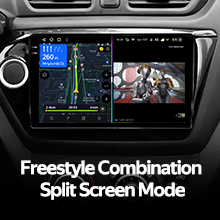
Figur 7: Split screen mode displaying navigation and video simultaneously.
Radio funktionalitet:
Access local radio stations with the integrated radio tuner. The system supports RDS (Radio Data System) for enhanced information display where available.

Figur 8: Radio interface for tuning into local stations.
Avancerede lydfunktioner
Dobbelt DSP-lydbehandling:
The TEYES CC3 2K features dual DSP (Digital Signal Processor) chips (ADAU1701 + ROHM32107) for superior audio processing. This allows for precise sound tuning and optimization, delivering a high-fidelity audio experience.

Figur 9: Audio playback interface, benefiting from dual DSP processing.
27-Segment Equalizer (EQ):
Fine-tune your audio output with the advanced 27-segment equalizer. This allows for detailed adjustment of frequency bands to match your personal preferences and vehicle acoustics.
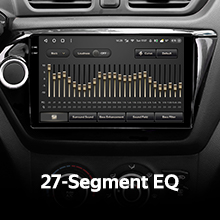
Figur 10: 27-Segment Equalizer for precise audio customization.
Optisk og koaksial digital lydudgang:
For audiophiles, the unit provides optical and coaxial digital audio outputs, allowing connection to external high-fidelity audio processors or amplifiers for an uncompromised sound experience.

Figur 11: Audio output settings, including digital options.
Lydfiltrering:
Advanced sound filtering options are available to optimize audio output for different speaker configurations and listening environments, ensuring clear and balanced sound reproduction.

Figur 12: Sound filtering interface for audio optimization.
Bag View Kamera funktionalitet
The included AHD 1080p rear camera provides real-time viewing of your vehicle's rear surroundings when reversing. The system also supports video recording from the camera, enhancing safety and providing a record of events.
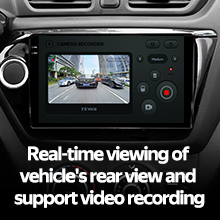
Figur 13: Real-time rear view camera display with recording option.
Produkt overview Video
Se denne officielle produktvideo for et visuelt overblikview of the TEYES CC3 2K head unit's features and user interface.
Video 1: TEYES CC3 2K Product Overview. This video demonstrates the unit's design, internal components, and various user interface screens in a car environment.
Specifikationer
| Mærke | TØJER |
| Model | CC3 2K |
| Operativsystem | Android |
| VÆDDER | 6 GB |
| ROM | 128 GB |
| Skærmstørrelse | 9.5 tommer |
| Display Type | LED, 2K In-cell Touchscreen |
| Processor | 8 kerner 2.0 GHz |
| Forbindelsesteknologi | Bluetooth (QCC3031QFN Qualcomm), USB, WIFI, Hotspot, 4G Internet |
| Korttype | North America (Supported Satellite Navigation System: GPS) |
| Lydudgangstilstand | Stereo (2*DSP ADAU1701 + ROHM32107, Optical and Coaxial Digital Audio Output) |
| Understøttelse af bakkamera | AHD 1080p (Included), Real-time viewing and video recording |
| Kompatibel køretøjstype | Car (Mazda 3 II BL 2009-2013) |
| Fabrikant | Shenzhen TEYES High tech Co., Ltd. |
| Model årgang | 2023 |
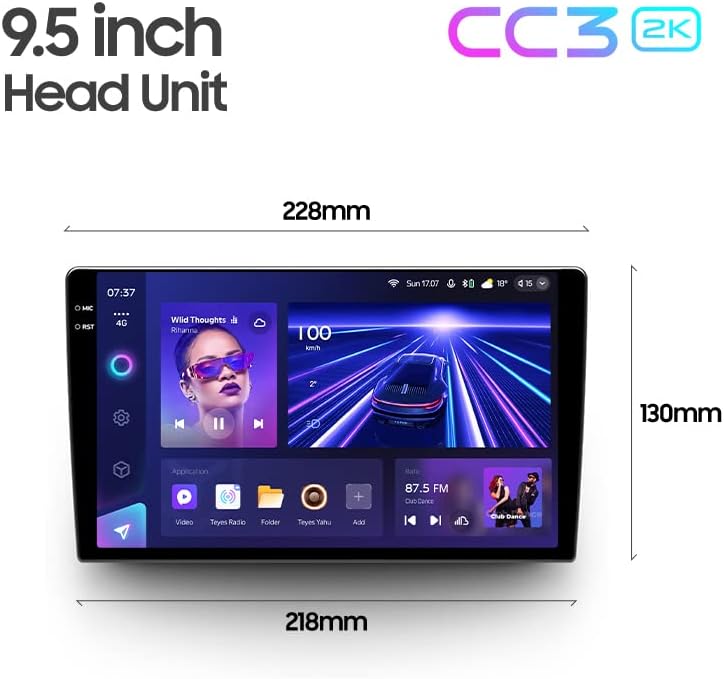
Figur 14: Dimensions of the 9.5-inch TEYES CC3 2K Head Unit.
Fejlfinding
If you encounter issues with your TEYES CC3 2K system, please refer to the following common troubleshooting steps:
- Ingen strøm: Kontrollér alle strømkabelforbindelser. Sørg for, at køretøjets batteri er korrekt tilsluttet og opladet.
- Ingen lyd: Verify speaker connections. Check audio settings within the unit, including volume levels and mute status. Ensure external ampsikringsapparater (hvis brugt) er tændt.
- Problemer med GPS-signal: Sørg for, at GPS-antennen er korrekt tilsluttet og placeret på et sted med frit lys. view af himlen (f.eks. på instrumentbrættet).
- Touchskærm reagerer ikke: Try restarting the unit. If the issue persists, a factory reset might be necessary (refer to the e-book for instructions).
- Bluetooth-forbindelsesproblemer: Ensure Bluetooth is enabled on both the head unit and your mobile device. Delete previous pairings and attempt to re-pair.
- Bakkamera viser ikke: Check the camera's power and video signal connections. Ensure the vehicle is in reverse gear.
- Systemforsinkelse/frysning: Close unnecessary background applications. Clear cache if possible. A system restart often resolves temporary performance issues.
For more detailed troubleshooting, consult the electronic instruction manual (e-book) provided with your product.
Garanti og support
Garantioplysninger:
The TEYES CC3 2K Car Radio Multimedia Navigation System comes with a 1 års garanti from the date of purchase. This warranty covers manufacturing defects and malfunctions under normal use. It does not cover damage caused by improper installation, misuse, accidents, unauthorized modifications, or natural disasters.
Gem venligst dit købsbevis for garantikrav.
Kundesupport:
For technical assistance, warranty claims, or further inquiries, please contact your original point of purchase or visit the official TEYES website for support resources. Ensure you have your product model number (CC3 2K) and purchase details ready when contacting support.
Ask a question about this manual
Ask about setup, troubleshooting, compatibility, parts, safety, or missing instructions. Manuals+ will review the question and use this page’s manual context to help answer it.