1. Introduktion
Thank you for choosing the Generic BT 1304 Bluetooth 5.0 Wireless Neckband Earphones. This manual provides detailed instructions for setting up, operating, and maintaining your device to ensure optimal performance and longevity.
2. Pakkens indhold
Tjek venligst pakken for følgende varer:
- Generic BT 1304 Wireless Neckband Earphones
- Ørepuder (forskellige størrelser)
- Opladningskabel (USB)
- Brugermanual

Figure 2.1: Generic BT 1304 Neckband Earphones and retail packaging.
3. Produktfunktioner
- 10MM Dynamic Driver: Delivers clear sound details with enhanced bass.
- Bluetooth 5.0-forbindelse: Stable wireless connection with a range of up to 10 meters (33 feet).
- Multi-function Controls: Integrated buttons for music playback and call management.
- Lang spilletid: Op til 10 timers musikafspilning på en enkelt opladning.
- Hurtig opladning: Quick charging capability, 1-2 hours for a full charge.
- Bred kompatibilitet: Compatible with most Android and iOS devices.
- Lightweight Neckband Design: Easy to wear and carry.
- Indbygget mikrofon: Til håndfri opkald.
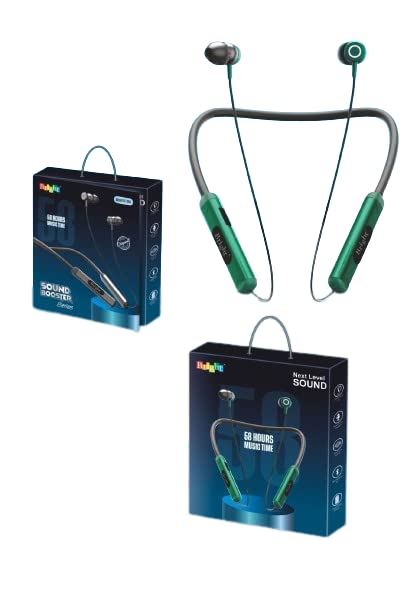
Figur 3.1: Overview of the Generic BT 1304 Neckband Earphones design.
4. Opsætning og første brug
4.1. Opladning af øretelefonerne
- Locate the hidden charging port on the side panel of the neckband.
- Connect the provided USB charging cable to the charging port on the earphones.
- Tilslut den anden ende af USB-kablet til en kompatibel USB-strømkilde (f.eks. en computers USB-port eller en vægadapter).
- The charging indicator light will illuminate, indicating that the earphones are charging.
- En fuld opladning tager typisk 1-2 timer. Indikatorlampen skifter eller slukker, når opladningen er færdig.
Note: Ensure the earphones are fully charged before first use for optimal battery life.
4.2. Bluetooth-parring
- Sørg for, at øretelefonerne er opladet og slukket.
- Press and hold the multi-function button on the neckband until the indicator light flashes, usually alternating between blue and red, indicating pairing mode.
- Aktiver Bluetooth på din smartphone eller enhed, og søg efter tilgængelige enheder.
- Select "BT 1304" from the list of available devices.
- Once connected, the indicator light will typically show a steady blue light or flash slowly.
- The earphones will automatically connect to the last paired device when powered on, if the device's Bluetooth is active and within range.
Tip: For best connectivity, ensure your device is within 10 meters (33 feet) of the earphones.
5. Betjeningsvejledning
5.1. Tænd/sluk
- Tænd: Tryk på multifunktionsknappen, og hold den nede i cirka 3 sekunder, indtil indikatorlampen blinker blåt.
- Sluk: Tryk på multifunktionsknappen, og hold den nede i cirka 5 sekunder, indtil indikatorlampen blinker rødt og derefter slukker.
5.2. Musikkontrol
- Afspil/pause: Tryk én gang på multifunktionsknappen.
- Næste nummer: Tryk på knappen Lydstyrke op (+), og hold den nede.
- Forrige nummer: Tryk og hold nede på lydstyrke ned-knappen (-).
- Lydstyrke op: Press the Volume Up (+) button briefly.
- Skrue ned for lyden: Press the Volume Down (-) button briefly.
5.3. Call Controls
- Besvar/afslut opkald: Tryk én gang på multifunktionsknappen.
- Afvis opkald: Tryk og hold multifunktionsknappen nede i cirka 2 sekunder.
- Genopkald sidste nummer: Dobbelttryk på multifunktionsknappen.
6. Vedligeholdelse og pleje
- Keep the earphones dry. Avoid exposure to moisture, rain, or liquids.
- Clean the earphones with a soft, dry cloth. Do not use abrasive cleaners.
- Store the earphones in a cool, dry place away from extreme temperatures.
- Undgå at tabe høretelefonerne eller udsætte dem for kraftige stød.
- Do not attempt to disassemble or modify the earphones, as this will void the warranty.
7. Fejlfinding
7.1. Earphones not turning on
- Ensure the earphones are fully charged. Connect them to a power source and allow them to charge for at least 30 minutes before attempting to power on again.
7.2. Cannot pair with device
- Make sure the earphones are in pairing mode (indicator light flashing blue/red).
- Sørg for, at Bluetooth er aktiveret på din enhed, og at den er inden for 10 meter fra øretelefonerne.
- Sluk Bluetooth på din enhed, og tænd den derefter igen.
- If previously paired, try "forgetting" or "unpairing" the earphones from your device's Bluetooth settings and then re-pair.
- Genstart både øretelefonerne og din enhed.
7.3. Ingen lyd eller lav lydstyrke
- Kontroller lydstyrkeniveauerne på både øretelefonerne og din tilsluttede enhed.
- Sørg for, at øretelefonerne er korrekt tilsluttet din enhed.
- Prøv at afspille forskellige lydkilder for at udelukke et problem med medierne file.
7.4. Intermittent connection
- Sørg for, at der ikke er nogen forhindringer mellem øretelefonerne og din enhed.
- Flyt dig væk fra andre trådløse enheder, der kan forårsage interferens.
- Keep your device within the recommended 10-meter Bluetooth range.
8. Specifikationer
| Feature | Detalje |
|---|---|
| Modelnavn | BT 1304 |
| Forbindelsesteknologi | Trådløs (Bluetooth 5.0) |
| Trådløs kommunikationsteknologi | Bluetooth |
| Driver størrelse | 10MM Dynamic Driver |
| Bluetooth rækkevidde | Op til 10 meter (33 fod) |
| Spilletid | Ca. 10 timer |
| Opladningstid | 1-2 timer |
| Kontrolmetode | Berøring/knap |
| Mikrofon | Included (In-Ear format) |
| Strømkilde | Batteridrevet |
| Formfaktor | In Ear, Neckband |
| Materiale | Plast |
| Produktdimensioner | 15 x 12 x 3 cm |
| Varens vægt | 200 g |
| Kompatibilitet | Android, iOS |
9. Garanti og support
This product comes with a standard warranty. For details regarding the warranty period and terms, please refer to the warranty information provided at the time of purchase or contact your retailer.
For technical support or further assistance, please contact the manufacturer or your local distributor. Keep your purchase receipt as proof of purchase for warranty claims.
Fabrikant: Generisk
Producentens adresse: MD IMRAN KHAN 13A, Kantal Parahoo, Mansatala Lane, Kolkata, WEST BENGAL, India


