
1. Introduktion
Thank you for choosing the HURRISE Smart Wireless WiFi Visual Doorbell. This device provides enhanced home security and convenience with its 720p high-definition video, two-way audio, and smart features. This manual will guide you through the installation, operation, and maintenance of your new doorbell to ensure optimal performance.
2. Sikkerhedsoplysninger
- Læs alle instruktioner omhyggeligt før brug.
- Udsæt ikke enheden for ekstreme temperaturer, fugt eller direkte sollys.
- Use only specified batteries (3 x AA, not included) for power. Ensure correct polarity.
- Hold enheden væk fra børn.
- Forsøg ikke selv at skille enheden ad eller reparere den. Kontakt support, hvis der opstår problemer.
3. Pakkens indhold
Bekræft at alle varer er til stede i din pakke:
- 1 x HURRISE Smart Wireless WiFi Visual Doorbell
- 1 x brugermanual
- 1 x klistermærke
- 2 x forbindelseskabler
- 4 x ekspansionsskruer
- 1 x Hexagonal Screwdriver
- 7 x skruer

Image: The HURRISE Smart Wireless WiFi Visual Doorbell shown with its complete set of accessories, including mounting hardware and cables.
4. Produktet er slutview
The HURRISE Smart Wireless WiFi Visual Doorbell features a sleek design with integrated camera, motion sensor, and doorbell button.

Billede: Forside view of the HURRISE Smart Wireless WiFi Visual Doorbell, highlighting the camera lens, infrared lights, and main doorbell button.
Nøglekomponenter:
- HD kamera: Captures 1280x720 resolution video with a 166° diagonal viewvinkel.
- Infrarøde lys: Six 850mm infrared lights for clear night vision.
- Dørklokkeknap: Activates the doorbell and initiates a call to your smartphone.
- Bevægelsessensor (PIR): Detects movement and can trigger alerts and recordings.
- Mikrofon og højttaler: Muliggør tovejs lydkommunikation.
5. Opsætning
5.1 Batteriinstallation
- Remove the back cover of the doorbell.
- Insert three (3) AA batteries (not included) into the battery compartment, ensuring correct polarity.
- Sæt bagdækslet sikkert på igen.
5.2 Fysisk installation
Vælg et passende sted i nærheden af din dør, og sørg for et godt Wi-Fi-signal.
- Mark the desired mounting holes on the wall using the backplate as a template.
- Drill holes and insert the expansion screws.
- Fastgør bagpladen til væggen ved hjælp af de medfølgende skruer.
- Attach the doorbell unit to the mounted backplate.
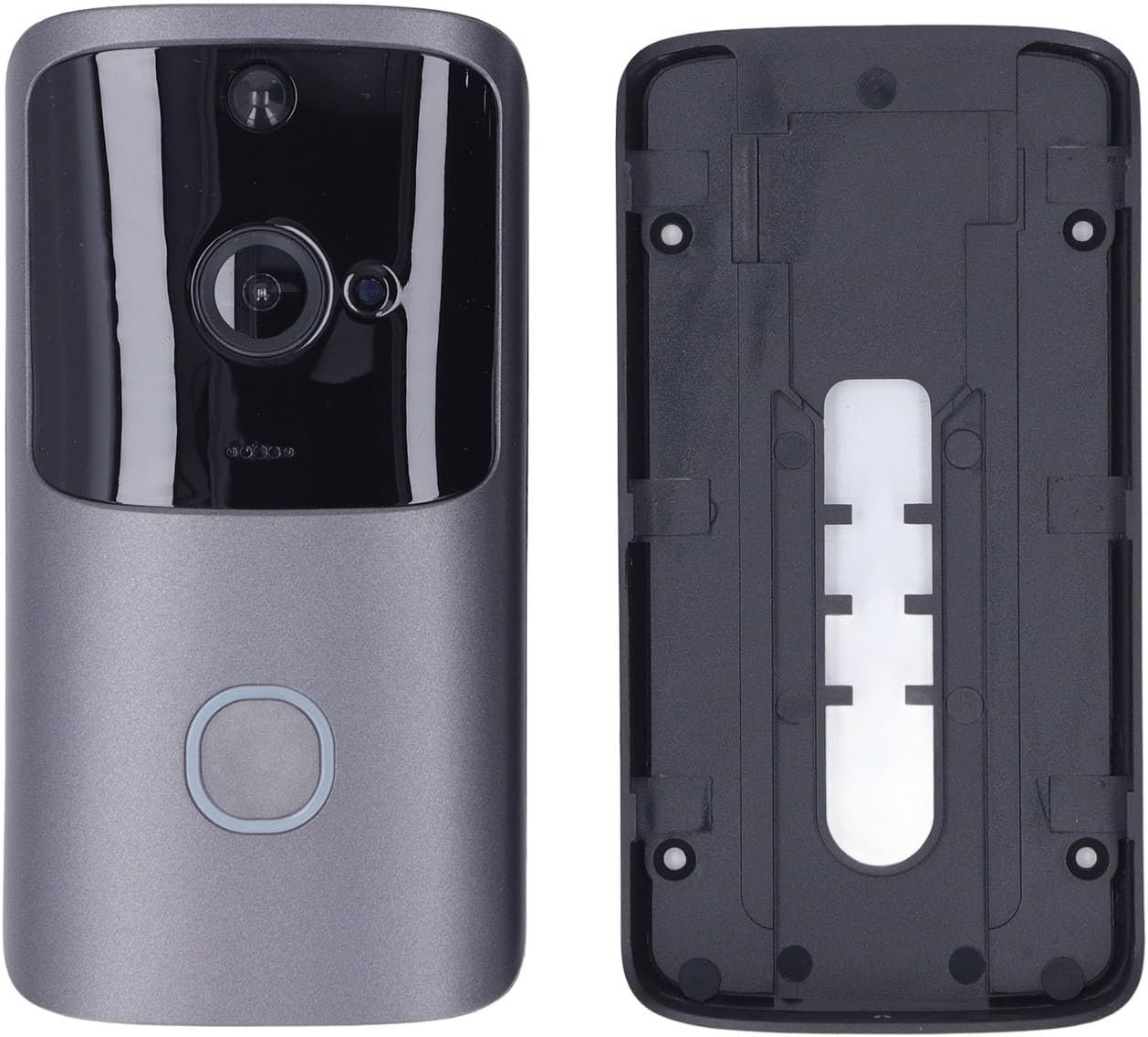
Image: The HURRISE Smart Wireless WiFi Visual Doorbell separated from its mounting backplate, illustrating the installation components.
5.3 Appinstallation og parring
- Download the dedicated mobile application from your smartphone's app store (e.g., App Store for iOS, Google Play Store for Android). Søg efter "HURRISE Doorbell" or refer to the QR code in the quick start guide (if provided).
- Åbn appen, og opret en konto, eller log ind.
- Follow the in-app instructions to add a new device. This typically involves pressing the doorbell button to put it into pairing mode and connecting it to your home Wi-Fi network (802.11b/g/n supported).
- Once paired, you will receive a confirmation in the app.
6. Betjeningsvejledning
6.1 Grundlæggende betjening
- Besvare et opkald: When a visitor presses the doorbell button, your smartphone will receive a notification. Open the app to view live video and engage in two-way audio communication.
- Levende View: You can access the live video feed from your doorbell at any time through the app, even without a visitor.

Image: The HURRISE Smart Wireless WiFi Visual Doorbell positioned next to a smartphone displaying a live video feed of a delivery person, demonstrating remote viewing kapaciteter.
6.2 Avancerede funktioner
- Bevægelsesdetektion (PIR): The doorbell features a Passive Infrared (PIR) sensor that detects movement. When motion is detected, you will receive an alert on your phone, and the doorbell can automatically record a short video clip (15 seconds per event).
- Nattesyn: The integrated infrared lights enable clear video monitoring even in low-light or complete darkness.
- Tovejs lyd: Speak directly to visitors at your door and hear their responses through the doorbell's built-in microphone and speaker.
- Opvågningstilstande: The doorbell can be activated by a button press, PIR motion detection, or actively woken up via your phone app. The wake-up time is approximately 600ms.
- Videolagring: The doorbell supports local storage via a memory card (8GB, 16GB, or 32GB, not included) for recorded video clips.
7. Vedligeholdelse
- Rensning: Gently wipe the camera lens and doorbell surface with a soft, dry cloth. Avoid using abrasive cleaners or solvents.
- Udskiftning af batteri: When the battery level is low, the app will notify you. Replace the three AA batteries promptly to ensure continuous operation.
- Firmwareopdateringer: Periodically check the app for available firmware updates to ensure your doorbell has the latest features and security enhancements.
8. Fejlfinding
| Problem | Mulig årsag | Løsning |
|---|---|---|
| Dørklokken opretter ikke forbindelse til Wi-Fi | Incorrect Wi-Fi password; Weak Wi-Fi signal; Doorbell too far from router | Verify Wi-Fi password; Move doorbell closer to router; Ensure router is 2.4GHz compatible. |
| Ingen notifikationer på telefonen | App notifications disabled; Phone in Do Not Disturb mode; App not running in background | Enable notifications for the doorbell app; Check phone settings; Ensure app has background data access. |
| Dårlig videokvalitet | Svagt Wi-Fi-signal; Beskidt kameralinse | Forbedr Wi-Fi-signalstyrken; Rengør kameralinsen. |
| Bevægelsesdetektion virker ikke | PIR sensitivity set too low; Obstruction in detection area; Batteries low | Adjust PIR sensitivity in app settings; Clear any obstructions; Replace batteries. |
| Kort batterilevetid | Frequent motion detection events; High usage; Low-quality batteries | Reduce PIR sensitivity; Use high-quality alkaline batteries; Limit live view adgang. |
9. Specifikationer
| Feature | Specifikation |
|---|---|
| Opløsning | 1280 x 720 (720p) |
| Diagonal View Vinkel | 166° |
| Infrarødt lys | 6 pieces, 850mm |
| Wi-Fi support | 802.11b/g/n |
| Samtaleanlæg | To-vejs lyd |
| Understøttelse af hukommelseskort | 8GB, 16GB, 32GB (not included) |
| Strømforsyning | 3 x AA batterier (medfølger ikke) |
| Vågnende tid | Inden for 600 ms |
| Opvågningstilstande | Button press, PIR detection, Phone active |
| Strømforbrug | Standby: 200uA, Operating: 170mA |
| Materiale | ABS |
| Særlige funktioner | Motion Detector, Night Vision |
10. Garanti og support
HURRISE products are designed for reliability and performance. For warranty information or technical support, please refer to the documentation included with your purchase or contact your retailer. Keep your proof of purchase for warranty claims.
For further assistance, please visit the HURRISE brand store: HURRISE Store