
1. Introduktion
This manual provides instructions for the proper use and care of your Docooler Portable USB Cassette Player. This device allows you to play audio cassettes and convert their content into digital MP3 files via a USB connection to a computer. Please read this manual thoroughly before operating the device to ensure optimal performance and longevity.
2. Produktet er slutview
The Docooler Portable USB Cassette Player is a compact, handheld device designed for playing and digitizing audio cassettes. It features a transparent casing, allowing visibility of the internal mechanism.
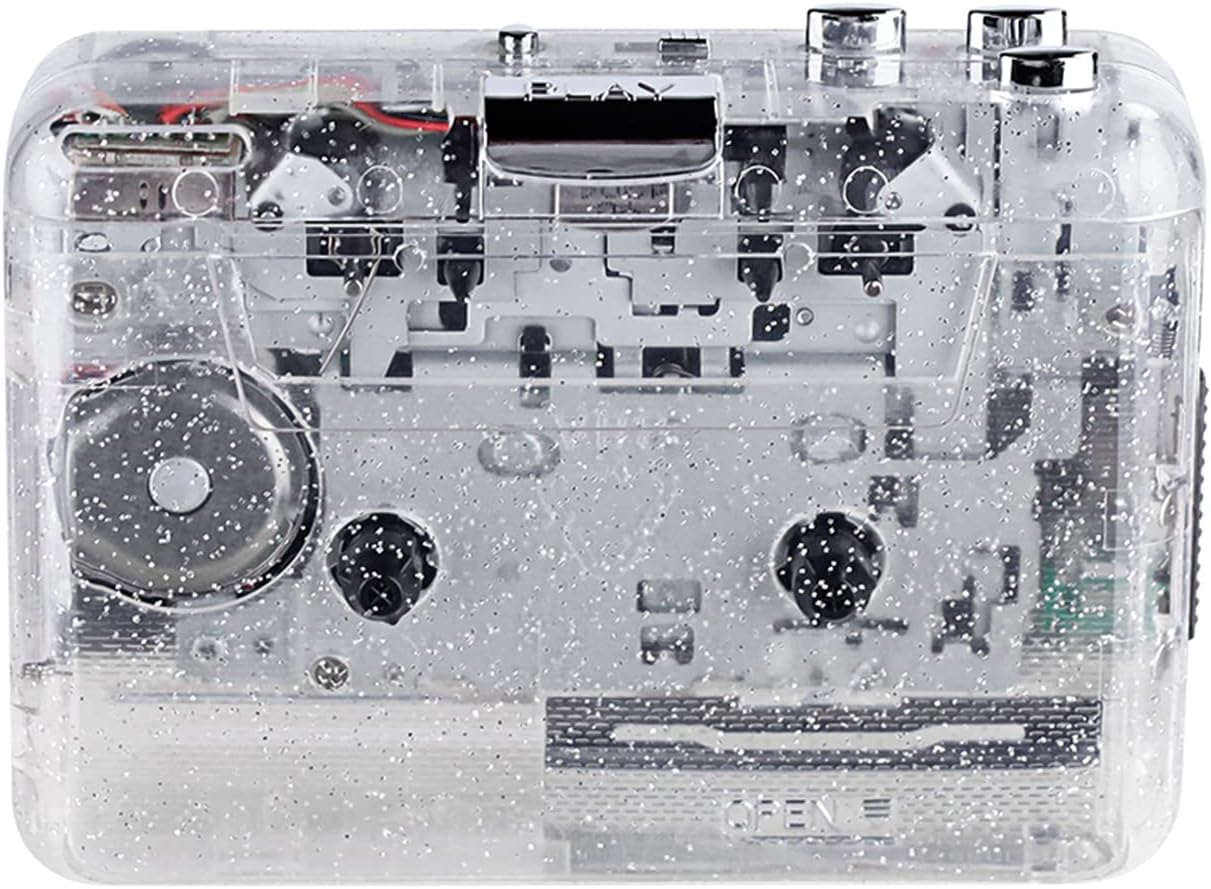
Figur 1: Forside view of the Docooler Portable USB Cassette Player, showcasing dens gennemsigtige design.

Figure 2: Various angles of the cassette player, including top, side, and open views.
Pakkeindhold:
- Docooler Portable USB Cassette Player
- USB kabel
- Brugervejledning (dette dokument)
- Headphones (may vary by package)
3. Opsætning
3.1 Strømforsyning
The cassette player can be powered by either batteries or a USB connection.
Batteri installation:
- Find batterirummet på enheden.
- Åbn batterirummets dæksel.
- Isæt 2 x AA-batterier (medfølger ikke), og sørg for korrekt polaritet (+/-).
- Luk batterirummets dæksel forsvarligt.
USB Strøm:
Connect the provided USB cable to the player's USB port and the other end to a powered USB port on your computer or a USB wall adapter. The device will draw power from the USB connection.
4. Betjeningsvejledning
4.1 Afspilning af et kassettebånd
- Åbn dækslet til kassetterummet.
- Insert an audio cassette tape with the open edge facing upwards.
- Luk dækslet til kassetterummet godt.
- Tilslut hovedtelefoner eller eksterne højttalere til 3.5 mm lydudgangsstikket.
- Tryk på SPIL knappen for at starte afspilningen.
- Brug STOP knappen for at stoppe afspilningen.
- Brug FF (Spol frem) og REW (spol tilbage) knapper til at navigere gennem båndet.
- Juster lydstyrken ved hjælp af lydstyrkeknappen.
- The "DIR" button allows you to quickly flip the tape direction. The "play mode" button can be used to reverse playback once or an unlimited number of times.

Figure 3: The cassette player in use, demonstrating tape insertion and playback setup.

Figure 4: Users listening to audio through headphones connected to the cassette player.
4.2 Converting Tapes to MP3 Files
The Docooler Portable USB Cassette Player can convert your analog cassette audio into digital MP3 files. This process requires a computer and compatible audio recording software (not included).
- Ensure the cassette player is powered (via batteries or USB).
- Connect the cassette player to your computer using the provided USB cable.
- Install and open your preferred audio recording software on your computer. Software such as Audacity (free and open-source) is commonly used for this purpose.
- Configure your recording software to recognize the cassette player as an audio input device.
- Insert the cassette tape you wish to convert into the player.
- Start recording in your software, then press the SPIL button on the cassette player.
- Monitor the recording process. Once the tape has finished playing, stop the recording in your software.
- Gem den optagede lyd som en MP3 file på din computer.

Figure 5: Illustration of the process to convert cassette audio to MP3 files using the player and a computer.
5. Vedligeholdelse
5.1 Rengøring af enheden
- Tør afspillerens yderside af med en blød, tør klud.
- Brug ikke flydende rengøringsmidler eller slibende materialer, da de kan beskadige overfladen.
- Periodically clean the tape heads and pinch rollers using a cotton swab lightly dampmed isopropylalkohol for at sikre optimal lydkvalitet og forhindre beskadigelse af båndet.
5.2 Opbevaring
- Når de ikke er i brug i længere perioder, skal batterierne fjernes for at forhindre lækage.
- Opbevar afspilleren et køligt, tørt sted væk fra direkte sollys og ekstreme temperaturer.
6. Fejlfinding
| Problem | Mulig årsag | Løsning |
|---|---|---|
| Ingen strøm | Dead batteries; USB cable not connected properly. | Replace batteries; ensure USB cable is securely connected. |
| Ingen lyd | Headphones/speakers not connected; volume too low; dirty tape heads. | Connect audio output device; increase volume; clean tape heads. |
| Poor sound quality (hissing, muffled) | Dirty tape heads; worn-out tape; low battery. | Clean tape heads; try a different tape; replace batteries. |
| Båndet afspilles ikke eller bevæger sig ikke | Tape jammed; mechanism issue; low battery. | Check tape for damage; replace batteries. |
| Cannot convert to MP3 | USB connection issue; software not configured correctly; no recording software. | Ensure USB is connected; check software settings; install compatible recording software. |
7. Specifikationer
- Model: B0C69FDZF6
- Strømforsyning: 2 x AA Batteries or USB 5V DC
- Interface: USB 2.0
- Lydudgang: 3.5 mm stereostik
- Dimensioner: 7.2 x 5.91 x 1.54 tommer (ca.)
- Vægt: 9.6 ounce (ca.)
- Fabrikant: Docooler
8. Sikkerhedsoplysninger
- Udsæt ikke enheden for vand eller overdreven fugt.
- Undgå at tabe eller udsætte enheden for kraftige stød.
- Forsøg ikke selv at skille enheden ad eller reparere den. Kontakt kvalificeret servicepersonale.
- Opbevares utilgængeligt for børn.
- Bortskaf batterier i henhold til lokale regler.
9. Garanti og support
For warranty information or technical support, please refer to the documentation included with your purchase or contact Docooler customer service through their official website or the retailer where the product was purchased. Please have your model number (B0C69FDZF6) and purchase date available when contacting support.