
1. Introduktion
This manual provides detailed instructions for the installation, operation, and maintenance of your Yamiry Smart Door Handle Lock with Keypad. This advanced keyless entry system offers multiple unlocking methods for enhanced convenience and security.
The Yamiry Smart Door Handle Lock is designed for easy DIY installation on most standard American wooden front doors, typically within 10 minutes, without requiring additional drilling. It features a reversible handle for compatibility with both left and right-handed doors.
Manage access conveniently through the mobile app, allowing you to grant permanent or temporary access, generate one-time passcodes remotely, and track unlock records. This smart lock is an ideal solution for homeowners, landlords, and property managers seeking efficient and secure access control.
2. Sikkerhedsoplysninger
- Læs alle instruktioner omhyggeligt før installation og brug.
- Forsøg ikke at skille låsen ad eller ændre den. Dette kan ugyldiggøre garantien og kompromittere sikkerheden.
- Use only specified battery types (Lithium Ion batteries required, not included).
- Keep mechanical keys in a secure location outside the property to prevent lockout in case of battery failure or electronic malfunction.
- Protect the lock from extreme temperatures and direct water exposure beyond its IP66 rating.
- Sørg for, at alle komponenter er forsvarligt fastgjort under installationen for at forhindre utilsigtet forskydning.
3. Pakkens indhold
Bekræft at alle komponenter er til stede i din pakke:
- Exterior assembly (1)
- Interior assembly (1)
- Adjustable latch (1)
- Mechanical key (2)
- Key Fob (2)
- Screw set (1)
4. Specifikationer
| Feature | Detalje |
|---|---|
| Mærke | Yamiry |
| Modelnavn | YR01 |
| Låsetype | Dødbolt |
| Materiale | Rustfrit stål, zink |
| Farve | Mat sort |
| Varedimensioner (L x B x H) | 5.5 x 2.95 x 0.79 tommer |
| Varens vægt | 2.59 pund |
| Strømkilde | Lithium Ion batteries (not included) |
| Forbindelse | Bluetooth, Wi-Fi (med valgfri gateway) |
| Kontrolmetode | App, Remote, Touch, Voice (with optional gateway) |
| Særlige funktioner | Fingerprint, Key Fob, Passcode, App Control, Mechanical Key, Auto-Lock |
| Vandtæt vurdering | IP66 |
| Driftstemperatur | -22°F til 185°F |

Image: The Yamiry Smart Lock is designed to withstand various weather conditions, featuring an IP66 waterproof rating and operational temperatures ranging from -22°F to 185°F.
5. Opsætning
5.1 Kontrol før installation
Før du starter installationen, skal du sørge for, at din dør opfylder følgende specifikationer:
- Dørtykkelse: 1-3/8" til 2" (35 mm-50 mm)
- backset: 60 mm eller 70 mm
- Dørhuls diameter: 2-1/8" (54 mm)
No additional drilling is required for most standard installations.

Image: This diagram illustrates the necessary door measurements, including thickness, backset, and door hole diameter, to ensure compatibility with the smart lock. No extra drilling is typically needed.
5.2 Installationstrin
The Yamiry Smart Door Handle Lock is designed for quick and effortless DIY installation, typically taking about 10 minutes. You will primarily need a screwdriver to replace your existing handle, knob, or deadbolt.
- Fjern dit eksisterende dørbeslag.
- Installer den nye lås i dørkanten.
- Mount the exterior assembly, ensuring the spindle aligns correctly with the latch.
- Attach the interior assembly and secure it with the provided screws.
- Insert the required Lithium Ion batteries (not included) into the interior assembly.
- Test låsens funktionalitet med den mekaniske nøgle.

Image: This visual guide demonstrates the straightforward installation process, highlighting that the lock can be installed in approximately 10 minutes without extra drilling. It also shows the reversible handle design, compatible with both left-handed and right-handed doors.

Image: This chart illustrates the compatibility of the Yamiry smart lock with different types of existing door hardware, demonstrating how it can replace standard knobs, handles, and deadbolts.
5.3 App Download and Initial Setup
To unlock the full potential of your smart lock, download the dedicated mobile app. The app allows for convenient access management and monitoring.
- Scan the QR code in the product packaging or search for the Yamiry app in your device's app store (iOS/Android).
- Opret en konto og log ind.
- Follow the in-app instructions to add your new smart lock. Ensure Bluetooth is enabled on your smartphone and you are within range of the lock.
- Once paired, you can begin configuring user access, passcodes, and other settings.

Image: The Yamiry mobile app provides comprehensive control over your smart lock, offering features such as keyless entry, user management, auto-lock settings, access log history, and the ability to generate passcodes remotely.
Video: This video provides an unboxing and initial setup guide for the Yamiry Smart Door Handle Lock with Keypad, demonstrating the components and first steps of installation.
6. Betjening af låsen
6.1 Oplåsningsmetoder
Your Yamiry Smart Door Handle Lock offers six versatile ways to unlock:
- Fingeraftryksgenkendelse: Place your registered finger on the sensor for quick access. The lock identifies your fingerprint in approximately 0.3 seconds.
- Bluetooth Mobile App: Use the Yamiry app on your smartphone to unlock the door when within Bluetooth range.
- Personlige adgangskoder: Enter your unique numerical code on the keypad.
- Key Fobs: Tap the provided key fob against the lock's sensor.
- Mekaniske nøgler: Brug den traditionelle mekaniske nøgle som backup.
- Alexa Voice Unlock & Remote Control (Requires WiFi Gateway): With a separately sold WiFi gateway, you can unlock the door using Alexa voice commands or remotely via the app from anywhere.
Image: This illustration highlights the various methods available to unlock the Yamiry smart lock, including fingerprint, mobile app, key fob, and keypad passcode entry.
Billede: Et nærbillede view of the smart lock's fingerprint sensor, emphasizing its rapid 0.3-second unlock time and the presence of an upgraded data encryption chip for enhanced security.

Image: This diagram explains the color-coded light indicators on the smart lock: Green signifies successful verification, Blue indicates active mode, and Red denotes failed verification.
6.2 App Features and Management
The Yamiry app provides comprehensive control over your smart lock:
- Brugeradministration: Add or remove users, and assign specific unlocking methods (fingerprint, passcode, key fob) to each.
- Fjerngenerering af adgangskode: Generate one-time or temporary passcodes for visitors or service providers, even when you are away from home.
- Access Log History: View a detailed record of all lock and unlock events, including the method used and the timestamp.
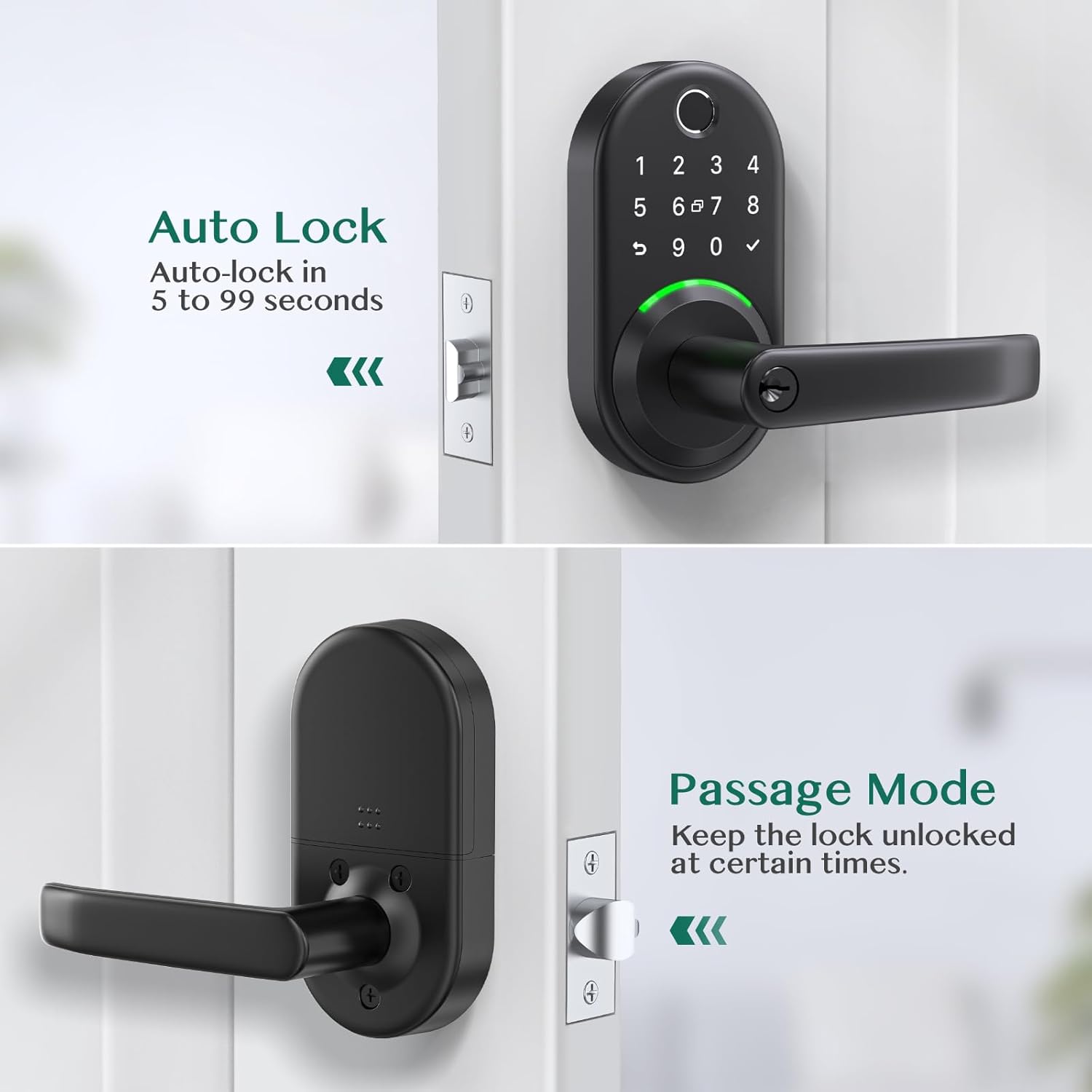
- Autolås: Configure the lock to automatically re-lock after a set period (e.g., 5 to 99 seconds) after being unlocked.
- Passagetilstand: Temporarily disable auto-lock to keep the door unlocked for extended periods, useful for gatherings or moving items.

Image: The Yamiry app's user management screen, displaying a list of registered family members and their assigned access permissions for the smart lock.

Image: The app interface for generating temporary passcodes, allowing users to create one-time or custom passcodes for guests or service personnel.

Image: A screenshot of the app's log history, displaying a chronological record of all lock and unlock activities, including the user and method of entry.
Image: This image illustrates the auto-lock function, which can be set to re-lock the door within 5 to 99 seconds, and the passage mode, which keeps the door unlocked for convenience.
7. Vedligeholdelse
7.1 Udskiftning af batteri
The lock requires Lithium Ion batteries (not included). When the battery level is low, the lock will provide an audible or visual alert. To replace batteries:
- Fjern batteridækslet på den indvendige del.
- Fjern forsigtigt de gamle batterier.
- Insert new Lithium Ion batteries, ensuring correct polarity.
- Sæt batteridækslet på igen.
Note: If the batteries are completely dead, you can use a power bank with a USB cable via the USB port on the bottom of the keypad to temporarily power the lock and gain entry.
7.2 Rengøring
Sådan bevarer du din smartlås' udseende og funktionalitet:
- Tør de udvendige overflader af med en blød, damp klæde.
- Undgå at bruge slibende rengøringsmidler, opløsningsmidler eller barske kemikalier, da disse kan beskadige overfladen og de elektroniske komponenter.
- Hold fingeraftrykssensoren og tastaturet rene og fri for snavs for optimal ydeevne.
8. Fejlfinding
| Problem | Mulig årsag/løsning |
|---|---|
| Låsen reagerer ikke på input. | Check battery level and replace if necessary. Ensure the lock is properly installed and all cables are connected. |
| Fingerprint recognition fails frequently. | Sørg for, at din finger er ren og tør. Prøv at registrere dit fingeraftryk igen i appen. Sørg for korrekt placering på sensoren. |
| Tastaturet lyser ikke eller reagerer ikke. | Press any key to activate the keypad. Check battery level. |
| Cannot connect to the lock via Bluetooth/App. | Ensure Bluetooth is enabled on your phone. Be within close proximity to the lock. Restart the app and/or your phone. If using a WiFi gateway, ensure it is properly configured and connected to your network. |
| Automatisk låsefunktion fungerer ikke som forventet. | Verify auto-lock settings in the app. Ensure the door sensor (if applicable) is clean and unobstructed. |
| Lock is making unusual noises. | Check for any obstructions in the door frame or latch mechanism. Ensure the lock is securely mounted and not loose. |
9. Garanti og support
For warranty information and technical support, please refer to the official Yamiry website or contact Yamiry customer service directly. Keep your purchase receipt as proof of purchase for any warranty claims.
Kontaktoplysninger: Please visit the Yamiry official webwebstedet eller se kontaktoplysningerne på din produktemballage for at få de mest opdaterede supportoplysninger.