
1. Introduktion og overview
The VIZIUUY 3MP Solar Security Camera offers advanced outdoor surveillance with its wireless design, solar power capabilities, and comprehensive features. This manual provides essential information for setting up, operating, and maintaining your camera to ensure optimal performance and security.

Image: VIZIUUY 3MP Solar Security Camera with its solar panel.
2. Hvad er der i æsken
Pak forsigtigt alle komponenter ud, og bekræft, at du har modtaget følgende:
- 1 x 3MP Solar PTZ Camera
- 1 x Solcellepanel
- 1 x brugermanual
- 1 x strømkabel
- 1 x advarselsmærkat
- 2 x Stand (1 for Camera, 1 for Panel)
- 2 x Screw bags

Billede: Alle komponenter er inkluderet i produktemballagen.
3. Opsætningsvejledning
3.1 Initial Setup (App & Pairing)
- Oplad kameraet: Before installation, fully charge the camera indoors using the provided power cable. This ensures the built-in battery has sufficient power for initial setup and operation.
- Download appen: Download the free "Cloudedge" app from your smartphone's app store (Google Play for Android or Apple App Store for iOS).
- Opret en konto: Open the Cloudedge app and follow the on-screen instructions to sign up and create a new user account.
- Tilføj enhed: In the app, select 'Add Device' and choose 'Battery Camera'. Follow the prompts to power on the camera and reset it if necessary.
- Opret forbindelse til Wi-Fi: Vælg dit 2.4 GHz Wi-Fi-netværk, og indtast adgangskoden. Kameraet understøtter ikke 5 GHz Wi-Fi.
- Scan QR -kode: The app will display a QR code. Hold your smartphone with the QR code 5-8 inches in front of the camera lens. The camera will emit a sound indicating successful pairing.
- Komplet opsætning: Once connected, follow the remaining app prompts to name your camera and finalize the setup process.
Video: A customer's unboxing and setup guide for the VIZIUUY Solar Security Camera, demonstrating the initial pairing process with the Cloudedge app.
3.2 Fysisk installation
The VIZIUUY camera and solar panel can be mounted using the provided stands and screws. Choose a location that provides optimal sunlight exposure for the solar panel and a clear view til kameraet.
- Monteringssted: Identify a suitable outdoor location for both the camera and the solar panel. Ensure the solar panel receives direct sunlight for several hours daily.
- Installer kamerabeslag: Use the provided mounting template to mark drill holes for the camera bracket. Secure the bracket to the wall or ceiling using the screws and wall anchors. The camera slides onto this bracket for easy attachment and removal.
- Install Solar Panel Bracket: Similarly, install the solar panel bracket in a location with maximum sun exposure.
- Fastgør solpanel: Secure the solar panel to its bracket and adjust its angle to face the sun.
- Tilslut solpanel: Connect the solar panel's power cable to the camera's charging port. Ensure the connection is secure and waterproof.

Image: Installation diagram for the camera and solar panel.

Image: Solar panel connected to the camera for continuous power.
4. Betjeningsvejledning
4.1 Pan, Tilt & Digital Zoom
Styr kameraets viewing angle remotely through the Cloudedge app. The camera offers 355° horizontal pan and 90° vertical tilt, providing a 360° field of view. Utilize the 4x digital zoom to inspect details within the live feed.

Image: Pan, Tilt, and 4X Digital Zoom functionality.
4.2 Nattesyn
The camera features upgraded 4pcs bright spotlights for enhanced night vision. It supports both color night vision (up to 50ft/15m) and infrared (IR) night vision for clear video in total darkness.
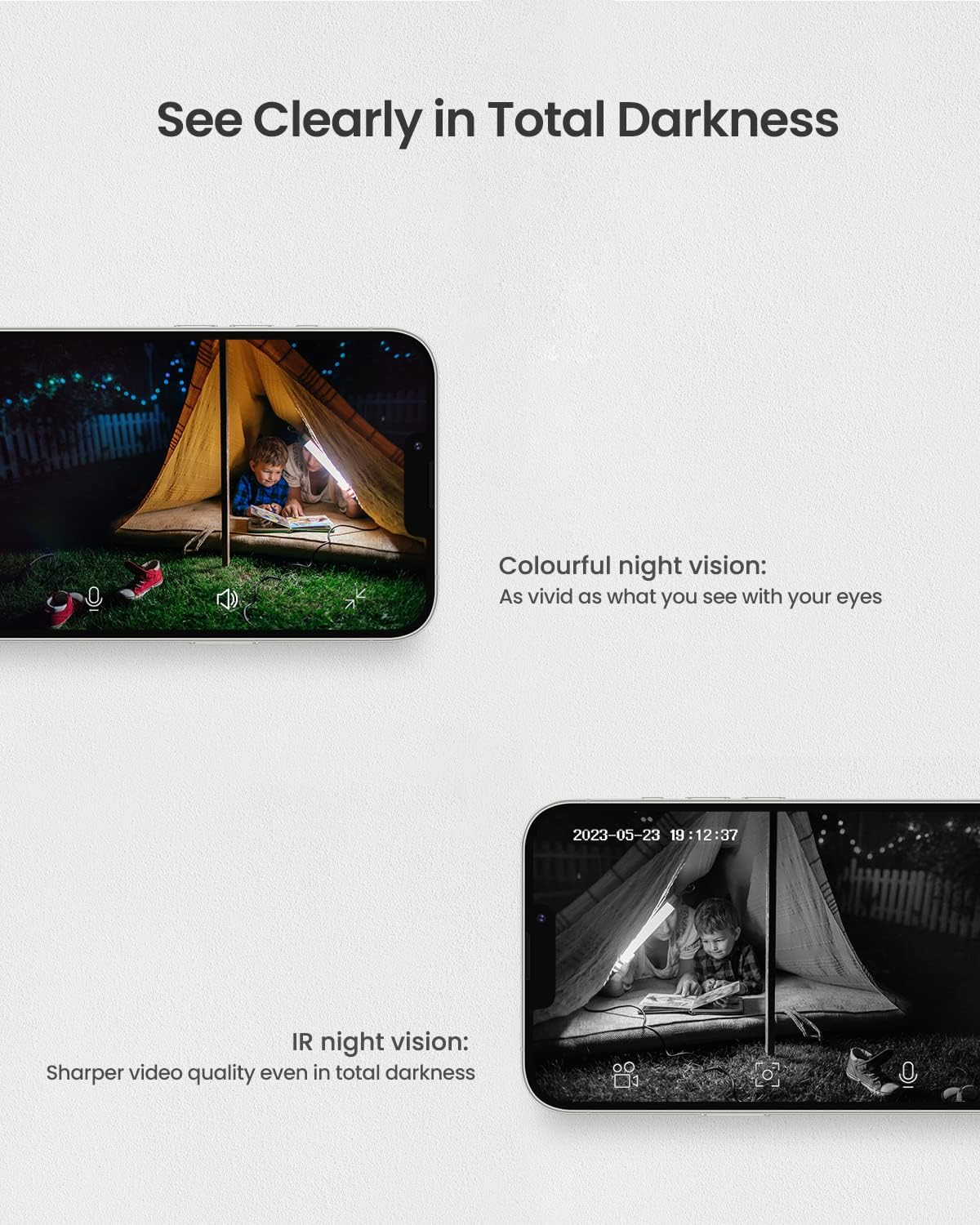
Image: Night vision capabilities, including color and IR modes.

Image: Visual comparison of camera view during day and night with color night vision.
4.3 Intelligent Motion Detection & Multi-Alarms
Equipped with upgraded PIR technology, the camera significantly enhances human-like recognition, reducing false alarms. Upon motion detection, the camera can automatically activate its floodlight and siren to deter intruders. Notifications are pushed to your smartphone. You can also customize motion detection areas and sensitivity levels (1-10) within the app.

Image: Intelligent motion detection features.

Image: Motion detection triggering spotlight and app alerts.

Image: Setting customized activity zones for motion detection.
4.4 Tovejslyd
The built-in microphone and speaker enable two-way communication. You can hear what's happening and speak to anyone in view of the camera directly from your smartphone.

Image: Two-way audio communication via the app.
4.5 Lagringsmuligheder
The camera supports two storage methods: local storage via a Micro SD card (up to 128GB, not included) and optional cloud storage with a free 7-day trial.

Image: Cloud and Micro SD card storage options.
4.6 Alexa-kompatibilitet
The VIZIUUY camera is compatible with Alexa, allowing for voice control and integration with smart home systems. You can ask Alexa to show you the camera feed on compatible devices.

Image: Alexa voice control integration.
5. Vedligeholdelse
- Rengør linse og solpanel: Tør regelmæssigt kameralinsen og solpanelet af med en blød klud.amp cloth to remove dust, dirt, or debris. This ensures clear image quality and efficient solar charging.
- Tjek montering: Periodically inspect the camera and solar panel mounting brackets to ensure they are secure and have not loosened due to weather conditions.
- Softwareopdateringer: Keep the Cloudedge app updated to the latest version to benefit from new features, bug fixes, and security enhancements.
6. Fejlfinding
- Kamera offline: Ensure the camera is fully charged and the solar panel is receiving adequate sunlight. Check your Wi-Fi connection and ensure the camera is within range of your 2.4GHz router. Try restarting the camera and your router.
- Dårlig billedkvalitet: Rengør kameralinsen. Sørg for, at der ikke er nogen forhindringer i kameraets synsfelt. view. Check your Wi-Fi signal strength in the app; a weak signal can affect video quality.
- Falske bevægelsesadvarsler: Adjust the motion detection sensitivity settings in the app. Define specific activity zones to exclude areas with frequent non-threatening movement (e.g., trees swaying).
- Batteri oplades ikke: Verify the solar panel is clean and positioned to receive direct sunlight. Ensure the solar panel cable is securely connected to the camera. If issues persist, try charging the camera directly with the power cable indoors.
- To-vejs lydproblemer: Check the volume settings on your smartphone and within the app. Ensure there is no obstruction blocking the camera's microphone or speaker.
7. Specifikationer
| Feature | Detalje |
|---|---|
| Modelnavn | VZ-3PT2-A |
| Videooptagelsesopløsning | 3 MP (2560*1920) |
| Indendørs/Udendørs brug | Udendørs |
| Strømkilde | Solar Powered / Power Adapter |
| Forbindelsesprotokol | Wi-Fi (KUN 2.4 GHz) |
| Controller type | CloudEdge app |
| Viewi vinkel | 355° panorering, 90° hældning (360° synsfelt View) |
| Night Vision Range | Up to 50ft/15m (Color Night Vision) |
| Digital Zoom | 4X |
| Batteristrøm | 9600 mioamp Timer |
| Opbevaring | Micro SD-kort (op til 128 GB), Cloud-lagring |
| International Protection Rating | IP66 |
| Emnemål L x B x H | 7 x 5 x 8 tommer |
8. Garanti og support
VIZIUUY is committed to providing high-quality products and customer satisfaction. Your VIZIUUY Solar Security Camera comes with:
- 1-års garanti: Dækker fabrikationsfejl og funktionsfejl ved normal brug.
- Livsvarig teknisk support: Access to dedicated technical assistance for the lifespan of your product.
- Local Phone Service: Support available via local phone service for convenient assistance.
- 90 dages gratis returret: For returnering inden for 90 dage efter købet.
For any inquiries or support needs, please refer to the contact information provided in your Quick Start Guide or on the VIZIUUY official webwebsted.