
BRAINWAVZ BWAVZ-EUFYW02-WH
BRAINWAVZ Skruefri vægbeslag til Eufy T8410X (IndoorCam S220 / E220)
Instruktionsmanual
Indledning
Denne manual indeholder detaljerede instruktioner til installation og brug af dit BRAINWAVZ skrueløse vægbeslag, der er specielt designet til Eufy T8410X (IndoorCam S220 / E220) sikkerhedskamera. Læs venligst disse instruktioner omhyggeligt inden installation for at sikre korrekt opsætning og optimal ydeevne.
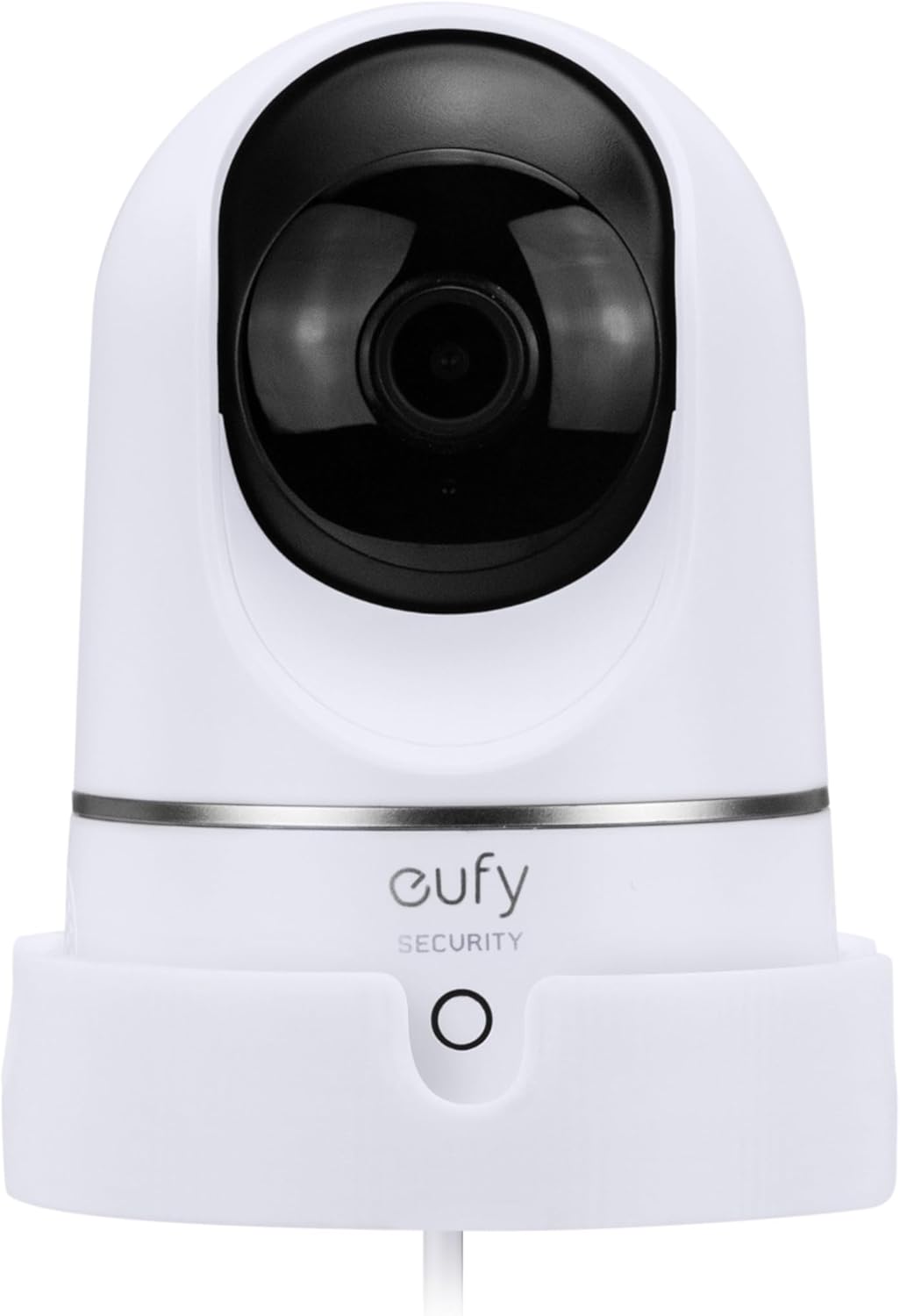
Billede: BRAINWAVZ-vægbeslaget vist med et kompatibelt Eufy T8410X-kamera, der illustrerer, hvordan kameraet sidder sikkert i beslaget.
Produkt overview
BRAINWAVZ vægbeslaget tilbyder en sikker og alsidig løsning til placering af dit Eufy T8410X-kamera. Det giver mulighed for forbedret viewvinkler og hjælper med at reducere blinde vinkler ved at montere kameraet på en lodret overflade.
Nøglefunktioner:
- Kompatibilitet: Specielt designet til Eufy T8410X (IndoorCam S220 / E220).
- Sikker montering: Kameraet sidder solidt i basen og er fastgjort med en medfølgende 6 mm monteringsbolt.
- Kabelstyring: Netledningen føres pænt ud bag på bøjlen.
- Alsidig installation: Understøtter både skruemontering og 3M VHB klæbemontering.
- Fleksibel orientering: Kan monteres på hovedet for snævrere placeringer og bedre vinkler.
- Holdbar konstruktion: Lavet af hård og holdbar plastik.
Hvad er der i æsken:
- BRAINWAVZ vægbeslag
- 3M VHB-tape (formonteret til selvklæbende montering)
- Skruer, skiver, vægdyvler og skruehætter (til skruemontering)
- ¼” monteringsbolt
Kompatibilitet
Dette BRAINWAVZ vægbeslag er eksklusivt kompatibelt med følgende Eufy-kameramodeller:
- Eufy T8410X
- Eufy Indendørskamera S220
- Eufy Indendørskamera E220
Sørg for, at din kameramodel matcher en af de anførte kompatible enheder, før du fortsætter installationen. Denne montering er ikke designet til brug med andre kameramodeller eller -mærker.

Billede: Visuel bekræftelse af kompatibilitet med Eufy T8410X-, IndoorCam S220- og E220-modellerne, der fremhæver kameraets modelnummerplacering.
Installationsvejledning
BRAINWAVZ vægbeslaget tilbyder to installationsmetoder: skruemontering for maksimal sikkerhed og klæbemontering for hurtig og værktøjsfri opsætning. Vælg den metode, der passer bedst til din vægoverflade og dine behov.
Metode 1: Skruemonteringsmulighed (anbefales for maksimal sikkerhed)
Denne metode giver den sikreste fastgørelse til dit kamerabeslag. Alt nødvendigt hardware er inkluderet.
- Vælg placering: Vælg en passende lodret overflade til montering. viewvinkler og adgang til strømkabler.
- Marker borehuller: Hold beslaget mod væggen på det ønskede sted. Brug en blyant til at markere placeringen af skruehullerne.
- Bor pilothuller: Brug et passende bor til din vægtype til at bore forboringshuller på de markerede steder. Hvis du monterer i gipsvæg, skal du isætte de medfølgende rawlplugs.
- Fastgør montering: Juster beslaget med forboringshullerne/vægdyblerne. Sæt skruerne gennem beslaget, og spænd dem godt fast med en skruetrækker. Sæt skruehætter over skruehovederne for et færdigt udseende.
- Sikkert kamera: Placer dit Eufy-kamera i holderen. Sørg for, at strømkablet er ført gennem det dertil indrettede adgangshul bagpå. Fastgør kameraet til holderen med den medfølgende 6 mm monteringsbolt.
- Juster retning (valgfrit): Beslaget kan monteres på hovedet, hvis det er nødvendigt af specifikke årsager. viewvinkler eller til at passe ind i snævrere rum.

Billede: Illustration, der viser skruemonteringsmuligheden med en skruetrækker sammen med 3M VHB-klæbebåndet til alternativ installation.

Billede: Diagram, der viser, hvordan man monterer Eufy-kameraet på hovedet i vægbeslaget og fastgør det med 6 mm bolten.
Metode 2: Selvklæbende monteringsmulighed (værktøjsfri installation)
Denne metode bruger stærk 3M VHB-tape til hurtig og nem installation uden værktøj. Vigtigt: Denne metode er IKKE egnet til malede,ampeller pudsede vægge. Disse overflader er ikke egnede til klæbende montering.
- Ren overflade: Sørg for, at den valgte lodrette overflade er ren, tør og glat. Tør eventuelt støv, snavs eller fedt væk.
- Forbered klæbemiddel: 3M VHB-tapen er forudfastgjort på bagsiden af monteringen. Fjern forsigtigt den røde beskyttelsesbagside fra tapen.
- Position Montering: Tryk beslaget godt fast på det ønskede sted på væggen. Tryk kraftigt og jævnt i mindst 30 sekunder for at sikre god vedhæftning.
- Tillad at indstille: For optimal vedhæftning skal du lade monteringen hærde i et par timer (ideelt set 24 timer), før du placerer kameraet i den. Dette gør det muligt for klæbemidlet at hæfte helt fast på overfladen.
- Sikkert kamera: Når klæbemidlet er helt hærdet, skal du placere dit Eufy-kamera i monteringen. Sørg for, at strømkablet er ført gennem det dertil indrettede adgangshul bagpå. Fastgør kameraet til monteringen med den medfølgende 6 mm monteringsbolt.

Billede: Nærbillede view af den stærke 3M VHB-klæbebånd på bagsiden af BRAINWAVZ-vægbeslaget, klar til montering.

Billede: Diagram, der illustrerer drop-in-designet for nem placering af kameraet og kabeladgangshullet for pæn føring af strømkablet.
Betjening af monteringen
Når BRAINWAVZ-vægbeslaget er installeret, giver det en stabil platform til dit Eufy T8410X-kamera. Selve beslaget har ingen bevægelige dele; dets funktion er at holde kameraet sikkert i en hævet position, så kameraets panorerings- og vippefunktioner fungerer effektivt fra en bedre position.tage punkt.
- Forbedret Viewing: Ved at montere dit kamera på en væg kan du opnå bredere dækning og reducere blinde vinkler sammenlignet med at placere det på en plan overflade.
- Sikkerhed: Den sikre pasform og den valgfrie skruemontering forhindrer utilsigtede stød eller bevægelse, hvilket holder dit kamera sikkert.
- Kabelstyring: Den integrerede kabeladgang sikrer en ryddelig installation og holder netledningen ude af vejen.

Billede: EksampBilleder af Eufy-kameraet monteret i forskellige hjemmemiljøer såsom en stue, et børneværelse, en garage og et hjemmekontor, hvilket demonstrerer alsidige placeringsmuligheder.
Opretholdelse
BRAINWAVZ vægbeslaget kræver minimal vedligeholdelse.
- Rensning: For at rengøre holderen skal du blot tørre den af med en blød, tør eller let fugtet klud.amp klud. Undgå at bruge skrappe kemikalier eller slibende rengøringsmidler, da disse kan beskadige overfladen.
- Inspektion: Kontrollér regelmæssigt monteringen for tegn på slid eller skader. Sørg for, at kameraet forbliver sikkert fastgjort med 6 mm bolten.
- Kontrol af klæbemiddel: Hvis du bruger selvklæbende beslag, skal du lejlighedsvis kontrollere, at beslaget stadig sidder godt fast på væggen. Hvis det viser tegn på at løsne sig, kan du overveje at fastgøre det igen med skruer, hvis overfladen tillader det, eller flytte det til en mere passende overflade.
Fejlfinding
Hvis du støder på problemer med dit BRAINWAVZ vægbeslag, bedes du bruge følgende almindelige løsninger:
- Beslaget sidder ikke fast (klæbemulighed):
- Sørg for, at vægoverfladen var ren, tør og glat inden påføring.
- Kontroller, at overfladen ikke er malet, dampeller pudset, da disse er uegnede til klæbende montering.
- Sørg for, at der blev påført tilstrækkeligt tryk under installationen, og at klæbemidlet fik lov til at hærde i flere timer (24 timer anbefales), før kameraet placeres.
- Hvis problemerne fortsætter, kan du overveje at bruge skruemontering for en mere permanent og sikker installation.
- Kameraet føles løst i monteringen:
- Sørg for, at 6 mm monteringsbolten er helt spændt, så kameraet er fastgjort til monteringen.
- Bekræft, at dit kamera faktisk er en kompatibel Eufy T8410X-, IndoorCam S220- eller E220-model.
- Beslaget er ustabilt (skruemulighed):
- Sørg for, at alle skruer er spændt helt.
- Ved montering i gipsvæg skal du sørge for, at der er brugt vægdyvler, og at de er korrekt monteret.
- Kontroller, om selve væggen er stabil og kan bære kameraets og monteringens vægt.
Specifikationer
| Mærke | BRAINWAVZ |
| Modelnummer | BWAVZ-EUFYW02-WH |
| Kompatible enheder | Eufy T8410X (IndoorCam S220 / E220) |
| Monteringstype | Vægmontering (skrue eller klæbemiddel) |
| Materiale | Holdbar plastik |
| Farve | Hvid |
| Varens vægt | 1.44 ounce |
| Pakkedimensioner | 7.13 x 4.53 x 3.43 tommer |
| Speciel funktion | Forbedret monteringssikkerhed og holdbarhed |
Garanti og support
BRAINWAVZ-produkter er designet til kvalitet og holdbarhed. For specifikke garantioplysninger eller teknisk support henvises til den officielle BRAINWAVZ-side. webwebstedet eller kontakt deres kundeservice direkte. Behold din købskvittering som købsbevis.
For yderligere hjælp kan du besøge BRAINWAVZ-butik på Amazon.
Ask a question about this manual
Ask about setup, troubleshooting, compatibility, parts, safety, or missing instructions. Manuals+ will review the question and use this page’s manual context to help answer it.