
FAO Schwarz Thunderbolt Jet X2
FAO Schwarz Thunderbolt Jet X2 Drone Brugermanual
Model: Thunderbolt Jet X2 | Brand: FAO Schwarz
Indledning
Welcome to the user manual for your new FAO Schwarz Thunderbolt Jet X2 Drone. This manual provides essential information for safe operation, setup, maintenance, and troubleshooting. Please read it thoroughly before operating your drone to ensure a safe and enjoyable experience.
Sikkerhedsoplysninger
- Brug altid dronen i åbne, ryddede områder, væk fra mennesker, dyr og forhindringer.
- Flyv ikke i nærheden af lufthavne, elledninger eller begrænset luftrum.
- Ensure the drone's battery and remote control batteries are fully charged before each flight.
- Hold fingre, hår og løstsiddende tøj væk fra roterende propeller.
- Må ikke anvendes i stærk vind eller ugunstige vejrforhold.
- Voksenopsyn anbefales til yngre brugere.
Hvad er der i æsken
Bekræft at alle komponenter er til stede:
- FAO Schwarz Thunderbolt Jet X2 Drone
- Fjernbetjening
- Genopladeligt dronebatteri
- USB opladningskabel
- Reservepropeller (hvis inkluderet)
- Brugervejledning (dette dokument)
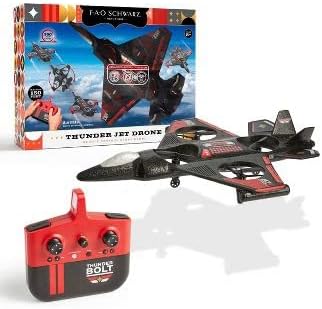
Image: The Thunderbolt Jet X2 Drone, its remote control, and the product packaging, showing the main components included.
Opsætning
1. Opladning af dronens batteri
- Locate the rechargeable drone battery.
- Tilslut batteriet til det medfølgende USB-opladerkabel.
- Sæt USB-kablet i en standard USB-strømkilde (f.eks. en computers USB-port eller en USB-vægadapter).
- Indikatorlampen på USB-kablet viser opladningsstatus (f.eks. rød for opladning, slukket for fuldt opladet).
- Opladning tager typisk cirka 60-90 minutter. Overoplades ikke.
2. Installation af fjernbetjeningsbatterier
- Åbn batterirummet på bagsiden af fjernbetjeningen.
- Insert 3x AAA batteries (not included) into the compartment, ensuring correct polarity (+/-).
- Luk batterirummet forsvarligt.

Billede: En detaljeret view of the remote control for the Thunderbolt Jet X2 Drone, highlighting its buttons and joysticks.
3. Parring af drone og fjernbetjening
- Placer dronen på en flad, plan overflade.
- Turn on the drone by pressing its power button. The drone's lights will flash.
- Tænd for fjernbetjeningen.
- Tryk venstre joystick (gashåndtag) helt op, og derefter helt ned.
- Dronens lys vil lyse konstant, hvilket indikerer vellykket parring.
Betjening af dronen
Grundlæggende kontrol
- Venstre joystick (gashåndtag): Up to ascend, down to descend.
- Højre joystick (retningsbestemt): Forward to move forward, backward to move backward, left to move left, right to move right.
- Trimknapper: Used to fine-tune the drone's stability if it drifts in any direction.
- Knap til start/landing med én knap: Tryk for automatisk at lette eller lande.
- 360° vippeknap: Press this button, then push the right joystick in any direction to perform a flip.

Image: The Thunderbolt Jet X2 Drone flying in the air, with a hand holding the remote control in the foreground, illustrating active operation.
Første flyvning
- Ensure you are in a safe, open area.
- Placer dronen på en flad overflade.
- Press the One-Key Take-off button, or slowly push the left joystick up to ascend.
- Practice hovering at a low altitude first.
- Use the right joystick for directional control.
- To land, press the One-Key Landing button or slowly pull the left joystick down until the drone lands.

Image: Three Thunderbolt Jet X2 Drones shown in different aerial maneuvers, demonstrating its agility and flight capabilities.
Opretholdelse
- Rensning: Use a soft, dry cloth to clean the drone and remote control. Do not use water or harsh chemicals.
- Propelinspektion: Regularly check propellers for damage (bends, cracks). Replace damaged propellers immediately using the provided spares.
- Batteripleje: Opbevar batterier et køligt og tørt sted. Lad ikke batterier være helt afladede i længere perioder.
- Opbevaring: When not in use, store the drone and remote in a safe place, away from direct sunlight and extreme temperatures.
Fejlfinding
| Problem | Mulig årsag | Løsning |
|---|---|---|
| Dronen reagerer ikke på fjernbetjeningen. | Ikke parret; lavt batteri; uden for rækkevidde. | Re-pair drone and remote; charge drone battery; replace remote batteries; ensure within 300 feet range. |
| Drone driver afsted under flyvning. | Needs trimming; uneven take-off surface. | Use trim buttons to adjust; ensure drone is on a flat surface before take-off. |
| Propellerne drejer ikke. | Blokering; beskadiget propel; motorproblem. | Check for obstructions; replace damaged propellers; contact support if motor issue suspected. |
Specifikationer
| Feature | Detalje |
|---|---|
| Mærke | FAO Schwarz |
| Modelnavn | Thunderbolt Jet X2 |
| Farve | Sort |
| Videooptagelsesopløsning | 480p |
| Forbindelsesteknologi | USB |
| Færdighedsniveau | Nybegynder |
| Batterikapacitet | 850 mioamp Timer |
| Videooptagelsesformat | MP4 |
| Maksimal rækkevidde | 300 fod |
| Materiale | Plast |
| Varens vægt | 1.61 pund |
| Pakkedimensioner | 17.48 x 12.68 x 4.37 tommer |
Garanti og support
For warranty information or technical support, please refer to the contact details provided on the product packaging or visit the official FAO Schwarz webwebstedet. Behold din købskvittering som købsbevis.
Ask a question about this manual
Ask about setup, troubleshooting, compatibility, parts, safety, or missing instructions. Manuals+ will review the question and use this page’s manual context to help answer it.