
1. Introduktion
Tak for købetasing the Hisense AX3120G 3.1.2 Channel Soundbar. This soundbar system is designed to enhance your audio experience for movies, music, and games with immersive sound, including Dolby Atmos and DTS:X support. This manual provides essential information for setting up, operating, and maintaining your device. Please read it thoroughly before use and retain it for future reference.
2. Sikkerhedsoplysninger
Overhold følgende sikkerhedsforanstaltninger for at forhindre skader på enheden eller personskade:
- Strømkilde: Use only the specified power supply. Ensure the voltage matcher din lokale strømforsyning.
- Ventilation: Do not block any ventilation openings. Maintain adequate space around the soundbar and subwoofer for proper airflow.
- Vand og fugt: Udsæt ikke enheden for regn, fugt eller dryppende/sprøjtende væsker. Placer ikke genstande fyldt med væsker, såsom vaser, oven på apparatet.
- Varme: Hold enheden væk fra varmekilder såsom radiatorer, varmeapparater, komfurer eller andre apparater (herunder ampløftere), der producerer varme.
- Rensning: Unplug the device from the power outlet before cleaning. Use a dry, soft cloth only.
- Service: Forsøg ikke selv at servicere dette produkt. Overlad al service til kvalificeret servicepersonale.
3. Pakkens indhold
Carefully unpack your soundbar system and ensure all items listed below are present and in good condition. If any item is missing or damaged, contact your retailer.
- Hisense AX3120G Soundbar
- Trådløs subwoofer
- Fjernbetjening
- AAA-batterier (2x)
- HDMI kabel
- Optisk lydkabel
- Vægmonteringssæt

Image: Hisense AX3120G Soundbar, wireless subwoofer, and remote control, showing product dimensions.
4. Opsætning
4.1. Placering
Overvej følgende placeringsretningslinjer for optimal lydgengivelse:
- Soundbar: Place the soundbar centrally below your TV. Ensure it is on a stable, flat surface or securely mounted to the wall using the provided kit.
- subwoofer: The wireless subwoofer can be placed anywhere in the room, ideally near the soundbar, for balanced bass. Experiment with different positions to find the best sound.

Image: The Hisense AX3120G Soundbar positioned below a television, with the wireless subwoofer placed to the side, illustrating a typical home entertainment setup.
4.2. Forbindelser
Tilslut soundbaren til dit tv eller andre lydkilder ved hjælp af en af følgende metoder:
- HDMI ARC/eARC (anbefales): Connect one end of the HDMI cable to the HDMI OUT (ARC/eARC) port on the soundbar and the other end to the HDMI ARC/eARC port on your TV. This allows audio to be sent from the TV to the soundbar and enables control of the soundbar with your TV remote.
- Optisk lyd: Connect one end of the optical cable to the OPTICAL IN port on the soundbar and the other end to the optical digital output port on your TV or audio source.
- USB: Sæt et USB-drev i USB-porten på soundbaren for at afspille lyd files direkte.
4.3. Subwoofer-parring
The wireless subwoofer should automatically pair with the soundbar when both devices are powered on. If the subwoofer does not connect, follow these steps:
- Ensure both the soundbar and subwoofer are powered on and within range.
- Press and hold the PAIR button on the back of the subwoofer for a few seconds. The indicator light on the subwoofer will flash.
- On the soundbar, select the Bluetooth input (if applicable) or cycle through inputs. The soundbar and subwoofer should connect automatically. The indicator light on the subwoofer will turn solid when connected.
5. Betjeningsvejledning
5.1. Tænd/sluk
Tryk på MAGT knappen på fjernbetjeningen eller soundbaren for at tænde eller slukke enheden.
5.2. Valg af input
Tryk på INPUT button on the remote control repeatedly to cycle through available input sources (HDMI, Optical, Bluetooth, USB).
5.3. Lydstyrkekontrol
Brug VOL+ og VOL- buttons on the remote control to adjust the master volume. Use the BASS + og BAS- buttons to adjust the subwoofer level.
5.4. Lydtilstande og -funktioner
The Hisense AX3120G supports advanced audio technologies for an immersive experience:
- Dolby Atmos og DTS:X: These technologies provide multi-dimensional sound, creating a captivating audio experience. The soundbar automatically detects and processes these formats when available from your source.
- 3.1.2 kanaler: Enjoy a rich soundstage with dedicated left, right, center, and two up-firing channels, plus a separate subwoofer for deep bass.
- Super bas: Forstærker lavfrekvente lyde for en mere effektfuld lydoplevelse.
- AI EQ Mode & 7 Personalized Sound Modes: Optimize your audio for different content types (e.g., Movie, Music, News, Game) using the AI EQ mode or select from 7 personalized sound modes for tailored listening.

Image: Visual representation of the soundbar and subwoofer, emphasizing key features like 3.1.2 channels, Super Bass, Dolby Atmos support, and 360W total output.
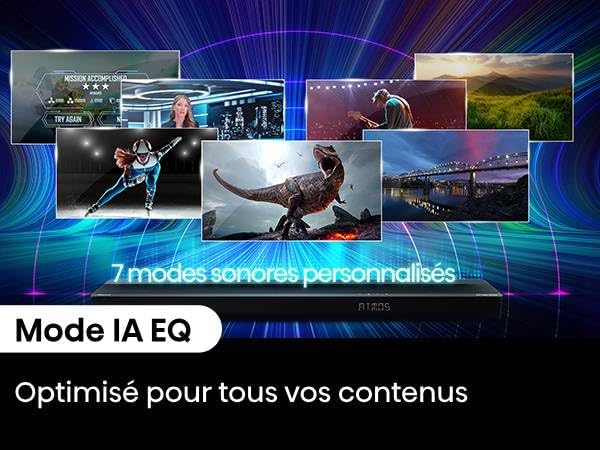
Image: The soundbar display showing 'ATOMS', with text highlighting '7 Personalized Sound Modes' and 'AI EQ Mode' for content optimization.
5.5. Bluetooth-parring
Sådan tilslutter du en Bluetooth-enhed:
- Tryk på Bluetooth button on the remote control to select Bluetooth input. The soundbar display will show "BT" and start flashing.
- Enable Bluetooth on your device (smartphone, tablet, etc.) and search for "Hisense AX3120G".
- Select the soundbar from the list of available devices. Once connected, the "BT" indicator on the soundbar will stop flashing and remain solid.
6. Vedligeholdelse
6.1. Rensning
To clean your soundbar and subwoofer:
- Tag altid enheden ud af stikkontakten før rengøring.
- Brug en blød, tør klud til at tørre overfladerne af.
- Do not use liquid cleaners, aerosol sprays, or abrasive materials, as these may damage the finish.
6.2. Opbevaring
If you plan to store the soundbar for an extended period, unplug it from the power outlet and store it in a cool, dry place, away from direct sunlight and extreme temperatures.
7. Fejlfinding
Hvis du støder på problemer med din soundbar, kan du se følgende almindelige problemer og løsninger:
| Problem | Mulig årsag | Løsning |
|---|---|---|
| Ingen strøm | Strømkabel ikke tilsluttet; Strømudtag ikke aktivt | Ensure power cables are securely connected. Check the power outlet with another device. |
| Ingen lyd | Forkert indgang valgt; Lydstyrke for lav; Kabler ikke tilsluttet korrekt | Vælg den korrekte inputkilde. Skru op for lydstyrken. Kontroller alle lydkabelforbindelser. Sørg for, at tv'ets lydudgang er indstillet til eksterne højttalere. |
| Subwooferen forbinder ikke | Subwoofer not paired; Out of range | Refer to Section 4.3 for subwoofer pairing instructions. Ensure subwoofer is within 10 meters of the soundbar. |
| Problemer med Bluetooth-forbindelse | Enhed ikke i parringstilstand; Uden for rækkevidde; Interferens | Ensure soundbar is in Bluetooth pairing mode. Move device closer to soundbar. Avoid strong electromagnetic interference. |
| Fjernbetjening virker ikke | Batterier opbrugt; Forhindring; Forkert vinkel | Udskift batterierne. Fjern eventuelle forhindringer mellem fjernbetjeningen og soundbaren. Ret fjernbetjeningen direkte mod soundbarens sensor. |
8. Specifikationer
Below are the technical specifications for the Hisense AX3120G Soundbar system:
| Feature | Specifikation |
|---|---|
| Modelnavn | AX3120G |
| Mærke | Hisense |
| Højttaler type | Soundbar med trådløs subwoofer |
| Konfiguration af lydkanal | 3.1.2 kanaler |
| Maksimal udgangseffekt | 360 watt |
| Frekvensrespons | 20000 Hz |
| Forbindelsesteknologi | Bluetooth, HDMI, USB, Optical Audio |
| Wireless Subwoofer Connectivity | Trådløs |
| Bluetooth rækkevidde | 10 meter |
| Særlige funktioner | Dolby Atmos, DTS:X Support, Up-firing Speakers |
| Monteringstype | Vægmonterbar |
| Soundbar Dimensions (W x D x H) | 920 x 60 x 90 mm |
| Varens vægt | 8.1 kilo |
| Inkluderede komponenter | Soundbar, Subwoofer, Remote Control, Batteries, Optical Cable, HDMI Cable |
9. Garanti og support
Hisense products are manufactured to the highest quality standards. This product comes with a limited warranty. For detailed warranty information, please refer to the warranty card included in your package or visit the official Hisense website. For technical support, troubleshooting assistance, or service inquiries, please contact Hisense customer service through their official channels.


