
1. Introduktion
This manual provides essential information for the safe and efficient operation of your Acekool Portable Air Conditioner. This 3-in-1 unit offers cooling, fan, and dehumidification functions, designed to provide comfort in various indoor environments. Please read this manual thoroughly before installation and use, and retain it for future reference.
2. Sikkerhedsoplysninger
For at forhindre skader på brugeren eller andre mennesker og materielle skader skal følgende instruktioner følges. Forkert betjening på grund af ignorering af instruktioner kan forårsage skade eller skade.
- Elektrisk sikkerhed: Ensure the power supply matches the unit's requirements (220 Volts). Do not operate with a damaged power cord or plug. Do not share the electrical outlet with other appliances. Always unplug the unit before cleaning or servicing.
- Refrigerant (R290): This appliance contains R290 refrigerant, which is flammable. Keep the unit away from open flames, heat sources, and ignition sources. Do not puncture or burn the refrigerant circuit.
- Placering: Place the unit on a flat, stable surface. Maintain a minimum distance of 20 cm from walls or other objects to ensure proper airflow. Do not block air inlets or outlets.
- Børn og kæledyr: Keep children and pets away from the unit. Do not allow children to play with the appliance or its controls.
- Vandafledning: Ensure proper drainage of condensed water, especially during dehumidification mode, to prevent water overflow and damage.
- Opretholdelse: Udfør kun vedligeholdelse som beskrevet i denne manual. Kontakt kvalificeret servicepersonale ved reparationer.
3. Hvad er der i æsken
Carefully unpack the box and ensure all items are present and undamaged. If any items are missing or damaged, contact customer support.
- Portable Air Conditioner Unit (x1)
- Fjernbetjening (x1)
- Exhaust Hose (x1)
- Window Sealing Kit (x1)
- Drain Hose (x1)
- Brugervejledning (x1)

Image: All components included in the product package, clearly labeled with numbers for identification.
4. Opsætning
Følg disse trin for at konfigurere dit bærbare klimaanlæg til optimal ydeevne.
4.1 Enhedsplacering
- Placer enheden på en fast, plan overflade i det ønskede rum.
- Ensure there is at least 20 cm of space around the unit for proper air circulation.
- Placer enheden i nærheden af et vindue eller en dør til installation af udstødningsslangen.
4.2 Montering af udstødningsslange
- Attach the exhaust hose connector to the back of the air conditioner unit.
- Forlæng udstødningsslangen, og fastgør vinduesadapteren til den anden ende.
- Adjust the window sealing plate to fit your window opening. Secure it in place.
- Insert the window kit adapter into the opening of the window sealing plate.
- Ensure the exhaust hose is as straight and short as possible to maximize efficiency. Avoid kinks or sharp bends.

Image: Visual instructions demonstrating the process of connecting the exhaust hose to the unit and installing it in a window.

Billede: Detaljeret view of the exhaust hose connection points, highlighting the ease of installation.
4.3 Strømtilslutning
Plug the power cord into a grounded electrical outlet (220V). Do not use extension cords or adapters.
5. Betjeningsvejledning
Your Acekool Portable Air Conditioner can be operated using the control panel on the unit or the included remote control.
5.1 Kontrolpanel overview
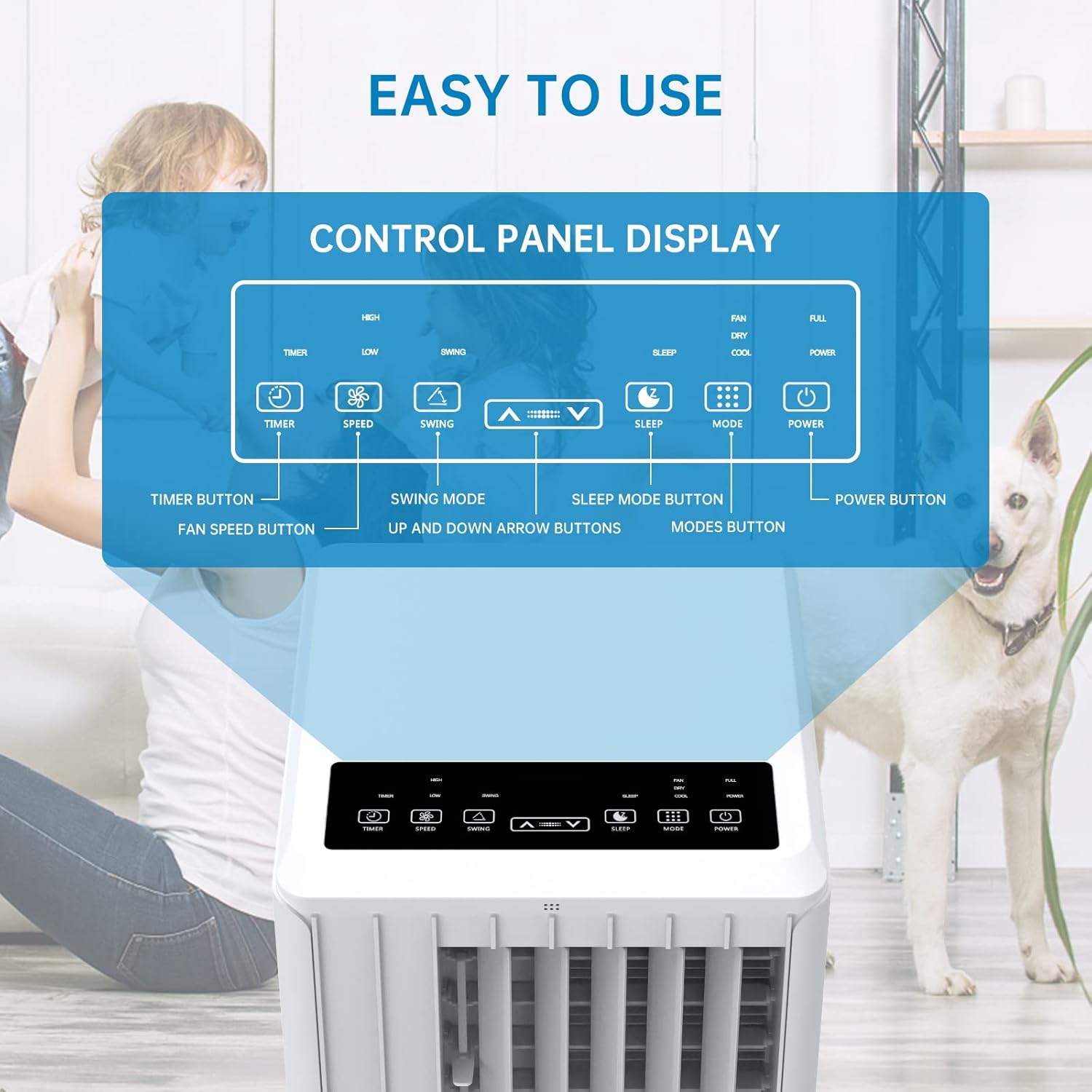
Image: A detailed diagram illustrating the control panel buttons and their functions, including Timer, Speed, Swing, Sleep, Mode, and Power.

Image: A user interacting with the touch-sensitive control panel, demonstrating its intuitive design.
- Power knap: Tænder eller slukker for enheden.
- Mode knap: Skifter mellem køle-, ventilator- og affugtningstilstande.
- Hastighedsknap: Justerer ventilatorhastigheden (Lav, Mellem, Høj).
- Timer knap: Sets the auto ON/OFF timer (up to 24 hours).
- Sving knap: Aktiverer eller deaktiverer den automatiske lameludsving for bredere luftfordeling.
- Pil op/ned: Justerer temperaturindstillinger eller timervarighed.
- Sleep knap: Activates Sleep Mode for quiet operation and energy saving during sleep.
5.2 Fjernbetjening
The remote control provides convenient operation from a distance. Ensure there are no obstructions between the remote and the unit's receiver.

Image: The portable air conditioner unit alongside its remote control, demonstrating the convenience of remote operation and the air swing feature.
5.3 driftstilstande
Enheden tilbyder tre primære driftstilstande:

Image: A graphic illustrating the three distinct modes of operation: Cooling, Dehumidifying, and Fan, with their respective visual effects.
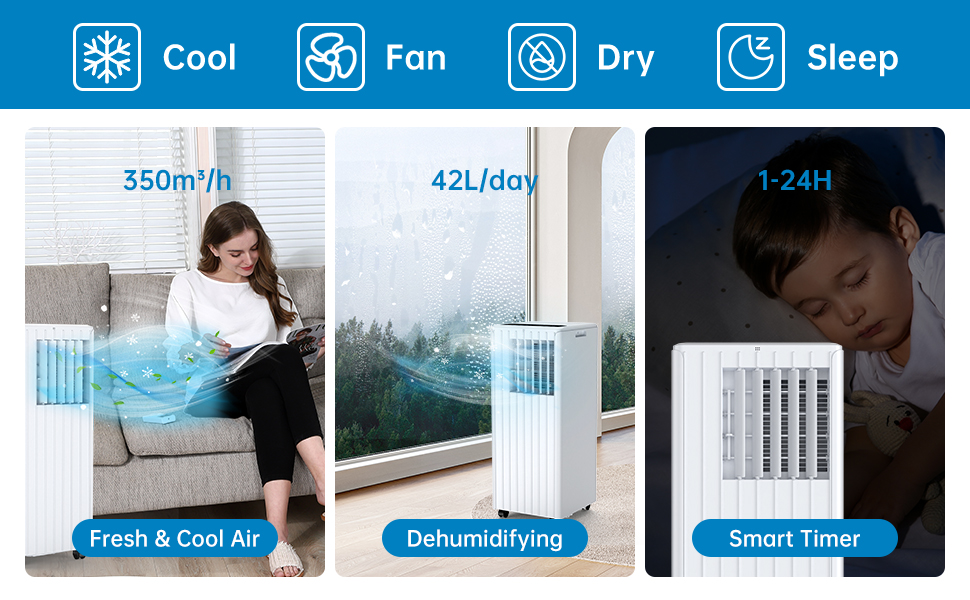
Image: A comprehensive display of the unit's modes, including cooling, fan, dry (dehumidifying), and sleep, along with performance metrics.
- Køletilstand: Provides powerful cooling. Set your desired temperature using the Up/Down arrows. The unit will cool until the room reaches the set temperature.
- Ventilatortilstand: Circulates air without cooling. Choose from Low, Medium, or High fan speeds.
- Affugtningstilstand: Removes excess moisture from the air. The unit will operate at a low fan speed. Ensure the continuous drainage hose is connected for prolonged use in this mode.
5.4 Dvaletilstand
Activate Sleep Mode for quiet operation and energy efficiency during nighttime. In this mode, the fan speed is reduced, and the temperature may gradually increase to ensure comfortable sleep.

Image: The portable air conditioner in a bedroom setting, illustrating its quiet operation and features like automatic shut-off and 24-hour smart timer for undisturbed sleep.

Image: A graph depicting the temperature adjustment curve in Sleep Mode, showing how the temperature gradually rises over several hours to maintain comfort.
6. Vedligeholdelse
Regelmæssig vedligeholdelse sikrer dit klimaanlægs levetid og effektiv drift.
6.1 Rengøring af luftfilter
Luftfilteret bør rengøres hver anden uge eller oftere afhængigt af brug og luftkvalitet. Et snavset filter kan reducere køleeffektiviteten og luftstrømmen.
- Tag enheden ud af stikkontakten.
- Find og fjern luftfilteret fra bagsiden eller siden af enheden.
- Wash the filter under running water (warm, not hot) or use a vacuum cleaner to remove dust.
- Allow the filter to dry completely before reinserting it into the unit. Do not expose to direct sunlight.

Billede: Et nærbillede view of the washable filter being easily removed from the unit for maintenance.
6.2 Vandafledning
The unit has an internal water collection tank. When the tank is full, the unit will stop operating and display an indicator. You will need to drain the water manually.
- Tag stikket ud af stikkontakten.
- Placer en lav bakke eller spand under drænudløbet nederst på bagsiden af enheden.
- Remove the drainage plug and allow the water to drain completely.
- Replace the drainage plug firmly.
For continuous drainage in dehumidification mode, connect the provided drain hose to the continuous drainage outlet.
6.3 Generel rengøring
Tør ydersiden af enheden af med en blød, damp klud. Brug ikke skrappe kemikalier, slibemidler eller opløsningsmidler.
6.4 Opbevaring
Før du opbevarer enheden i længere tid:
- Tøm alt kondensvandet ud.
- Rengør luftfilteret.
- Tag netledningen ud, og rul den pænt op.
- Opbevar enheden et tørt, køligt sted, væk fra direkte sollys og ekstreme temperaturer.
7. Fejlfinding
Hvis du støder på problemer med dit klimaanlæg, kan du se tabellen nedenfor for almindelige problemer og løsninger.
| Problem | Mulig årsag | Løsning |
|---|---|---|
| Enheden tænder ikke | Ingen strømforsyning Vandtank fuld Overophedningsbeskyttelse aktiveret | Kontroller strømstik og stikkontakt Tøm vandbeholderen Allow unit to cool down for 30 minutes |
| Utilstrækkelig køling | Luftfilter snavset Udstødningsslange blokeret eller knækket Værelsesstørrelsen er for stor Vinduer/døre åbne Temperaturindstillingen er for høj | Rens luftfilteret Kontroller og rens udstødningsslangen Ensure unit is suitable for room size Luk alle vinduer og døre Sænk den indstillede temperatur |
| Vandlækage | Aftapningsprop løs Enheden er ikke i niveau Continuous drain hose improperly connected | Sikker aftapningsprop Placer enheden på en plan overflade Ensure drain hose is properly attached and sloped downwards |
| Enheden er støjende | Enheden står ikke på en plan overflade Interne komponenter vibrerer | Placer enheden på en flad, stabil overflade This may be normal operation noise, especially at high fan speeds. Ensure no obstructions. |
| Fjernbetjening virker ikke | Batterier døde eller forkert isat Blokering mellem fjernbetjening og enhed | Udskift batterier, kontroller polariteten Remove any obstructions, ensure direct line of sight |
8. Specifikationer
Technical specifications for the Acekool Portable Air Conditioner Model PAC-M09.
| Feature | Specifikation |
|---|---|
| Modelnummer | PAC-M09 |
| Mærke | Acekool |
| Kølekapacitet | 9000 BTU'er |
| Kølemiddel | R290 |
| Strømforsyning | 220 volt |
| Maksimalt støjniveau | 55 dB(A) |
| Produktmål (L x B x H) | 38.2 x 35 x 88.5 cm |
| Produktets vægt | 26 kg |
| Affugtningskapacitet | 42 l/dag |
| Energieffektivitetsvurdering | Klasse A |
| SEER | 2.8 |
| Anbefalet dækningsområde | 30-40 m² |
9. Garanti og support
For warranty information, technical support, or service inquiries, please refer to the warranty card included with your product or contact Acekool customer service through their official website or the retailer where the product was purchased. Please have your model number (PAC-M09) and purchase date ready when contacting support.