
1. Introduktion
This manual provides detailed instructions for the PTHTECHUS S80K Smart Watch. Please read this manual thoroughly before using the device to ensure proper operation and to maximize its features. This smartwatch is designed to assist in activity tracking, communication, and health monitoring for young users.

Image 1.1: The PTHTECHUS S80K Smart Watch, showcasing its display and pink strap.
2. Hvad er der i æsken
Upon unpacking your PTHTECHUS S80K Smart Watch, please verify that all the following items are included:
- 1 x PTHTECHUS S80K Smart Watch
- 1 x ladekabel
- 1 x Brugermanual (dette dokument)

Image 2.1: Contents of the PTHTECHUS S80K Smart Watch package, including the watch and its charging cable, with dimensions.
3. Opsætning
3.1. Opladning af smarturet
Before initial use, fully charge the smartwatch. Connect the magnetic charging cable to the charging contacts on the back of the watch and plug the USB end into a compatible power adapter (not included) or a computer's USB port. The watch display will indicate charging status.
3.2. App Installation
To utilize all features of your smartwatch, download and install the companion application, CO-FIT, on your smartphone. The app is compatible with Android 4.4 and above, and iOS 8.0 and above.
- Scan the QR code provided in the quick start guide or search for "CO-FIT" in your smartphone's app store (Google Play Store for Android, Apple App Store for iOS).
- Download og installer applikationen.
- Følg instruktionerne på skærmen for at oprette en konto og konfigurere din profile.
3.3. Enhedsparring
Pair your smartwatch with the CO-FIT app via Bluetooth:
- Sørg for, at Bluetooth er aktiveret på din smartphone.
- Open the CO-FIT app and navigate to the "Device" or "Add Device" section.
- The app will search for available devices. Select "S80K" or the corresponding device name from the list.
- Bekræft parringsanmodningen på både din smartphone og smartwatch.
- Når uret er parret, synkroniserer det data med appen.
4. Betjeningsvejledning
4.1. Grundlæggende navigation
- Touchskærm: Stryg til venstre, højre, op eller ned for at navigere gennem menuer og funktioner. Tryk for at vælge en mulighed.
- Side knap: Tryk for at vende tilbage til startskærmen eller vække enheden.
4.2. Foretage og modtage opkald
After connecting the smartwatch to your phone via Bluetooth, you can manage calls directly from your wrist.
- Foretage opkald: Access the dial pad or synchronized contacts on the watch to initiate a call.
- Modtagelse af opkald: Når et opkald kommer ind, viser uret nummeret på opkalderen. Tryk på det grønne ikon for at besvare eller det røde ikon for at afvise.
- The built-in microphone and speaker allow for hands-free communication.

Image 4.1: The smartwatch displaying an incoming call, demonstrating its communication capabilities.

Image 4.2: Visual representation of making and answering calls directly from the smartwatch interface.
4.3. Meddelelser
Receive SMS and app notifications directly on your smartwatch. Ensure notification permissions are granted in the CO-FIT app and your phone's settings.
- The watch supports notifications from various applications such as WhatsApp, Facebook, Instagram, Twitter, and more.
- Note: Replying to messages directly from the watch is not supported.

Image 4.3: The smartwatch showing incoming message notifications and the voice assistant interface.

Image 4.4: Illustration of smart notifications being displayed on the watch, keeping the user informed.
4.4. Sundhedsovervågning
The smartwatch offers 24-hour health monitoring features to help track well-being. Note: This data is for reference only and cannot be used for medical diagnosis or treatment.
- Heart Rate Monitoring: Uret overvåger løbende din puls. View real-time data on the watch or in the CO-FIT app.
- Overvågning af blodilt (SpO2): Mål dine iltmætningsniveauer i blodet.
- Søvnovervågning: Tracks sleep patterns, including deep sleep, light sleep, and awake times, providing a comprehensive analysis of sleep quality.
- Blodtryksovervågning: Giver estimerede blodtryksmålinger.

Image 4.5: The smartwatch interface showing continuous heart rate monitoring.

Image 4.6: The smartwatch displaying blood oxygen monitoring results.

Image 4.7: The smartwatch showing sleep tracking data, encouraging healthy sleep habits.
4.5. Sportstilstande
The watch supports 37 different sports modes to track various physical activities. It records steps, distance, and calorie consumption.
- Select your desired sport mode (e.g., mountaineering, running, cycling, yoga) from the watch menu.
- The watch will display real-time statistics during your workout.
- Review your activity data in the CO-FIT app for detailed analysis.

Image 4.8: Visual representation of the 37 available sport modes, including skiing, running, and cycling.

Image 4.9: The smartwatch interface showing a list of sports modes for selection.
4.6. Tilpasning af urskiver
Personalize your smartwatch with over 120 available watch face styles or create custom dials using your own photos.
- Access the watch face gallery through the CO-FIT app.
- Select from various online styles or upload a personal photo to create a unique watch face.
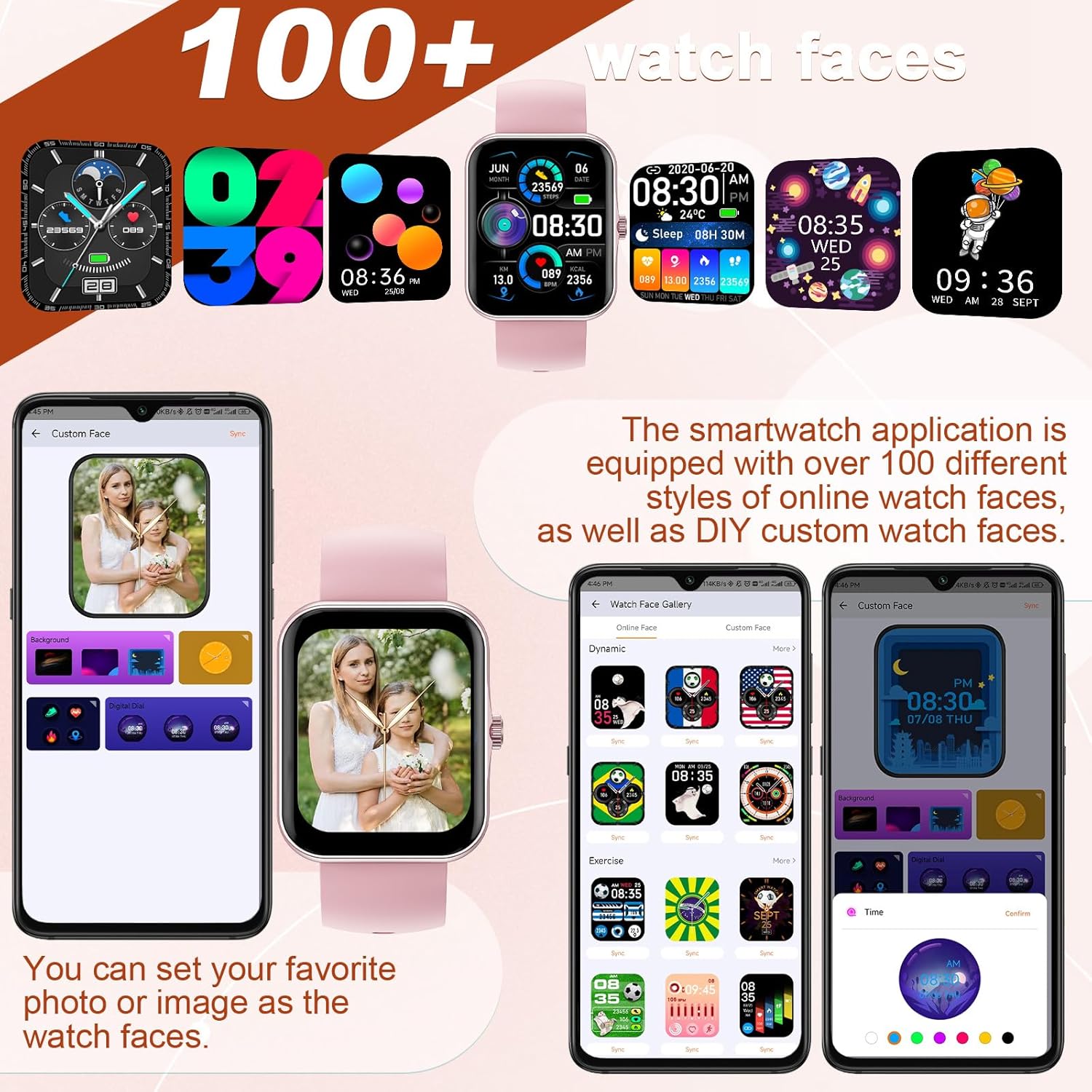
Image 4.10: A selection of watch faces and the interface for customizing them with personal photos.

Image 4.11: A collage of diverse watch faces and custom dial options available for the smartwatch.
4.7. Musik kontrol
Control your smartphone's music playback directly from the smartwatch.
- Play, pause, skip tracks, and adjust volume without needing to access your phone.

Image 4.12: The smartwatch interface for music control and remote camera operation.
4.8. Kamerakontrol
Brug dit smartwatch som fjernbetjent udløser til din smartphones kamera.
- Open the camera function in the CO-FIT app and then use the watch to trigger photos.
4.9. Stemmeassistent
The integrated voice assistant allows for hands-free control and information retrieval.
- Activate the voice assistant on the watch to make calls, check weather forecasts, play music, and more.

Image 4.13: A user engaging with the AI voice assistant feature on the smartwatch.
4.10. Vejrvisning
View aktuelle vejrforhold og prognoser direkte på dit ur.
- Ensure the watch is connected to your smartphone and location services are enabled for accurate weather updates.

Image 4.14: The smartwatch showing a multi-day weather forecast.
5. Vedligeholdelse
5.1. Rensning
- Tør urets skærm og rem regelmæssigt af med en blød, tør klud.
- For genstridigt snavs, brug en let damp klud og tør derefter grundigt.
- Undgå at bruge skrappe kemikalier eller slibende materialer, da disse kan beskadige uret.
5.2. Batteripleje
- Oplad uret regelmæssigt, selvom det ikke bruges ofte, for at opretholde batteriets sundhed.
- Avoid extreme temperatures, as they can affect battery performance and lifespan.
5.3. Vandafvisende
Important: This smartwatch is NOT waterproof. It is not suitable for swimming, showering, or submersion in water. Exposure to water may cause damage not covered by warranty.
6. Fejlfinding
If you encounter issues with your PTHTECHUS S80K Smart Watch, please refer to the following common solutions:
- Uret tænder ikke: Sørg for, at uret er fuldt opladet. Tilslut det til opladeren i mindst 30 minutter.
- Kan ikke parres med telefonen:
- Sørg for, at Bluetooth er aktiveret på din telefon og uret.
- Sørg for, at uret er inden for din telefons Bluetooth-rækkevidde (typisk 10 meter).
- Genstart både din telefon og uret.
- Ryd Bluetooth-cachen på din telefon, og prøv at parre igen.
- Notifikationer vises ikke:
- Check notification permissions in the CO-FIT app and your phone's system settings.
- Ensure the watch is properly connected to the app.
- Unøjagtige sundhedsdata: Ensure the watch is worn snugly on your wrist, not too tight or too loose. Clean the sensor on the back of the watch. Remember that health data is for reference and not medical use.
- Kort batterilevetid: Reduce screen brightness, disable unnecessary notifications, and close background apps on the watch if available.
Hvis problemet fortsætter, bedes du kontakte kundesupport for yderligere assistance.
7. Specifikationer
| Feature | Detalje |
|---|---|
| Modelnavn | S80K |
| Mærke | PTHTECHUS |
| Skærmstørrelse | 1.83 tommer |
| Displayteknologi | LCD |
| Opløsning | 240 x 284 |
| Forbindelse | Bluetooth |
| Operativsystem | AsteroidOS |
| Batteritype | Lithium Polymer (1 inkluderet) |
| Produktdimensioner | 8.66 x 1.57 x 0.79 tommer |
| Varens vægt | 1.76 ounces (50 gram) |
| Særlige funktioner | Activity Tracker, Heart Rate Monitor, Notifications, Oxymeter (SpO2), Phone Call |
| Human Interface Input | Buttons, Dial, Touchscreen |
8. Garanti og support
For warranty information and customer support, please refer to the documentation provided with your purchase or visit the official PTHTECHUS website. If you require technical assistance or have questions regarding your S80K Smart Watch, please contact the seller or manufacturer directly.