
1. Introduktion
The Geemarc CL610 is a corded emergency telephone designed for individuals seeking enhanced safety and communication features. It includes an amplified receiver, large customizable photo buttons, and a waterproof SOS bracelet for remote emergency activation and call answering. This manual provides essential information for setting up, operating, and maintaining your CL610 phone.
Nøglefunktioner:
- Høreapparatkompatibilitet: Designed for users with hearing aids (T-position compatible).
- Powerful Ringer: Adjustable ringer volume up to 90dB.
- Amplified Reception Volume: Op til 40dB amplification for clear conversations.
- SOS funktion: Automatically dials up to 30 pre-programmed emergency numbers, attempting each up to 15 times.
- Waterproof Emergency Bracelet: Activates SOS function and answers calls remotely.
- Voice Caller ID: Announces caller's name for saved contacts.
- Photo Buttons: Three customizable memory buttons for one-touch dialing with pictures.
2. Sikkerhedsoplysninger
- Læs alle instruktioner omhyggeligt, før du bruger enheden.
- Keep the phone and SOS bracelet away from water and excessive moisture.
- Brug kun den strømadapter, der følger med produktet.
- Forsøg ikke selv at åbne, ændre eller reparere enheden. Overlad al service til kvalificeret personale.
- Bortskaf batterier og produkt på en ansvarlig måde i henhold til lokale regler.
3. Pakkens indhold
Sørg for at alle varer er til stede i pakken:
- Geemarc CL610 Corded Phone Base
- Håndsæt
- Håndsætledning
- Telefonledning
- Strømadapter
- Waterproof SOS Bracelet
- Brugervejledning (dette dokument)
- 1 x AA Battery (for backup power)
4. Produktet er slutview
The Geemarc CL610 phone features a large, easy-to-read keypad and clearly labeled function buttons. The SOS bracelet is lightweight and designed for comfortable wear.
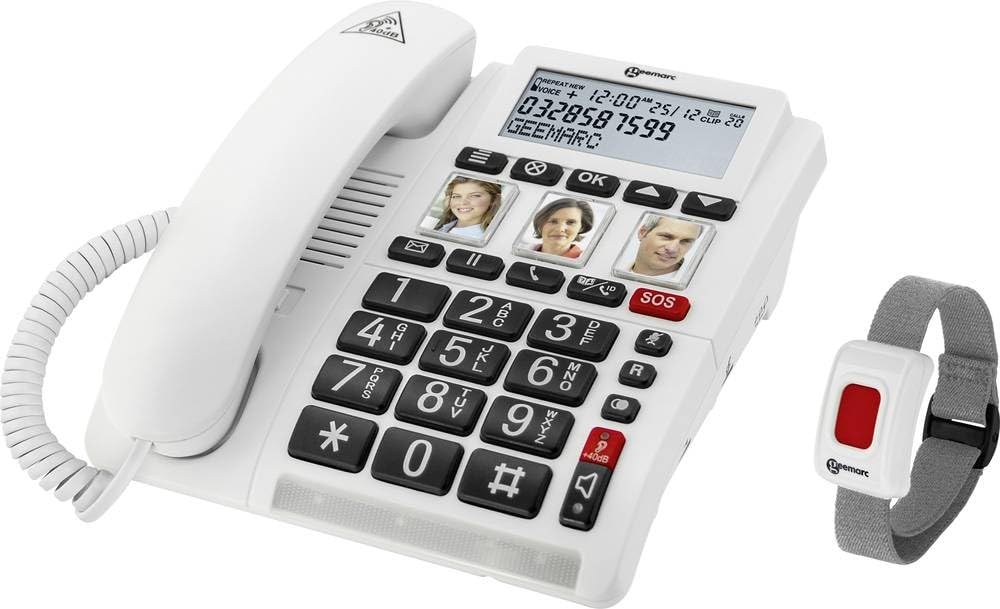
Image: The Geemarc CL610 corded phone, showing the large keypad, photo buttons, and the red SOS button on the base. The accompanying SOS bracelet is also visible.
Hovedkomponenter:
- Telefonbase: Contains the keypad, photo buttons (M1, M2, M3), red SOS button, and volume controls.
- Håndsæt: For standard calls, with an amplification slider underneath.
- SOS Bracelet: A wearable, waterproof device with a single button for remote SOS activation and call answering.
5. Opsætning
5.1 Tilslutning af telefonen
- Connect one end of the telephone line cord to the wall jack and the other end to the designated port on the phone base.
- Connect the handset cord to the handset and the phone base.
- Plug the power adapter into the phone base and then into a standard electrical outlet.
5.2 Batteriinstallation (backup)
The phone requires 1 AA battery for backup power, which helps retain settings and provides limited functionality during a power outage.
- Locate the battery compartment on the underside of the phone base.
- Isæt 1 AA-batteri, og sørg for korrekt polaritet (+/-).
- Luk batterirummets dæksel forsvarligt.
5.3 Programming Photo Buttons (M1, M2, M3)
These buttons allow for one-touch dialing to frequently called numbers.
- Løft håndsættet.
- Press and hold the desired photo button (M1, M2, or M3) until you hear a confirmation tone.
- Dial the phone number you wish to save (up to 24 digits).
- Press the same photo button again to save the number. You will hear another confirmation tone.
- Insert a photo of the contact under the transparent cover of the button.
5.4 Programming SOS Emergency Numbers
The SOS function can dial up to 30 pre-programmed emergency contacts.
- Access the SOS programming mode (refer to the detailed manual for specific menu navigation steps, usually involving a 'SET' or 'PROG' button).
- Enter the first emergency contact number.
- Repeat for up to 30 numbers.
- You may also have the option to record a personalized SOS message that will play when an emergency contact answers.
- Exit programming mode to save settings.
5.5 SOS Bracelet Pairing
The SOS bracelet must be paired with the phone to function correctly.
- Sørg for, at telefonen er tændt.
- Initiate pairing mode on the phone (refer to the detailed manual for specific button presses, often a dedicated 'PAIR' button or menu option).
- Press and hold the button on the SOS bracelet until the phone indicates successful pairing.
- Test the bracelet's functionality by briefly pressing its button to ensure it triggers the SOS sequence or answers a call.
6. Betjeningsvejledning
6.1 Foretage et opkald
- Standardopkald: Lift the handset, dial the desired number using the large keypad, and wait for the call to connect.
- Photo Button Dialing: Lift the handset, then press the desired pre-programmed photo button (M1, M2, or M3). The phone will automatically dial the saved number.
6.2 Modtagelse af et opkald
- Når telefonen ringer, skal du løfte håndsættet for at besvare opkaldet.
- Alternatively, if wearing the SOS bracelet, press the button on the bracelet to answer the call in hands-free (speakerphone) mode.
6.3 Amplified Volume
For users with hearing difficulties, the CL610 offers significant volume amplifikation.
- Under et opkald skal du trykke på den dedikerede amplification button on the phone base (often marked with a speaker icon or '+').
- Use the slider control located under the handset to adjust the reception volume up to 40dB to a comfortable level.
6.4 Brug af SOS-funktionen
In an emergency, the SOS function can be activated in two ways:
- On the Phone Base: Press the large red SOS button on the phone base.
- Via SOS Bracelet: Press the button on the waterproof SOS bracelet.
Upon activation, the phone will automatically dial the pre-programmed emergency numbers sequentially. It will attempt to connect with each number up to 15 times until an answer is detected. If a personalized SOS message was recorded, it will play upon connection.
6.5 Kompatibilitet med høreapparater
The CL610 is compatible with hearing aids equipped with a 'T' (Telecoil) position. To use this feature, simply switch your hearing aid to the 'T' position during a call for direct audio transmission to your ears.
6.6 Justering af ringelydstyrke
Adjust the ringer volume using the dedicated control on the phone base. The ringer can be set to a loud level, up to 90dB, to ensure you do not miss incoming calls.
6.7 Voice Caller ID
If you have saved contacts in the phone's directory (up to 30 names) with associated voice recordings, the phone will announce the caller's name aloud when they call, instead of just ringing. This feature helps identify callers without needing to look at the display.
7. Vedligeholdelse
7.1 Rengøring af enheden
To clean your Geemarc CL610 phone and SOS bracelet:
- Tør overfladerne af med en blød, let fugtig kludamp klæde.
- Brug ikke slibende rengøringsmidler, opløsningsmidler eller stærke kemikalier.
- Do not immerse the phone base in water. The SOS bracelet is waterproof but should be cleaned gently.
7.2 Udskiftning af batteri
The AA backup battery in the phone base should be replaced periodically, or when the low battery indicator appears (if applicable). The SOS bracelet also contains a battery that may require replacement by a qualified technician if its functionality diminishes.
8. Fejlfinding
If you encounter issues with your Geemarc CL610, try the following solutions:
- Ingen klartone:
- Check that all cables (telephone line, power adapter, handset cord) are securely connected.
- Ensure the phone is powered on and the power adapter is plugged into a working outlet.
- Cannot Hear Caller / Low Volume:
- Adjust the reception volume using the slider under the handset.
- Aktiver amplification function by pressing the dedicated button on the phone base.
- Ensure your hearing aid is in the 'T' position if you are using it.
- SOS Function Not Working:
- Verify that emergency numbers are correctly programmed in the phone's memory.
- Check the battery status of the SOS bracelet and ensure it is properly paired with the phone.
- Ensure there is an active telephone line connection.
- Phone Not Ringing:
- Check the ringer volume settings on the phone base.
- Ensure that any 'Do Not Disturb' or silent modes are not activated.
Hvis problemet fortsætter efter at have forsøgt disse trin, bedes du kontakte kundesupport.
9. Specifikationer
| Mærke | Geemarc |
| Modelnummer | CL610_WH_VDE |
| Dimensioner (L x B x H) | 20 x 18 x 7 cm |
| Strømkilde | AC Adapter |
| Backup batteri | 1 x AA (required) |
| Reception Volume Amplifikation | Op til 40dB |
| Ringelydstyrke | Op til 90dB |
| SOS Number Capacity | Op til 30 numre |
| Optagelseskapacitet | 30 Minutes (for voice messages/caller ID) |
| Taletid | 6 timer |
| Standby tid | 2 Minutes (Note: This typically refers to handset standby, unusual for a corded phone, but as per source data) |
| Vis nummer | Ja |
| Kompatibel med høreapparater | Yes (T-position) |
| Materiale | Plast |
| Inkluderet tilbehør | SOS Bracelet |
10. Garanti og support
This Geemarc CL610 product comes with a standard manufacturer's warranty. For detailed warranty terms and conditions, including coverage period and limitations, please refer to the warranty card included in your product packaging or visit the official Geemarc webwebsted.
For technical support, troubleshooting assistance beyond what is provided in this manual, or inquiries regarding spare parts, please contact Geemarc customer service. Contact details, such as phone numbers or email addresses, can typically be found on the manufacturer's webwebsted (www.geemarc.com) eller i produktemballagen.