
1. Introduktion
Thank you for choosing the COOSII AC01 Over-Ear Wired Headphones. These headphones are designed to provide a comfortable and immersive audio experience with passive noise isolation and clear stereo sound. This manual will guide you through the setup, operation, and maintenance of your new headphones.
2. Pakkens indhold
- COOSII AC01 Over-Ear Wired Headphones
- Opbevaringspose
- Brugervejledning (denne manual)
3. Produktet er slutview & Funktioner

Figure 1: COOSII AC01 Over-Ear Wired Headphones (Black Blue)
3.1 Comfort & Design
- Truly Over-Ear & Exceptional Comfort: Features enlarged, deeply cushioned ear pads made with high-grade protein leather and breathable mesh, designed to softly surround the entire ears for long-lasting comfort.
- Justerbart pandebånd: Ergonomically designed with lightweight TPU material for a perfect fit for various head sizes.
- Let og foldbar: Portable and foldable design ideal for easy transport and travel.

Figure 2: Enlarged Protein Earmuff for enhanced comfort.
3.2 Sound Quality & Noise Isolation
- Passiv støjisolering: 360-degree surrounding over-ear construction blocks up to 85% of ambient sounds.
- Dynamisk driver: Equipped with a 40mm DLC dynamic driver for well-balanced bass and treble performance with clear stereo mid-range.
- HD-mikrofon: Ensures excellent voice pick-up and automatically suppresses wind noise for optimized calls.

Figure 3: Passive Noise Isolation capability.
3.3 Connectivity & Controls
- 3.5 mm lydstik: Gold-plated plug for wide compatibility with various devices.
- In-line kontroller: Built-in buttons for volume adjustment, managing phone calls, and controlling music playback (play/pause/skip).
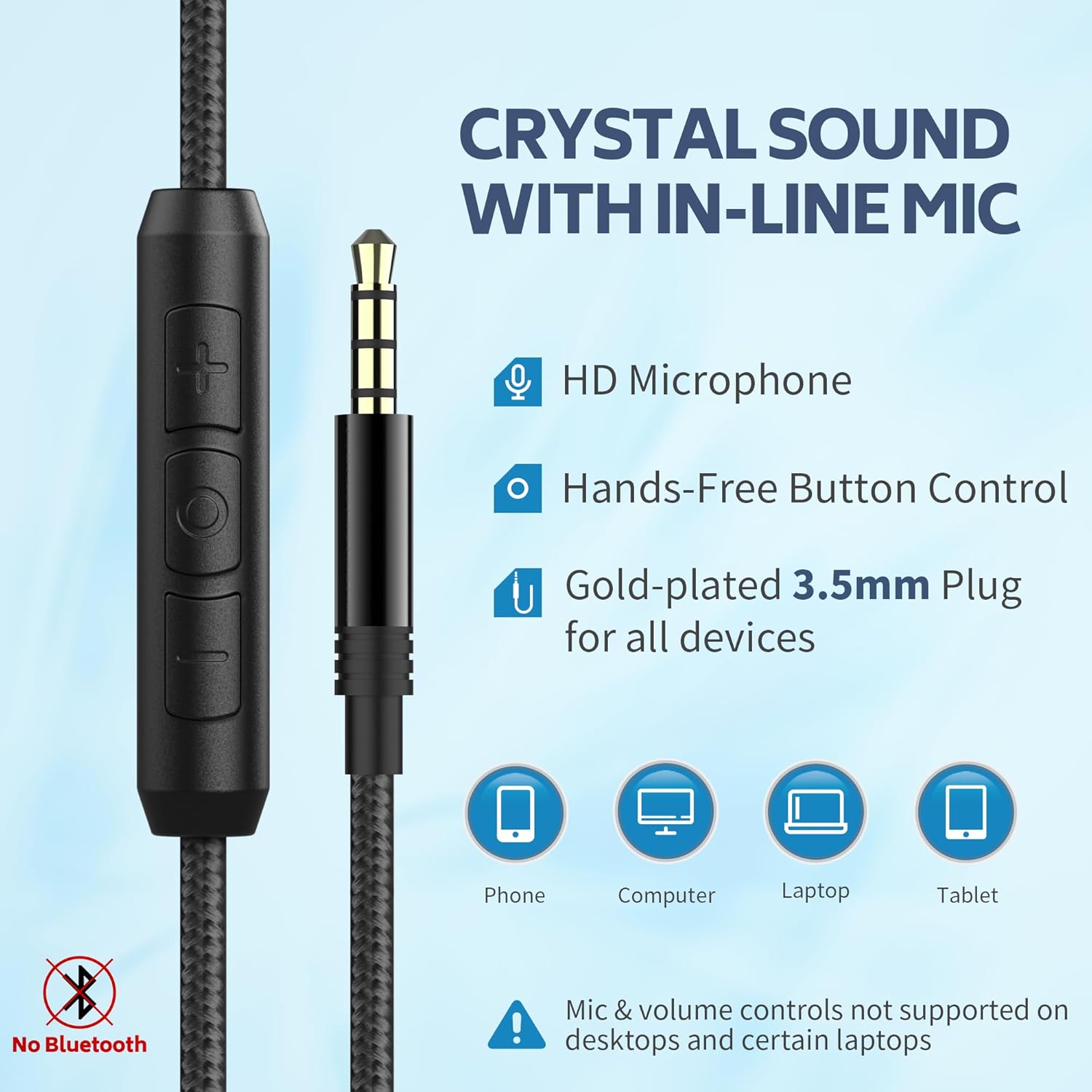
Figure 4: In-line microphone and control buttons.
4. Opsætning
4.1 Tilslutning af hovedtelefoner
- Locate the 3.5mm audio jack on your device (phone, tablet, laptop, computer, Chromebook).
- Insert the 3.5mm plug of the headphone cable firmly into the audio jack.
- Sørg for, at forbindelsen er sikker for optimal lydkvalitet.
4.2 Justering for komfort
- Gently extend or retract the headband on both sides to fit your head size.
- Position the earcups so they fully cover your ears, ensuring the soft cushions provide a comfortable seal.
- The earcups can pivot slightly to conform to your head shape.

Figure 5: Adjusting the headband and earcups for a comfortable fit.
5. Betjeningsvejledning
5.1 Kontrol af lydafspilning
- Afspil/pause: Press the central button on the in-line control once to play or pause audio.
- Næste nummer: Tryk to gange hurtigt på midterknappen for at springe til næste nummer.
- Forrige nummer: Tryk hurtigt tre gange på midterknappen for at gå til det forrige nummer.
5.2 Lydstyrkejustering
- Forøg lydstyrke: Press the '+' button on the in-line control.
- Skru ned for lydstyrken: Press the '-' button on the in-line control.
5.3 Opkaldshåndtering
- Besvar/afslut opkald: Press the central button once during an incoming call or to end an active call.
- Afvis opkald: Press and hold the central button for approximately 2 seconds during an incoming call.
Note: Volume control and microphone functions are not compatible with all PC computers. A separate adapter may be required for full functionality on some PCs.
6. Vedligeholdelse
- Rensning: Brug en blød, tør klud til at rengøre hovedtelefonerne. Brug ikke flydende rengøringsmidler eller aerosoler.
- Opbevaring: When not in use, fold the headphones and store them in the provided storage bag to protect them from dust and damage.
- Undgå fugt: Hold hovedtelefonerne væk fra vand, fugtighed og ekstreme temperaturer.
- Kabelpleje: Undgå skarpe bøjninger eller overdreven trækkraft i kablet for at forhindre skader.

Figur 6: Sammenklappeligt design til kompakt opbevaring.
7. Fejlfinding
- Ingen lyd:
- Sørg for, at 3.5 mm lydstikket er sat helt i din enhed.
- Check the volume level on your device and using the in-line controls.
- Test hovedtelefonerne med en anden enhed for at udelukke et enhedsspecifikt problem.
- Microphone Not Working on PC:
- Some PC computers require a separate audio splitter (Y-cable) to use both headphone and microphone functions simultaneously with a single 3.5mm jack.
- Verify your PC's audio settings to ensure the correct input device is selected.
- In-line Volume Control Not Responding:
- This feature may not be fully compatible with all devices. Adjust volume directly on your device if the in-line controls do not work.
8. Specifikationer
| Modelnavn | AC01 |
| Mærke | COOSII |
| Forbindelsesteknologi | Kablet |
| Hovedtelefonstik | 3.5 mm Jack |
| Øreplacering | Over Ear |
| Formfaktor | Over Ear |
| Støjkontrol | Lydisolering (passiv) |
| Audio driver type | Dynamisk driver (40 mm) |
| Materiale | Kunstlæder |
| Varens vægt | 10.2 ounce |
| Pakkedimensioner | 7.09 x 5.28 x 3.62 tommer |
| Inkluderede komponenter | Headphones, Storage Bag |
9. Garanti og support
For warranty information or technical support, please contact COOSII customer service through the retailer where the product was purchased or visit the official COOSII webwebsted. Gem venligst din købsbevis til garantikrav.