
GATEXPERT SW300DC-S
GATEXPERT SW300DC Single Automatic Gate Opener User Manual
Model: SW300DC-S
1. Introduktion
This manual provides detailed instructions for the installation, operation, maintenance, and troubleshooting of the GATEXPERT SW300DC Single Automatic Gate Opener. This system is designed for single swing gates weighing up to 660 pounds and with a maximum length of 10 feet. Please read this manual thoroughly before installation and operation to ensure proper function and safety.
2. Sikkerhedsoplysninger
ADVARSEL: Improper installation or use can lead to serious injury or death. Always follow all safety precautions.
- Sørg for, at alle elektriske tilslutninger udføres af en kvalificeret elektriker, og at de overholder lokale el-forskrifter.
- Afbryd strømmen, før du udfører vedligeholdelse eller service.
- Hold hænder, fødder og tøj væk fra porten og åbnermekanismen under drift.
- Lad ikke børn lege i nærheden af porten eller betjene fjernbetjeningerne.
- Install safety devices such as photo-eye sensors to prevent the gate from closing on obstructions.
- Inspicer regelmæssigt porten og åbneren for tegn på slid, skader eller forkert justering.
- The gate opener is designed for single swing gates only. Do not use for other applications.

Figur 2.1: Overview of the GATEXPERT SW300DC Single Automatic Gate Opener kit, showing the main components including the actuator, control box, remotes, and various installation hardware.
3. Pakkens indhold
Bekræft, at alle nedenstående komponenter er til stede i din pakke:
- 1 x Gate Opener Motor (Actuator)
- 1 x kontrolboks
- 2 x fjernbetjeninger
- 1 x Accessories Box (containing mounting brackets, bolts, nuts, pins, keys)
- 1 x Brugermanual (dette dokument)
- 2 x CR2032 batteries (included for remotes)
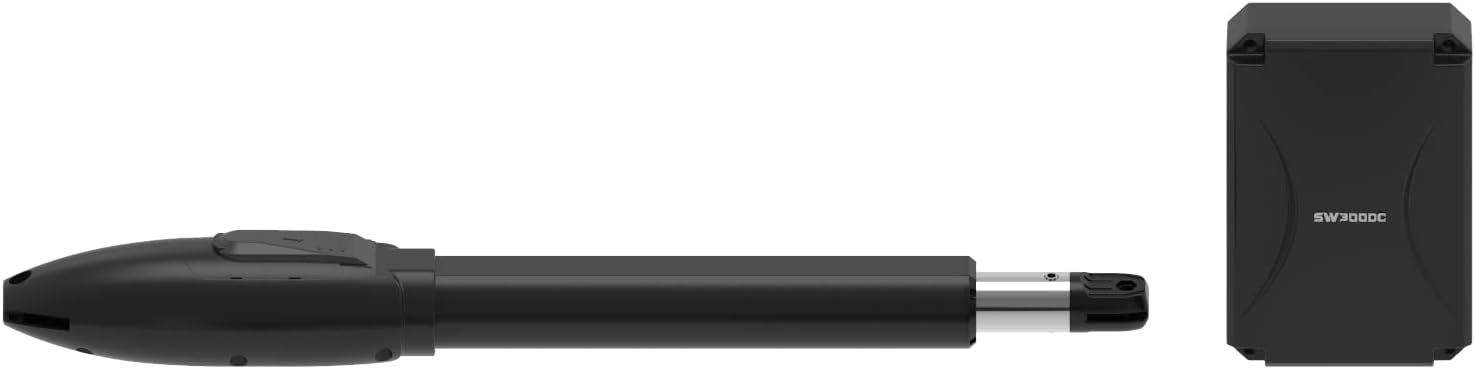
Figur 3.1: Side view of the SW300DC actuator and the control box, illustrating their compact design.
4. Opsætning og installation
Proper installation is crucial for the safe and efficient operation of your gate opener.
4.1 Tjekliste før installation
- Ensure your gate is in good working condition, swings freely, and is properly balanced.
- Verify the gate weight is less than 660 lbs and length is less than 10 ft.
- Plan the location for the control box and actuator, considering power access and gate movement.
- Gather necessary tools (drills, wrenches, measuring tape, level, etc.).
4.2 Mounting the Actuator and Control Box
- Determine the optimal mounting points on the gate post and gate frame for the actuator.
- Securely attach the mounting brackets using appropriate fasteners.
- Mount the actuator to the brackets, ensuring it is level and aligned with the gate's pivot point.
- Install the control box in a secure, weather-protected location near the gate, ensuring easy access for wiring.

Figur 4.1: Eksamples of the GATEXPERT SW300DC gate opener installed on different types of swing gates, demonstrating typical mounting configurations.
4.3 Elektriske forbindelser
The SW300DC operates on DC24V. It includes a 110V/24V transformer for direct connection to a 110V AC power supply.
- Connect the 24V DC output from the transformer to the control board.
- Wire the actuator motor to the designated terminals on the control board.
- If installing optional accessories (e.g., photo-eyes, keypads), refer to their specific wiring diagrams and connect them to the appropriate terminals on the control board.
- Ensure all wiring is properly insulated and protected from environmental elements.

Figur 4.2: Intern view of the control box, showing the circuit board, transformer, and terminal blocks for electrical connections.
5. Betjeningsvejledning
5.1 Initial Travel Setting
Before first use, the gate opener's travel limits must be set. The SW300DC uses an electromechanical limit switch.
- Tænd for systemet.
- Follow the specific programming steps outlined in the control board's supplementary guide (usually a small diagram or sticker inside the control box) to teach the opener the fully open and fully closed positions. This typically involves pressing a "SET" button and manually moving the gate or using the remote to define limits.
- Test the gate's full travel several times to ensure it opens and closes smoothly without obstruction and stops at the desired positions.
5.2 Betjening af fjernbetjening
The system comes with two remote controls for convenient operation.
- Tryk på den angivne knap på fjernbetjeningen for at åbne eller lukke porten.
- Pressing the button again during operation will typically stop the gate.
- Refer to the control board's programming instructions for adding or removing remote controls.
6. Vedligeholdelse
Regelmæssig vedligeholdelse sikrer din portåbner's lange levetid og pålidelige drift.
- Månedlig: Inspect the gate and opener for any loose bolts, worn parts, or signs of corrosion. Lubricate moving parts as recommended by the manufacturer (e.g., pivot points, hinges).
- Kvartalsvis: Check the electrical connections for tightness and signs of wear. Clean any debris from the actuator arm and control box.
- Årligt: Test all safety features, such as photo-eye sensors, to ensure they are functioning correctly.
- Keep the area around the gate clear of obstructions.
7. Fejlfinding
Dette afsnit omhandler almindelige problemer, du kan støde på.
| Problem | Mulig årsag | Løsning |
|---|---|---|
| Gaten reagerer ikke på fjernbetjeningen. | Dead remote battery; remote not programmed; power issue. | Replace remote battery; reprogram remote; check power supply to control box. |
| Porten åbner delvist eller stopper uventet. | Obstruction; limit switch issue; gate friction. | Check for obstructions; re-set travel limits; lubricate gate hinges. |
| Motoren kører, men porten bevæger sig ikke. | Actuator disengaged; mechanical failure. | Ensure actuator is properly engaged; inspect for broken parts. |
| Porten kører langsomt. | Lav voltage; excessive friction; motor wear. | Check power supply; lubricate gate; consult support if motor is failing. |
For issues not listed here or if solutions do not resolve the problem, please contact GATEXPERT customer support.
8. Specifikationer
| Feature | Detalje |
|---|---|
| Modelnummer | SW300DC-S |
| Applicable Gate Type | Enkelt svingport |
| Maks. Portvægt | 660 lbs (300 kg) |
| Maks. Portlængde | 10 fod (3 fod) |
| Motor Voltage | DC24V |
| Strømforsyning | 110V AC (via included 110V/24V transformer) |
| Begrænsningskontakt type | Elektromekanisk |
| Produktdimensioner | 104.14 x 10.01 x 8.56 cm (Aktuator) |
| Varens vægt | 9.3 kg (Total package) |
| Medfølgende batterier | 2 x CR2032 (for remotes) |
9. Garanti og support
The GATEXPERT SW300DC Single Automatic Gate Opener comes with a one-year warranty from the date of purchase.
For technical assistance, warranty claims, or any questions regarding your product, please contact GATEXPERT customer service.
- Kundeservice: Please refer to the contact information provided on the GATEXPERT official webwebstedet eller din købsdokumentation.
- When contacting support, please have your model number (SW300DC-S) and purchase date ready.
Ask a question about this manual
Ask about setup, troubleshooting, compatibility, parts, safety, or missing instructions. Manuals+ will review the question and use this page’s manual context to help answer it.