
1. Produktet er slutview
The Cudy GS108D is an 8-port Gigabit Ethernet Network Switch designed for expanding your network connectivity. It offers high-speed data transfer for devices such as computers, IPTVs, printers, NAS, game consoles, and routers. Featuring a plug-and-play design, fanless operation, and energy-efficient technology, this switch provides a reliable and quiet solution for both home and office networks.

Billede: Forside view of the Cudy GS108D switch, highlighting its 8 Gigabit Ethernet ports and LED indicators.
Nøglefunktioner:
- 8 Gigabit Ethernet-porte: Provides high-speed wired connections for multiple devices.
- Plug and Play: Requires no software installation or configuration for immediate use.
- Design uden blæser: Ensures quiet operation, suitable for any environment.
- Energieffektiv: Compliant with IEEE802.3az standard, saving power when ports are idle.
- Alsidig montering: Understøtter både placering på skrivebord og vægmontering.
2. Pakkens indhold
Bekræft, at din pakke indeholder følgende varer:
- Cudy GS108D 8-Port Gigabit Ethernet Network Switch
- Strømadapter
- Instruktionsmanual (dette dokument)
- Ethernet Cable (may vary by region/package)

Image: Contents of the Cudy GS108D package, showing the switch, power adapter, and an Ethernet cable.
3. Fysisk beskrivelse
Frontpanel:
The front panel features eight 10/100/1000 Mbps RJ45 ports. Each port has an associated LED indicator to show link/activity status.
- Power LED: Indikerer strømstatus for kontakten.
- Forbind/Handl-LED'er (1-8):
- Solid grøn: A device is connected and the link is active.
- Blinkende grønt: Data sendes eller modtages på porten.
- Slukket: No device is connected or the link is inactive.

Billede: Detaljeret view of the Cudy GS108D's front panel, showing the 8 RJ45 ports and their corresponding LED indicators.
Bagside:
The rear panel typically contains the power input port.
Dimensioner:
The compact design of the GS108D allows for flexible placement. Approximate dimensions are 138mm (5.43") L x 61.5mm (2.42") W x 24mm (0.94") H.
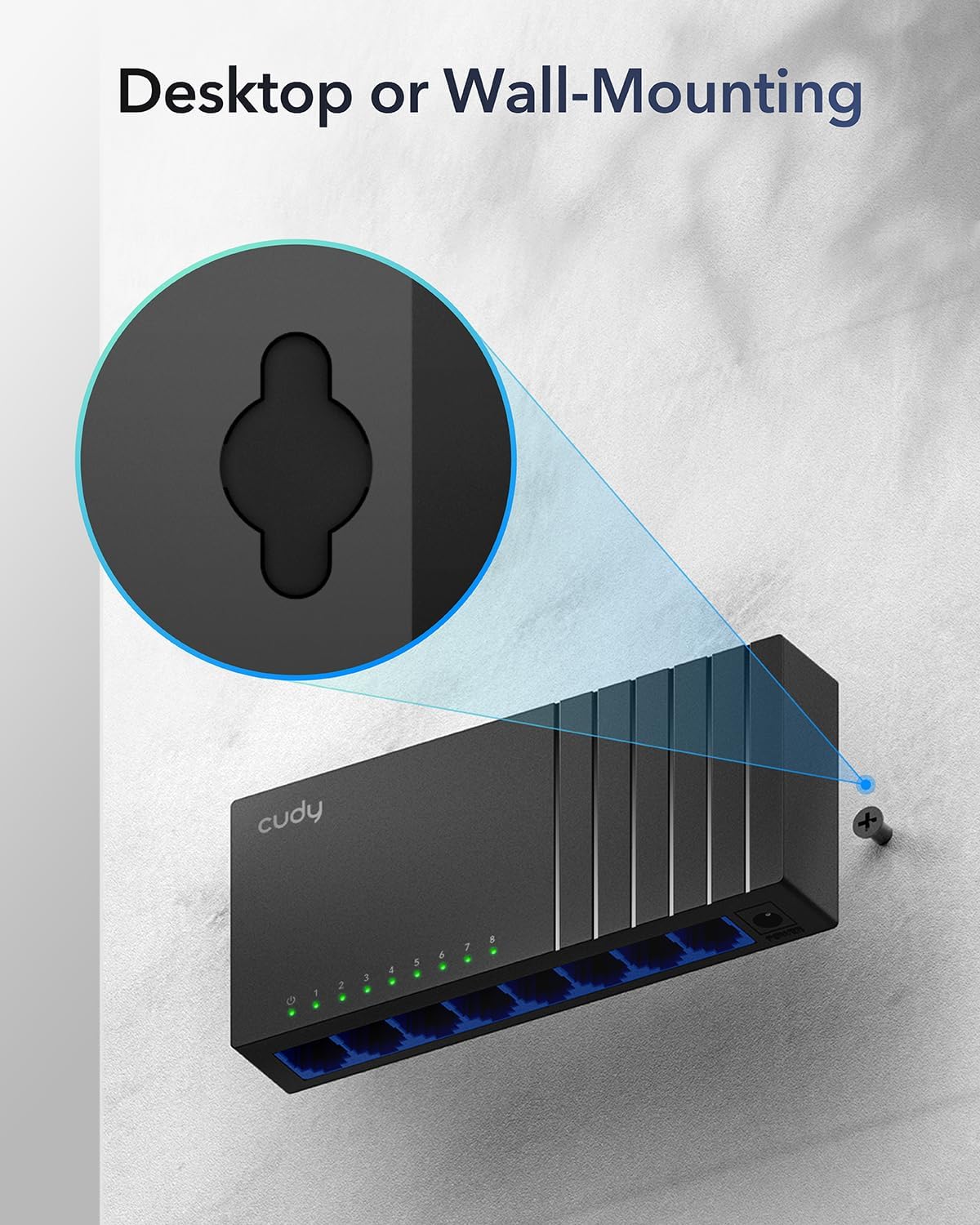
Image: The Cudy GS108D switch with its compact dimensions clearly indicated.
4. Opsætningsvejledning
The Cudy GS108D switch is designed for simple plug-and-play installation. No complex configuration is required.
Trin 1: Strømtilslutning
- Connect one end of the provided power adapter to the power port on the rear panel of the GS108D switch.
- Sæt den anden ende af strømadapteren i en almindelig stikkontakt.
- Kontroller, at strøm-LED'en på frontpanelet lyser, hvilket angiver, at kontakten modtager strøm.

Image: The Cudy GS108D switch with its power adapter connected and ready for use.
Trin 2: Enhedsforbindelse
- Connect your network devices (e.g., computer, router, NAS, game console) to any of the 8 RJ45 ports on the front panel using standard Ethernet cables (Cat5e or higher recommended for Gigabit speeds).
- Ensure the Link/Act LED for each connected port illuminates, indicating a successful connection. If the LED is flashing, data is being transmitted.

Image: A laptop being connected to the Cudy GS108D switch with an Ethernet cable, demonstrating a typical setup.
Trin 3: Monteringsmuligheder
The GS108D supports both desktop placement and wall mounting.
- Desktopplacering: Simply place the switch on a flat, stable surface.
- Vægmontering: The switch features mounting slots on its underside. Use appropriate screws (not included) to secure the switch to a wall.

Image: The Cudy GS108D switch shown with its wall-mounting slots, illustrating how it can be securely attached to a wall.
5. Betjeningsvejledning
Once connected, the Cudy GS108D operates automatically without further user intervention.
Auto-forhandling
Each port on the switch automatically detects the network speed (10/100/1000 Mbps) and duplex mode (Half/Full Duplex) of the connected device and adjusts accordingly for optimal performance.
Trafikoptimering
The switch features a 4 Mbit packet buffer to ensure stable and efficient data forwarding, reducing packet loss and improving overall network performance, especially during high traffic loads.
Energy Efficiency (IEEE 802.3az)
The GS108D incorporates energy-efficient Ethernet technology. It automatically adjusts power consumption based on cable length and network traffic, reducing energy usage when ports are idle or when connected devices are turned off.

Image: Visual representation of the power-saving feature, showing reduced energy consumption when ports are idle.
Langdistance transmission
The switch supports long-distance Ethernet cable runs, allowing for reliable data transmission up to 170 meters (557 feet) with Cat5e or higher Ethernet cables.

Image: Illustration of the Cudy GS108D's capability for long-distance transmission, up to 170 meters, requiring Cat5e or higher cables.
6. Vedligeholdelse
To ensure optimal performance and longevity of your Cudy GS108D switch, follow these maintenance guidelines:
- Placering: Place the switch in a cool, dry location away from direct sunlight, heat sources, and excessive moisture. Ensure adequate ventilation around the device.
- Rensning: Brug en blød, tør klud til at rengøre ydersiden af kontakten. Brug ikke flydende rengøringsmidler eller rengøringsmidler på sprayform.
- Magt: Use only the provided power adapter. Disconnect the power adapter during electrical storms or when unused for long periods.
- Kabler: Ensure all Ethernet cables are securely connected and free from damage.
7. Fejlfinding
If you encounter issues with your Cudy GS108D switch, refer to the following common troubleshooting steps:
Ingen strøm
- Sørg for, at strømadapteren er korrekt tilsluttet både afbryderen og en fungerende stikkontakt.
- Kontroller om stikkontakten fungerer ved at tilslutte en anden enhed.
- Verify that the Power LED on the switch is illuminated. If not, try a different power outlet.
Ingen link/aktivitet på en port
- Sørg for, at Ethernet-kablet er korrekt tilsluttet både switchporten og den tilsluttede enhed.
- Prøv at bruge et andet Ethernet-kabel for at udelukke kabelskader.
- Tilslut enheden til en anden port på switchen.
- Verify that the connected device (e.g., computer, router) is powered on and its network adapter is enabled.
- If connecting to a router, ensure the router's port is active.
Langsom netværkshastighed
- Ensure you are using Cat5e or higher Ethernet cables for Gigabit speeds. Older Cat5 cables may limit speed.
- Check the Link/Act LED for the port. A solid green light indicates a Gigabit connection. If it's amber or off, there might be a speed mismatch or connection issue.
- Verify that the connected devices also support Gigabit Ethernet.
- Reducer netværksbelastning ved at begrænse samtidige aktiviteter med høj båndbredde.
8. Specifikationer
| Feature | Beskrivelse |
|---|---|
| Mærke | Cudy |
| Modelnummer | GS108D |
| Antal havne | 8 |
| Interface | RJ45 |
| Dataoverførselshastighed | 1000 megabit pr. sekund (gigabit) |
| Switch Type | Ethernet-switch |
| Kompatible enheder | Camera, Desktop, Laptop, Router |
| Voltage | 28 Volts (Input for power adapter) |
| Driftstemperatur | 40°F til 104°F (4.4°C til 40°C) |
| Etuimaterialetype | Plast |
| Varedimensioner (L x B x H) | 7.87" x 5.91" x 5.91" (Product packaging dimensions, actual device is smaller) |
| Varens vægt | 200 gram |
9. Garanti og support
Garantioplysninger:
The Cudy GS108D 8-Port Gigabit Ethernet Network Switch comes with a 2-års garanti fra købsdatoen. Gem venligst din købsbevis i forbindelse med garantikrav. Denne garanti dækker materiale- og fabrikationsfejl ved normal brug.
Teknisk support:
For technical assistance, troubleshooting, or further inquiries, please visit the official Cudy website or contact Cudy customer support. Cudy is committed to delivering high-performance, user-friendly communication technology and provides resources to help you with your product.
Du kan ofte finde supportressourcer, ofte stillede spørgsmål og kontaktoplysninger på Cudy-butikken på Amazon or the main Cudy webwebsted.