
1. Introduktion
The GAMDIAS HELIOS P2-1000G is a fully modular power supply unit designed for high-performance computing systems. It features 80 Plus Gold certification for energy efficiency, supports ATX 3.1 and PCIe Gen 5.1 standards, and incorporates 100% Japanese capacitors for enhanced reliability. This manual provides essential information for the safe installation, operation, and maintenance of your power supply.
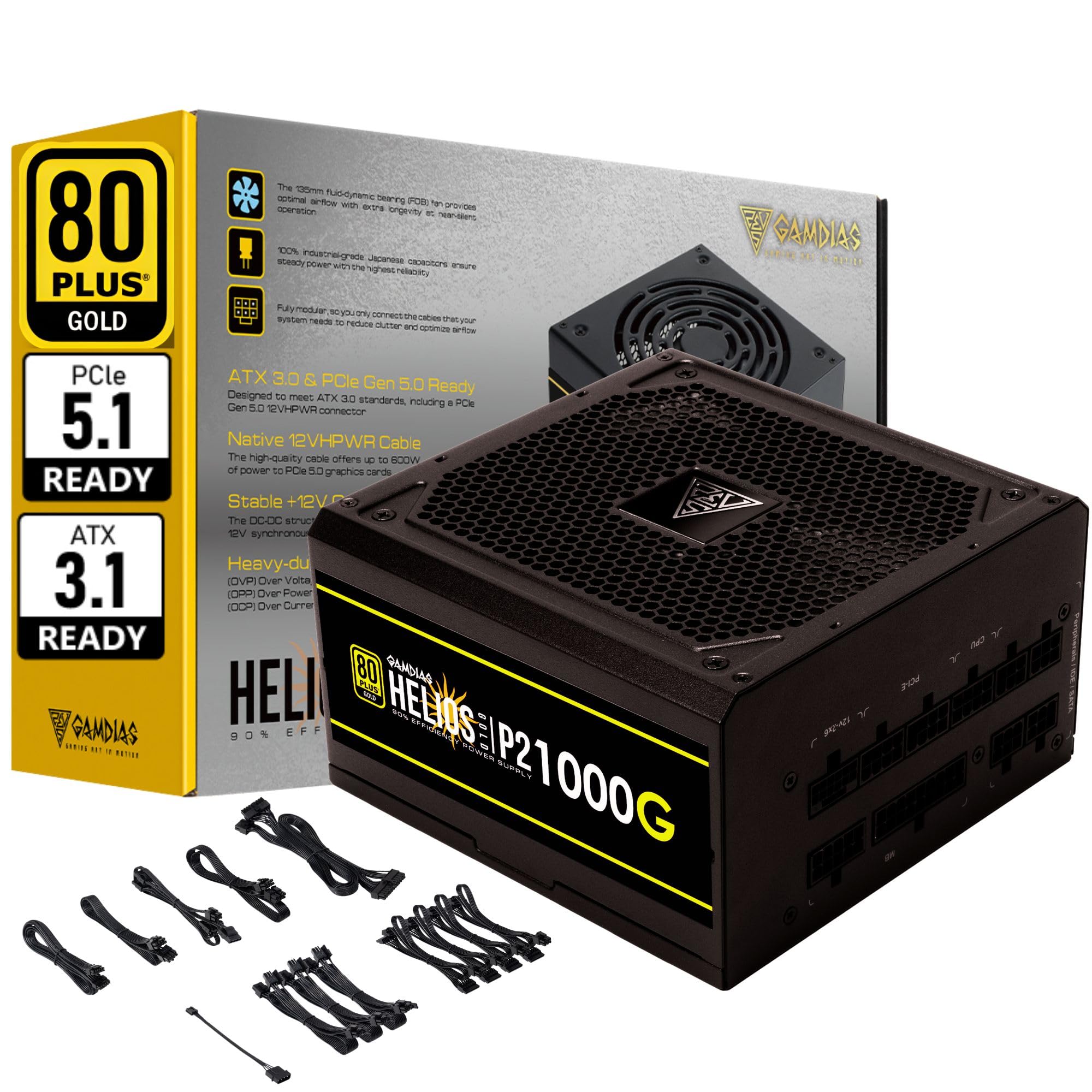
Billede 1.1: Overview of the GAMDIAS HELIOS P2-1000G Power Supply.
2. Sikkerhedsoplysninger
- Høj voltage: The power supply contains high voltage components. Do not open the power supply casing. There are no user-serviceable parts inside. Opening the unit will void the warranty and poses a risk of electric shock.
- Korrekt jording: Ensure the power supply is properly grounded using the provided power cord.
- Ventilation: Do not block the ventilation openings of the power supply. Ensure adequate airflow around the unit to prevent overheating.
- Miljø: Avoid installing the power supply in environments with high humidity, extreme temperatures, or excessive dust.
- Sluk: Always disconnect the AC power cord from the wall outlet before installing, removing, or cleaning the power supply or any connected components.
- Korrekt Wattage: Ensure the power supply's wattage is sufficient for your system's components.
3. Pakkens indhold
Bekræft at alle varer er til stede i pakken:
- GAMDIAS HELIOS P2-1000G Power Supply Unit
- Modular Cable Set (including 24-pin ATX, CPU, PCIe, SATA, Molex, and 12VHPWR cables)
- AC strømledning
- Monteringsskruer
- Brugervejledning (dette dokument)
4. Produktfunktioner
The HELIOS P2-1000G power supply incorporates several features designed for performance and reliability:
- 80 PLUS Gold Certificeret Effektivitet: Achieves up to 92% efficiency at 50% load, reducing power consumption and heat generation.
- ATX 3.1 and PCIe Gen 5.1 Ready: Designed to meet the latest power standards, supporting next-generation graphics cards with up to 200% total power excursion.
- Indbygget 12VHPWR-kabel: Includes a native 16-pin (12VHPWR) PCIe connector capable of delivering up to 600W for PCIe 5.1 graphics cards.
- Quiet Operation with 135mm Dual-Ball Bearing Smart Fan: Features a high-quality 135mm fan with a dual-ball bearing design for durability and quiet operation. The smart fan control adjusts speed based on load to minimize noise.
- Fuldt modulært design: Allows for connecting only the necessary cables, improving cable management and airflow within the PC case.
- Premium Japanese Capacitors: Built with 100% high-quality Japanese 105°C/221°F electrolytic capacitors for superior durability and power stability.
- Omfattende beskyttelsesmekanismer: Includes Over Current Protection (OCP), Over Temperature Protection (OTP), Over Voltage Protection (OVP), Over Power Protection (OPP), Under Voltage Protection (UVP), and Short Circuit Protection (SCP) to ensure system safety.
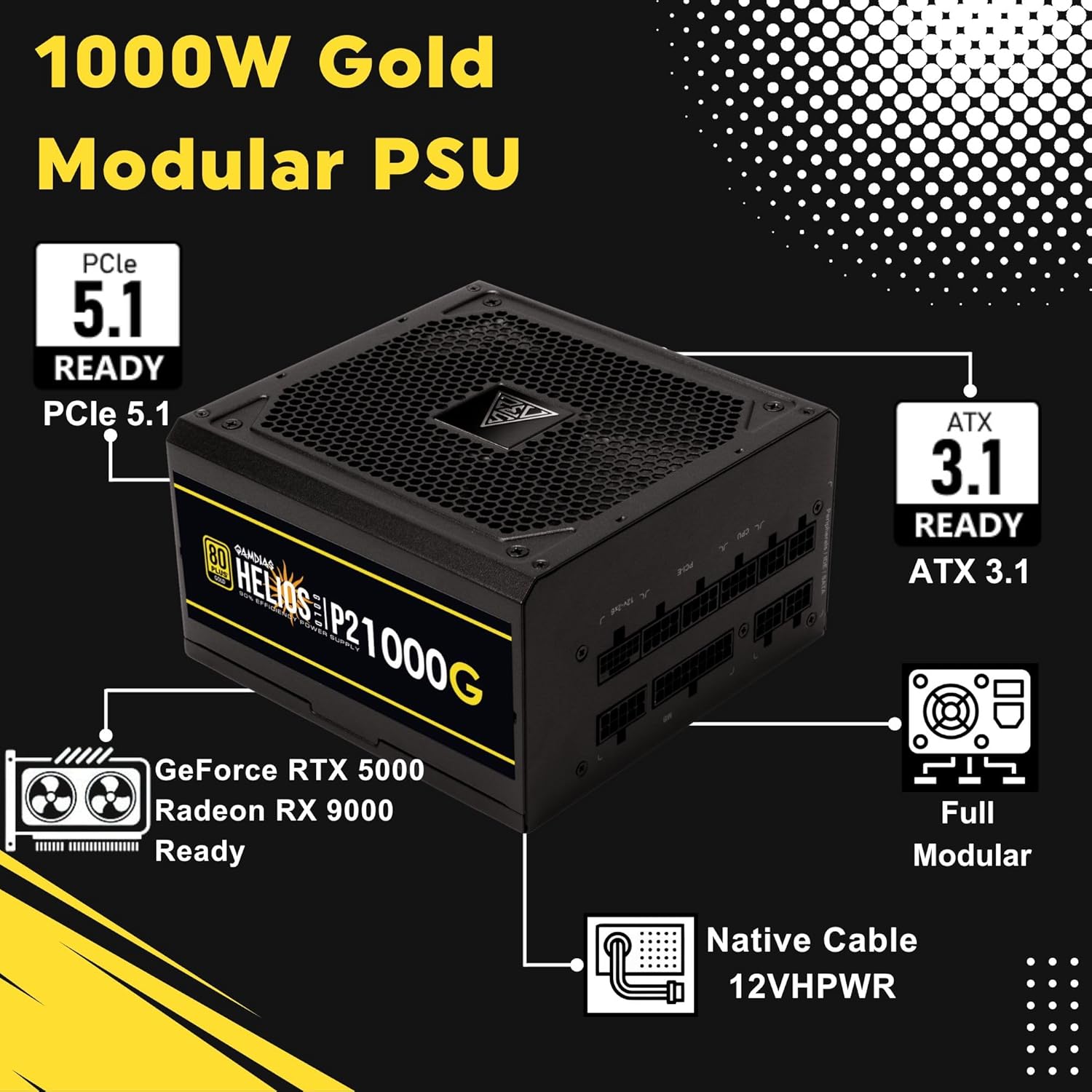
Image 4.1: Key features of the HELIOS P2-1000G, including PCIe 5.1 and ATX 3.1 readiness.

Image 4.2: The 80 Plus Gold certification ensures high energy efficiency.
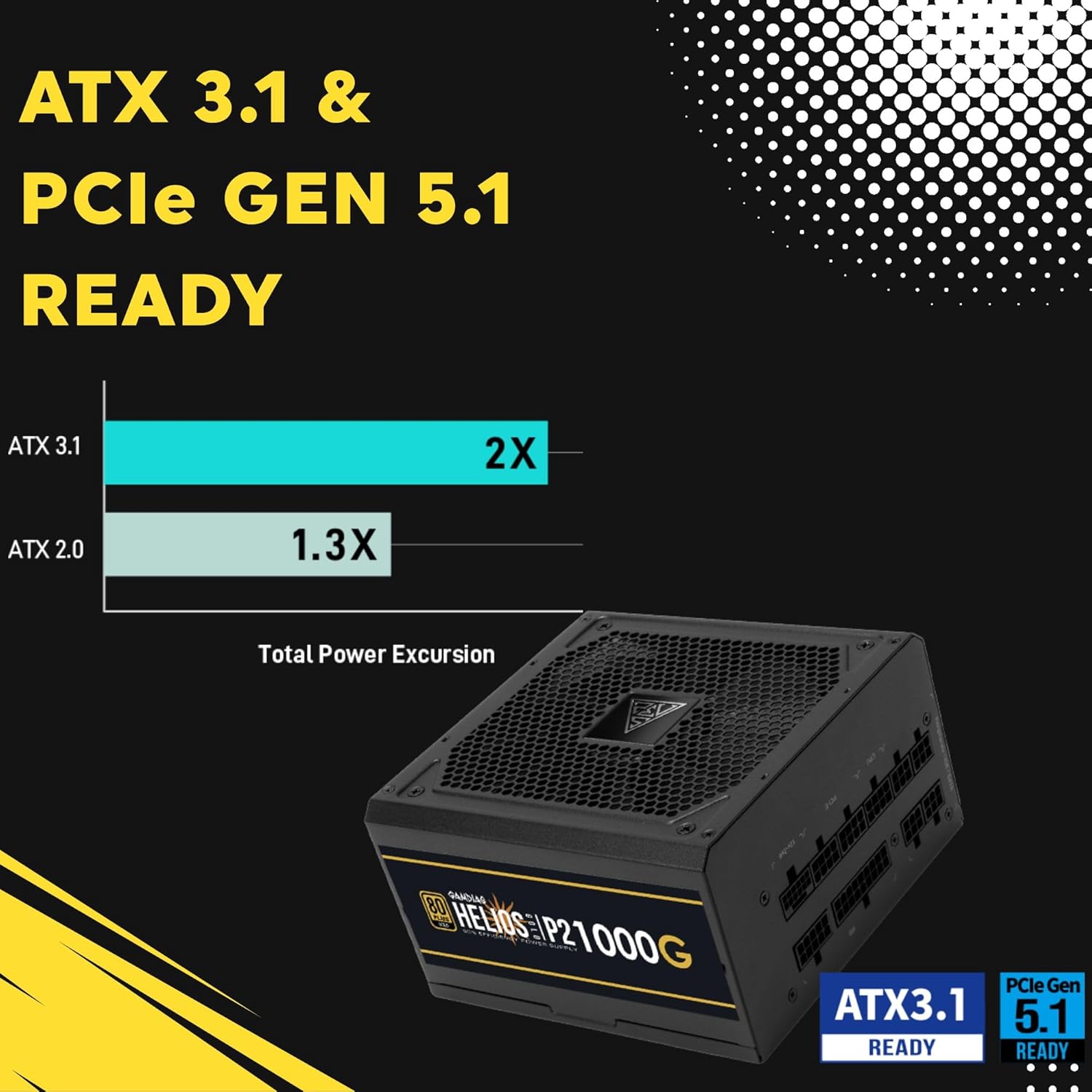
Image 4.3: The power supply is ready for ATX 3.1 and PCIe Gen 5.1, offering improved power excursion.

Image 4.4: Icons representing the various protection features integrated into the power supply.
5. Opsætning og installation
5.1 Fysisk installation
- Forbered dit system: Sørg for, at din computer er helt slukket og taget stikket ud af stikkontakten.
- Monter strømforsyningen: Carefully slide the HELIOS P2-1000G into the power supply bay of your PC case. Ensure the fan is oriented correctly (typically facing downwards for bottom-mounted PSUs, or upwards if your case design requires it for optimal airflow).
- Secure the PSU: Use the provided mounting screws to secure the power supply to the PC case from the rear.
5.2 Kabelforbindelser
The HELIOS P2-1000G is fully modular. Connect only the cables required for your system components.
- 24-bens ATX bundkortkabel: Connect the large 24-pin cable to the corresponding port on your motherboard. Ensure it clicks into place.
- CPU (EPS) Cable: Connect the 4+4-pin or 8-pin CPU cable to the CPU power connector(s) on your motherboard. High-end motherboards may require two 8-pin connectors.
- PCIe Graphics Card Cables:
- 12VHPWR-kabel: For compatible PCIe 5.1 graphics cards, connect the native 16-pin 12VHPWR cable directly to the GPU. Ensure a firm connection.
- 6+2-pin PCIe Cables: For other graphics cards, connect the 6+2-pin PCIe cables to the GPU power connectors.
- SATA-strømkabler: Connect SATA power cables to your SSDs, HDDs, and other SATA-powered devices.
- Perifere (Molex) kabler: Connect Molex cables for any legacy peripherals that require them.
- AC strømledning: Once all internal connections are made, connect the AC power cord to the power supply and then to a grounded wall outlet.

Image 5.1: The native 16-pin 12VHPWR cable for direct connection to PCIe 5.1 graphics cards.
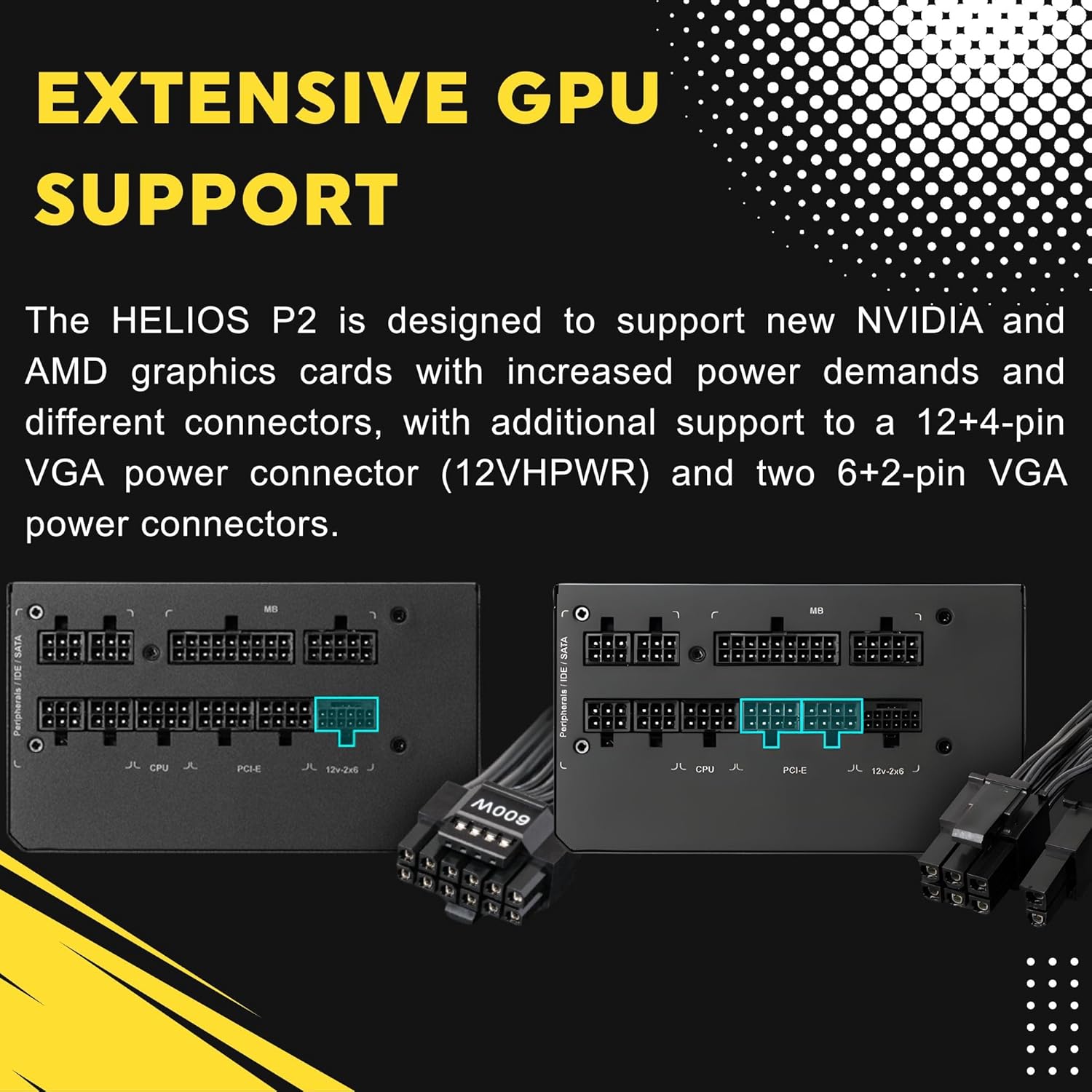
Image 5.2: Illustration of the fully modular design, showing various cable connections.
6. Betjeningsvejledning
6.1 Tænd dit system
After ensuring all cables are securely connected, flip the power switch on the back of the power supply to the 'ON' (I) position. You can then power on your computer using the case's power button.
6.2 Smart Fan Control
The HELIOS P2-1000G features a smart fan control system. The 135mm fan will adjust its speed automatically based on the power supply's load and internal temperature. This ensures optimal cooling while minimizing noise during lighter loads.

Image 6.1: Graph illustrating the smart fan's speed adjustment relative to power output.
7. Vedligeholdelse
7.1 Rengøring
To maintain optimal performance and longevity, periodically clean the power supply:
- Afbryd strømmen: Always unplug the AC power cord from the wall outlet and the power supply before cleaning.
- Fjernelse af støv: Use compressed air to gently blow dust out of the fan grille and ventilation openings. Hold the fan blades to prevent them from spinning rapidly during cleaning, which can damage the bearings.
- Udvendig rengøring: Wipe the exterior of the power supply with a soft, dry cloth. Do not use liquid cleaners or solvents.
7.2 Opbevaring
If storing the power supply, keep it in a cool, dry environment, away from direct sunlight and extreme temperatures. Use its original packaging if available to protect it from dust and physical damage.
8. Fejlfinding
Hvis du støder på problemer med din strømforsyning, kan du se følgende almindelige fejlfindingstrin:
- Ingen strøm:
- Sørg for, at netledningen er korrekt tilsluttet både strømforsyningen og stikkontakten.
- Kontroller, at tænd/sluk-knappen på bagsiden af strømforsyningen er i positionen 'ON' (I).
- Verify all modular cables are firmly seated in both the power supply and the components.
- Test stikkontakten med en anden enhed for at bekræfte, at den har strøm.
- Systemustabilitet/nedbrud:
- Sørg for, at dit systems strømkrav ikke overstiger strømforsyningens kapacitet på 1000 W.
- Kontroller for løse kabelforbindelser, især til bundkortet og grafikkortet.
- Ensure adequate ventilation within your PC case to prevent overheating of components, including the PSU.
- Høj ventilatorstøj:
- The fan speed adjusts based on load. High system load will naturally increase fan speed.
- Check for dust accumulation in the fan or vents and clean as described in the Maintenance section.
If issues persist after performing these steps, contact GAMDIAS customer support.
9. Specifikationer
| Feature | Specifikation |
|---|---|
| Modelnavn | HELIOS P2-1000G |
| Mærke | GAMDIAS |
| Output Wattage | 1000 watt |
| Formfaktor | ATX |
| Effektivitetscertificering | 80 PLUS guld |
| Afkølingsmetode | Air (135mm Dual-Ball Bearing Smart Fan) |
| Connector Type | ATX, PCI Express (Native 12VHPWR) |
| Kompatible enheder | Personlig computer |
| Produktmål (L x B x H) | 12.8 x 8.27 x 4.13 tommer |
| Varens vægt | 7.28 pund (3300 gram) |
| Dato først tilgængelig | 19. april 2023 |
10. Garantioplysninger
GAMDIAS products are manufactured to the highest quality standards. For detailed warranty terms and conditions, please refer to the official GAMDIAS webwebstedet eller garantikortet, der fulgte med dit produkt. Gem din købsbevis til garantikrav.
11. Kundesupport
If you require technical assistance or have questions regarding your GAMDIAS HELIOS P2-1000G power supply, please visit the official GAMDIAS support website or contact their customer service department. Contact information can typically be found on the GAMDIAS webwebsted eller i produktemballagen.