
GATEXPERT SL500DCL
GATEXPERT SL500DCL betjeningssæt til automatisk skydeport Brugervejledning
Model: SL500DCL
1. Introduktion
This user manual provides comprehensive instructions for the installation, operation, and maintenance of your GATEXPERT SL500DCL Sliding Automatic Gate Operator Kit. This powerful gate opener is designed for sliding gates weighing up to 1100 pounds and up to 40 feet in length. It features a 150W motor and operates on 110V/60Hz power supply.
The system includes an infrared sensor for enhanced safety, ensuring the gate reverses if an obstruction is detected during closing. It also offers various customizable settings such as running speed, slow stop speed, auto-reverse sensitivity, and auto-close function. For optimal performance and safety, please read this manual thoroughly before installation and use.

Figure 1.1: Typical applications of the GATEXPERT SL500DCL gate opener in various environments, including residential, courtyard, farm, and ranch properties.
2. Sikkerhedsoplysninger
ADVARSEL: Improper installation or use can lead to serious injury or death. Always follow all safety precautions and instructions.
- Sørg for, at alle elektriske tilslutninger udføres af en kvalificeret elektriker, og at de overholder lokale el-forskrifter.
- Do not allow children to operate or play near the gate opener. Keep remote controls out of reach of children.
- Undersøg regelmæssigt porten og åbneren for tegn på slid, skader eller forkert justering. Må ikke anvendes, hvis de er beskadigede.
- The infrared sensor is a critical safety feature. Ensure it is installed correctly and remains unobstructed.
- In case of power failure or remote control loss, use the provided manual release keys to operate the gate.
- Do not attempt to repair the gate opener yourself. Contact qualified service personnel.
- Keep hands and clothing clear of the gate and chain mechanism during operation.

Figur 2.1: Overview of the GATEXPERT SL500DCL kit components, highlighting the main gate operator unit, drive chains, remote controls, and infrared safety sensors.
3. Pakkens indhold
Bekræft, at alle nedenstående komponenter er til stede i din pakke:
- 1 x SL500DCL Gate Operator Unit
- 2 x fjernbetjeninger
- 2 x manuelle udløsertaster
- 1 x Set of Infrared Sensors
- 2 x 20ft Chains (total 40ft)
- Mounting Hardware (bolts, nuts, brackets)
- Installationsmanual
- Advarselsskilt
Figure 3.1: All items included in the GATEXPERT SL500DCL Sliding Automatic Gate Operator Kit.
4. Specifikationer
| Feature | Specifikation |
|---|---|
| Model | SL500DCL |
| Max portvægt | 1100 lbs (500 kg) |
| Max portlængde | 40 fod (12 m) |
| Motorkraft | 150W |
| Strømforsyning | 110V/60Hz |
| Varens vægt | 38.8 pund |
| Produktmål (L x B x H) | 12.76 x 9.21 x 20.08 tommer (324 x 234 x 509.5 mm) |
| Battery Cell Type (for remotes) | Lithium Manganese Dioxide (2 included) |
| Farve | Mørkegrøn |

Figure 4.1: Detailed dimensions of the SL500DCL gate operator unit.
5. Opsætning og installation
This section outlines the general steps for installing your GATEXPERT SL500DCL gate opener. Refer to the detailed installation manual included in your kit for specific diagrams and instructions.
5.1 Forberedelse af stedet
- Ensure the gate slides smoothly and is properly aligned.
- Clear any debris or obstructions from the gate's path.
- Forbered en stabil, plan betonplade eller et fundament til montering af portåbnerenheden.
5.2 Mounting the Gate Operator
Securely mount the SL500DCL unit to the prepared foundation using the provided mounting hardware. Ensure the unit is level and positioned correctly relative to the gate and chain path.
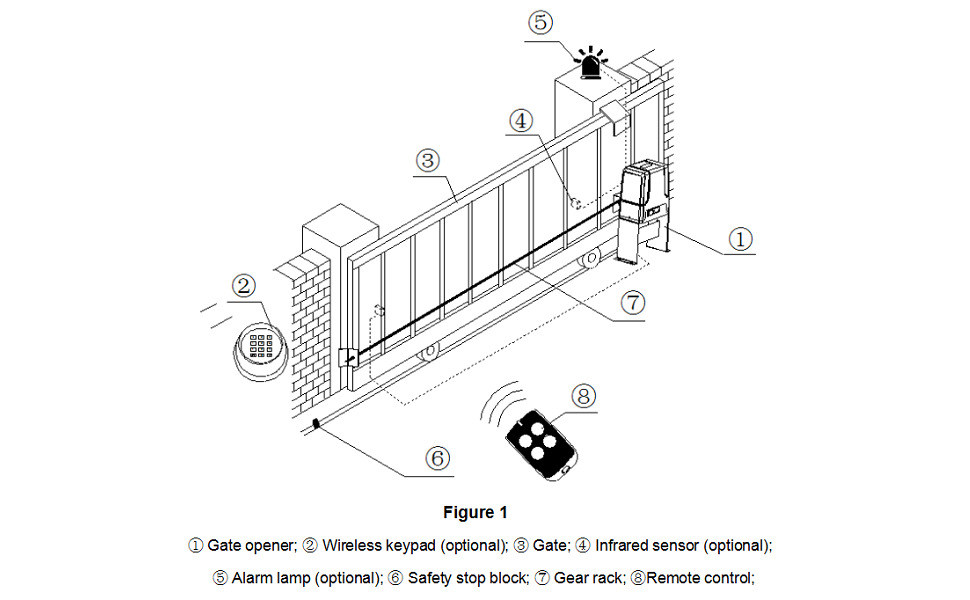
Figure 5.1: System diagram illustrating the placement of the gate opener and optional accessories. (1) Gate opener; (2) Wireless keypad (optional); (3) Gate; (4) Infrared sensor (optional); (5) Alarm lamp (optional); (6) Safety stop block; (7) Gear rack; (8) Remote control.
5.3 Installing the Chain and Gear Rack
Attach the provided chains to the gate and route them through the gate opener's sprocket. Ensure the chain is taut but allows for smooth movement. If using a gear rack system, securely attach the gear rack to the gate, ensuring proper engagement with the opener's drive gear.
5.4 Elektriske forbindelser
Connect the gate opener to a 110V/60Hz power source. Install the infrared safety sensors according to the manual's instructions, ensuring they are aligned and properly wired. Additional accessories like solar panels, wireless keypads, or alarm lamps can be connected as per the detailed wiring diagrams.

Figure 5.2: Internal components of the SL500DCL unit, illustrating the motor and control board for wiring reference.
6. Betjeningsvejledning
6.1 Betjening af fjernbetjening
The gate opener is operated using the provided remote controls. Pressing a button on the remote will initiate the gate's movement (open or close). A second press will stop the gate. A third press will reverse its direction.
6.2 Manuel udløsning
I tilfælde af strøm outage or remote control malfunction, the gate can be operated manually. Insert one of the manual release keys into the lock on the side of the unit and turn it to disengage the motor. This allows you to push the gate open or closed by hand.
6.3 justerbare indstillinger
The SL500DCL offers several adjustable settings to optimize performance:
- Løbehastighed: Adjust the overall speed of the gate.
- Slow Stop Speed: Configure the speed at which the gate slows down before reaching its limit.
- Slow Stop Distance: Set the distance over which the gate will slow down.
- Auto-reverse When Meeting Obstacles: Sensitivity setting for the safety reversal feature.
- Auto-close Function: Enable or disable automatic closing after a set delay.
- Acceleration: Adjust the initial acceleration of the gate.
- Start-up Delay: Configure a brief delay before the gate begins to move.
Refer to the detailed programming section in your included installation manual for instructions on how to access and modify these settings.
7. Vedligeholdelse
Regular maintenance ensures the longevity and safe operation of your gate opener.
- Månedlig: Inspect the gate for smooth operation, ensuring no binding or dragging. Check the chain tension and lubricate if necessary.
- Kvartalsvis: Clean the infrared sensors to ensure they are free of dirt, dust, or spiderwebs. Test the safety reversal feature by placing an object in the gate's path during closing.
- Årligt: Inspect all mounting hardware for tightness. Check electrical connections for corrosion or damage.
- Hold området omkring portåbneren fri for vegetation og affald.
8. Fejlfinding
Dette afsnit omhandler almindelige problemer, du kan støde på. Kontakt kundesupport ved mere komplekse problemer.
| Problem | Mulig årsag | Løsning |
|---|---|---|
| Porten bevæger sig ikke. | No power; remote battery dead; manual release engaged; safety sensor obstructed. | Kontroller strømforsyningen; udskift fjernbetjeningens batteri; deaktiver den manuelle udløser; ryd sensorens bane. |
| Porten vender uventet. | Obstruction in path; faulty safety sensor; sensitivity set too high. | Remove obstruction; clean/check sensor; adjust sensitivity setting. |
| Fjernbetjening virker ikke. | Fuldt batteri; uden for rækkevidde; fjernbetjening ikke programmeret. | Replace battery; move closer to unit; reprogram remote (refer to manual). |
| Gate laver usædvanlige lyde. | Lack of lubrication; worn chain/gear; misalignment. | Lubricate chain; inspect chain/gear for wear; check gate alignment. |
9. Garanti og support
Your GATEXPERT SL500DCL Sliding Automatic Gate Operator Kit is backed by a 1 års garanti fra købsdatoen. Denne garanti dækker fejl i materialer og udførelse ved normal brug.
Additionally, we offer a free product return and exchange service within 30 days of purchase. For any issues encountered during product installation or use, or to claim warranty service, please contact us via service email. Our team is committed to providing comprehensive system solutions and support.
For further assistance, please refer to the contact information provided in your product packaging or visit the official GATEXPERT webwebsted.
Ask a question about this manual
Ask about setup, troubleshooting, compatibility, parts, safety, or missing instructions. Manuals+ will review the question and use this page’s manual context to help answer it.