
RedThunder K84
RedThunder K84 trådløst tastatur og mus-kombination brugermanual
Model: K84
1. Introduktion
Thank you for choosing the RedThunder K84 Wireless Keyboard and Mouse Combo. This high-performance 2.4G wireless set is designed to provide a seamless and responsive experience for both work and gaming. Featuring a compact 75% layout keyboard with rainbow backlighting and a lightweight honeycomb optical mouse, this combo offers comfort, durability, and convenience. This manual provides detailed instructions for setup, operation, maintenance, and troubleshooting to ensure optimal performance of your device.

The RedThunder K84 Wireless Keyboard and Mouse Combo, showcasing the compact keyboard, honeycomb mouse, and the shared USB receiver.
2. Pakkens indhold
Kontroller venligst, at alle varer er til stede i din pakke:
- RedThunder K84 trådløst tastatur
- RedThunder Wireless Mouse
- USB Receiver (shared for both keyboard and mouse)
- USB-C ladekabel
3. Opsætningsvejledning
3.1 Indledende opladning
Before first use, it is recommended to fully charge both the keyboard and mouse. The keyboard is equipped with an 1850 mAh battery, and the mouse with a 500 mAh battery. Use the provided USB-C charging cable to connect the devices to a computer's USB port or a compatible USB charger. A full charge typically takes approximately 8 hours for initial use.

The USB-C charging port on the keyboard, indicating where to connect the charging cable.
3.2 Tilslutning af USB-modtageren
The keyboard and mouse share a single USB receiver for wireless connectivity. The receiver is typically stored in a compartment on the bottom of the mouse or keyboard (location may vary by unit). Remove the USB receiver and plug it into an available USB port on your computer or gaming console.
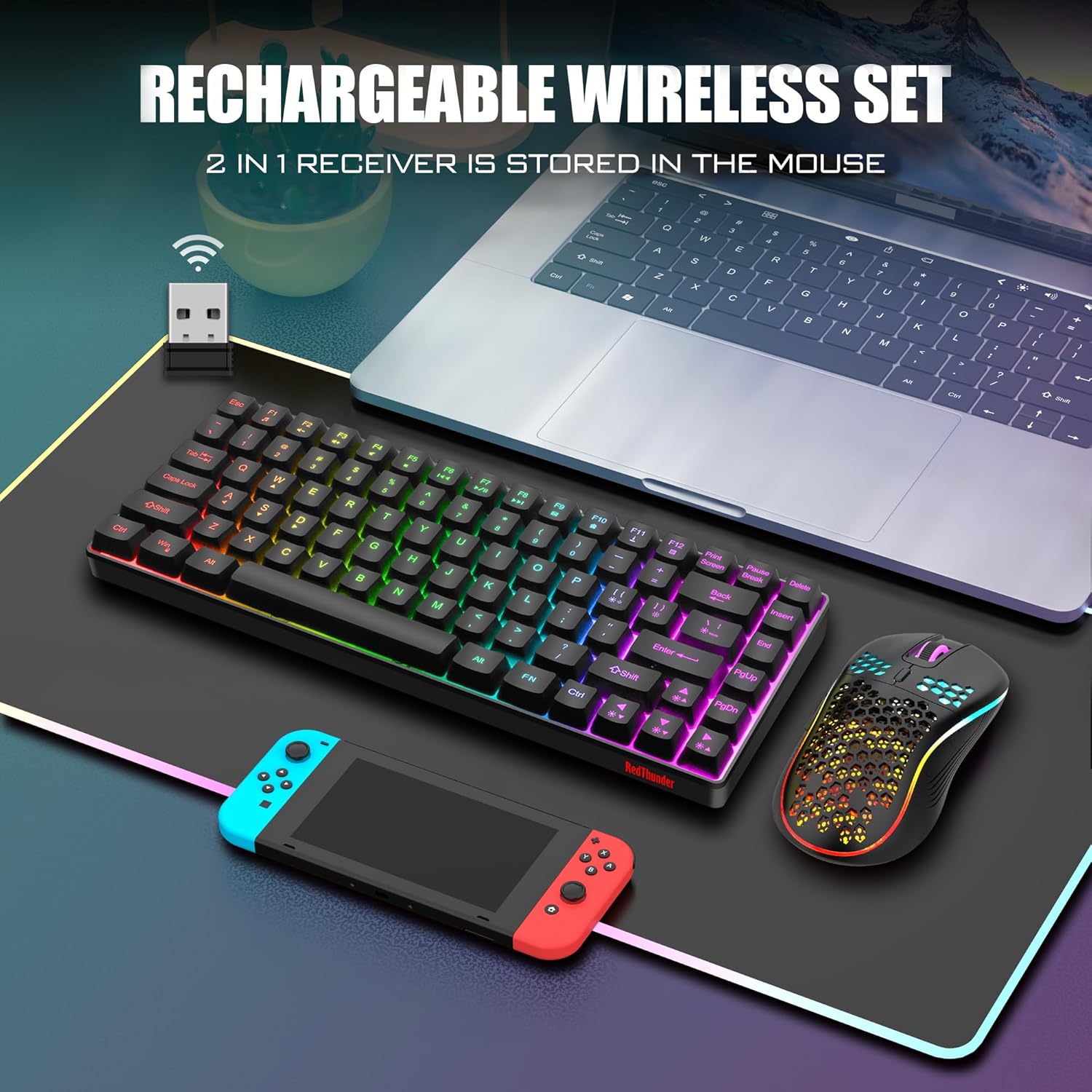
The shared USB receiver, which connects both the keyboard and mouse to your device.
3.3 Tænd
Once the USB receiver is connected, turn on the keyboard and mouse using their respective power switches. The devices are designed for plug-and-play functionality and should automatically pair with the receiver. If pairing issues occur, refer to the Troubleshooting section.
4. Betjeningsvejledning
4.1 Tastaturfunktioner
The K84 keyboard features an 84-key compact layout, retaining essential media and arrow keys. It includes various backlight modes and brightness levels.
- Skift af baggrundsbelysningstilstand: Trykke FN + M to cycle through 3 groups of rainbow backlight effects (3 static modes, 1 dynamic breathing mode).
- Justering af baggrundsbelysningens lysstyrke: Trykke FN + Side op at øge lysstyrken, FN + Side ned for at mindske lysstyrken (3 niveauer).
- Breathing Rate Adjustment: Trykke FN + +/- to adjust the breathing speed (4 rates).
- Tænd/sluk baggrundslys: Trykke FN + Scroll Lock for at tænde eller slukke baggrundsbelysningen.

Illustration of the keyboard's backlight control keys and their functions.
4.2 Musens funktioner
The honeycomb optical mouse features a lightweight design and adjustable DPI settings.
- DPI-justering: Press the DPI button located on top of the mouse to cycle through 1200, 2400, and 3200 DPI settings.
- Lyseffekt: The mouse has a built-in 7-color cyclic gradual lighting effect.

Close-up of the RedThunder mouse, highlighting the DPI adjustment button.
4.3 Strømbesparende tilstand
Both the keyboard and mouse are equipped with smart energy-saving functions. If there is no operation within 2 minutes, they will automatically enter sleep mode to conserve battery. Press any key on the keyboard or move/click the mouse to wake them up.
5. Vedligeholdelse
5.1 Rengøring
To maintain the appearance and functionality of your keyboard and mouse:
- Brug en blød, tør klud til at tørre overfladerne af.
- Til genstridigt snavs, let dampRengør kluden med vand eller en mild rengøringsopløsning. Undgå skrappe kemikalier.
- Use compressed air to remove dust and debris from between the keyboard keys and mouse crevices.
5.2 Pleje af batterier
For at forlænge batterilevetiden:
- Undgå at aflade batterierne helt ofte.
- Opbevar apparaterne et køligt og tørt sted, når de ikke er i brug i længere perioder.
- Charge the devices regularly, even if not used daily, to maintain battery health.
6. Fejlfinding
If you encounter issues with your RedThunder K84 combo, please refer to the following common solutions:
| Problem | Mulig årsag | Løsning |
|---|---|---|
| Tastatur/mus reagerer ikke | Low battery; USB receiver disconnected; Pairing lost. | Charge devices fully. Ensure USB receiver is securely plugged in. Turn devices off and on. If connection is lost, try re-pairing by turning off both devices, unplugging the receiver, plugging it back in, then turning on the mouse and keyboard. |
| Baggrundslys virker ikke | Baggrundsbelysningen er slukket; Lavt batteri. | Trykke FN + Scroll Lock for at slå baggrundsbelysningen til/fra. Oplad tastaturet. |
| Musemarkøren er uregelmæssig eller reagerer ikke | Snavset optisk sensor; Uegnet overflade; Lavt batteri. | Clean the optical sensor on the bottom of the mouse. Use on a clean, non-reflective surface. Charge the mouse. |
| Mouse scroll wheel stutters or doesn't work | Debris in scroll wheel mechanism; Software issue. | Try cleaning around the scroll wheel with compressed air. Restart your computer. If the issue persists, contact customer support. |
| Kort batterilevetid | Frequent use of backlight; Aging battery. | Reduce backlight brightness or turn it off when not needed. Ensure full charges. If battery life significantly degrades over time, it may indicate battery wear. |
7. Specifikationer
| Feature | Detalje |
|---|---|
| Modelnummer | K84 |
| Forbindelsesteknologi | 2.4G trådløs (USB-modtager) |
| Tastaturlayout | 75% (84 Keys) TKL |
| Tastaturbaggrundslys | Rainbow Backlit (3 static, 1 dynamic breathing mode) |
| Mus DPI | 1200 / 2400 / 3200 DPI |
| Tastaturets batterikapacitet | 1850 mAh (Rechargeable Lithium Ion) |
| Musens batterikapacitet | 500 mAh (Rechargeable Lithium Ion) |
| Keyboard Key Levetid | 10,000,000 tastetryk |
| Materiale | Acrylonitril Butadien Styren (ABS) |
| Kompatible enheder | Spillekonsol, bærbar computer, pc |
| Varens vægt | 1.43 pund |
| Pakkedimensioner | 15.63 x 6.18 x 1.81 tommer |
8. Garanti og support
RedThunder products are designed for durability and performance. For any issues not covered in this manual or for warranty inquiries, please contact RedThunder customer support. You can often find contact information on the product packaging or the official RedThunder webwebsted.
En officiel brugermanual i PDF-format kan også downloades: Download brugermanual (PDF)
Note: No official product videos with creator type 'Seller' were available in the provided data to embed in this manual.
Ask a question about this manual
Ask about setup, troubleshooting, compatibility, parts, safety, or missing instructions. Manuals+ will review the question and use this page’s manual context to help answer it.