
Indledning
This manual provides instructions for the proper setup, operation, and maintenance of your Motorola Talkabout T460 Two Way Radio. Please read this manual thoroughly before using your device to ensure optimal performance and safety.
The Motorola Talkabout T460 is designed for reliable communication with features such as IP54 weatherproof rating, 22 channels, 121 privacy codes, and various power options.
Pakkens indhold
The Motorola Talkabout T460 8-Pack includes the following items:
- 8 Motorola T460 2-Way Radios
- 8 NiMH Rechargeable Battery Packs
- 4 Micro USB Wall Charging Cables
- 8 bælteclips
- 4 Brugervejledninger
Opsætning
1. Batteriinstallation
Your T460 radio can be powered by either the included NiMH rechargeable battery pack or three AA alkaline batteries (not included).
- Sørg for, at radioen er slukket.
- Find batteridækslet på bagsiden af radioen.
- Tryk ned på låsen, og skub dækslet af.
- Insert the NiMH battery pack or three AA batteries, observing the polarity markings (+/-).
- Sæt dækslet til batterirummet på igen, og sørg for, at det klikker sikkert på plads.
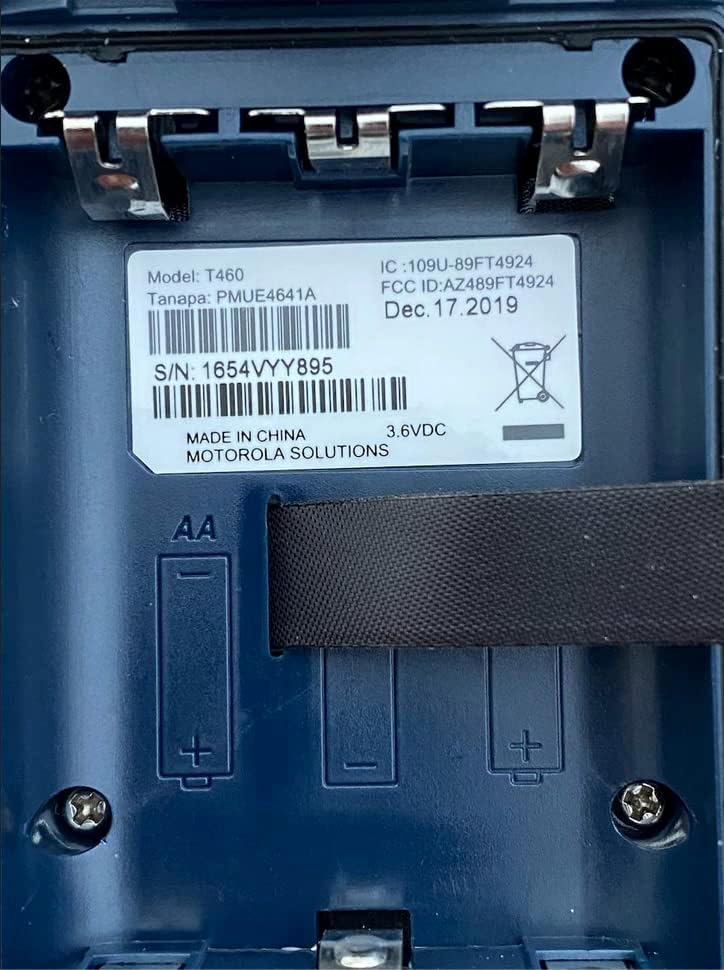
Figur 1: Battery compartment of the Motorola T460 radio, showing the label with model information and slots for AA batteries.
2. Charging the NiMH Battery Pack
The included NiMH battery packs can be charged using the micro-USB wall charging cables. Charging can be done via a standard wall outlet, a vehicle adapter, or a computer USB port.
- Connect the micro-USB cable to the charging port on the radio.
- Connect the other end of the cable to a power source (wall adapter, vehicle adapter, or computer).
- Batteriindikatoren på radioens display viser opladningsstatus.
- En fuld opladning tager typisk flere timer.
3. Montering af bælteclips
To attach the belt clip, align the clip with the grooves on the back of the radio and slide it downwards until it locks into place.
Betjeningsvejledning
1. Tænd/sluk
To turn the radio on or off, rotate the On/Off/Volume knob clockwise or counter-clockwise until you hear a click.
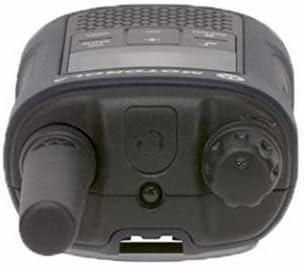
Figur 2: Top view of the Motorola T460 radio, highlighting the On/Off/Volume knob on the right side.
2. Justering af lydstyrke
Rotate the On/Off/Volume knob to adjust the listening volume.
3. Kanalvalg
Your T460 radio has 22 channels. Use the Menu knappen og Op/Ned knapper for at vælge en kanal.
4. Privatlivskoder
The radio supports 121 privacy codes per channel, totaling 2,662 combinations. This helps reduce interference from other users. To set a privacy code, enter the menu and navigate to the privacy code setting for the selected channel.
5. Sending og modtagelse
- At sende: Press and hold the Push-to-Talk (PTT) button located on the side of the radio. Speak clearly into the microphone. Release the PTT button to listen.
- At modtage: Sørg for, at PTT-knappen ikke er trykket ned. Radioen modtager automatisk transmissioner på den valgte kanal og privathedskode.

Figur 3: Bund view of the Motorola T460 radio, displaying the 'Talkabout' branding. The PTT button is on the side, not visible in this view.
6. PTT Power Boost
The PTT power boost feature allows you to temporarily increase the transmitter power output to extend transmission range when needed. This feature also helps conserve battery life when maximum range is not required.
7. iVOX/VOX (Hands-Free Communication)
The iVOX/VOX feature enables hands-free communication by detecting your voice and automatically transmitting. This is useful when your hands are occupied. Refer to the radio's on-screen menu for activation and sensitivity settings.
8. VibraCall™ Alert
Activate the VibraCall feature for silent alerts in situations where an audible ring tone might be disruptive.
9. Call Tones
Customize your radio's call tone by selecting from the available options in the menu settings.
10. Weather Alert and NOAA Weather Radio
The T460 can receive real-time weather conditions and alerts. Turn on the weather channel or enable weather alerts to stay informed. Note: NOAA radio service availability may vary by region. Consult your local weather office for details.
11. Nødsignalknap
In an emergency, press the dedicated emergency alert button. The radio will transmit an alert siren followed by spoken or incidental sounds, signaling distress to other radios within range.
12. Indbygget LED-lommelygte
Activate the integrated LED flashlight for illumination during low-light conditions or emergencies.
Opretholdelse
1. Batteripleje
- Always use genuine Motorola NiMH battery packs or recommended AA alkaline batteries.
- Charge NiMH batteries fully before first use.
- Do not overcharge or leave batteries discharged for extended periods.
- Remove batteries if the radio will not be used for a long time.
2. Rensning
Tør radioens yderside af med en blød kludamp cloth. Do not use harsh chemicals or abrasive cleaners. Ensure the charging port cover is securely closed to maintain the IP54 weatherproof rating.
3. Vejrbeskyttelse
The T460 radio has an IP54 weatherproof rating, meaning it is protected against dust and splashing water from any direction. While it can withstand rain and snow, it is not designed for submersion. Ensure all port covers are sealed to maintain water resistance.
Fejlfinding
| Problem | Mulig løsning |
|---|---|
| Radioen tænder ikke. |
|
| Kan ikke sende eller modtage. |
|
| Dårlig lydkvalitet. |
|
| Batterilevetiden er kort. |
|
Specifikationer
| Model | T460 |
| Kanaler | 22 FRS-kanaler |
| Privatlivskoder | 121 (CTCSS/DCS) |
| Vejrbestandighed | IP54 Vejrbestandig |
| Batteritype | NiMH Rechargeable Pack (included) or 3 AA Alkaline Batteries (not included) |
| Batterilevetid (ca.) | Up to 10 hours (NiMH), Up to 26 hours (AA) |
| Voltage | 9 volt |
| Display Type | LED |
| Særlige funktioner | Weather Alert, Emergency Alert, iVOX/VOX, VibraCall, LED Flashlight, PTT Power Boost |
| Item Weight (8-pack) | 5.52 pund |
| Package Dimensions (8-pack) | 10.63 x 9.96 x 9.84 tommer |
Garantioplysninger
The Motorola Talkabout T460 Two Way Radio comes with a 1 års producentgaranti fra købsdatoen. Denne garanti dækker materiale- og fabrikationsfejl ved normal brug. Gem venligst din købsbevis i tilfælde af garantikrav.
For full warranty terms and conditions, please refer to the separate warranty document included with your product or visit the official Motorola Solutions webwebsted.
Støtte
For technical assistance, troubleshooting beyond this manual, or to inquire about replacement parts, please contact Motorola Solutions customer support.
- Online support: Visit the official Motorola Solutions webwebsted for ofte stillede spørgsmål og supportressourcer.
- Telefonsupport: Se kontaktoplysningerne på produktemballagen eller på den officielle webwebsted.