
1. Introduktion
Thank you for choosing the Edtiske WiFi Extender. This device is designed to expand your existing Wi-Fi network coverage, eliminate dead zones, and provide a stable, high-speed internet connection throughout your home or office. With dual-band support (5GHz and 2.4GHz) and speeds up to 1200Mbps, it ensures seamless streaming, gaming, and browsing for multiple devices.
2. Pakkens indhold
Kontroller venligst, at alle varer er til stede i din pakke:
- 1 x Edtiske WiFi Extender Unit
- 1 x Power Adapter (integrated)
- 1 x Brugsanvisning (dette dokument)
3. Produktet er slutview

Figure 3.1: Edtiske WiFi Extender plugged into a standard wall outlet.
The Edtiske WiFi Extender is a compact device designed for easy integration into your home. It features a direct plug-in design, eliminating the need for external power adapters.
3.1. Nøglefunktioner
- Dual-band tilslutning: Supports both 5GHz (up to 866Mbps) and 2.4GHz (up to 300Mbps) Wi-Fi bands for flexible and high-speed connections.
- Bred dækning: Extends Wi-Fi signal up to 10,000 sq. ft, covering large homes and multiple floors.
- Høj enhedskapacitet: Kan tilslutte op til 45 enheder samtidigt.
- Flere driftstilstande: Functions as an Access Point (AP), Repeater, or Router.
- Ethernet-porte: Equipped with WAN and LAN ports for wired connections.

Figure 3.2: Dual-band capabilities of the WiFi Extender.

Figure 3.3: High-gain antennas and Ethernet ports for stable connections.
3.2. LED-indikatorer
- Power LED: Indikerer strømstatus.
- WLAN LED: Angiver Wi-Fi-aktivitet.
- LAN LED: Angiver aktivitet på LAN-porten.
- WAN LED: Angiver aktivitet på WAN-porten.
- Signalstyrke LED'er: Indicate the strength of the Wi-Fi signal received from the main router.
3.3. Knapper og porte
- WPS/Nulstillingsknap: Used for WPS (Wi-Fi Protected Setup) pairing or to reset the device to factory defaults (press and hold for 10 seconds).
- WAN Port (RJ45): Used for connecting to a modem in Router mode or for internet access in AP mode.
- LAN-port (RJ45): Used for connecting wired devices (e.g., PC, game console) to the network.
4. Opsætning
The Edtiske WiFi Extender supports three main operating modes: Repeater Mode, AP Mode, and Router Mode. Choose the mode that best suits your network needs.
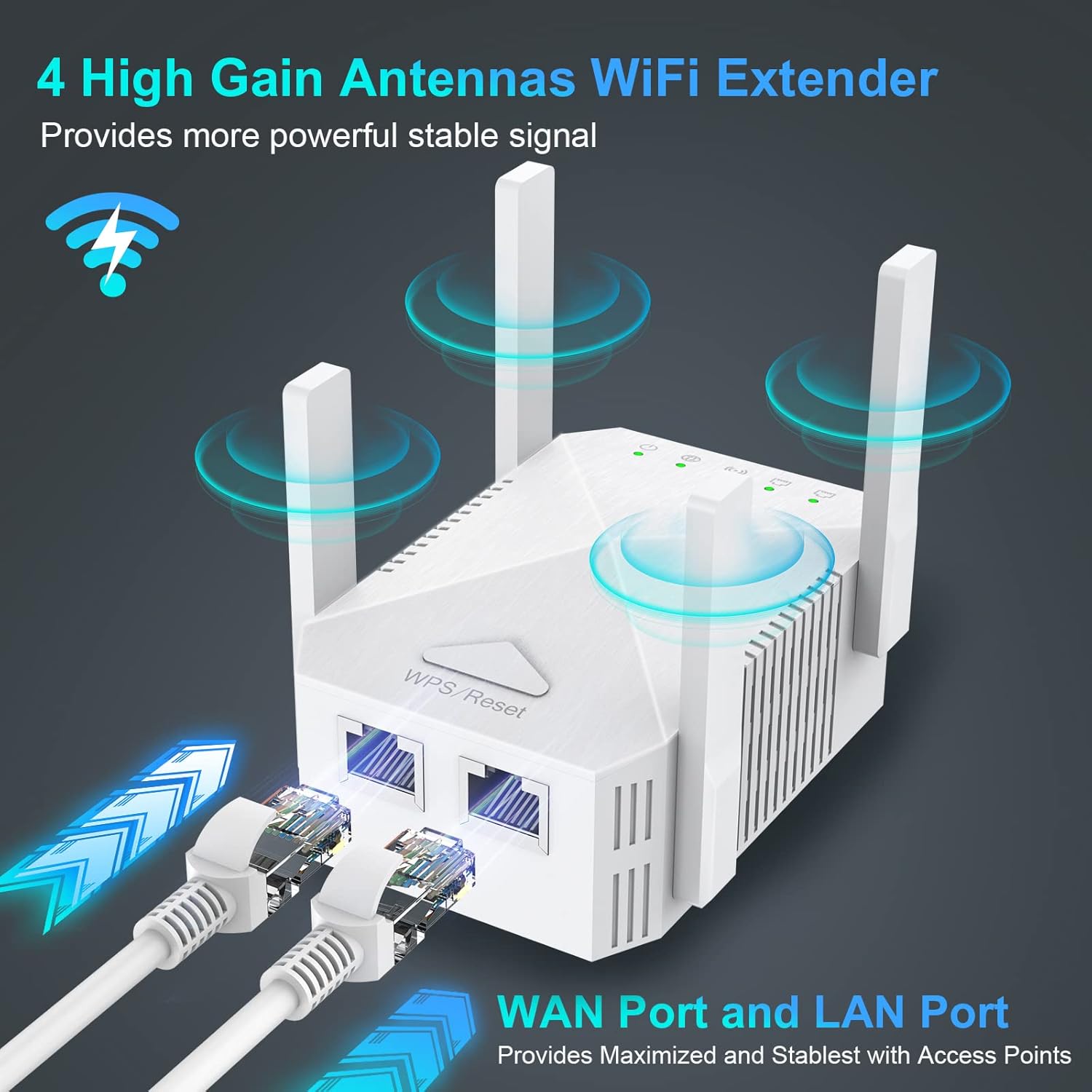
Figure 4.1: Three-in-one mode application.
4.1. Initial Setup Steps (Common to all modes)
- Tænd: Plug the WiFi Extender into a power outlet near your main router. Wait for the Power LED to turn solid.
- Tilslut til forlænger: On your computer or mobile device, connect to the Wi-Fi network broadcast by the extender (e.g., "WiFi_Extender_XXXX"). No password is required initially.
- Adgangsopsætningsside: Åbn a web browser and enter the default IP address (usually 192.168.10.1) or the setup URL provided in the quick guide.
- Login: Indtast standardbrugernavn og adgangskode (normalt "admin" for begge).
- Vælg tilstand: Follow the on-screen wizard to select your desired operating mode (Repeater, AP, or Router).
4.2. Opsætning af repeatertilstand
In Repeater Mode, the extender wirelessly connects to your existing router and rebroadcasts the signal to extend coverage.
- After selecting Repeater Mode, the extender will scan for available Wi-Fi networks.
- Select your main Wi-Fi network (SSID) from the list.
- Enter the Wi-Fi password for your main network.
- You can choose to keep the same SSID for the extended network or create a new one.
- Click "Apply" or "Save" to complete the setup. The extender will restart.
- Once restarted, relocate the extender to a location between your router and the Wi-Fi dead zone. Ensure the Signal Strength LEDs indicate a good connection.
4.3. Opsætning af AP-tilstand (adgangspunkt)
In AP Mode, the extender connects to your router via an Ethernet cable and creates a new wireless network, converting a wired network into a wireless one.
- Connect an Ethernet cable from your main router's LAN port to the Extender's WAN port.
- Select AP Mode in the setup wizard.
- Configure the new Wi-Fi network's SSID and password.
- Klik på "Anvend" eller "Gem". Forlængeren genstarter.
4.4. Opsætning af routertilstand
In Router Mode, the extender acts as a primary router, connecting directly to your modem and creating a new Wi-Fi network.
- Connect an Ethernet cable from your modem to the Extender's WAN port.
- Select Router Mode in the setup wizard.
- Choose your internet connection type (e.g., PPPoE, Dynamic IP, Static IP) and enter necessary details provided by your ISP.
- Configure the new Wi-Fi network's SSID and password.
- Klik på "Anvend" eller "Gem". Forlængeren genstarter.
5. Betjening af forlængeren
Once configured, the Edtiske WiFi Extender operates automatically. For optimal performance, consider the following:
- Placering: For Repeater Mode, place the extender roughly halfway between your main router and the area where you need improved Wi-Fi. Avoid placing it near large metal objects, concrete walls, or other electronic devices that may cause interference.
- Signalstyrke: Monitor the Signal Strength LEDs on the extender. Green indicates a strong connection, yellow indicates a fair connection, and red indicates a weak or no connection. Adjust placement if necessary.
- Kablede forbindelser: Use the LAN port to connect wired devices for maximum stability and speed, especially for gaming consoles, smart TVs, or desktop computers.

Figure 5.1: Extended WiFi coverage throughout a property.

Figure 5.2: Wide compatibility with up to 45 connected devices.

Figure 5.3: Extending WiFi to every corner of the house.
6. Vedligeholdelse
To ensure the longevity and optimal performance of your Edtiske WiFi Extender, follow these maintenance guidelines:
- Hold rent: Tør regelmæssigt enheden af med en blød, tør klud. Brug ikke flydende rengøringsmidler eller aerosoler.
- Ventilation: Sørg for, at ventilationshullerne ikke er blokerede. Korrekt luftgennemstrømning forhindrer overophedning.
- Firmwareopdateringer: Kontroller jævnligt producentens website for firmware updates. Updates can improve performance, add features, and fix bugs.
- Power Cycle: If you experience intermittent issues, try unplugging the extender from the power outlet for 10 seconds and then plugging it back in. This can resolve minor glitches.
- Miljøforhold: Undgå at udsætte enheden for ekstreme temperaturer, fugt eller direkte sollys.
7. Fejlfinding
If you encounter issues with your WiFi Extender, refer to the following common problems and solutions:
- Ingen internetadgang efter opsætning:
- Ensure the extender is receiving a strong signal from your main router (check Signal Strength LEDs).
- Bekræft, at den Wi-Fi-adgangskode, der blev indtastet under opsætningen, er korrekt.
- Prøv at genstarte både din primære router og extenderen.
- If in Repeater Mode, ensure your main router is broadcasting both 2.4GHz and 5GHz bands if you intend to extend both. Note that some users have reported that in Repeater Mode, the extender may primarily communicate with the router on the 2.4GHz band, potentially limiting overall speed even if the extender broadcasts a 5GHz network.
- Kan ikke få adgang til opsætningssiden:
- Ensure your device is connected to the extender's Wi-Fi network (not your main router's).
- Ryd din browsers cache, eller prøv en anden browser.
- Bekræft IP-adressen eller URL er korrekt.
- Langsomme hastigheder:
- Relocate the extender closer to your main router to improve signal strength.
- Reducer interferens ved at flytte extenderen væk fra andre elektroniske enheder.
- Ensure your main router is providing adequate internet speed.
- Consider using a wired connection via the LAN port for critical devices.
- Hyppige afbrydelser:
- Se efter firmwareopdateringer.
- Perform a factory reset (press and hold the WPS/Reset button for 10 seconds) and reconfigure the extender.
- Ensure the extender is not placed in an area with too many physical obstructions.
8. Specifikationer
| Feature | Beskrivelse |
|---|---|
| Mærke | Edtiske |
| Modelnummer | Hvid |
| Produktdimensioner | 3.45 x 2.24 x 1.18 tommer |
| Varens vægt | 4.2 ounce |
| Standard for trådløs kommunikation | 802.11ac |
| Dataoverførselshastighed | 1200 megabit pr. sekund |
| Frekvensbåndsklasse | Dobbeltbånd (5 GHz/2.4 GHz) |
| Connector Type | RJ45 (WAN/LAN) |
9. Garanti og support
The Edtiske WiFi Extender typically comes with a manufacturer's warranty. Please refer to the warranty information provided in the original packaging or contact the seller/manufacturer directly for details regarding warranty claims and technical support. Keep your purchase receipt as proof of purchase.