
Produkt overview
The DELLA 8000 BTU Smart Window Air Conditioner is designed to provide efficient and quiet cooling for your living space. Featuring Wi-Fi connectivity, it allows for convenient control via a smartphone app, remote, or the intuitive on-unit display. This Energy Star certified unit is ideal for cooling rooms approximately 300-350 square feet.

Front view of the DELLA 8000 BTU Smart Window Air Conditioner, showcasing its compact design, digital display, and the included remote control and smartphone app interface for convenient operation.
Nøglefunktioner:
- Høj ydeevne: 8000 BTU cooling capacity, 690W, 115V/60Hz, Energy Star rated with 11.5 EER, suitable for 300-350 sq. ft.
- Lydløs drift: Fan speeds ranging from 53 dB(A) to 58 dB(A) for quiet cooling.
- Smart kontrol: Wi-Fi enabled for control via the DELLA application on iOS or Android devices.
- Flere indstillinger: Variable temperature (61℉-88℉), Sleep Mode, Fan Speed selection, 24-hour Timer, ECO Mode, Automatic Mode, and Fan-only mode.
- Nem vedligeholdelse: Washable and reusable air filter for optimal performance.
- Enkel installation: Compact size (18.58 x 15.59 x 13.31 inches) and lightweight (45.4 lbs) with included installation kit for windows 23-36 inches wide and minimum 14.5 inches high.
Vigtige sikkerhedsoplysninger
Please read all safety instructions carefully before operating your air conditioner to prevent injury or damage. Keep this manual for future reference.
- Sæt altid enheden i en jordet stikkontakt med 3 ben. Fjern ikke jordstikket.
- Brug ikke en adapter eller forlængerledning.
- Sørg for, at netledningen ikke er i klemme eller beskadiget.
- Brug ikke klimaanlægget med en beskadiget netledning eller stik.
- Tag stikket ud af stikkontakten før rengøring eller servicering.
- Bloker ikke luftåbninger.
- Hold brændbare materialer væk fra enheden.
- Dette apparat er ikke beregnet til brug af personer (inklusive børn) med nedsatte fysiske, sensoriske eller mentale evner, eller mangel på erfaring og viden, medmindre de har fået opsyn eller instruktion i brugen af apparatet af en person, der er ansvarlig for deres sikkerhed.
Installationsvejledning
The DELLA 8000 BTU Smart Window Air Conditioner is designed for easy installation in standard double-hung windows. Ensure your window meets the following requirements:
- Vinduesbredde: 23 til 36 tommer (58.4 til 91.4 cm)
- Minimum vinduesåbningshøjde: 14.5 tommer (36.8 cm)

This diagram illustrates the recommended window dimensions for installation: suitable for windows 23 to 36 inches wide with a minimum height of 14.5 inches. Product dimensions are also shown: 18.58 inches depth, 15.59 inches width, and 13.31 inches height.
Installationssæt indhold:
The air conditioner comes with a complete installation kit to facilitate setup and ensure a secure fit, minimizing air leaks and noise.

The complete installation kit includes all necessary components for easy assembly and effective reduction of air leaks and outside noise: Filler Panels, Insulation Strips, Lock Frame & Sash Lock, Screws, Window Sash Seal, and Top Mounting Rail.
Grundlæggende installationstrin:
- Forbered vinduet ved at rengøre karmen og rammen.
- Attach the top mounting rail to the air conditioner.
- Place the unit into the window opening, ensuring it is securely seated on the window sill.
- Extend the side filler panels to fill the window opening.
- Secure the unit and filler panels using the provided screws and sash lock.
- Apply the window sash seal to prevent air leakage.
- Sæt enheden i en jordet stikkontakt.
For detailed step-by-step instructions, refer to the full user manual PDF available for download.
Betjening af dit klimaanlæg
Kontrolpanel og fjernbetjening:
The air conditioner can be operated using the control panel on the unit or the included remote control. The LED digital display shows the current temperature and settings.

A detailed diagram of the air conditioner's intuitive control panel, showing buttons for temperature adjustment, fan speed selection (High, Med, Low, Auto), operating modes (Cool, Dry, Fan, Auto), Sleep mode, 24-hour Timer, and a Filter reminder.
- POWER -knap: Tænder eller slukker for enheden.
- MODE knap: Skifter mellem driftstilstande: Køling, Tørring, Ventilator, Auto.
- FAN SPEED knap: Adjusts fan speed: High, Medium, Low, Auto Speed.
- Temperature Control Buttons (▲/▼): Adjusts desired temperature (61℉-88℉).
- TIMER knap: Indstiller 24-timers tænd/sluk-timeren.
- SLEEP knap: Activates Sleep Mode, which adjusts temperature and fan speed for quiet operation.
- ECO knap: Activates ECO mode for energy-saving operation.
- FILTER knap: Indicates when the air filter needs cleaning.
Driftstilstande:
- Cool tilstand: Provides cooling to the set temperature.
- Tør tilstand: Dehumidifies the room without significant cooling.
- Ventilatortilstand: Cirkulerer luft uden afkøling.
- Automatisk tilstand: Automatically selects cooling or fan-only operation based on room temperature.
- Sove mode: Gradually increases the set temperature and reduces fan speed for quiet, comfortable sleep.
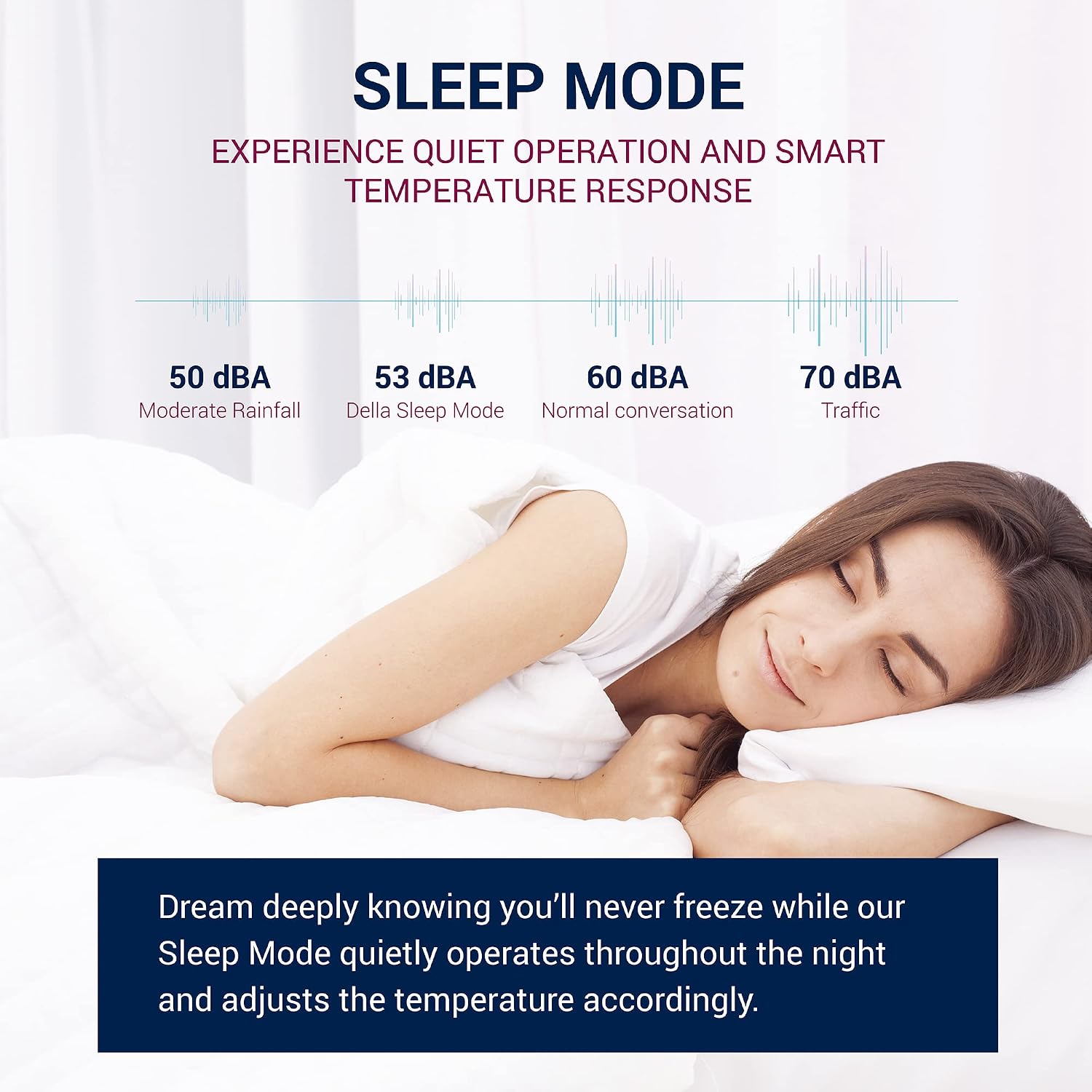
The Sleep Mode provides quiet operation and smart temperature response, gradually adjusting the temperature throughout the night to ensure comfortable sleep without excessive noise. The graphic compares its 53 dBA noise level to moderate rainfall and normal conversation.
Smart Features (Wi-Fi & App Control):
The DELLA Smart Window Air Conditioner is equipped with Wi-Fi connectivity, allowing you to control it remotely using the DELLA+ app on your smartphone or tablet.

The DELLA air conditioner is Wi-Fi enabled, allowing control from anywhere using the free DELLA+ application available for iOS and Android devices. This image shows a user interacting with the app.
- App-download: Download the free DELLA+ app from the App Store (iOS) or Google Play Store (Android).
- Parring: Follow the in-app instructions to pair your air conditioner with your Wi-Fi network.
- Fjernbetjening: Adjust temperature, change modes, set fan speed, and manage timers from anywhere with an internet connection.
- Smart Location (Geo-fencing): Utilize the geo-fencing feature to automatically turn the AC ON when you are approaching home and OFF when you leave, saving energy and ensuring comfort upon arrival.

The Smart Location feature utilizes geo-fencing technology to automatically turn the air conditioner ON as you approach home and OFF when you leave, optimizing energy usage and comfort.
Vedligeholdelse og pleje
Regelmæssig vedligeholdelse sikrer optimal ydeevne og forlænger levetiden på dit klimaanlæg.
Rengøring af luftfilter:
The air filter should be cleaned regularly, typically every two weeks or when the 'Filter' indicator light illuminates, to maintain cooling efficiency and air quality.

The air conditioner features convenient and durable reusable filters that can be easily removed, washed with warm water and dish soap, or vacuumed, and reinstalled for optimal performance and cleaner air.
- Sluk og tag stikket ud af klimaanlægget.
- Åbn frontpanelet, og skub forsigtigt luftfilteret ud.
- Clean the filter using warm water and mild dish soap, or vacuum it to remove dust and debris.
- Skyl grundigt, og lad filteret lufttørre helt, inden det sættes i igen.
- Once the filter is reinstalled, plug in the unit and press the 'Filter' button to reset the indicator.
Generel rengøring:
- Tør ydersiden af enheden af med en blød, damp klæde. Brug ikke skrappe kemikalier eller slibende rengøringsmidler.
- Sørg for, at dræningsområdet er fri for forhindringer.
- Ved langtidsopbevaring skal enheden rengøres grundigt, lades tørre og dækkes til for at beskytte den mod støv.
Fejlfinding Guide
Før du kontakter kundesupport, bedes du se følgende tabel for almindelige problemer og løsninger på disse.
| Problem | Mulig årsag | Løsning |
|---|---|---|
| Klimaanlægget tænder ikke. | Ingen strømforsyning; Netledningen er ikke sat i; Afbryderen er udløst. | Kontroller strømforbindelsen; Sørg for, at stikkontakten fungerer; Nulstil afbryderen. |
| Enheden blæser varm luft. | Air filter is dirty; Temperature setting is too high; Room size exceeds capacity. | Clean air filter; Lower temperature setting; Ensure unit is appropriate for room size. |
| Enheden er støjende. | Loose installation; Fan obstruction; Normal operating sounds. | Check installation for secure fit; Remove any obstructions; Some noise is normal during operation. |
| Vand drypper udenfor. | Normal kondens. | This is normal during high humidity operation. Ensure proper drainage. |
| Fjernbetjening virker ikke. | Batteries are dead; Obstruction between remote and unit; Remote sensor is dirty. | Udskift batterier; Fjern blokeringer; Rengør fjernbetjeningssensoren. |
| Problemer med Wi-Fi-forbindelse. | Forkert Wi-Fi-adgangskode; Router for langt væk; Appen er ikke opdateret. | Verify Wi-Fi password; Move unit closer to router or use extender; Update DELLA+ app. |
Produktspecifikationer
Detailed technical specifications for the DELLA 8000 BTU Smart Window Air Conditioner.
| Specifikation | Værdi |
|---|---|
| Fabrikant | Della |
| Modelnummer | 048-TL-WAC8K32 |
| Kølekraft | 8000 britiske termiske enheder (BTU) |
| Varens vægt | 45.4 pund |
| Produktmål (D x B x H) | 15.59 x 18.58 x 13.31 tommer |
| Farve | Hvid |
| Strømkilde | Elektrisk med ledning |
| Voltage | 115 volt |
| Wattage | 690 watt |
| Installationsmetode | Vindue |
| Lydniveau | 56 dB (gennemsnit) |
| Særlige funktioner | WiFi aktiveret |
| Inkluderede komponenter | Window Air Conditioner, Installation Kit |
| Energieffektivitetsforhold (EER) | 11.5 |
| BEE-stjerneklassificering | Yes (Energy Star Certified) |
| Recommended Cooling Area | 300-350 kvadratfod |

The official EnergyGuide label for the DELLA 8000 BTU Window Air Conditioner, indicating an estimated yearly energy cost of $68 and a Combined Energy Efficiency Ratio (CEER) of 11.4, highlighting its energy efficiency.

A guide to choosing the appropriate BTU rating based on room size. For example, an 8,000 BTU unit is recommended for areas up to 350 square feet, while larger units are suitable for up to 700 square feet.

Factors to consider when calculating your room's final BTU requirements, including location (hot climate), sunlight exposure, heat-generating appliances, ceiling height, insulation quality, and the number of occupants.
Garanti og kundesupport
For warranty information and customer support, please refer to the documentation included with your product or visit the Della official website. You can also find a detailed User Manual (PDF) for this product via the following link: DELLA 8000 BTU Smart Window Air Conditioner User Manual PDF.
If you encounter issues not covered in this manual or require further assistance, please contact Della customer support through their official channels.