
1. Introduktion og overview
The Cubii Revive is a cordless, portable foot and lower leg massager designed to provide ultra-quiet vibration for relaxation, recovery, and rejuvenation. Its passive vibration technology supports muscle recovery in the feet and lower body, helping users feel refreshed. The device features a slim design, making it easy to use and store in various environments, from home to office.

Image 1.1: The Cubii Revive Foot Massager, a sleek and portable device for muscle recovery.
2. Nøglefunktioner
- Passive Vibration Technology: Aids in feet and lower-body muscle recovery.
- Ultra-stille drift: Ensures a peaceful environment without disruptive noise.
- Trådløst og bærbart design: Rechargeable and slim, allowing for use anywhere.
- Intensitet, der kan tilpasses: Offers 10 levels of adjustable vibration to suit individual comfort.
- Ergonomic Footplate: Designed to fit all foot sizes and provide optimized seated angles for comfort.

Image 2.1: Visual representation of the Cubii Revive's key features, including passive vibration, customizable levels, and ergonomic design.
3. Opsætning
The Cubii Revive is designed for immediate use with minimal setup. It comes pre-assembled in one piece. Ensure the device is fully charged before first use.
3.1 Udpakning og første inspektion
- Åbn forsigtigt produktemballagen.
- Remove the Cubii Revive unit from the box.
- Undersøg enheden for tegn på skader under transport.
- Locate the charging cable and user manual within the packaging.
3.2 Opladning af enheden
Connect the provided charging adapter to the charging port located on the side of the Cubii Revive. Plug the adapter into a standard electrical outlet. The battery indicator on the display will show the charging status. A full charge typically provides approximately 4 hours of use.
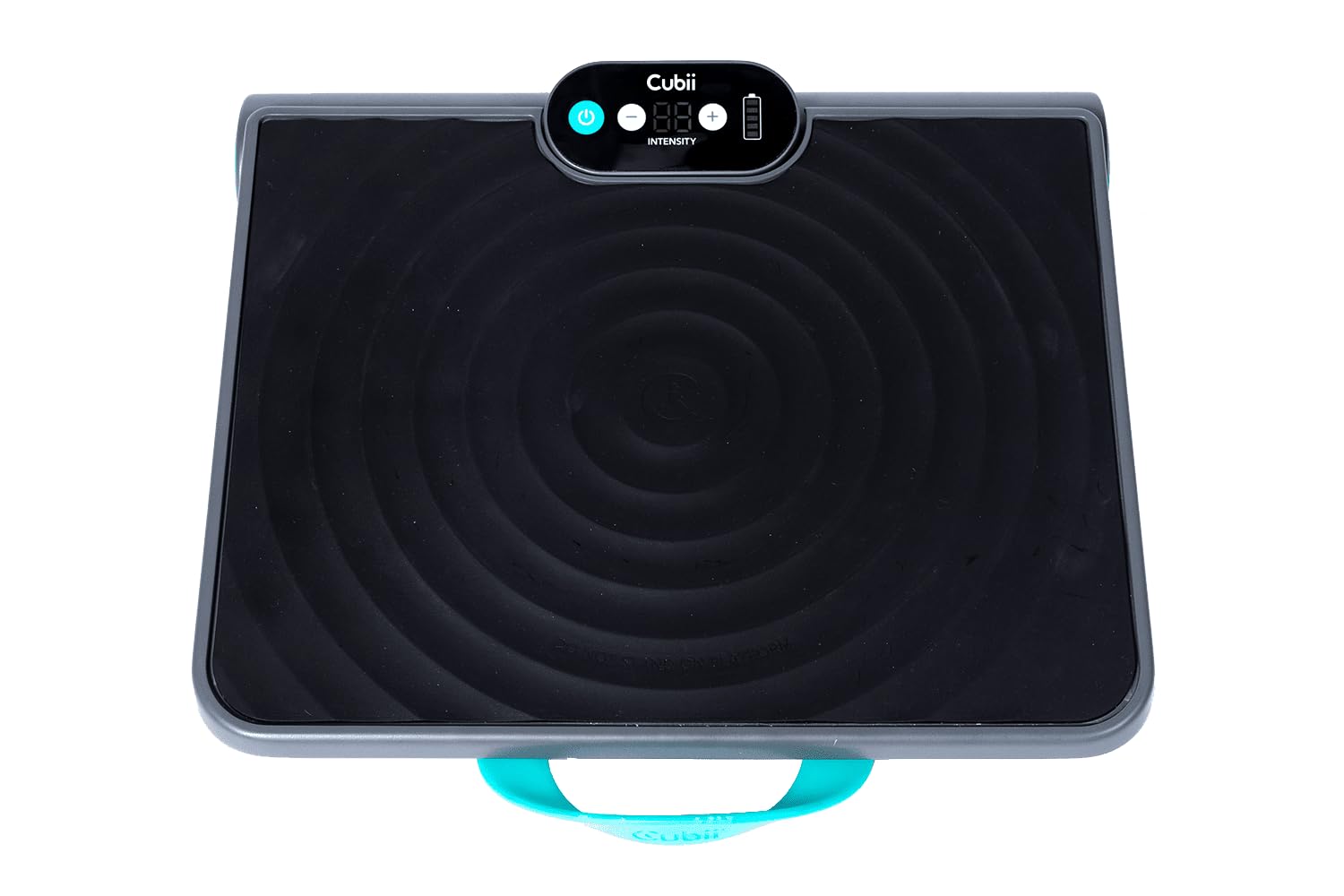
Image 3.1: Close-up of the Cubii Revive's control panel, showing the power button, intensity controls, and battery indicator.
3.3 Placering
Place the Cubii Revive on a flat, stable surface where you intend to use it. The device features suction cups on the bottom to help keep it securely in place during operation. It can be used while seated on a chair, sofa, or any comfortable seating arrangement.
Video 3.1: An official seller video demonstrating the Cubii Revive Vibration Plate in use, highlighting its stability and ease of placement.
4. Betjeningsvejledning
The Cubii Revive is designed for simple and intuitive operation.
4.1 Tænd/sluk
- For at tænde enheden skal du trykke på Power knap (usually indicated by a universal power symbol) on the control panel.
- For at slukke for enheden skal du trykke på og holde nede Power knap igen, indtil displayet slukker.
4.2 Justering af vibrationsintensitet
- Once powered on, the device will start at a low intensity level.
- Brug '+' button to increase the vibration intensity.
- Brug '-' button to decrease the vibration intensity.
- The display will show the current intensity level, ranging from 1 to 10.

Image 4.1: A user's feet placed comfortably on the ergonomic footplate of the Cubii Revive, ready for a massage session.
4.3 Anbefalet brug
Place your feet comfortably on the footplate. You can wear socks or shoes. Start with a lower intensity level and gradually increase it to find your preferred comfort level. Typical sessions can range from 5 to 10 minutes, or as desired for relaxation and recovery.
5. Sikkerhedsoplysninger
Please read all safety warnings before using the Cubii Revive.
- Keep the device away from water. Do not use it in wet environments.
- Do not use the device while sleeping or in a manner that could cause it to fall or cause injury.
- Consult a healthcare professional before use if you have any injuries, open wounds, or medical conditions that could be affected by vibrations.
- Stop brugen, hvis du oplever ubehag eller bivirkninger.
- Dette produkt er ikke beregnet til at diagnosticere, behandle, helbrede eller forebygge nogen sygdom eller helbredstilstand.
6. Vedligeholdelse
Proper care and maintenance will ensure the longevity and optimal performance of your Cubii Revive.
- Rensning: Tør enheden af med en blød, damp klæde. Brug ikke slibende rengøringsmidler eller nedsænk enheden i vand.
- Opbevaring: Store the Cubii Revive in a cool, dry place when not in use. Its compact design allows for easy storage under a bed or in a closet. The built-in handle facilitates easy transport and storage.
- Batteripleje: Oplad batteriet regelmæssigt, selvom det ikke bruges ofte, for at opretholde batteriets tilstand.

Image 6.1: A user enjoying the Cubii Revive in a home setting, demonstrating its discreet and convenient use.
7. Fejlfinding
If you encounter any issues with your Cubii Revive, please refer to the following common troubleshooting steps:
- Enheden tænder ikke: Ensure the device is fully charged. Connect it to the power adapter and allow it to charge for at least 30 minutes before attempting to power it on again.
- Svag vibration: Check the intensity level on the display and increase it using the '+' button. Ensure your feet are placed firmly on the footplate.
- Device Moving During Use: Verify that the suction cups on the bottom of the device are clean and making full contact with a smooth, flat surface.
- Usædvanlig støj: Power off the device and inspect for any obstructions or loose parts. If the noise persists, contact customer support.
8. Specifikationer
| Feature | Detalje |
|---|---|
| Produktdimensioner | 16.9 x 14.6 x 5.1 tommer |
| Varens vægt | 9.5 pund |
| Modelnummer | VB01-AQU-CBNA-01 |
| Mærkenavn | Cubii |
| Strømkilde | Batteridrevet |
| Særlige funktioner | Cordless, 10 Intensity Levels, Ultra-Quiet |
| Massage Therapy Technique | Vibration |
| Materiale Type | Metal, Gummi, Plast |
| Farve | Gray, Aqua |
9. Garanti og support
The Cubii Revive comes with a manufacturer's warranty. Please refer to the warranty information provided on the product packaging for specific details regarding coverage and duration.
For technical support, troubleshooting assistance, or warranty claims, please contact Cubii Customer Service. Contact information can typically be found in the product packaging or on the official Cubii webwebsted.