
1. Introduktion
This manual provides detailed instructions for the assembly, operation, and maintenance of your BONTEC Mobile TV Stand, Model A08. Please read this manual thoroughly before installation and use to ensure safe and correct operation. Keep this manual for future reference.

Image 1.1: Fully assembled BONTEC Mobile TV Stand.
2. Sikkerhedsoplysninger
- Sørg for, at alle komponenter er til stede og ubeskadigede før montering. Må ikke anvendes, hvis nogen af delene mangler eller er defekte.
- Do not exceed the maximum weight capacity of 40 kg (88 lbs) for the TV mount and 60 kg (132 lbs) for the bottom glass shelf, 10 kg (22 lbs) for the upper glass shelf.
- This stand is designed for TVs between 30 and 70 inches. Verify your TV's VESA pattern is compatible (75x75mm to 600x400mm).
- Saml stativet på en blød, ren overflade for at forhindre ridser.
- Always use two people for lifting and mounting the TV onto the stand.
- Ensure the locking wheels are engaged when the stand is in a stationary position to prevent accidental movement.
- Hold børn og kæledyr væk under montering. Små dele kan være en kvælningsfare.
3. Pakkens indhold
Please check the package contents against the list below. If any parts are missing or damaged, contact customer support.
- Hovedstøttesøjle
- Base plate with pre-installed wheels
- TV-monteringsbeslag og arme
- Two tempered glass shelves (one large, one small)
- Kabelstyringsclips
- All necessary screws, washers, and spacers for assembly and TV mounting
- Monteringsværktøj (f.eks. unbrakonøgle)

Image 3.1: Assortment of TV mounting hardware.
4. Opsætnings- og monteringsvejledning
Følg disse trin omhyggeligt for korrekt montering. Det anbefales at få en anden person til at hjælpe med monteringen af TV'et.
- Assemble the Base and Main Column: Attach the main support column to the base plate. Ensure all screws are tightened securely. The base features four 360° swivel wheels, two of which are lockable.
- Installer glashylder: Secure the two tempered glass shelves to the main column at your desired heights. The larger shelf (550x350 mm) typically goes at the bottom, and the smaller one (380x250 mm) above it. Ensure they are level and firmly attached.
- Fastgør TV-monteringsbeslag: Secure the TV mounting bracket to the main column. This bracket allows for height adjustment and swivel.
- Attach Mounting Arms to TV: Identify the correct screws and spacers for your TV's VESA mounting holes. Attach the vertical mounting arms to the back of your TV. Ensure the arms are centered and securely fastened.
- Mount TV onto Stand: With assistance, carefully lift your TV and hook the mounting arms onto the TV mounting bracket on the stand. Secure the TV in place using the safety lock mechanism.
- Adjust Height (Post-Mounting): The TV mounting plate offers two-stage height adjustment (50mm increments). The central column also allows for three-stage height adjustment (40mm increments). Adjust to your preferred viewing højde.

Image 4.1: Height adjustment options for the TV mount and central column.

Image 4.2: Key features including safety lock and cable management system.
5. Betjeningsvejledning
5.1 Justering af TV-højde
The TV mount allows for vertical height adjustments. Loosen the securing bolts on the mounting arms, adjust the TV to the desired height, and then re-tighten the bolts firmly. The main column also offers additional height adjustments.
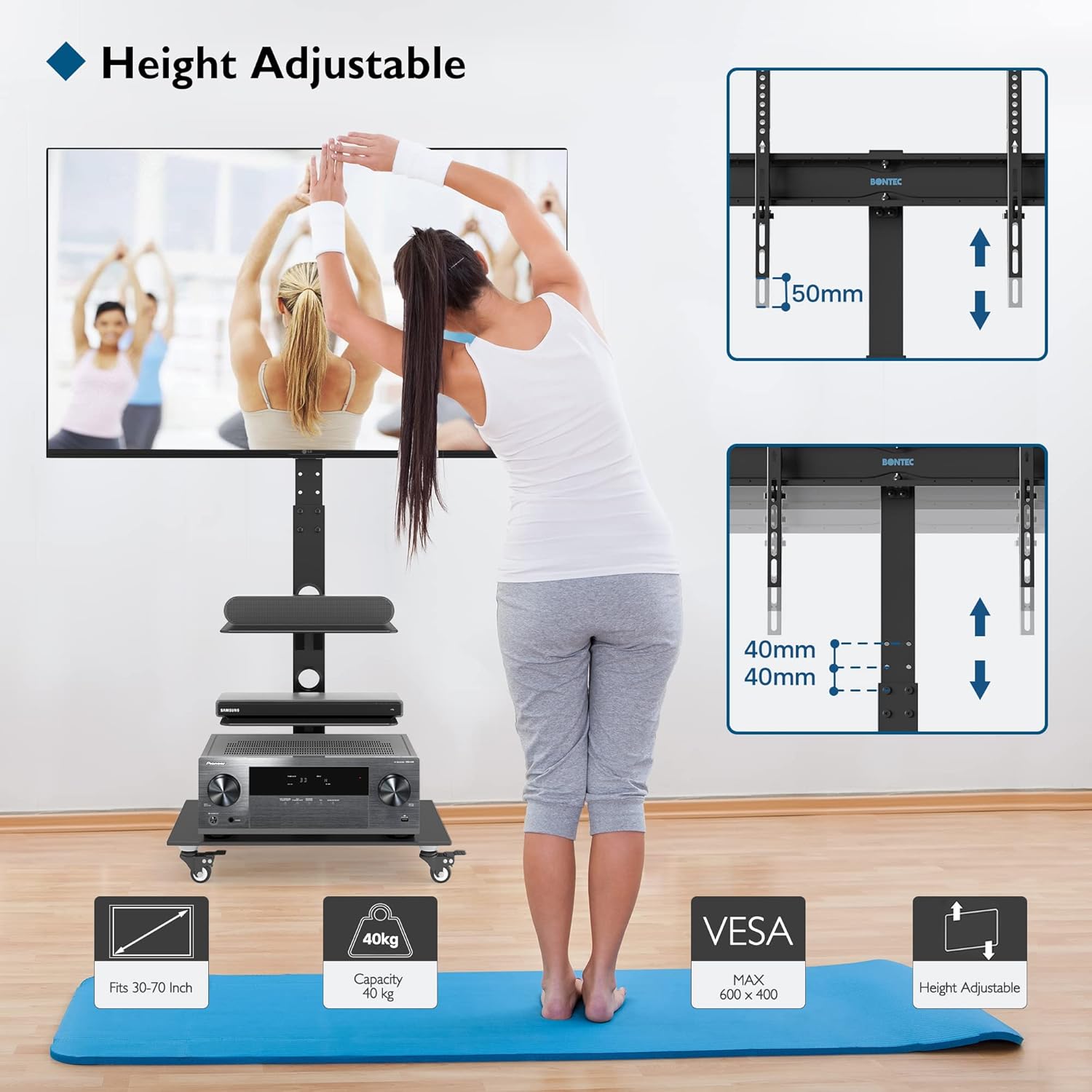
Image 5.1: Visual representation of height adjustment capabilities.
5.2 Swiveling the TV
The TV mounting bracket can swivel up to ±37° (left and right). Gently rotate the TV to achieve your optimal viewing angle. Ensure the stand's base remains stable during rotation.

Image 5.2: Illustration of the TV's swivel function.
5.3 Flytning af stativet
To move the TV stand, unlock the two locking wheels by flipping their levers. Carefully push the stand to its new location. Once positioned, engage the locking wheels to secure the stand and prevent unintended movement.
5.4 Kabelstyring
Utilize the integrated cable management system by routing your TV and device cables through the clips or openings along the main column. This helps maintain a tidy appearance and prevents cable tangles.
6. Vedligeholdelse
- Rensning: Wipe the stand and glass shelves with a soft, damp klud. Undgå slibende rengøringsmidler eller opløsningsmidler, der kan beskadige overfladen.
- Inspektioner: Kontrollér regelmæssigt alle skruer og forbindelser for at sikre, at de forbliver fastspændte. Spænd efter om nødvendigt.
- Hjulpleje: Hold hjulene fri for snavs for at sikre en jævn bevægelse.
7. Fejlfinding
- Stativet er ustabilt: Ensure all assembly screws are fully tightened. Verify the TV weight does not exceed the maximum capacity. Ensure the stand is on a flat, level surface.
- TV'et er ikke i vater: Check that the mounting arms are attached evenly to the TV and the TV mounting bracket is level on the main column. Adjust as needed.
- Difficulty moving stand: Ensure the locking wheels are disengaged. Check for any obstructions or debris around the wheels.
- TV'et passer ikke: Verify your TV's size (30-70 inches) and VESA pattern (75x75mm to 600x400mm) are compatible with the stand.
8. Specifikationer
| Feature | Specifikation |
|---|---|
| Modelnummer | A08 |
| Mærke | BONTEC |
| Materiale | Legeret stål, hærdet glas |
| Farve | Sort |
| Monteringstype | Fritstående montering |
| Kompatible tv-størrelser | 30-70 tommer |
| Maksimal tv-vægtkapacitet | 40 kg (88 lbs) |
| VESA-kompatibilitet | 75x75mm til 600x400mm |
| Drejevinkel | ±37° |
| Maksimal hældningsvinkel | 20° |
| Højdejustering | Up to 1385 mm (from floor to center of TV) |
| Upper Glass Shelf Dimensions | 380x250 mm |
| Upper Glass Shelf Capacity | 10 kg (22 lbs) |
| Bottom Glass Shelf Dimensions | 550x350 mm |
| Bottom Glass Shelf Capacity | 60 kg (132 lbs) |
| Hjul | 4 x 360° Swivel Rubber Wheels (2 lockable) |

Billede 8.1: Detaljerede dimensioner og vægtkapaciteter.
9. Garanti og support
BONTEC products are manufactured to high-quality standards. For warranty information or technical support, please refer to the documentation provided with your purchase or contact BONTEC customer service through their official channels. Please have your model number (A08) and purchase details ready when contacting support.


