
1. Introduktion
This manual provides instructions for the safe and efficient use of your TRILINK TP1-M26 8000mAh Rechargeable USB Desk Fan. This versatile fan features a powerful 8000mAh battery, 5 adjustable speeds, 360° rotation, an LED display, and remote control functionality. It is designed for various cooling needs in environments such as home, office, camping, or while using a pram.

Image 1.1: TRILINK TP1-M26 Fan with key features highlighted.
2. Sikkerhedsinstruktioner
- Læs alle instruktioner, før du bruger ventilatoren.
- Do not insert fingers or any objects into the fan grill when it is operating.
- Hold ventilatoren væk fra vand eller andre væsker for at undgå elektrisk stød.
- Do not use the fan in excessively humid or dusty environments.
- Ensure the fan is placed on a stable surface or securely clipped to prevent it from falling.
- Do not attempt to disassemble or repair the fan yourself. Contact qualified service personnel.
- Opbevares utilgængeligt for børn og kæledyr.
- Brug kun det medfølgende USB-C-kabel til opladning.
- Udsæt ikke batteriet for ekstreme temperaturer eller direkte sollys.
3. Pakkens indhold
Bekræft at alle varer er til stede i pakken:
- 1 x TRILINK TP1-M26 Rechargeable USB Desk Fan
- 1 x fjernbetjening
- 1 x USB Type-C Charging Cable (80cm)
- 1 x brugermanual
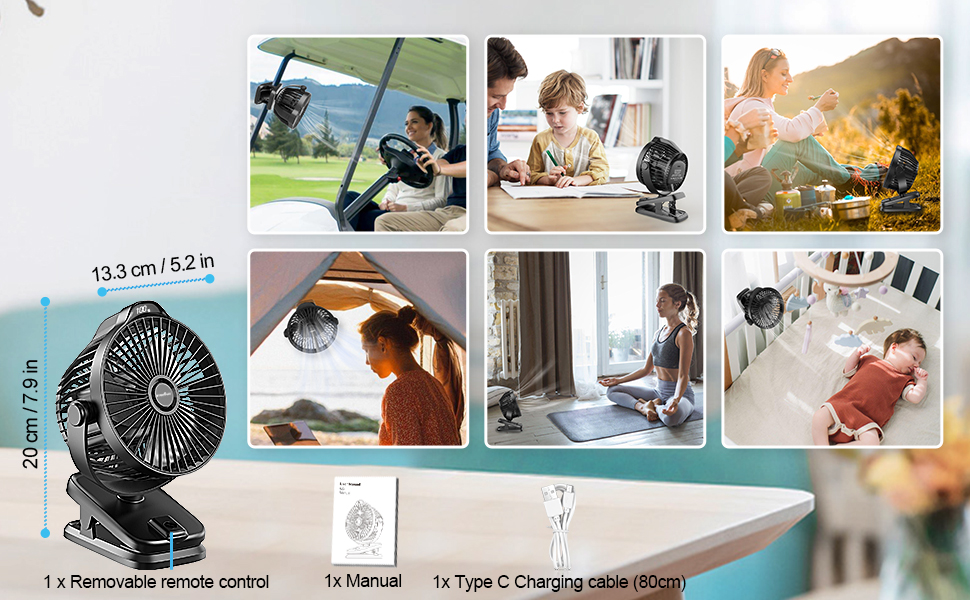
Image 3.1: Included components and fan dimensions.
4. Produktet er slutview
The TRILINK TP1-M26 fan is designed for portability and versatility. Key components include:
- Ventilatorhoved: Contains the blades and motor, adjustable for direction.
- Kontrolpanel: Located on the top of the fan head, features a touch button for power and speed adjustment.
- LED display: Integrated into the fan head, shows current wind speed and battery level.
- Clip Base: A strong clip allows attachment to various surfaces. It also serves as a stable desktop stand.
- Remote Control Slot: The remote control can be stored securely in the fan's base.
- USB-C opladningsport: Located on the side or back of the fan for convenient charging.
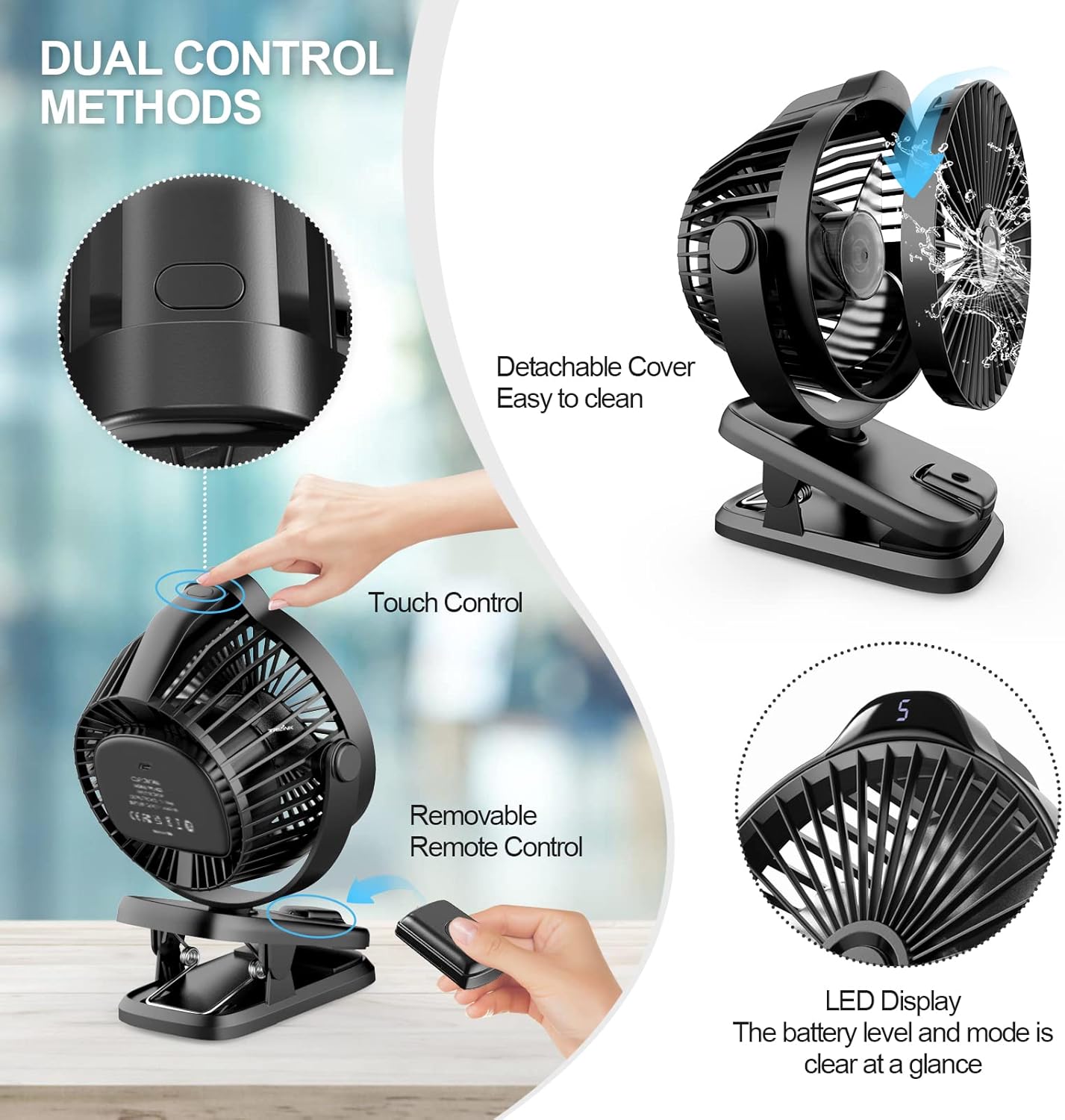
Image 4.1: Fan controls and features.

Image 4.2: Fan rotation capabilities.
5. Opsætning
5.1 Placeringsmuligheder
The TRILINK TP1-M26 fan offers multiple placement options:
- Desktopbrug: Place the fan on any flat, stable surface. The clip base provides a sturdy stand.
- Clip-on Use: Use the strong clip to attach the fan to desks, shelves, baby strollers, treadmill frames, or other suitable edges. Ensure the clip is securely fastened.
- Hængende brug: The fan can be hung from appropriate hooks or rods using the integrated hanging feature on the clip.

Image 5.1: Versatile placement options (Hang, On Table, Clip).
5.2 Adjusting Fan Direction
The fan head can be manually adjusted 360° horizontally and 270° vertically to direct airflow precisely where needed. Gently rotate the fan head to achieve the desired angle.
6. Betjeningsvejledning
6.1 Power On/Off and Speed Adjustment (Manual)
- Tænd: Press the touch control button on the top of the fan head once to turn on the fan at speed level 1.
- Juster hastighed: Each subsequent press of the touch button will cycle through the 5 available speed levels (1-5).
- Sluk: After speed level 5, pressing the button again will turn the fan off. Alternatively, press and hold the touch button for a few seconds to power off the fan directly from any speed setting.
6.2 Betjening af fjernbetjening
The included remote control allows for convenient operation from a distance of approximately 3 meters.
- Power knap: Tryk for at tænde eller slukke for blæseren.
- Hastighedsjusteringsknapper: Use the '+' and '-' buttons to increase or decrease the fan speed through the 5 levels.

Image 6.1: Remote control in use.
6.3 LED-display
The LED display on the fan head provides real-time information:
- Vindhastighed: Displays the current fan speed level (1-5).
- Batteriniveau: Viser den resterende batteriprocenttage when the fan is operating or charging.

Image 6.2: Fan modes and battery life estimates.
7. Opladning
The TRILINK TP1-M26 fan is equipped with an 8000mAh rechargeable battery, offering extended use. To charge the fan:
- Locate the USB Type-C charging port on the fan.
- Connect the provided USB Type-C cable to the fan's charging port.
- Connect the other end of the USB cable to a suitable USB power source (e.g., power bank, laptop, desktop computer, wall adapter).
- The LED display will show the battery charging status. A full charge is indicated when the display shows 100%.
A full charge can provide up to 29 hours of operation on the lowest speed setting (Mode 1).
8. Vedligeholdelse
8.1 Rengøring af blæseren
To ensure optimal performance and airflow, regularly clean the fan blades and grill.
- Ensure the fan is turned off and unplugged from any power source before cleaning.
- The front grill of the fan is detachable for easy cleaning. Gently twist or unclip the front cover as indicated in the product overview (Billede 4.1).
- Wipe the fan blades and interior surfaces with a soft, dry cloth. For stubborn dust, a slightly damp cloth can be used, ensuring no water enters the motor housing.
- Clean the exterior of the fan with a soft, dry cloth.
- Once clean and dry, reattach the front grill securely.
8.2 Opbevaring
When not in use for extended periods, store the fan in a cool, dry place, away from direct sunlight and extreme temperatures. Ensure the battery is partially charged (around 50%) before storage to prolong its lifespan.
9. Fejlfinding
| Problem | Mulig årsag | Løsning |
|---|---|---|
| Ventilatoren tænder ikke. | Batteriet er afladet. | Oplad ventilatoren med det medfølgende USB-C-kabel. |
| Ventilatoren tænder ikke. | Tænd/sluk-knappen er ikke trykket korrekt ind. | Ensure the touch control button is pressed firmly or held for a few seconds. |
| Fjernbetjeningen virker ikke. | Fjernbetjeningens batteri er lavt eller afladet. | Replace the remote control battery (typically a coin cell battery). |
| Fjernbetjeningen virker ikke. | Obstruction between remote and fan, or out of range. | Ensure a clear line of sight and operate within 3 meters of the fan. |
| Svag luftstrøm. | Fan blades or grill are dirty. | Clean the fan blades and grill as described in the Maintenance section. |
| Svag luftstrøm. | Ventilatoren er på lav hastighed. | Increase the fan speed using the touch button or remote control. |
10. Specifikationer
| Feature | Detalje |
|---|---|
| Mærke | TRILINK |
| Modelnavn | Clip On Fan |
| Modelnummer | TP1-M26 |
| Batterikapacitet | 8000mAh |
| Strømkilde | Battery Powered (USB Type-C rechargeable) |
| Antal hastigheder | 5 |
| Rotation | 360° Horizontal, 270° Vertical (manual) |
| Kontrolmetode | Knapstyring, Fjernbetjening |
| Støjniveau | 35 decibel |
| Wattage | 1.02 watt |
| Voltage | 5 volt (DC) |
| Produktmål (D x B x H) | 8D x 13.3W x 20H centimeter |
| Varens vægt | 495 gram |
| Materiale | Polypropylene, Plastic (Blade Material) |
| Særlige funktioner | Adjustable Tilt, LED Light, Portable, Quiet Operation, Remote Controlled |
11. Garanti og support
For warranty information or technical support, please refer to the documentation included with your purchase or contact TRILINK customer service. Keep your purchase receipt as proof of purchase for any warranty claims.
Contact information for support may be found on the manufacturer's webwebstedet eller på produktemballagen.