
1. Introduktion
This document serves as an instruction manual for the Generic replacement infrared remote control designed for various Air Conditioner (AC) units. This remote is compatible with specific Electra, Elco, Emailair, and Johnson AC models, including RC08B and RC08C. It is intended as a direct replacement for your original remote control, provided its appearance and button layout match the images shown in this manual.
Please ensure your original remote control is identical to the one depicted in this manual to guarantee full compatibility and functionality. This remote operates via infrared (IR) signals.
2. Opsætning
2.1 Batteriinstallation
Fjernbetjeningen kræver to (2) AAA-batterier for at fungere. Følg disse trin for at installere batterierne:
- Find batterirummets dæksel på bagsiden af fjernbetjeningen.
- Skub dækslet nedad, eller tryk på låsen (hvis den er monteret) for at åbne rummet.
- Isæt to AAA-batterier, og sørg for, at de positive (+) og negative (-) poler er justeret korrekt med markeringerne inde i batterirummet.
- Skub batteridækslet tilbage på plads, indtil det klikker sikkert.
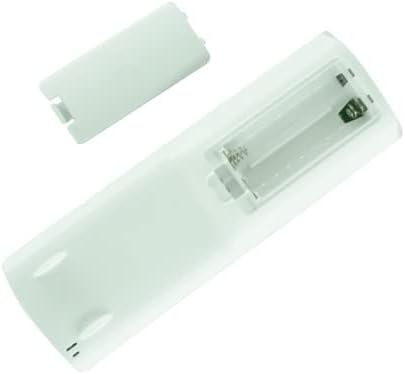
Billede: Bagside view of the remote control with the battery cover open, illustrating the correct orientation for AAA battery insertion.
Note: Brug altid nye batterier, og udskift begge batterier samtidig. Bland ikke gamle og nye batterier eller forskellige typer batterier.
3. Betjeningsvejledning
This remote control functions as an infrared transmitter. For optimal performance, point the remote directly at the infrared receiver on your AC unit. Ensure there are no obstructions between the remote and the AC unit.

Billede: Forside view of the replacement AC remote control, displaying its LCD screen and button layout.
3.1 Button Functions (Common)
The remote control features various buttons for controlling your AC unit. While specific functions may vary slightly depending on your AC model, the general purpose of common buttons is as follows:
- Tænd/sluk (rød knap): Turns the AC unit On or Off.
- Mode: Skifter mellem driftstilstande (f.eks. Køling, Varme, Ventilator, Tørring, Auto).
- Temp +/-: Justerer den ønskede temperaturindstilling.
- Blæserhastighed: Justerer ventilatorhastigheden (f.eks. Lav, Mellem, Høj, Auto).
- Svinge: Styrer lamelsvingningfunktionen.
- Sove: Activates or deactivates sleep mode for energy saving and quiet operation.
- Timer: Sets a timer for the AC unit to turn On or Off automatically.
- Lys: Controls the display light on the AC unit.
- Eco/Clean: Activates energy-saving or self-cleaning functions, if available on your AC unit.
For detailed information on specific functions and advanced settings, please refer to the original instruction manual of your Air Conditioner unit.
4. Vedligeholdelse
4.1 Rengøring af fjernbetjeningen
For at bevare fjernbetjeningens udseende og funktionalitet skal du rengøre den regelmæssigt:
- Tør overfladen af med en blød, tør klud.
- For genstridigt snavs, let dampRengør kluden med vand eller et mildt, ikke-slibende rengøringsmiddel. Spray ikke rengøringsmiddel direkte på fjernbetjeningen.
- Avoid using harsh chemicals, abrasive cleaners, or solvents, as these can damage the remote's finish or internal components.
4.2 Udskiftning af batteri
Replace batteries when the remote's range decreases or if the display becomes dim or unresponsive. Refer to Section 2.1 for battery installation instructions. Remove batteries if the remote will not be used for an extended period to prevent leakage.
5. Fejlfinding
If you experience issues with your remote control, please review følgende almindelige problemer og løsninger:
| Problem | Mulig årsag/løsning |
|---|---|
| Fjernbetjeningen reagerer ikke eller har kort rækkevidde. |
|
| Visse funktioner virker ikke. |
|
| Remote does not control the AC unit at all. |
|
Hvis fejlfindingstrinene ikke løser problemet, bedes du kontakte sælgeren for yderligere assistance.
6. Specifikationer
| Feature | Detalje |
|---|---|
| Mærke | Generisk |
| Modelkompatibilitet | Electra RC08B, RC08C; Elco RC08B, RC08C; Emailair RC08C, RC08B; Johnson RC08C, RC08B |
| Forbindelsesteknologi | Infrarød (IR) |
| Controller type | Knap kontrol |
| Batterier påkrævet | 2 x AAA batterier (medfølger ikke) |
| Speciel funktion | Replacement remote; Ergonomic design |
| Fabrikant | Nemt at prøve |
| Oprindelsesland | Kina |
7. Garanti og support
7.1 Returpolitik
This product is subject to a 30-day return policy for refund or replacement, as per the seller's terms. Please refer to your purchase details for specific return instructions and eligibility.
7.2 Kundesupport
For any questions, concerns, or issues not covered in this manual, please contact the seller directly through the platform where the purchase was made. Provide your order number and a clear description of the issue for prompt assistance.