
1. Introduktion
This manual provides essential instructions for the setup, operation, and maintenance of your DISHENGZHEN M10 11.6-inch Smart POS Terminal. This integrated system is designed for various business environments, offering a comprehensive solution for payment processing and till management. Please read this manual thoroughly before using the device to ensure proper functionality and safety.
2. Sikkerhedsoplysninger
Observe the following safety precautions to prevent damage to the device or injury to users:
- Udsæt ikke enheden for vand eller overdreven fugt.
- Undgå at placere enheden i nærheden af varmekilder eller i direkte sollys.
- Brug kun den medfølgende strømadapter.
- Forsøg ikke at åbne eller reparere enheden selv. Kontakt kvalificeret servicepersonale.
- Sørg for tilstrækkelig ventilation omkring enheden under drift.
3. Pakkens indhold
Bekræft at alle varer er til stede i pakken:
- 1 x DISHENGZHEN M10 Touch Screen Cash Register
- 3 x USB-kabler
- 1 x DC Power Adapter (100-240V/AC input, DC 12V/4A/3A output)
4. Produktet er slutview
The DISHENGZHEN M10 is an all-in-one POS terminal featuring an 11.6-inch main display and a 4.3-inch customer-facing display, integrated with a thermal printer and multiple payment acceptance options.

Figur 4.1: The DISHENGZHEN M10 Smart POS Terminal, showcasing dets elegante design og integrerede komponenter.
4.1 nøglekomponenter
- 11.6-tommer IPS HD-skærm: Main operator touch screen (1366*768 pixel or 1920*1080 pixel options).
- 4.3-inch IPS Screen Display: Customer-facing display for transaction amounts, QR codes, and advertisements.
- Integrated 80mm Thermal Printer: Built-in printer with auto-cutter function, supporting both thermal labels and thermal receipts.
- Omni-Payment Solution: Includes NFC Contactless, an inbuilt QR code reader, and a hybrid card reading payment module for various payment types.
- Operativsystem: Supports Windows 10 Pro or Android 7.1/8.1.
- Forbindelse: Multiple USB ports.

Figur 4.2: A customer using a smartphone to scan a QR code on the 4.3-inch display for payment, demonstrating the integrated payment capabilities.

Figur 4.3: Nærbillede view of the integrated 80mm thermal printer dispensing a receipt, alongside the card swipe slot for traditional card payments.

Figur 4.4: An illustrative diagram highlighting key features such as the 11.6-inch IPS Capacitive Touch screen, Windows 10/Android OS, 80mm Receipt Thermal Printer with Autocutter, and optional components like 1D/2D barcode scanner, NFC, and 4.3-inch LCD Display.

Figur 4.5: The main 11.6-inch display showing a grid of applications, including IPI-POS, alongside a thermal label being printed from the integrated printer.

Figur 4.6: The DISHENGZHEN M10 terminal displaying the Windows 10 operating system interface, demonstrating its compatibility with Windows-based POS software.
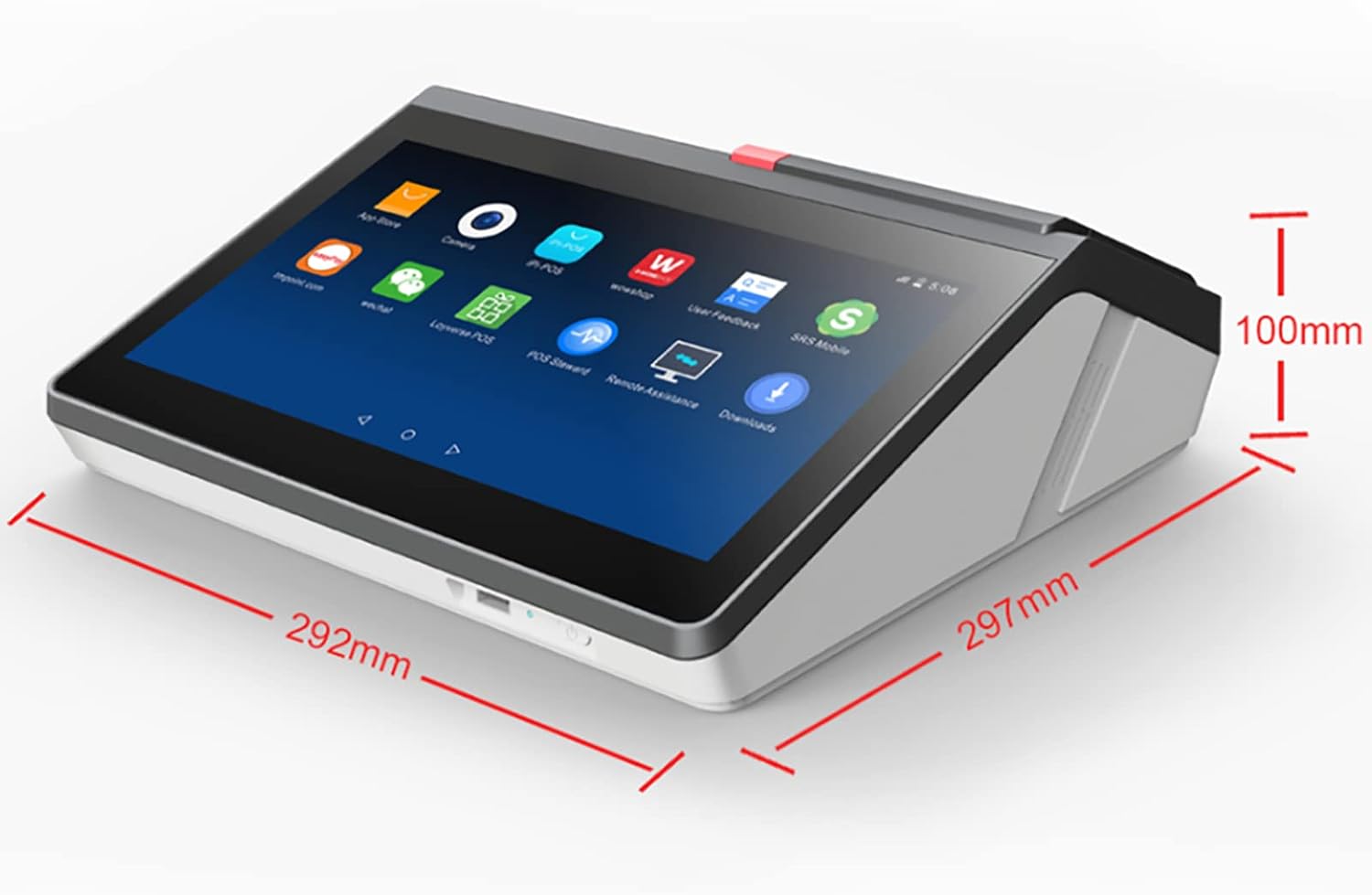
Figur 4.7: The DISHENGZHEN M10 terminal displaying the Android operating system interface, showing its versatility for Android-based POS applications.
Figur 4.8: A diagram illustrating the physical dimensions of the DISHENGZHEN M10 terminal, with measurements of approximately 292mm (width), 297mm (depth), and 100mm (height).
5. Opsætningsvejledning
5.1 Udpakning og placering
- Carefully remove the POS terminal and all accessories from the packaging.
- Place the terminal on a stable, flat surface with adequate ventilation.
- Ensure the area is free from excessive dust, moisture, and direct heat.
5.2 Strømtilslutning
- Connect the DC power adapter to the power input port on the terminal.
- Sæt strømadapteren i en passende stikkontakt.
5.3 Initial Boot and OS Selection
- Tryk på tænd/sluk-knappen for at tænde enheden.
- The system may prompt you to select the operating system (Windows 10 or Android) during the initial boot, depending on the configuration. Follow the on-screen instructions.
- Complete any initial setup steps for the chosen operating system, such as language, time zone, and network configuration.
5.4 Tilslutning af eksterne enheder
Use the provided USB ports to connect any external peripherals such as barcode scanners, external keyboards, or mice, if required.
6. Betjeningsvejledning
6.1 Betjening af berøringsskærmen
The 11.6-inch main display features a G+G Capacitive touchscreen. It is oil-proof and water-resistant, allowing operation with wet hands or gloves. Use light touches for navigation and input.
6.2 Thermal Printer Operation
6.2.1 Ilægning af termopapir
- Åbn printerdækslet.
- Insert a roll of 80mm thermal paper, ensuring the paper feeds from the bottom of the roll.
- Træk en lille mængde papir ud forbi skæreenheden.
- Luk printerdækslet godt, indtil det klikker på plads.
6.2.2 Printing Receipts and Labels
The integrated printer supports both receipt and label printing. Printing functions are typically managed through your installed POS software. Ensure the correct paper type is loaded for your desired output.
6.3 Payment Acceptance
The M10 terminal supports multiple payment methods:
- NFC Kontaktløs: For tap-to-pay transactions, instruct customers to tap their card or mobile device on the designated NFC area on the customer display.
- QR Code Reader: The inbuilt QR code reader allows customers to make payments by scanning a QR code displayed on the customer screen or by presenting a QR code from their mobile device to the reader.
- Chip Card Reader: Insert chip cards into the designated slot.
- Magnetstribelæser: Swipe cards through the magnetic stripe reader slot.
Follow the prompts on the main display and the customer display during transactions.
6.4 POS Software Usage
The terminal comes pre-configured with a POS cash register system software. Familiarize yourself with the specific functions of your installed software for sales, inventory management, reporting, and other business operations.
7. Vedligeholdelse
7.1 Rengøring af enheden
- Turn off the device and disconnect it from the power source before cleaning.
- Brug en blød, damp cloth to wipe the screen and exterior surfaces. Avoid abrasive cleaners or solvents.
- For the touchscreen, use a screen-specific cleaner if necessary, applied to the cloth, not directly to the screen.
7.2 Thermal Paper Replacement
Replace the thermal paper roll when it runs out, following the instructions in Section 6.2.1.
8. Fejlfinding
If you encounter issues with your DISHENGZHEN M10 terminal, refer to the following common problems and solutions:
| Problem | Mulig årsag | Løsning |
|---|---|---|
| Enheden tænder ikke | Power cable disconnected; Faulty power adapter; Power outlet issue | Check power cable connections; Try a different power outlet; Contact support if adapter is suspected faulty |
| Printeren udskriver ikke | No paper; Paper loaded incorrectly; Printer cover not closed; Software issue | Load new paper roll correctly; Ensure cover is latched; Check POS software printer settings |
| Touchscreen reagerer ikke | Software freeze; Screen dirty; Hardware issue | Restart the device; Clean the screen; Contact support if issue persists |
| Payment module not working | Software error; Module disabled; Hardware issue | Restart the device; Check POS software payment settings; Ensure module is clean; Contact support |
9. Specifikationer
| Feature | Detalje |
|---|---|
| Produktnavn | M10 All in One Touch Screen Android POS System |
| Type | Berøringsskærm POS-terminal |
| Hovedskærmstørrelse | 11.6 tommer IPS HD-skærm |
| Hovedskærmopløsning | 1366*768 pixels (or 1920*1080 pixel option) |
| Tryk på Type | G+G Capacitive touch screen (10-dot) |
| Kundedisplay | 4.3 tommer IPS skærm |
| CPU | Intel J1900 Quad core 2.0 Ghz (for Windows version) |
| Hukommelse | 1GB/2GB (Android), 4GB (Windows) |
| Harddisk kapacitet | 16GB/32GB |
| Operativsystem | Windows 10 Pro (with license) / Android 7.1/8.1 |
| Printer | Built-in 80mm thermal printer with autocutter |
| Udskrivningshastighed | 116mm/s (for 80mm thermal printing) |
| Betalingsmodul | NFC Contactless, Inbuilt QR code reader, Hybrid card reader |
| Forbindelse | 3 x USB-porte |
| Strømadapter | 100-240V/AC input, DC 12V/4A/3A output |
| Arbejdstemperatur | 0℃~40℃ |
| Fabrikant | DISHENGZHEN |
| ASIN | B0BWYFVRZF |
10. Garantioplysninger
This DISHENGZHEN M10 Smart POS Terminal is covered by a standard manufacturer's warranty. Please refer to your purchase documentation or contact your retailer for specific warranty terms and conditions. Keep your proof of purchase for warranty claims.
11. Support
For technical assistance, troubleshooting, or service inquiries, please contact your product vendor or the DISHENGZHEN customer support channel provided at the time of purchase. When contacting support, please have your product model (M10) and ASIN (B0BWYFVRZF) readily available.