1. Introduktion
This user manual provides detailed instructions for the installation, operation, and maintenance of your Generic DZ41-CAN Electric Bikes LCD Display. This display is specifically designed for use with M500 and BBS0102 mid-drive motors, offering a high-contrast, large-size color display for essential riding data.
Læs venligst denne manual grundigt, inden produktet tages i brug, for at sikre korrekt funktion og sikkerhed.
2. Sikkerhedsoplysninger
- Sørg altid for, at displayet er sikkert monteret, inden du kører.
- Forsøg ikke at skille skærmen ad eller ændre den. Dette kan ugyldiggøre garantien og forårsage skade.
- The display features a waterproof design, but avoid submerging it in water or exposing it to high-pressure water jets.
- Rengør skærmen med en blød,amp klæde. Brug ikke slibende rengøringsmidler eller opløsningsmidler.
- Pay attention to your surroundings while riding. Do not become overly focused on the display.
3. Pakkens indhold
Tjek venligst pakken for følgende varer:
- 1 x Generic DZ41-CAN Electric Bike Display
4. Produktet er slutview
4.1 Display Components
The DZ41-CAN display features a clear LCD screen and intuitive control buttons for easy operation.

Figur 1: Forside view of the DZ41-CAN LCD Display.

Figure 2: Close-up of the control buttons.
- LCD skærm: Displays real-time data such as speed, battery level, assistance level, trip distance, and error messages.
- '+'-knap: Increases assistance level, navigates up in menus.
- '-' Knap: Decreases assistance level, navigates down in menus.
- 'M' (Tilstand)-knap: Powers on/off, confirms selections, switches display modes.
4.2 Dimensioner
The compact design ensures it fits well on most handlebars.
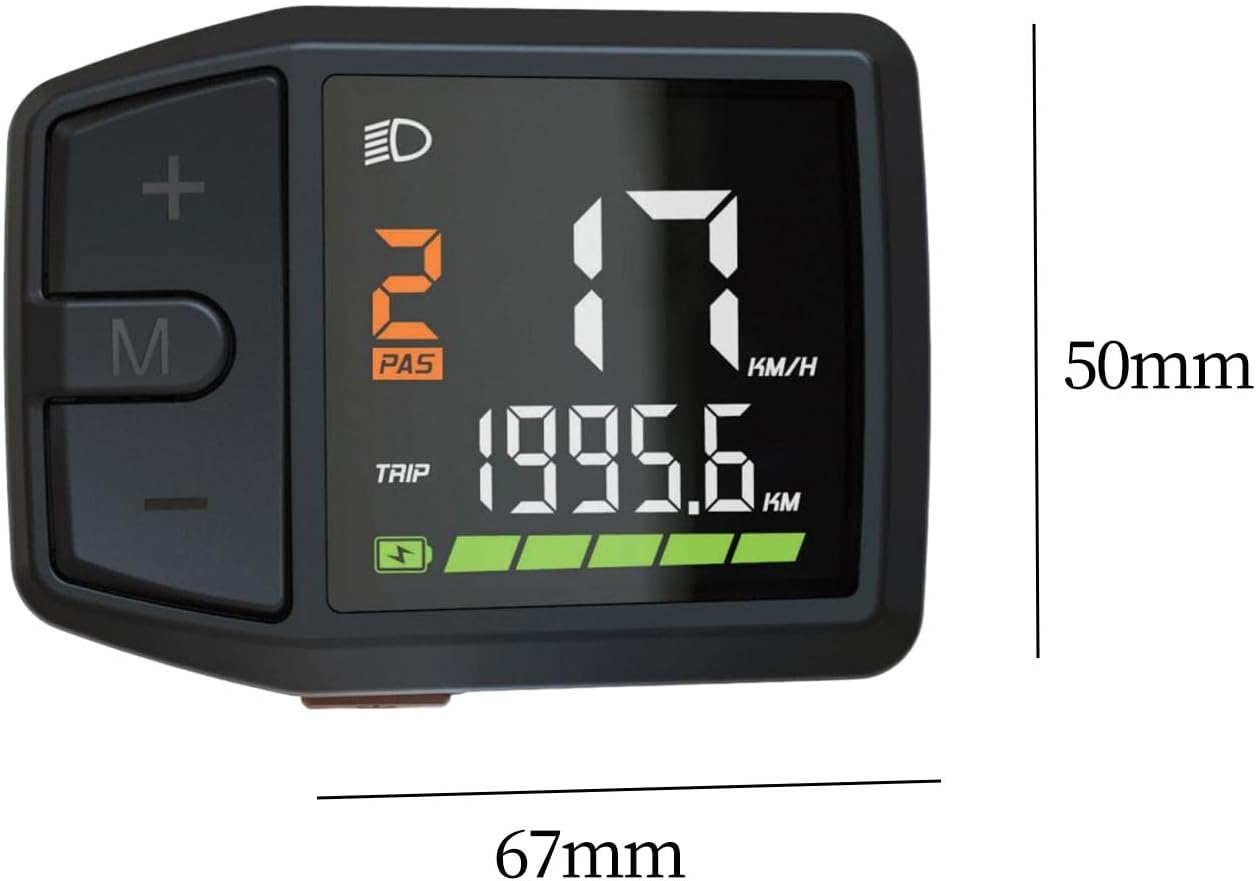
Figure 3: Display dimensions (approx. 67mm x 50mm).
5. Opsætning og installation
The DZ41-CAN display is designed for easy integration with M500 and BBS0102 mid-drive motors.
- Montering: Securely attach the display to your e-bike's handlebar using the provided mounting bracket. Ensure it is positioned for clear visibility and easy access to buttons.
- Kabelforbindelse: Connect the display's cable to the corresponding port on your e-bike's motor system (M500 or BBS0102). Ensure the connection is firm and secure.
- Kabelstyring: Route the cable neatly along the bike frame, securing it with cable ties to prevent interference with moving parts.
- Indledende kontrol: After installation, perform a quick check to ensure all connections are secure and the display powers on correctly.
6. Betjeningsvejledning
6.1 Tænd/sluk
- For at tænde: Press and hold the 'M' button for approximately 2 seconds until the display illuminates.
- For at slukke: Press and hold the 'M' button for approximately 2 seconds until the display turns off.
6.2 Displayfunktioner
The display provides comprehensive data for your ride:
- Hastighed: Current riding speed (KM/H or MPH).
- Batteriniveau: Real-time battery charge indicator.
- Assistance Level (PAS): Current pedal assist level (e.g., 0-5 or 0-9).
- Rejseafstand: Tilbagelagt afstand under den aktuelle tur.
- Total Odometer: Samlet tilbagelagt distance af cyklen.
- Forlygteindikator: Icon illuminates when headlights are active.
- Fejlmeddelelser: Displays codes or symbols for system malfunctions.
6.3 Knapfunktioner
- '+'-knap: Short press to increase pedal assistance level. Long press may activate walk mode or enter settings.
- '-' Knap: Short press to decrease pedal assistance level. Long press may activate walk mode or enter settings.
- 'M'-knap: Short press to cycle through display modes (e.g., Trip, Odometer, Max Speed, Avg Speed). Long press to power on/off.
6.4 Justering af indstillinger
Specific settings adjustments (e.g., unit conversion, wheel size) may be accessible through a combination of button presses. Refer to your e-bike's main controller manual for detailed instructions on advanced settings, as the display acts as an interface.
7. Vedligeholdelse
- Rensning: Regularly wipe the display screen and body with a soft, lint-free, damp cloth. Avoid using harsh chemicals or abrasive materials that could scratch the screen.
- Opbevaring: Når elcyklen og displayet ikke er i brug i længere perioder, skal de opbevares køligt og tørt, væk fra direkte sollys og ekstreme temperaturer.
- Kabelinspektion: Periodically check the display cable and connectors for any signs of wear, damage, or corrosion. Ensure connections remain secure.
8. Fejlfinding
If you encounter issues with your DZ41-CAN display, refer to the table below for common problems and solutions.
| Problem | Mulig årsag | Løsning |
|---|---|---|
| Skærmen tændes ikke. | Loose cable connection; Low e-bike battery; Faulty display. | Check all cable connections; Charge e-bike battery; Contact support if issue persists. |
| Ingen hurtiglæsning. | Speed sensor issue; Loose motor connection. | Check speed sensor alignment and connection; Ensure motor connection is secure. |
| Forkerte data vises. | Incorrect settings (e.g., wheel size); Sensor malfunction. | Verify settings through the display or e-bike controller; Check sensor for damage. |
| Displayet viser en fejlkode. | System malfunction; Specific component error. | Refer to your e-bike's main controller manual for error code definitions and solutions. |
9. Specifikationer
| Feature | Detalje |
|---|---|
| Model | DZ41-CAN |
| Kompatibilitet | Bafang M500, BBS0102 mid-drive motors |
| Display Type | LCD, High Contrast Color |
| Skærmstørrelse | 6.7 centimeter |
| Materiale | PP and PC |
| Vandtæt design | Ja |
| Monteringstype | Styrmontering |
| Human Interface Input | Knapper |
| Farve | Sort |
10. Garanti og support
For warranty information and technical support, please refer to the documentation provided with your e-bike or contact the seller directly. Keep your purchase receipt as proof of purchase.

