
Indledning
This manual provides essential information for the safe and efficient use of your ONN 42-Inch Full HD LED Smart TV, Model 100018254. Please read these instructions thoroughly before operating your television and retain them for future reference.
Hvad er der i æsken
Bekræft, at alle komponenter er til stede, før du fortsætter med opsætningen.
- ONN 42-Inch Full HD LED Smart TV
- Fjernbetjening
- TV-bord (2 stk.)
- Skruer til TV-stativ
- Strømledning
- Lynstartguide (ikke inkluderet i denne manual)

Billede: Forside view of the ONN 42-inch Smart TV displaying the Roku TV home screen with various streaming app icons like Netflix, Disney+, Apple TV, Hulu, Peacock, and Roku Channel. The TV is black with slim bezels and two stand feet.
Opsætning
1. Montering af tv-stativet
- Placer forsigtigt tv-skærmen med nedad på en blød, ren overflade for at forhindre skader.
- Juster hvert stativstykke med de tilsvarende skruehuller i bunden af tv'et.
- Fastgør hvert stativstykke med de medfølgende skruer. Sørg for, at de er spændt godt fast.

Image: A diagram illustrating the dimensions of the ONN 42-inch TV, showing its width as 43 inches and height as 37 inches when placed on its stand.
2. Vægmontering (valgfrit)
This TV is compatible with VESA standard wall mounts. Refer to your wall mount's instructions for proper installation. Ensure the wall mount can support the weight of the television.

Billede: Bagside view of the ONN 42-inch TV, highlighting the VESA mounting screw holes in a square pattern and various input ports on the side and bottom right.
3. Tilslutning af enheder
Connect your external devices such as cable boxes, gaming consoles, or Blu-ray players to the TV's input ports.
- HDMI: For high-definition audio and video. Use an HDMI cable to connect devices like set-top boxes, game consoles, or streaming sticks.
- USB: Til tilslutning af USB-lagerenheder for at afspille medier files.
- Wi-Fi: For internet connectivity to access smart TV features and streaming services.
4. Guide til første opstart og opsætning
- Sæt netledningen i tv'et og derefter i en stikkontakt.
- Tryk på tænd/sluk-knappen på fjernbetjeningen eller på selve tv'et.
- Follow the on-screen instructions to complete the initial setup, including language selection, network connection (Wi-Fi), channel scanning, and linking to your Roku account (if applicable).
Betjening af tv'et
1. Fjernbetjening overview
The remote control allows you to navigate the TV's interface and control various functions.
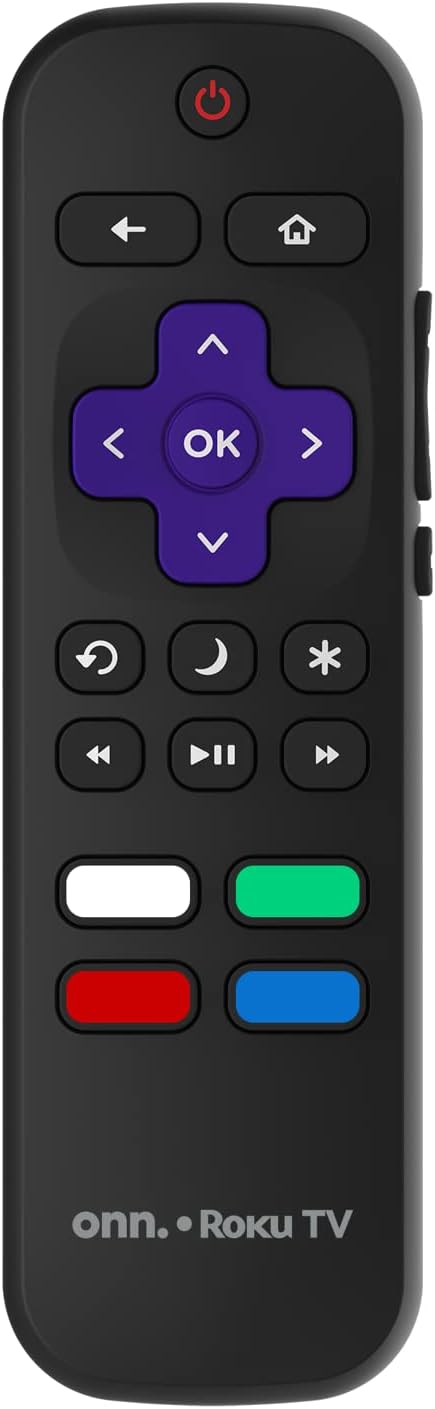
Image: The ONN Roku TV remote control, featuring a power button, directional pad, OK button, home button, back button, volume controls, and dedicated buttons for popular streaming services.
- Power knap: Tænder eller slukker for tv'et.
- Directional Pad (D-Pad) & OK: Navigerer i menuer og bekræfter valg.
- Hjemknappen: Vender tilbage til Roku TV-startskærmen.
- Tilbage knap: Vender tilbage til den forrige skærm eller menu.
- Lydstyrke op/ned: Justerer lydstyrken.
- Mute-knap: Slår lyden fra eller til.
- Kanal op/ned: Skifter kanal (for antenne-/kabelindgange).
- Dedikerede app-knapper: Quick access to popular streaming services like Netflix, Hulu, etc.
2. Smart TV-funktioner
Your ONN Smart TV provides access to a wide range of streaming content and smart functionalities.
- Streamingtjenester: Access pre-installed apps like Netflix, YouTube, and many more through the Roku Channel Store.
- Stemmestyring: Compatible with Alexa and Google Assistant for hands-free control (requires a separate compatible voice assistant device).
- Automatiske softwareopdateringer: The TV will automatically update its software when connected to the internet, ensuring you have the latest features and security.
3. Valg af input
To switch between connected devices (e.g., cable box, game console), use the Input button on your remote or select the desired input from the Roku TV home screen.
4. Billed- og lydindstillinger
Access the TV's settings menu to customize picture and sound preferences. Navigate to Indstillinger > TV-billedindstillinger or Indstillinger> Lyd to adjust options like brightness, contrast, color, sound mode, and equalizer settings.
Opretholdelse
1. Rengøring af skærmen
- Always turn off the TV and unplug it before cleaning.
- Brug en blød, fnugfri klud, let drænetamprengøres med vand eller en specialiseret skærmrenser.
- Sprøjt ikke rengøringsmiddel direkte på skærmen. Påfør det først på kluden.
- Undgå at bruge slibende rengøringsmidler, alkohol, benzen eller fortyndere, da disse kan beskadige skærmen.
2. Softwareopdateringer
Ensure your TV is connected to the internet to receive automatic software updates. These updates improve performance, add features, and enhance security. You can manually check for updates in the Indstillinger > System > Systemopdatering menu.
Fejlfinding
Hvis du støder på problemer med dit tv, kan du bruge følgende almindelige løsninger:
Ingen strøm
- Kontroller, om netledningen er korrekt tilsluttet både tv'et og stikkontakten.
- Kontroller, at stikkontakten fungerer ved at tilslutte en anden enhed.
- Prøv at trykke på tænd/sluk-knappen på selve tv'et, ikke kun på fjernbetjeningen.
Intet billede / Forvrænget billede
- Sørg for, at den korrekte inputkilde er valgt (f.eks. HDMI 1, HDMI 2).
- Kontrollér alle kabelforbindelser mellem tv'et og eksterne enheder.
- Try a different HDMI cable if possible.
- Juster billedindstillingerne (lysstyrke, kontrast) i tv-menuen.
Ingen lyd / Lav lyd
- Check if the TV is muted or if the volume is turned down.
- Ensure external audio devices (soundbars, receivers) are properly connected and powered on.
- Kontroller lydindstillingerne i tv-menuen.
Problemer med netværksforbindelse
- Kontroller, at din Wi-Fi-router er tændt og fungerer.
- Genstart din router og dit modem.
- Gå til Indstillinger > Netværk > Kontroller forbindelse på dit tv for at diagnosticere problemet.
- Sørg for, at du indtaster den korrekte Wi-Fi-adgangskode.
Specifikationer
| Feature | Detalje |
|---|---|
| Modelnummer | 100018254 |
| Skærmstørrelse | 42 tommer |
| Displayteknologi | LED |
| Opløsning | 1080p (Full HD) |
| Opdateringshastighed | 60 Hz |
| Forbindelse | USB, Wi-Fi |
| Understøttede internettjenester | Netflix, YouTube (and others via Roku platform) |
| Kontrolmetode | Voice (via Alexa & Google Assistant compatible devices), Remote Control |
| Monteringstype | Vægmontering (VESA-kompatibel) |
| Farve | Sort |
| UPC | 671227025567 |

Image: Energy Guide label for Television Model 100018254, indicating an estimated yearly energy cost of $11 based on 12 cents per kWh and 5 hours use per day.
Garanti og support
For warranty information and technical support, please refer to the documentation included with your purchase or visit the official ONN support webwebsted. Gem din købskvittering for garantikrav.