
1. Introduktion
This manual provides detailed instructions for the installation, operation, and maintenance of your DS18 RV.R1 RV Headunit. Please read this manual thoroughly before using the product to ensure proper function and to prevent damage.
2. Produktet er slutview
The DS18 RV.R1 is a wall-mounted stereo receiver designed for recreational vehicles, offering a comprehensive audio and multimedia experience. It features a clear LCD screen, multiple connectivity options, and dual-zone audio control.

Billede 2.1: Forside view of the DS18 RV.R1 RV Headunit, showcasindens display og betjeningselementer.
Nøglefunktioner:
- 2-Zone Audio Control: Manage audio in two separate areas of your RV.
- Høj voltage Præamp Udgange: 2.5V for main zones and 4V for subwoofer output.
- FM/AM Radio with RDS: Enjoy radio broadcasts with 18 FM and 12 AM preset stations.
- Multimedieafspilning: USB input for MP3/WMA files (up to 64GB) and HDMI pass-through for TV integration.
- Bluetooth v5.0: Wireless audio streaming and connectivity.
- Integreret Amplivligere: 4 channels x 17W continuous power at 4 ohms (50W max).
- 2-bånds equalizer: Adjustable Bass (100Hz) and Treble (10KHz) with +/- 7dB gain.
3. Opsætning og installation
The RV.R1 is designed for wall-mounted installation. Ensure you have adequate space and proper wiring before beginning. Professional installation is recommended.
3.1 Ledningsforbindelser
Refer to the wiring diagram on the unit's chassis and the included harness for correct connections. Key connections include power, ground, speaker outputs, RCA outputs, USB, HDMI, and auxiliary input.
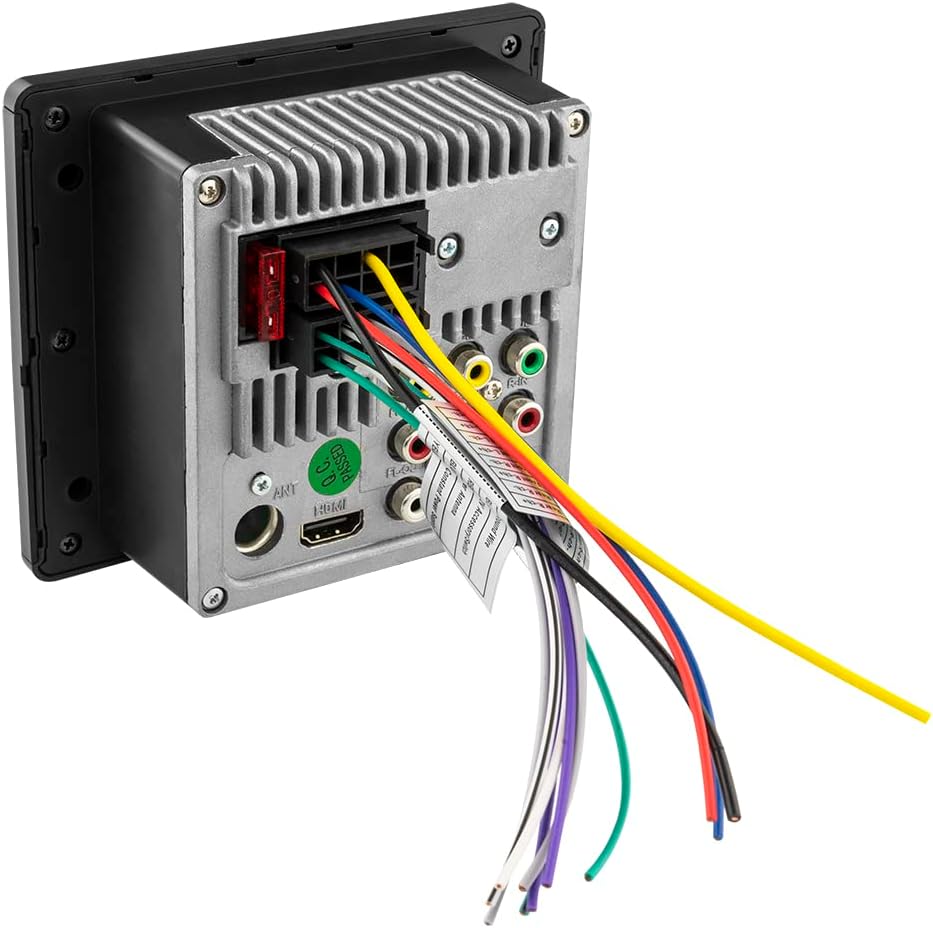
Billede 3.1: Bagside view of the RV.R1, illustrating the wiring harness, RCA outputs, HDMI port, and fuse location.
3.2 Dimensioner
The unit's dimensions are approximately 1.83 inches (D) x 5.1 inches (W) x 4.43 inches (H). Ensure your mounting location accommodates these measurements.

Image 3.2: Dimensional drawing of the RV.R1 for installation planning.
4. Betjeningsvejledning
The RV.R1 features an intuitive interface with a central rotary knob and dedicated buttons for various functions.
4.1 Tænd/sluk og valg af kilde
- Tryk på O/SRC knappen for at tænde eller slukke enheden.
- Tryk kort på O/SRC button to cycle through available audio sources (FM, AM, Bluetooth, USB, AUX, HDMI).
4.2 Volume and Menu Control
- Drej den centrale knap for at justere lydstyrken.
- Press the central knob to access the menu for audio settings (Bass, Treble, Balance, EQ, Loudness) and other system configurations. Rotate the knob to navigate and press to select.
4.3 Radiobetjening (FM/AM)
- Select FM or AM source.
- Brug Band button to switch between FM1, FM2, FM3, AM1, AM2 bands.
- Brug Søge knapper (|< og >>|) to tune to the next/previous station.
- Press and hold a preset button (1-6) to save the current station. Short press to recall a saved station.
4.4 USB-afspilning
- Indsæt et USB-drev, der indeholder MP3 eller WMA files into the front USB port. The unit will automatically switch to USB source and begin playback.
- Brug Afspil/pause, Næste/Forrige spor, Gentage, og Tilfældig knapper til kontrol.
5. Forbindelse
5.1 Bluetooth -parring
- Select Bluetooth as the source. The unit will enter pairing mode.
- On your mobile device, search for "DS18 RV.R1" and connect.
- Når den er parret, kan du streame lyd trådløst fra din enhed.
5.2 HDMI Pass-Through
The RV.R1 includes an HDMI pass-through feature, allowing you to integrate your TV's audio into the RV.R1's sound system. Connect your TV's HDMI output to the RV.R1's HDMI input, and the RV.R1's HDMI output to another display if needed.
5.3 USB-port
The front USB port supports media playback and can also provide charging for compatible devices.
5.4 Hjælpeindgang
Connect external audio devices using a 3.5mm auxiliary cable to the front AUX input.
6. Lydfunktioner
6.1 2-bånds equalizer
Adjust the bass and treble frequencies to customize your sound. The bass control operates at 100Hz, and the treble control at 10KHz, both with a gain range of +/- 7dB.
6.2 Dual Zone Control
The RV.R1 allows for independent volume control over two separate audio zones, enabling different listening experiences in various areas of your RV.
6.3 Præamp Udgange
For enhanced audio systems, the unit provides 2.5V preamp outputs for the main zones and a dedicated 4V preamp output for a subwoofer, allowing connection to external amplivførere.
7. Specifikationer
| Feature | Specifikation |
|---|---|
| Modelnummer | RV.R1 |
| Udgangseffekt (kontinuerlig) | 4 x 17W @ 4 ohms (14.4V) |
| Udgangseffekt (maks.) | 4 x 50W @ 4 ohms (14.4V) |
| Pre-output Level (Zones 1/2) | 2.5 Volts (14.4V) |
| Pre-output Level (Subwoofer) | 4 Volts (14.4V) |
| Equalizer bånd | 2 Bands (Bass: 100Hz, Treble: 10KHz) |
| Equalizer Gain | +/- 7 dB |
| Forbindelsesteknologi | USB, RCA, HDMI, Auxiliary, Bluetooth |
| Bluetooth version | v5.0 |
| USB Reader Capacity | Op til 64 GB |
| Understøttede lydformater | MP3, WMA |
| HDMI porte | 2 (1 input, 1 output for pass-through) |
| Radiofunktioner | FM (18 presets), AM (12 presets), RDS |
| Varedimensioner (D x B x H) | 1.83 cm x 5.1 cm x 4.43 cm |
| Sikring | 10A |
Video 7.1: En overview of the DS18 RV.R1 RV Headunit, detailing its features and connectivity options.
8. Vedligeholdelse
8.1 Rengøring
To maintain the unit's appearance and functionality, regularly wipe the screen and buttons with a soft, dry cloth. Avoid using abrasive cleaners or solvents.
8.2 Udskiftning af sikringer
The unit is equipped with a 10A fuse located at the rear. If the unit fails to power on or experiences electrical issues, check and replace the fuse if necessary. Always use a fuse of the correct rating (10A) to prevent damage.
9. Fejlfinding
If you encounter issues with your RV.R1 headunit, refer to the following common troubleshooting steps:
- Ingen strøm: Check all power connections, including the 10A fuse at the rear of the unit. Ensure the vehicle's battery has sufficient charge.
- Ingen lyd: Verify speaker connections, volume levels, and selected audio source. Check if the mute function is active.
- Problemer med Bluetooth-forbindelse: Ensure Bluetooth is enabled on your device and the RV.R1 is in pairing mode. Try unpairing and re-pairing the device.
- USB-afspilningsfejl: Ensure the USB drive is formatted correctly (FAT32) and contains supported audio files (MP3, WMA). Try a different USB drive.
- Dårlig radiomodtagelse: Kontroller antenneforbindelsen. Sørg for, at du befinder dig i et område med god signalstyrke.
For persistent issues, contact DS18 customer support.
10. Garanti og support
10.1 Garantioplysninger
The DS18 RV.R1 RV Headunit comes with a 1 års begrænset garanti fra købsdatoen. Denne garanti dækker fabrikationsfejl og udførelse under normal brug. Gem venligst din købsbevis i tilfælde af garantikrav.
10.2 Kundesupport
For technical assistance, warranty inquiries, or further information, please visit the official DS18 website or contact their customer support department. Contact details can typically be found on the manufacturer's webwebsted eller produktemballage.
11. Hvad er der i æsken
The product package for the DS18 RV.R1 RV Headunit includes:
- DS18 RV.R1 Stereo Headunit Receiver