
1. Introduktion
This manual provides detailed instructions for the installation, operation, and maintenance of your TP-Link Deco X50-Outdoor AX3000 Whole Home Mesh WiFi 6 Unit. The Deco X50-Outdoor is designed to extend your mesh WiFi network to outdoor and indoor spaces, providing robust and stable wireless connectivity. Please read this manual thoroughly before using the device to ensure proper setup and optimal performance.
2. Sikkerhedsoplysninger
Følg altid disse grundlæggende sikkerhedsforanstaltninger for at mindske risikoen for brand, elektrisk stød og personskade:
- Udsæt ikke denne enhed for vand eller fugt.
- Forsøg ikke at adskille, reparere eller modificere enheden.
- Brug kun den strømadapter, der følger med enheden.
- Ensure the device is installed in a stable location to prevent it from falling.
- Hold enheden væk fra varmekilder og direkte sollys.
- For outdoor installation, ensure all cable connections are properly sealed to prevent water ingress.
3. Pakkens indhold
Bekræft, at din pakke indeholder følgende varer:
- 1 x TP-Link Deco X50-Outdoor Unit
- 1 x strømadapter
- 1 x Ethernet-kabel
- Mounting Kit (includes mounting bracket, screws, and wall plugs)
- Hurtig installationsvejledning

Image: The retail packaging for the TP-Link Deco X50-Outdoor unit, showing the device and its key features.
4. Produktet er slutview
The Deco X50-Outdoor is a cylindrical, white unit designed for both outdoor and indoor use. It features an IP65 rating for waterproof and dustproof protection, making it suitable for various weather conditions.
4.1 Enhedslayout

Billede: Forside view of the TP-Link Deco X50-Outdoor unit, showcasing its sleek, cylindrical design and 'deco outdoor' branding.

Image: The bottom of the Deco X50-Outdoor unit, revealing the port cover and the attachment point for the mounting bracket.
4.2 Porte og knapper
Under the protective cover at the bottom of the unit, you will find the following:
- PoE -port: Used for Power over Ethernet (PoE) connection, providing both power and data through a single Ethernet cable.
- LAN Ports (2): For connecting wired devices or for backhaul connection to other Deco units.
- Strømport: For connecting the included power adapter when not using PoE.
- Nulstil knap: A small button to reset the device to factory settings.

Billede: Et nærbillede view of the PoE and AC power supply ports located at the base of the Deco X50-Outdoor unit, with labels indicating their functions.
5. Opsætning
Follow these steps to set up your Deco X50-Outdoor unit. It is recommended to use the TP-Link Deco app for a guided setup process.
5.1 Download the Deco App
- Scan the QR code in the Quick Installation Guide or search for "TP-Link Deco" in the App Store or Google Play.
- Download og installer Deco-appen på din smartphone eller tablet.
5.2 Fysisk installation
The Deco X50-Outdoor can be mounted on a pole, wall, or placed on a tabletop.
- Vælg en placering: Select a location that provides optimal WiFi coverage and is within range of your existing Deco network (if extending). For outdoor use, ensure it's protected from direct impact and accessible for power/Ethernet.
- Montering:
- Stangmontering: Use the provided straps to secure the mounting bracket to a pole.
- Vægbeslag: Drill holes, insert wall plugs, and screw the mounting bracket to the wall.
- Bordplade: Simply place the unit on a flat, stable surface.
- Tilslut strøm:
- Brug af strømadapter: Connect the provided power adapter to the power port and plug it into an electrical outlet.
- Brug af PoE: Connect an Ethernet cable from a PoE-enabled switch or injector to the PoE port on the Deco unit.
- Connect to Existing Network (Optional): If you are using the Deco X50-Outdoor as a satellite unit, it will connect wirelessly to your main Deco unit. For a wired backhaul, connect an Ethernet cable from one of the LAN ports to your main Deco unit or network switch.

Image: The Deco X50-Outdoor unit securely mounted on an outdoor pole, demonstrating a typical installation scenario.
5.3 App-Guided Setup
- Åbn Deco-appen, og log ind med dit TP-Link-ID. Hvis du ikke har et, skal du oprette en konto.
- Tap the "+" icon in the top right corner to add a new Deco unit.
- Select your Deco model (X50-Outdoor) and follow the on-screen instructions to complete the setup. The app will guide you through connecting the unit and integrating it into your existing Deco mesh network.
6. Betjening
Once set up, your Deco X50-Outdoor unit will automatically integrate into your mesh network, providing seamless WiFi coverage. You can manage your network using the TP-Link Deco app.
6.1 Deco App Features
Deco-appen giver dig mulighed for at:
- View connected devices and their status.
- Opret et gæstenetværk.
- Administrer forældrekontrol.
- Prioritize devices for optimal performance (QoS).
- Access HomeShield Security features.
- Opdater firmware.
- Monitor network health and usage.
6.2 LED-indikatorstatus
The LED on your Deco unit indicates its status:
- Solid grøn: Decoen fungerer korrekt.
- Pulserende grøn: Deco starter op.
- Fast rød: Deco har et problem (f.eks. ingen internetforbindelse).
- Pulserende rød: Deco is disconnected from the main Deco unit.
- Ensfarvet blå: Deco er klar til opsætning.
- Pulserende blå: Deco is pairing via Bluetooth.
7. Vedligeholdelse
Regular maintenance ensures the longevity and optimal performance of your Deco X50-Outdoor unit.
7.1 firmwareopdateringer
Keep your Deco's firmware updated to benefit from the latest features, security enhancements, and bug fixes. You can check for and install updates via the Deco app.
7.2 Rengøring
Wipe the device with a soft, dry cloth. Do not use liquid cleaners or chemical sprays.
7.3 Miljøhensyn
Despite its outdoor rating, avoid placing the unit in locations where it is constantly submerged in water or exposed to extreme physical impact.
8. Fejlfinding
If you encounter issues with your Deco X50-Outdoor, try the following solutions:
8.1 Ingen internetforbindelse
- Check the LED status. If solid red, ensure your main Deco unit has an internet connection.
- Verify that the Ethernet cable (if used) is securely connected.
- Restart your modem, main Deco unit, and then the X50-Outdoor unit.
8.2 Deco X50-Outdoor Disconnected
- Ensure the unit is within range of your main Deco or another satellite Deco.
- Kontroller strømforbindelsen.
- Try relocating the unit to a closer position to the main Deco.
8.3 Slow WiFi Speed
- Ensure the unit is placed in an open area, free from obstructions.
- Se efter firmwareopdateringer.
- Use the Deco app to run a network optimization test.
8.4 Fabriksindstilling
If issues persist, you may need to perform a factory reset. With the Deco unit powered on, use a pin to press and hold the Reset button until the LED turns solid red (approximately 1 second), then release. The unit will restart with factory default settings.
9. Specifikationer
Technical details for the TP-Link Deco X50-Outdoor unit:
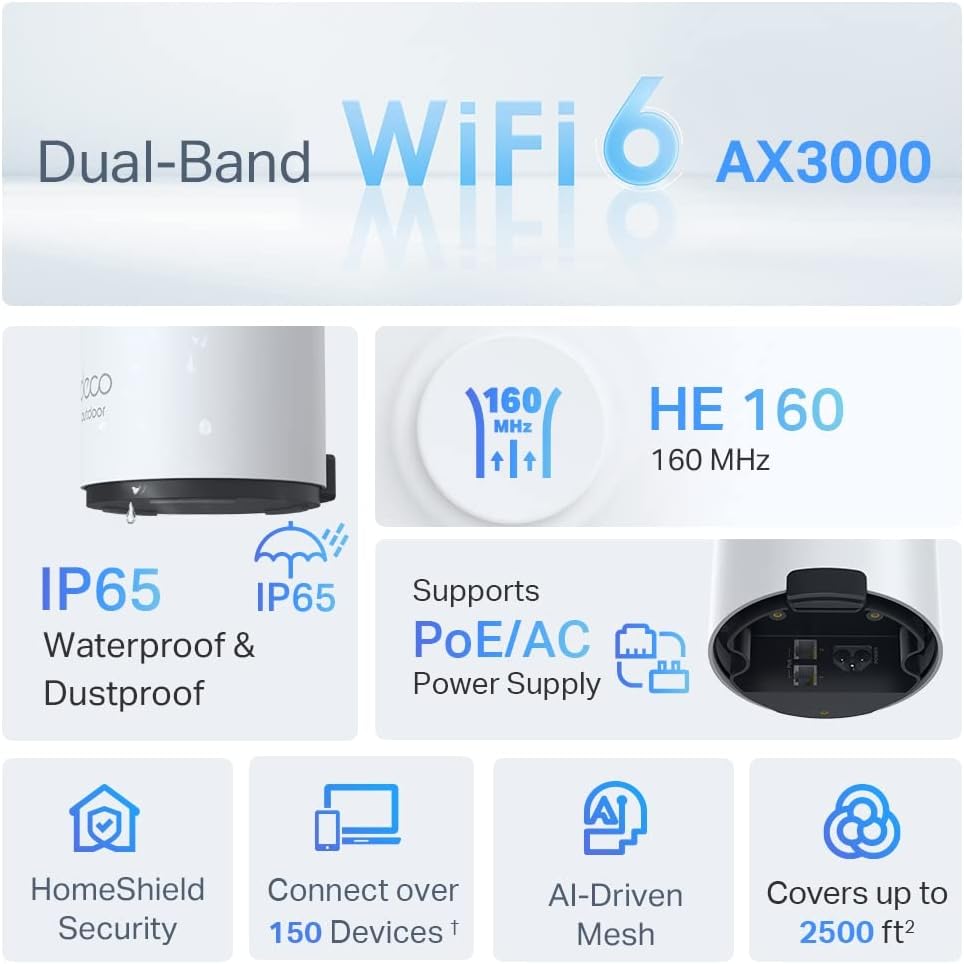
Image: An infographic highlighting key features of the Deco X50-Outdoor, including Dual-Band WiFi 6, AX3000 speeds, IP65 rating, PoE/AC power support, HomeShield Security, support for over 150 devices, AI-Driven Mesh, and up to 2500 sq ft coverage.
| Feature | Detalje |
|---|---|
| Modelnavn | AX3000 Outdoor Whole Home Mesh WiFi 6 Unit |
| Trådløs Standard | Wi-Fi 6 (802.11ax) |
| Frekvensbåndsklasse | Dual-Band |
| Dataoverførselshastighed | Op til 2402 Mbps (5 GHz) + 574 Mbps (2.4 GHz) |
| Forbindelsesområde | Up to 2000 Square Feet (per unit) |
| Havne | 2 x Gigabit Ethernet Ports (Auto-sensing WAN/LAN) |
| Strømforsyning | PoE (802.3at) or AC Power Adapter (240V AC) |
| Vejrbestandighed | IP65 (Vandtæt og støvtæt) |
| Sikkerhedsprotokol | WPA, WPA2, WPA3 |
| Kontrolmetode | TP-Link Deco App |
| Varens vægt | 0.9 kilo |
10. Garanti og support
For garantioplysninger og teknisk support henvises til den officielle TP-Link-side. webwebsted eller kontakt deres kundeservice.
- TP-Link Officiel Webwebsted: www.tp-link.com
- Teknisk support: Besøg supportsektionen på TP-Link webwebsted for ofte stillede spørgsmål, fejlfindingsvejledninger og kontaktoplysninger.