
Profile PHNT12CC
Profile PHNT12CC Clearview Klimaanlæg brugervejledning
Mærke: Profile | Model: PHNT12CC
1. Introduktion og overview
Profile PHNT12CC Clearview Air Conditioner is an Energy Star certified window unit designed for efficient and quiet cooling of medium rooms up to 550 square feet. Featuring innovative inverter technology and a unique design that maintains full window view, this air conditioner offers advanced comfort and convenience.
Key features include ultra-quiet operation, an industry-exclusive flex-depth for custom fit, and built-in Wi-Fi for smart control via the SmartHQ app.
2. Sikkerhedsoplysninger
Læs alle sikkerhedsinstruktioner omhyggeligt inden installation og betjening for at forhindre personskade eller beskadigelse. Gem denne manual til senere brug.
- Always ensure the unit is properly grounded. Do not use extension cords or adapter plugs.
- Afbryd strømmen før servicering eller rengøring af enheden.
- Brug ikke klimaanlægget med en beskadiget netledning eller stik.
- Ensure the window installation is secure and stable to prevent the unit from falling.
- Hold børn og kæledyr væk fra enheden under drift.
- Bloker ikke luftindtag eller -udtag.
3. Produktfunktioner

Fuldt vindue View
This Energy Star certified window air conditioner is designed to maintain the full view through the window, letting it open and close freely after you install the unit and allowing more natural light into the room. Fits windows 20"-40" wide, 13" minimum window opening height, 10" minimum height from floor.

Inverter teknologi
Adaptive air conditioner inverter technology operates at smooth, varying levels, reducing noise and maximizing energy efficiency. At 34% more efficient, you can save energy without sacrificing performance.

Ultra stille drift
This quiet air conditioner reaches sounds as low as 40 dB, underlining GE Profile's rating as the Quietest Window AC Brand in the US. ClearView's operation keeps the air flowing for minimal disruption.

Industry Exclusive Flex-Depth
The flex-depth design is engineered to expand to multiple positions, accommodating walls between 4.5" and 13.75" thick. The unit comes in the closed position and can be adjusted based on your windowsill depth for a secure, custom fit.

Indbygget Wi-Fi
Use the SmartHQ app to control and monitor this WiFi-enabled smart air conditioner from anywhere, giving you connected peace of mind. Compatibility with devices like Amazon Alexa and Google Assistant makes everyday use easier and more versatile than ever. A remote control is also included.

Indbygget pumpe
The unit automatically collects condensation and empties it outside, eliminating the need for manual drainage in most conditions.
4. Opsætning og installation
Profile PHNT12CC is designed for easy and safe installation in single or double-hung windows. No mounting bracket is needed, allowing the window to be freely opened and closed after installation (subject to local code approval).
Installation trin overview:
- Unpack the air conditioner and all included components, including the window kit.
- Prepare the window opening. Ensure the window dimensions meet the requirements: 20"-40" wide, 13" minimum opening height.
- Adjust the unit's flex-depth to fit your wall thickness, ranging from 4.5" to 13.75".
- Carefully place the unit into the window opening, ensuring it is level and securely seated.
- Install the included window kit components to seal the opening around the unit.
- Allow the unit to sit for at least 2 hours after installation before plugging it in to allow compressor oil to settle.
For detailed, step-by-step installation instructions, please refer to the comprehensive User Manual PDF available for download from the product page or included with your purchase.
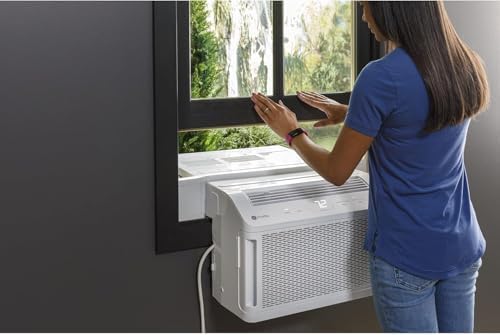
The design allows for easy window operation after installation.
5. Betjeningsvejledning
Din Profile PHNT12CC air conditioner offers various modes and fan speeds for optimal home comfort. You can control the unit using the electronic controls on the unit, the included remote control, or via the SmartHQ app.
Kontrolpanel og fjernbetjening:
- Power knap: Tænder/slukker enheden.
- Valg af tilstand: Cycle through cooling, fan-only, and other available modes.
- Temperaturjustering: Brug knapperne '+' og '-' til at indstille den ønskede temperatur.
- Blæserhastighed: Juster ventilatorhastigheden (Lav, Mellem, Høj, Auto).
- Timer: Set a 24-hour on/off timer for scheduled operation.
- Nulstil filter: Resets the filter indicator light after cleaning.
SmartHQ App Control:
Download the SmartHQ app to your smartphone or tablet to unlock advanced control features:
- Monitor current status and settings.
- Schedule operation times.
- Control the unit remotely from anywhere.
- Check energy usage.
- Set up geolocation for automated control based on your proximity.

Electronic controls provide easy access to settings.
6. Vedligeholdelse
Regelmæssig vedligeholdelse sikrer optimal ydeevne og levetid for dit klimaanlæg.
Filterrensning:
- The unit features a removable filter for easy cleaning.
- An indicator light will illuminate after approximately 250 hours of operation to remind you to clean the filter.
- To clean, remove the filter and wash it with warm, soapy water. Rinse thoroughly and allow it to air dry completely before reinserting.
- After cleaning and reinserting the filter, press the "Filter Reset" button on the control panel or remote.
Vandafledning:
- The built-in pump automatically collects and expels condensation outside.
- During periods of high humidity or before storing the unit for the winter, it is recommended to manually drain any accumulated water to prevent stagnation and mold growth. Refer to the full user manual for specific drainage procedures.
7. Fejlfinding
This section addresses common issues you might encounter. For more detailed troubleshooting, please consult the full User Manual PDF.
| Problem | Mulig årsag/løsning |
|---|---|
| Enheden tænder ikke. | Kontroller, om strømkablet er sat ordentligt i. Sørg for, at afbryderen ikke er udløst. |
| Air conditioner is not cooling effectively. | Check if the air filter is dirty and needs cleaning. Ensure windows and doors are closed. Verify the temperature setting is appropriate. Room size may exceed unit capacity. |
| Pinging noise from unit. | A pinging noise from water hitting the condenser on rainy or humid days is normal. This process helps remove moisture and improves efficiency. |
| Filter indicator light is on. | The air filter needs cleaning. Clean the filter and press the "Filter Reset" button. |
8. Specifikationer
| Specifikation | Detalje |
|---|---|
| Modelnummer | PHNT12CC |
| Kølekapacitet | 12,200 BTU |
| Dækningsområde | Op til 550 kvm. Ft. |
| Produktdimensioner (DxBxH) | 28 cm x 19.63 cm x 12.75 cm |
| Varens vægt | 75.8 pund |
| Støjniveau | Så lavt som 40 dB |
| Voltage | 115 volt |
| Formfaktor | Vindue |
| Særlige funktioner | Filter Light Reminder, Inverter Compressor, Remote Controlled, WiFi Enabled |
| Energy Star-certificeret | Ja |
| Sæsonbestemt energieffektivitetsforhold (SEER) | 12.1 |
9. Garanti og support
Din Profile PHNT12CC Clearview Air Conditioner comes with a 1 års begrænset garanti from the manufacturer, GE Appliances.
For complete warranty details, service inquiries, or additional support, please refer to the full User Manual PDF provided with your product or visit the official GE Appliances support website. You may also find helpful information and FAQs on the Profile Butik på Amazon.
Ask a question about this manual
Ask about setup, troubleshooting, compatibility, parts, safety, or missing instructions. Manuals+ will review the question and use this page’s manual context to help answer it.