
Lindy 38365
Lindy 38365 Extender, SDVoE HDMI 4K60 and USB Transmitter User Manual
Model: 38365
1. Introduktion
The Lindy 38365 Extender is an advanced SDVoE (Software Defined Video over Ethernet) device designed for transmitting high-quality 4K@60Hz 4:4:4 HDMI video and USB signals over a 10G network. This device supports uncompressed resolution with HDR10 and no latency, making it ideal for professional AV installations. It can operate in either Encoder (Transmitter) or Decoder (Receiver) mode, offering flexibility for various system configurations.
2. Sikkerhedsoplysninger
- Læs alle instruktioner omhyggeligt, før du betjener enheden.
- Udsæt ikke enheden for fugt, ekstreme temperaturer eller direkte sollys.
- Use only the provided power supply and mounting hardware.
- Forsøg ikke at åbne eller reparere enheden selv. Overlad al service til kvalificeret personale.
- Sørg for korrekt ventilation for at forhindre overophedning.
3. Pakkens indhold
- Lindy 38365 Extender Unit
- Strømforsyning
- Monteringsudstyr
- Brugervejledning (dette dokument)
4. Produktet er slutview
The Lindy 38365 Extender is a versatile unit capable of functioning as both an SDVoE HDMI 4K60 and USB Transmitter (Encoder) or Receiver (Decoder). It features multiple ports for video, audio, USB, and network connectivity.
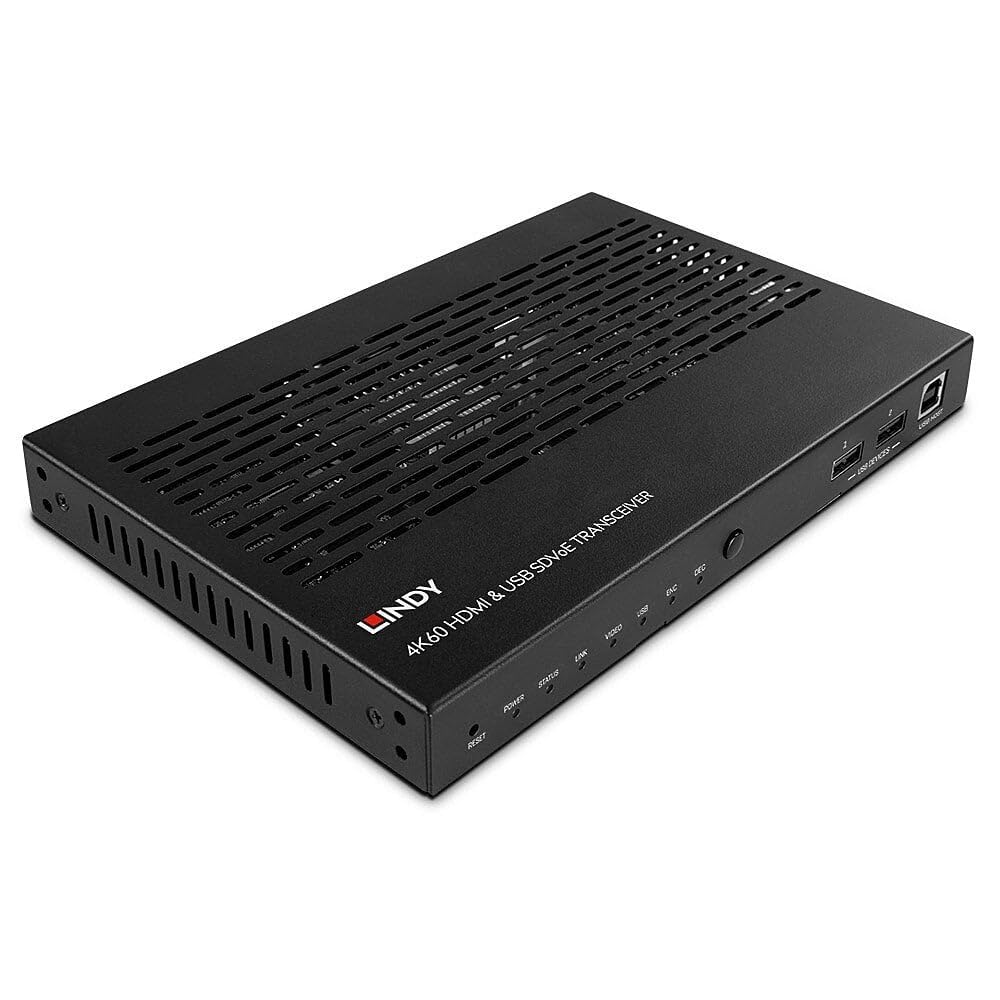
Figure 4.1: Lindy 38365 Extender - Overall View. This image displays the top and side panels of the black extender unit, highlighting its ventilation grilles and various input/output ports.
4.1 Frontpanel

Figure 4.2: Front Panel. The front panel includes LED indicators for Power, Status, Link, Video, USB, Encoder (ENC), and Decoder (DEC) modes. It also features a Reset button, a Mode button, two USB device ports, and one USB Host port.
- Genstarts knap: Nulstiller enheden.
- LED-indikatorer: Power, Status, Link, Video, USB, ENC (Encoder), DEC (Decoder).
- MODE knap: Toggles between Encoder and Decoder modes.
- USB DEVICES (1, 2): USB ports for connecting peripheral devices.
- USB-VÆRT: USB port for connecting to a host computer.
4.2 Bagpanel

Figure 4.3: Rear Panel. This view shows the DC 12V power input, RS-232 terminal block, IR In/Out jacks, HDMI In/Out ports, 10G (PoE) SFP+ port, 1G LAN port, and Audio In/Out jacks.
- DC 12V: Strømindgangsstik.
- RS-232 (TX, RX): Seriel kontrolport.
- IR IN / IR OUT: Infrared signal input and output for remote control.
- HDMI IN: HDMI indgangsport.
- HDMI OUT: HDMI udgangsport.
- 10G (PoE) SFP+: 10 Gigabit Ethernet port with SFP+ cage, supporting Power over Ethernet.
- 1G LAN: 1 Gigabit Ethernet port.
- LYD IND / LYD UD: Analog audio input and output jacks.

Figure 4.4: Rear Panel Close-up. A detailed view of the power, control, and HDMI ports on the rear panel, showing the DC 12V input, RS-232 terminal, IR In/Out, and HDMI In/Out connectors.
5. Opsætning
Follow these steps to set up your Lindy 38365 Extender:
- Determine Mode: Decide whether the unit will function as an Encoder (Transmitter) or a Decoder (Receiver). Use the MODE button on the front panel to switch between modes. The corresponding LED (ENC or DEC) will illuminate.
- Strømtilslutning: Connect the provided 12V DC power supply to the DC 12V port on the rear panel. Alternatively, if using a PoE-enabled 10G network switch, the unit can be powered via the 10G (PoE) SFP+ port.
- Netværks forbindelse: Connect the 10G (PoE) SFP+ port to your 10 Gigabit Ethernet network switch using an appropriate SFP+ module and fiber or copper cable. The 1G LAN port can be used for additional network connectivity or control.
- HDMI Connection (Encoder Mode):
- Connect your HDMI source (e.g., Blu-ray player, PC) to the HDMI-IN havn.
- If local monitoring is required, connect an HDMI display to the HDMI OUT havn.
- HDMI Connection (Decoder Mode):
- Connect your HDMI display (e.g., TV, projector) to the HDMI OUT havn.
- USB-forbindelse:
- In Encoder mode, connect a host computer to the USB-VÆRT havn.
- Connect USB peripheral devices (e.g., keyboard, mouse) to the USB-ENHEDER ports (1, 2).
- Lydforbindelse: If using external analog audio, connect your audio source to LYD IND and your audio receiver/speakers to LYD UD.
- RS-232 & IR Control: Connect RS-232 control devices to the terminal block and IR emitters/receivers to the IR IN/OUT jacks as needed for system integration.
6. Betjeningsvejledning
Once all connections are made and the unit is powered on, the Lindy 38365 Extender will automatically detect the connection type and begin operation based on its configured mode (Encoder or Decoder).
- Modeskift: Tryk på MODE button on the front panel to toggle between Encoder (ENC) and Decoder (DEC) functionality. The active mode is indicated by the illuminated LED.
- LED-indikatorer: Monitor the front panel LEDs to confirm power, network link, video signal presence, and USB activity.
- SDVoE Features: The device supports advanced SDVoE features such as Multicast, Video Wall, and Multiview configurations. These advanced functionalities typically require a compatible SDVoE controller and software for configuration and management. Refer to your SDVoE system documentation for detailed setup of these features.
- USB-udvidelse: USB devices connected to the "USB DEVICES" ports on the Decoder unit will be extended to the host connected to the "USB HOST" port on the Encoder unit.
7. Vedligeholdelse
- Rensning: Rengør enheden med en blød, tør klud. Brug ikke flydende rengøringsmidler eller rengøringsmidler på sprayform.
- Ventilation: Sørg for, at ventilationsåbningerne ikke er blokeret for at forhindre overophedning.
- Firmwareopdateringer: Periodically check the Lindy webwebstedet for tilgængelige firmwareopdateringer for at sikre optimal ydeevne og kompatibilitet.
8. Fejlfinding
- Ingen videoudgang:
- Verify all HDMI cables are securely connected.
- Ensure the unit is in the correct mode (Encoder/Decoder).
- Check the network connection and ensure the 10G link is active.
- Confirm the source and display are powered on and functioning correctly.
- No USB Functionality:
- Ensure USB cables are properly connected to the USB HOST and USB DEVICES ports.
- Verify the unit is in the correct mode for USB extension.
- Problemer med netværksforbindelse:
- Check the 10G (PoE) SFP+ port and 1G LAN port connections.
- Confirm your network switch supports 10G and PoE (if used).
- Verify network cable integrity.
- Enheden tænder ikke:
- Ensure the 12V DC power supply is correctly connected and plugged into a working outlet.
- If using PoE, confirm the 10G network switch is providing power.
9. Specifikationer
| Feature | Detalje |
|---|---|
| Mærke | Lindy |
| Modelnummer | 38365 |
| Forbindelsesteknologi | Ethernet |
| Understøttet opløsning | Up to 4K@60Hz 4:4:4 with HDR10 (uncompressed) |
| Latency | Ingen latenstid |
| Driftstilstande | Encoder eller Decoder |
| Netværksporte | 1x 10G (PoE) SFP+, 1x 1G LAN |
| HDMI porte | 1x HDMI In, 1x HDMI Out |
| USB-porte | 1x USB Host, 2x USB Devices |
| Lydudgangstilstand | Stereo, Surround (5.1) |
| Kontrolmetoder | Push Button (Mode), RS-232, IR, Remote |
| Strømindgang | DC 12V, PoE (Power over Ethernet) |
| Wattage | 5 watt |
| Varens vægt | 1.29 kilo |
| Farve | Sort |
10. Garanti
The Lindy 38365 Extender comes with a 3 års garanti from the date of purchase. Please retain your proof of purchase for warranty claims. This warranty covers manufacturing defects and faults under normal use conditions.
11. Support
For technical support, troubleshooting assistance, or further information regarding your Lindy 38365 Extender, please visit the official Lindy website or contact your local Lindy customer service representative. Ensure you have your product model number and purchase details available when seeking support.
Relaterede dokumenter - 38365
 |
LINDY 4K60 HDMI & USB SDVoE Transceiver Brugermanual (Model 38365) Brugermanual til LINDY 4K60 HDMI & USB SDVoE Transceiver (model 38365). Opdag, hvordan du konfigurerer og betjener denne enhed til ukomprimeret 4K Ultra HD AV-distribution over 10G-netværk, inklusive HDR-understøttelse, encoder-/decoder-tilstande, PoE og Web GUI-styring. |
 |
LINDY 300m Fiberoptisk HDMI 4K60 Dongle Extender Brugermanual Omfattende brugermanual til LINDY 300m Fibre Optic HDMI 4K60 Dongle Extender, der dækker funktioner, specifikationer, installation og fejlfinding. Understøtter 4K UHD-opløsninger, HDR og multikanalslyd. |
 |
LINDY 70m Cat.6 2 Port HDMI 4K60 Splitter Extender User Manual User manual for the LINDY 70m Cat.6 2 Port HDMI 4K60 Splitter Extender, covering safety instructions, package contents, features, specifications, product overview, installation, troubleshooting, recycling information, and compliance statements. |
 |
Lightware HDMI-TPX-seriens hurtigstartguide: 4K HDMI 2.0-forlængere A concise guide to Lightware's HDMI-TPX-106 and HDMI-TPX-107 series AV extenders, detailing their features, specifications, and setup for extending HDMI 2.0 signals up to 4K60 4:4:4 over a single CATx cable. |
 |
LINDY 50m HDMI 4K60 Repeater User Manual Comprehensive user manual for the LINDY 50m HDMI 4K60 Repeater. Covers introduction, package contents, features, detailed specifications including resolutions and distances, installation guide, troubleshooting tips, recycling information, and CE/FCC compliance. This guide helps users ensure proper setup and operation of the HDMI signal extender. |
 |
LINDY 300m Fiberoptisk HDMI 4K60 & USB KVM Extender Brugermanual Brugermanual til LINDY 300m Fiberoptisk HDMI 4K60 & USB KVM Extender. Detaljer om sikkerhedsinstruktioner, pakkeindhold, funktioner, specifikationer, installation, betjening, DIP-switch-indstillinger, IR/seriel styring, fejlfinding og genbrugsinformation. |
Ask a question about this manual
Ask about setup, troubleshooting, compatibility, parts, safety, or missing instructions. Manuals+ will review the question and use this page’s manual context to help answer it.