
Indledning
Thank you for choosing the Gigastone QP-10200B 3-in-1 Qi Power Bank. This device combines the functionality of a traditional wall charger, a portable power bank, and a wireless charging pad into one compact unit. With a 10,000 mAh capacity, USB-C PD 3.0, USB-A QC3.0, and 15W wireless charging, it provides versatile power solutions for your mobile devices. Please read this manual carefully to ensure proper use and to maximize the performance and lifespan of your product.
Produkt overview
Nøglefunktioner
- 4-i-1 funktionalitet: Functions as a power bank, wireless charging pad, PD charger, and QC charger.
- Høj kapacitet: 10,000 mAh internal battery for extended use.
- Hurtig opladning: Supports USB-C Power Delivery (PD 3.0) 20W and USB-A Quick Charge (QC3.0) 18W.
- Trådløs opladning: 15W Qi wireless charging compatible with various devices (7.5W for iPhone, 10-15W for Android).
- Integrated AC Plug: Foldable AC plug (100-240V) for direct wall charging and self-recharging.
- Opladning af flere enheder: Kan oplade op til 3 enheder samtidigt.
- Sikkerhedsbeskyttelse: Equipped with over current, over charge, overheat, over voltage, short circuit, and static electricity protection.
- Kompakt design: Lightweight and portable with a foldable plug for easy travel.
Komponentidentifikation
Se diagrammet nedenfor for en oversigtview of the power bank's components.

Image: Gigastone QP-10200B 3-in-1 Qi Power Bank showing its various parts and features. This includes the foldable AC plug, 10,000mAh power capacity, wireless charging indicator, USB-C PD 3.0 (20W) port, USB-A QC3.0 (18W) port, power button, clear LED display for power status, anti-slip rubber base, and the Qi wireless charging area.
- AC-stik: Foldable prongs for direct wall charging.
- USB-C PD 3.0 port: For fast charging compatible devices with up to 20W output.
- USB-A QC3.0 Port: For fast charging compatible devices with up to 18W output.
- Qi trådløs opladningsplade: For wireless charging Qi-enabled devices.
- Power knap: Activates the power bank and LED display.
- LED Power Status Display: Viser den resterende batteriprocenttage.
- Trådløs indikator: Lights up when wireless charging is active.
Opsætning
Indledende opladning
Before first use, it is recommended to fully charge the power bank. To do this:
- Fold out the integrated AC plug.
- Plug the power bank directly into a standard wall outlet (100-240V).
- LED-displayet viser opladningsstatus. Powerbanken er fuldt opladet, når displayet viser 100%.
This process also recharges the power bank itself without needing an additional cable.
Betjeningsvejledning
Opladning af enheder via USB-porte
To charge your devices using the USB-C or USB-A ports:
- Connect your device to the power bank using a compatible USB-C to USB-C cable (for PD 3.0) or a USB-A to device-specific cable (for QC3.0).
- Tryk på tænd/sluk-knappen på powerbanken for at aktivere opladningen.
- The LED display will show the power bank's remaining charge, and your device should indicate that it is charging.

Image: The Gigastone QP-10200B power bank demonstrating its ability to charge three devices concurrently: one smartphone via USB-C, a Nintendo Switch via USB-A, and another smartphone wirelessly on its top surface.
The power bank supports charging up to three devices simultaneously (two via USB ports and one wirelessly).
Hurtig opladningsydelse
The Gigastone QP-10200B supports fast charging protocols to quickly power up your compatible devices.

Image: A visual representation of the Gigastone QP-10200B's fast charging performance, indicating that it can charge an iPhone 13 2.3 times, a Samsung S21 1.8 times, and an iPad Air 4 1.3 times faster than standard charging methods. It highlights support for PD 20W for newer iPhones and PD 18W for older models.
For optimal fast charging, ensure your device and charging cable are compatible with USB-C PD 3.0 or USB-A QC3.0 standards.
Trådløs opladning
To charge your Qi-enabled device wirelessly:
- Press the power button on the power bank to activate it.
- Place your Qi-enabled device (e.g., smartphone) directly onto the wireless charging pad area of the power bank.
- Sørg for, at enheden er centreret på opladningspad'en for optimal ydeevne.
- The wireless indicator light on the power bank will illuminate, and your device should show that it is charging.
Note: Remove any metal objects, magnetic attachments, or thick cases from your device before placing it on the wireless charging pad, as these can interfere with charging.
Genopladning af Power Bank
You can recharge the Gigastone QP-10200B in two ways:
- Via AC Plug: Fold out the integrated AC plug and plug the power bank directly into a wall outlet. This is the most convenient method as it requires no additional cables.
- Via USB-C-port: Connect a USB-C cable from a wall adapter (not included) to the power bank's USB-C port.
The LED display will show the charging status, indicating the battery percentage mens den genoplades.

Image: The Gigastone QP-10200B power bank is shown in a hand, emphasizing its compact size for travel. An inset compares the convenience of its integrated AC plug for recharging against the clutter of multiple charging cables.
Opretholdelse
- Hold powerbanken væk fra vand, fugt og ekstreme temperaturer.
- Undgå at tabe eller udsætte enheden for kraftige stød.
- Rengør powerbanken med en blød, tør klud. Brug ikke skrappe kemikalier eller slibende rengøringsmidler.
- Opbevar powerbanken på et køligt, tørt sted, når den ikke er i brug.
- For optimal battery health, fully charge and discharge the power bank at least once every three months if not used regularly.
Fejlfinding
- Enheden oplader ikke:
- Ensure the power bank is sufficiently charged. Check the LED display.
- Tryk på tænd/sluk-knappen for at aktivere powerbanken.
- Kontroller, om opladningskablet er korrekt tilsluttet til både powerbanken og din enhed.
- Prøv et andet opladningskabel eller -port.
- For wireless charging, ensure your device is Qi-enabled and properly aligned on the charging pad. Remove any thick cases or metal objects.
- Langsom opladning:
- Ensure your device and cable support fast charging (PD 3.0 or QC3.0).
- Undgå at oplade flere enheder samtidigt, hvis du har brug for maksimal hastighed for én enhed.
- Kontroller om kablet er beskadiget.
- Powerbanken oplades ikke:
- Ensure the AC plug is fully extended and securely plugged into a live wall outlet.
- If using the USB-C port for recharging, ensure the wall adapter and cable are functional.
- Overophedning:
- Det er normalt, at powerbanken bliver lidt varm under opladning eller afladning.
- If it becomes excessively hot, disconnect all devices and unplug it from the wall. Allow it to cool down before reuse.
- Ensure proper ventilation and avoid covering the power bank during operation.
Specifikationer
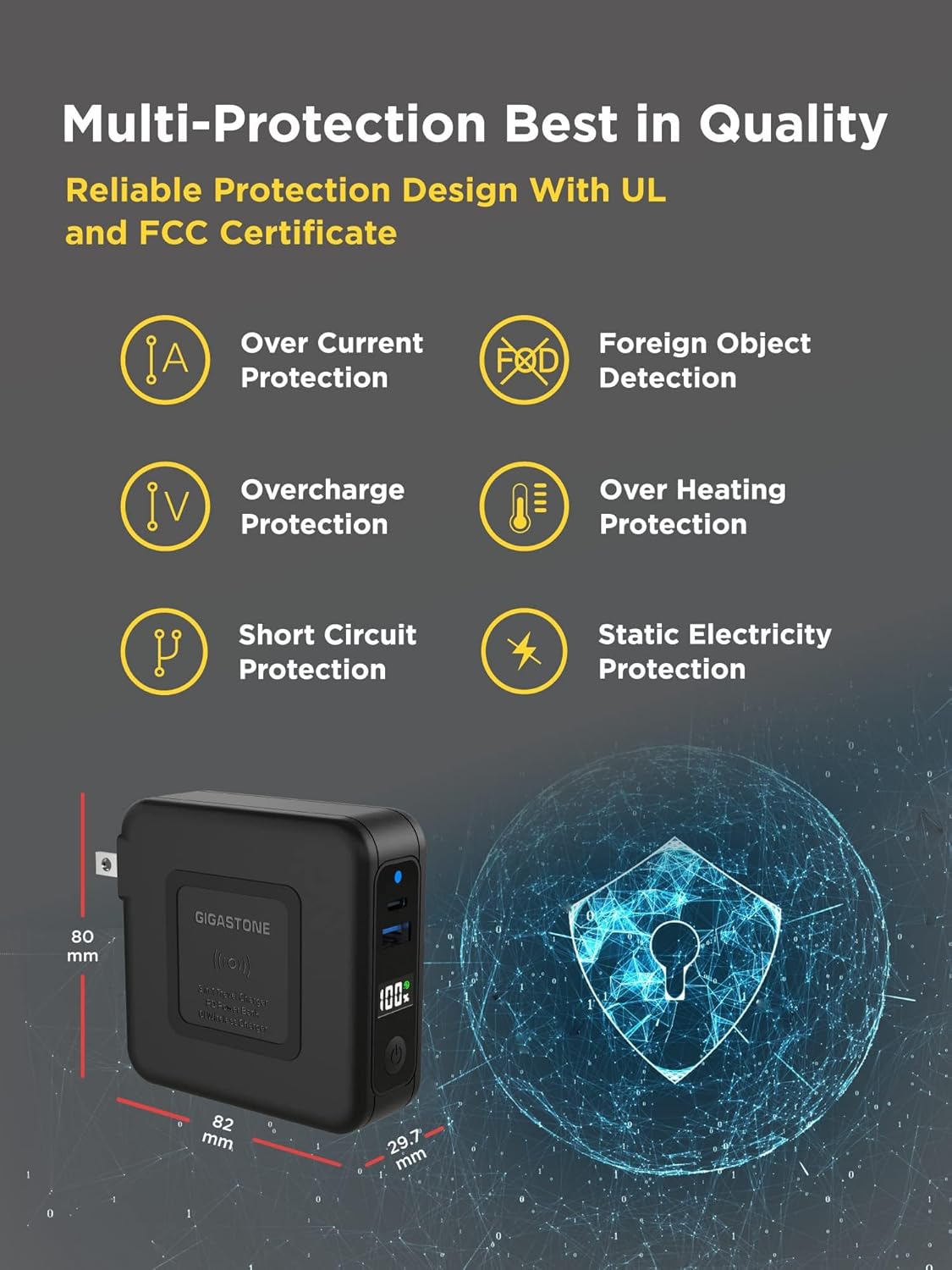
Image: The Gigastone QP-10200B power bank highlighting its compact dimensions (80mm x 82mm x 29.7mm) and comprehensive safety features, including protection against over current, foreign objects, overcharge, overheating, short circuits, and static electricity.
| Feature | Detalje |
|---|---|
| Modelnummer | QP-10200B |
| Batterikapacitet | 10,000 mAh |
| USB-C Output (PD 3.0) | 20W Maks |
| USB-A-udgang (QC3.0) | 18W Maks |
| Trådløs udgang | 15W Max (7.5W for iPhone, 10-15W for Android) |
| AC indgang | 100-240V |
| Dimensioner (L x B x H) | 3.22 x 3.14 x 1.17 tommer (82 x 80 x 29.7 mm) |
| Antal havne | 3 (1x USB-C, 1x USB-A, 1x Wireless) |
| Sikkerhedsfunktioner | Over current, over charge, overheat, over voltage, short circuit, static electricity protection |
| Kompatible enheder | Apple, Android, Qi-enabled devices, Macbook, Samsung, iPhone |
Sikkerhedsoplysninger
Overhold venligst følgende sikkerhedsforanstaltninger:
- Du må ikke selv adskille, ændre eller reparere enheden.
- Udsæt ikke powerbanken for ild, direkte sollys eller høje temperaturer.
- Brug ikke powerbanken i våde omgivelser, og nedsænk den ikke i vand.
- Opbevares utilgængeligt for børn.
- Brug kun originale eller certificerede kabler til opladning.
- Bortskaf powerbanken i henhold til lokale regler for elektronisk affald.
Garanti og support
Garantioplysninger
The Gigastone QP-10200B 3-in-1 Qi Power Bank comes with a 1 års begrænset producentgaranti fra købsdatoen. Denne garanti dækker defekter i materialer og udførelse ved normal brug. Den dækker ikke skader forårsaget af misbrug, ulykker, uautoriseret ændring eller eksterne årsager.

Image: Gigastone branding alongside the QP-10200B power bank, prominently displaying a "1 Year Warranty" badge, indicating the product's manufacturer warranty.
Kundesupport
For warranty claims, technical support, or any questions regarding your Gigastone product, please contact our customer service team:
- E-mail: service@gigastone.com
- Telefon: +1-949-450-2900
- Webwebsted: www.gigastone.com
- Adresse: 17520 Von Karman Ave, Irvine, CA 92614, USA
Please have your model number (QP-10200B) and proof of purchase ready when contacting support.