
1. Introduktion
The LogiLink SP0061 Emergency Radio is a versatile and essential device designed for emergency situations, offering multiple power sources and critical functions. This compact unit integrates a radio receiver, a powerful LED flashlight, and the capability to charge external devices. Its robust design ensures reliable performance when conventional electricity sources are unavailable, making it an indispensable tool for preparedness.
Nøglefunktioner omfatter:
- Multiple charging options: Dynamo crank, solar panel, and USB input.
- Integrated 3.7V lithium polymer battery.
- Option to use 3 AAA batteries (not included) for alternative power.
- Built-in LED flashlight with continuous and SOS flash modes.
- USB-A-udgang til opladning af eksterne enheder.
- FM/AM/SW1/SW2 World Receiver.
2. Sikkerhedsoplysninger
Læs og forstå alle sikkerhedsinstruktioner, før du bruger dette produkt. Manglende overholdelse af disse instruktioner kan resultere i elektrisk stød, brand eller alvorlig personskade.
- Vandtæthed: The device is water-resistant. However, avoid submerging it in water or exposing it to heavy rain for extended periods. Ensure all port covers are securely closed to maintain water resistance.
- Temperatur: Do not expose the device to extreme temperatures (above 50°C / 122°F or below -10°C / 14°F) or direct sunlight for prolonged periods, especially when charging via solar panel.
- Batterisikkerhed: The device contains an integrated lithium-ion battery. Do not attempt to replace it. If using AAA batteries, ensure correct polarity and do not mix old and new batteries or different types of batteries. Remove AAA batteries if the device will not be used for an extended period.
- Rensning: Disconnect the device from all power sources before cleaning. Use a soft, dry cloth. Do not use liquid cleaners or aerosols.
- Demontering: Forsøg ikke at skille ad, reparere eller ændre enheden. Dette vil ugyldiggøre garantien og kan forårsage skade eller personskade.
- Børn: Opbevar enheden utilgængeligt for børn.
3. Produktet er slutview
Familiarize yourself with the components of your LogiLink Emergency Radio:

Figur 3.1: Front view of the LogiLink Emergency Radio, highlighting the radio dial, volume control, and integrated flashlight.
- 1. Telescopic Antenna: For forbedret radiomodtagelse.
- 2. Solpanel: For charging the internal battery via sunlight.
- 3. Crank Handle: For manual power generation (dynamo charging).
- 4. Flashlight: Integreret LED-lys med flere tilstande.
- 5. Radio Dial/Tuner: To select radio frequencies (FM/AM/SW1/SW2).
- 6. Lydstyrke-/tænd/sluk-knap: Til at tænde/slukke radioen og justere lydstyrken.
- 7. Band Selector Switch: To switch between FM, AM, SW1, and SW2 bands.
- 8. USB-A Output Port: Til opladning af eksterne enheder.
- 9. Micro-B Input Port: Til opladning af radioen via USB-kabel.
- 10. AAA Battery Compartment: For optional AAA battery power.
- 11. SOS-knap: Activates emergency alarm and flashlight flash mode.
4. Opsætning
4.1. Battery Installation (Optional AAA Batteries)
The LogiLink Emergency Radio has an integrated lithium-ion battery. For alternative power, you can install 3 AAA batteries (not included).
- Find batteridækslet på bagsiden af radioen.
- Skub dækslet åbent.
- Isæt 3 AAA-batterier, og sørg for at polerne vender korrekt (+ og -).
- Luk batterirummets dæksel forsvarligt.

Figur 4.1: Open battery compartment for AAA battery installation.
4.2. Første opladning
It is recommended to fully charge the integrated lithium-ion battery via USB before first use to ensure optimal performance.
- Connect the provided USB cable to the Micro-B input port on the radio.
- Connect the other end of the USB cable to a USB power adapter (not included) or a computer USB port.
- The charging indicator light will illuminate. Allow the radio to charge until the indicator light changes or turns off (refer to the indicator light behavior in the specifications).
5. Betjeningsvejledning
5.1. Radiofunktion
- Drej på Lydstyrke/afbryderknap clockwise to turn on the radio and adjust the volume.
- Forlæng Teleskop antenne for bedre modtagelse.
- Brug Båndvælgerkontakt to choose between FM, AM, SW1, or SW2 bands.
- Drej på Radio Dial/Tuner to find your desired station.
- Adjust the antenna position and location for optimal signal clarity.

Figur 5.1: Operating the radio function with extended antenna and visible tuning controls.
5.2. Lommelygtebetjening
The integrated LED flashlight offers two modes:
- Kontinuerligt lys: Press the flashlight button once to turn on the continuous light. Press again to turn it off.
- SOS Flash-tilstand: Tryk og hold på SOS knap to activate the emergency alarm and flashing light. Release the button to turn it off.

Figur 5.2: The integrated flashlight in operation.
5.3. Opladning af eksterne enheder
The radio can act as a power bank to charge small electronic devices like smartphones.
- Sørg for, at radioens interne batteri er tilstrækkeligt opladet.
- Connect your device's charging cable to the USB-A-udgangsport på radioen.
- Radioen vil begynde at oplade din eksterne enhed.
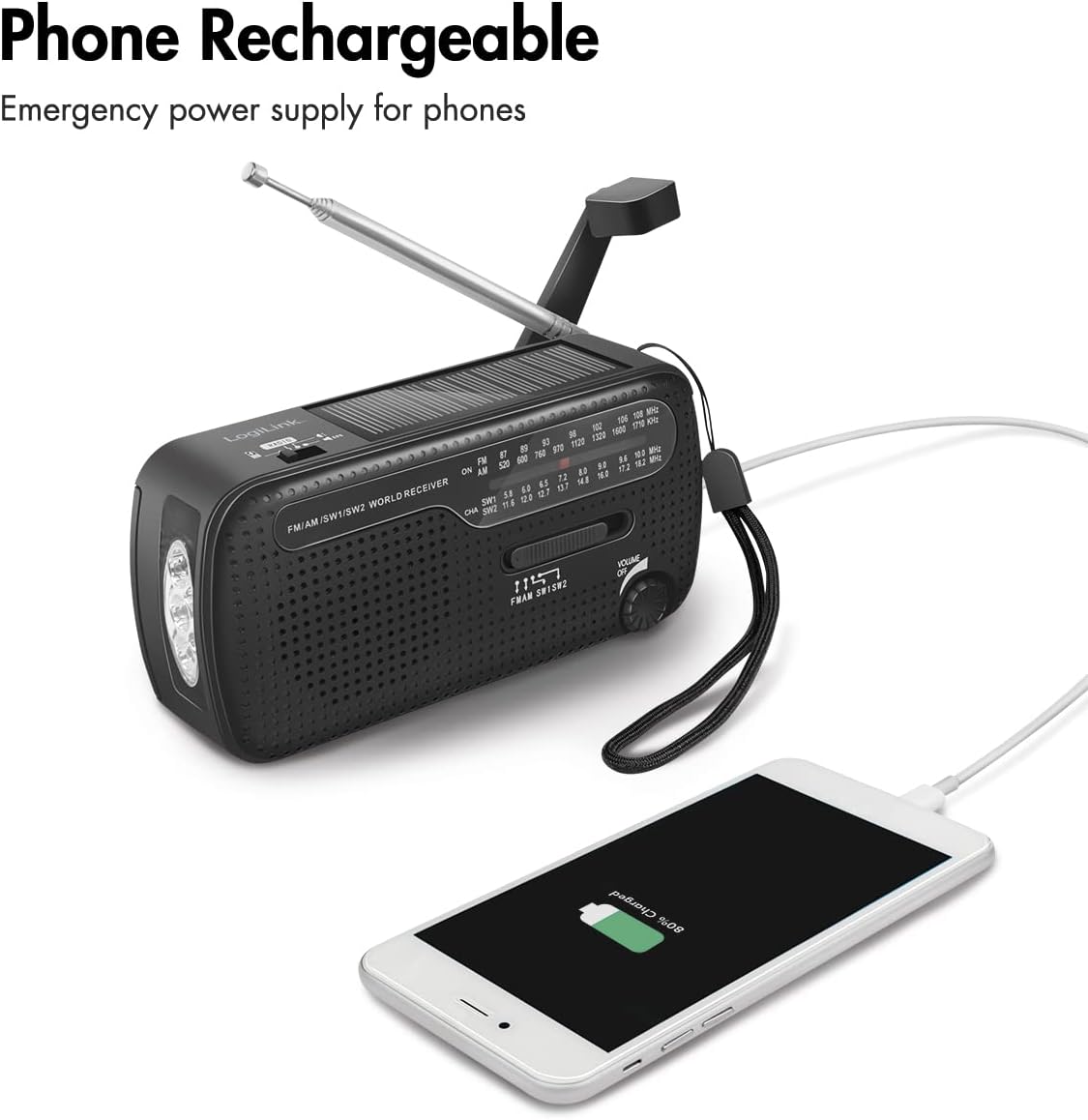
Figur 5.3: Charging a smartphone using the radio's USB output.
6. Charging Methods for the Radio
The LogiLink Emergency Radio offers three primary ways to charge its internal battery:
6.1. Dynamo Crank Charging
This method allows you to generate power manually.
- Fold ud Krumtaphåndtag located on the back of the radio.
- Rotate the crank handle clockwise or counter-clockwise at a steady pace (approximately 120-150 RPM) for several minutes.
- A charging indicator light will show that the battery is being charged.

Figur 6.1: The dynamo crank handle in position for manual charging.
6.2. Opladning af solpaneler
The integrated solar panel provides a convenient way to charge the radio using sunlight.
- Place the radio in direct sunlight, ensuring the Solpanel is facing upwards and unobstructed.
- The solar charging indicator light will illuminate when charging is active.
- Note that solar charging is slower than USB charging and is best for maintaining charge or for emergency top-ups.

Figur 6.2: The solar panel on top of the radio.
6.3. USB-opladning
For the fastest and most efficient charging, use the USB input.
- Tilslut det medfølgende USB-kabel til Micro-B Input Port på radioen.
- Connect the other end of the USB cable to a USB power adapter (not included) or a computer USB port.
- The charging indicator light will show that the battery is being charged.

Figur 6.3: USB cable connected to the radio's Micro-B input port for charging.
7. Vedligeholdelse
- Rensning: Brug en blød, tør klud til at rengøre radioens yderside. Brug ikke slibende rengøringsmidler eller opløsningsmidler.
- Opbevaring: Store the radio in a cool, dry place away from direct sunlight and extreme temperatures. If storing for an extended period, ensure the internal battery has some charge, and remove any optional AAA batteries.
- Batteripleje: To prolong the life of the internal lithium-ion battery, avoid fully discharging it frequently. Recharge it periodically if not in use.
8. Fejlfinding
If you encounter issues with your LogiLink Emergency Radio, refer to the following troubleshooting guide:
| Problem | Mulig årsag | Løsning |
|---|---|---|
| Radioen tænder ikke. | Internal battery is depleted. Optional AAA batteries are depleted or incorrectly installed. | Charge the internal battery via USB, solar, or dynamo crank. Check and replace AAA batteries if used. Ensure correct AAA battery polarity. |
| Dårlig radiomodtagelse. | Antenna not extended. Weak signal in current location. Incorrect band selected. | Fully extend the telescopic antenna. Move to an open area or higher ground. Ensure the correct band (FM/AM/SW1/SW2) is selected. Adjust the tuning dial slowly. |
| Lommelygten virker ikke. | Det interne batteri er afladet. | Oplad det interne batteri. |
| External device not charging from USB-A output. | Radio's internal battery is too low. USB cable is faulty. External device is incompatible or fully charged. | Ensure the radio's internal battery has sufficient charge. Try a different USB cable. Check if the external device is compatible or already charged. |
| Crank handle is stiff or not charging. | Mechanism might be obstructed or damaged. | Ensure no debris is obstructing the crank. If damaged, do not force it; contact support. |
9. Specifikationer
Detailed technical specifications for the LogiLink Emergency Radio SP0061:

Figur 9.1: Product dimensions of the LogiLink Emergency Radio.
| Feature | Specifikation |
|---|---|
| Modelnummer | SP0061 |
| Mærke | Logilink |
| Farve | Sort |
| Strømkilde | Battery Powered (Integrated Lithium-ion, optional 3x AAA) |
| Integreret batteri | 1 Lithium-ion (3.7V) |
| Valgfri batterier | 3x AAA (ikke inkluderet) |
| Micro-B Input | 5V/0.3A (1.5W) |
| Solpanel output | 5V/0.035A (0.175W) |
| Crank Generator Output | 5V/0.4A (2W) |
| USB-A-output | 5V/0.4A (2W) |
| Understøttede radiobånd | FM, AM, SW1, SW2 |
| Frekvensområde | 45 Hz - 20 kHz |
| Højttaler diameter | 50 mm |
| Lommelygtetilstande | Continuous light, Flash (SOS mode) |
| Særlige funktioner | Integrated AM Antenna, Integrated Flashlight, Portable, Rechargeable, Overcharge and Discharge Protection |
| Forbindelsesteknologi | USB |
| Display Type | LED |
| Vandmodstandsniveau | Vandtæt |
| Produktmål (L x B x H) | 13.4L x 4.5B x 6.3H cm |
| Varens vægt | 223 gram |
| Fabrikant | 2direct GmbH |
| Inkluderede komponenter | Brugermanual |
| Tilgængelighed af reservedele | Oplysninger utilgængelige |
| Softwareopdateringer garanteret indtil | Oplysninger utilgængelige |
10. Garanti og support
This product comes with a standard manufacturer's warranty. Please refer to the warranty card included in your product packaging for specific terms and conditions. For technical support, troubleshooting assistance, or warranty claims, please contact the manufacturer or your point of purchase.
Fabrikant: 2direct GmbH
For further assistance, please visit the LogiLink official webwebsted eller kontakt deres kundeserviceafdeling.