
Indledning
Tak, fordi du har valgt Joyhill kaffevægten med timer. Denne digitale vægt er designet til præcise målinger og er ideel til kaffebrygning, bagning, madlavning og meget mere. Med dens dobbelte LED-display, automatiske og manuelle tidsfunktioner samt flere enhedsmuligheder giver den en problemfri og præcis vejeoplevelse. Læs venligst denne manual grundigt inden brug for at sikre korrekt betjening og vedligeholdelse.
Sikkerhedsinstruktioner
- Vægten må ikke nedsænkes i vand eller andre væsker. Vægten er vandafvisende, men ikke vandtæt.
- Undgå at placere vægten på ujævne eller ustabile overflader for at sikre nøjagtige aflæsninger.
- Overbelast ikke vægten ud over dens maksimale kapacitet på 3 kg (6.6 lb).
- Hold vægten væk fra ekstreme temperaturer og direkte sollys.
- Brug kun det medfølgende Type-C-opladerkabel. Undgå at bruge hurtigopladere, der kan beskadige batteriet.
- Rengør vægten med en blød, damp klud. Brug ikke slibende rengøringsmidler eller kemikalier.
Pakkens indhold
- Joyhill Kaffevægt
- Silikone beskyttelsespude
- Type-C USB-opladningskabel
- Brugervejledning (dette dokument)
Produktegenskaber
- Højpræcisionsmåling: Udstyret med opgraderede højpræcisions-enkeltsensorer, der tilbyder en nøjagtighed på 0.1 g/0.005 oz og en maksimal vejekapacitet på 3 kg/6.6 LB.
- Dobbelt LED-skærm: Letlæseligt display til samtidig kontrol af tid og vægt.
- Timingfunktioner: Har både automatiske og manuelle timingtilstande for præcis brygningskontrol.
- Enhedskonvertering: Understøtter skift mellem gram (g), milliliter (ml), ounces (oz), pund (lb), pund:ounces (lb:oz) og fluid ounces (fl'oz).
- Silikone pude: Varmeisoleret, vandtæt og skridsikker silikonepude for forbedret stabilitet og beskyttelse.
- Berøringskontrolknapper: Fire følsomme berøringsknapper til tænd/sluk/tara, enhedsvalg, valg af tidstilstand og timer start/stop/nulstilling.
- Automatisk sluk: Slukker automatisk efter 5 minutters inaktivitet for at spare energi.
- Valg af biplyd: Mulighed for at slå biplyden for betjening til eller fra.

Joyhill kaffevægten tilbyder høj nøjagtighed for præcise målinger.

Denne multifunktionelle digitale vægt er velegnet til en række forskellige vejebehov i køkkenet.
Opsætning
Indledende opladning
Før første brug skal vægten oplades helt med det medfølgende USB-opladerkabel af type C. Tilslut kablet til vægtens opladningsport og en kompatibel USB-strømkilde. Displayet viser opladningsstatus.
Placering af silikonepuden
Placer silikonebeskyttelsespuden på vejeplatformen. Denne pude er designet til at være varmeisolerende, vandtæt og skridsikker, hvilket beskytter vægten og sikrer stabilitet under brug.

Vægten leveres med en silikonepude og et Type-C-opladerkabel for nemheds skyld.
Betjeningsvejledning
Tænd/sluk og tarafunktion (Ʉ / T-knap)
- Tænd: Tryk kort på Ʉ / T-knappen for at tænde vægten.
- Tara: Mens vægten er tændt, tryk kort på Ʉ / T-knappen for at nulstille displayet (tarafunktion). Dette er nyttigt til at veje ingredienser i en beholder.
- Sluk: Tryk længe på Ʉ / T-knappen for at slukke for vægten.
Enhedskonvertering (ENHED-knap)
Tryk kort på ENHEDS-knappen for at gennemgå de tilgængelige vægtenheder: gram (g) > milliliter (ml) > ounces (oz) > pund (lb) > pund:ounces (lb:oz) > fluid ounces (fl'oz).
Timing-tilstande (MODE-knap og Timer-knap)
- Skiftemetoder: Tryk kort på MODE-knappen for at skifte mellem manuel og automatisk timingtilstand.
- Manuel timing: I manuel tilstand skal du trykke kort på Timer-knappen (urikonet) for at starte eller stoppe timeren. Tryk længe på Timer-knappen for at nulstille timeren.
- Automatisk timing: I automatisk tilstand starter timeren automatisk, når vægten registreres (f.eks. når du begynder at hælde vand op til kaffe). Timeren stopper automatisk, når vægten stabiliserer sig efter hældning.
- Biplyd til/fra: Tryk længe på MODE-knappen for at aktivere eller deaktivere knappens stemmefunktion (biplyd).
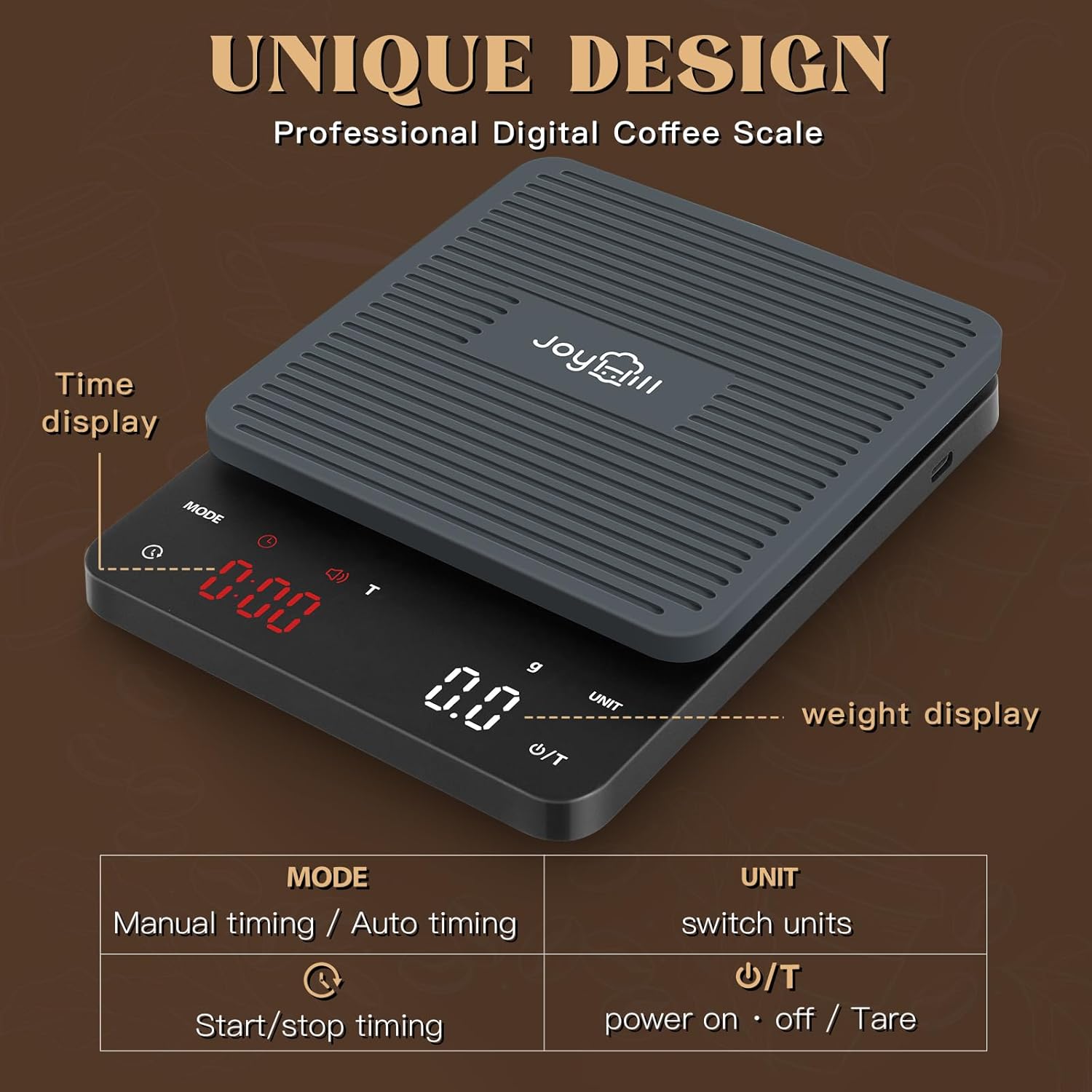
Overview af vægtens display og berøringsknapper.

Instruktioner til brug af tara- og automatiske tidsindstillinger.
Demonstration af Joyhill Coffee Scale's enhedskonverterings- og tidsfunktioner.
Vedligeholdelse og pleje
- Rensning: Tør vægtens overflade og silikonepuden af med en blød kludamp klud. Brug ikke skrappe kemikalier, slibende rengøringsmidler, og nedsænk ikke vægten i vand.
- Opbevaring: Opbevar vægten et køligt og tørt sted. Den kompakte størrelse (6.7 x 5.0 cm) gør den nem at opbevare i skuffer eller skabe.
- Batteripleje: Oplad vægten regelmæssigt, især hvis den ikke skal bruges i længere tid. Undgå at aflade batteriet helt ofte.

Regelmæssig rengøring hjælper med at bevare vægtens udseende og funktionalitet.
Fejlfinding
| Problem | Mulig årsag | Løsning |
|---|---|---|
| Skalaen tænder ikke. | Lavt batteri. | Oplad vægten med det medfølgende Type-C USB-kabel. Sørg for, at opladeren ikke er en hurtigoplader (PD/IQ-opladning), da den muligvis ikke er kompatibel. |
| Upræcise aflæsninger. | Ujævn overflade; vægten er ikke tareret; objektet overstiger den maksimale kapacitet. | Placer vægten på en plan, stabil overflade. Tryk på Ʉ / T-knappen for at tarere den før vejning. Overskrid ikke 3 kg (6.6 lb). |
| Timerdisplayet er svagt eller svært at se. | Potentiel produktionsvariation eller -fejl. | Hvis displayet konstant er svagt, skal du kontakte kundesupport for at få hjælp. |
| Vægten slukker uventet. | Lavt batteri; automatisk sluk-funktion aktiveret. | Genoplad vægten. Bemærk, at vægten har en automatisk slukfunktion efter 5 minutters inaktivitet. Hvis den slukker under aktiv brug, skal du sørge for, at den er fuldt opladet. |
Specifikationer
| Feature | Detalje |
|---|---|
| Modelnummer | EK2912R |
| Mærke | JOYHILL |
| Produktdimensioner | 8.2 x 7 x 2 tommer |
| Varens vægt | 0.63 ounce |
| Maksimal kapacitet | 3 kg / 6.6 lb |
| Nøjagtighed | 0.1 g / 0.005 oz |
| Strømkilde | 1 lithium-ion batteri (medfølger) |
| Display Type | LED |
| Farve | Sort |
Garanti og support
For garantioplysninger og kundesupport henvises til den dokumentation, der følger med dit produkt, eller besøg den officielle JOYHILL-side. webHvis du har spørgsmål eller støder på problemer, der ikke er dækket i denne manual, bedes du kontakte JOYHILLs kundeservice for at få hjælp.