
Indledning
This manual provides detailed instructions for the proper use and care of your Casio Edifice EFB-680D-1AVUDF chronograph watch. Please read this manual thoroughly to ensure optimal performance and longevity of your timepiece. Keep this manual for future reference.
Opsætning
1. Tidsindstilling
Sådan indstiller du tiden på dit ur:
- Pull the crown out to the second click position. The second hand will move to the 12 o'clock position.
- Rotate the crown to set the hour and minute hands to the desired time. Ensure the AM/PM setting is correct if your watch has a 24-hour indicator.
- Skub kronen tilbage i normal position. Sekundviseren genoptager bevægelsen.
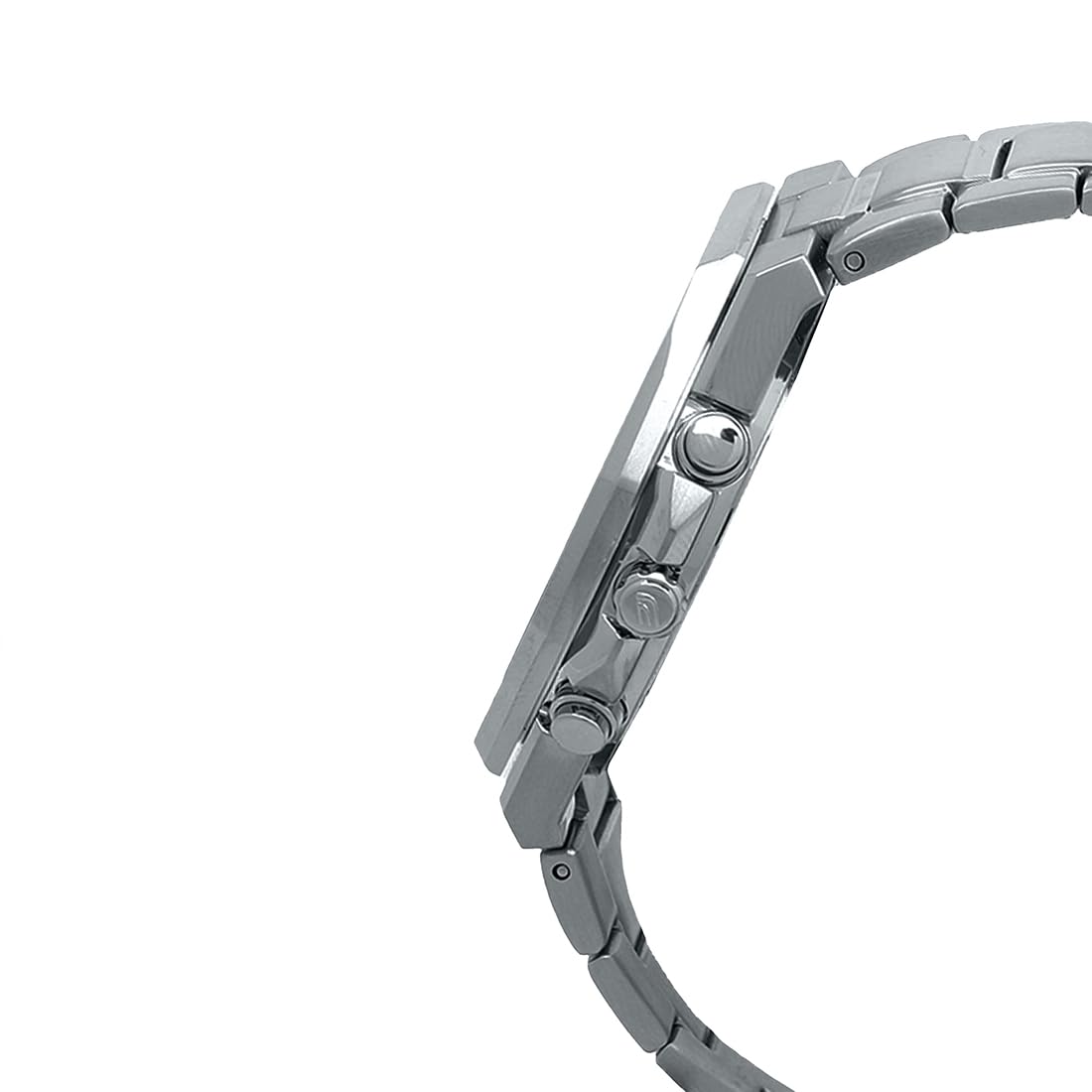
Billede: Side view of the watch, illustrating the crown and pushers used for time setting and chronograph operation.
2. Datoindstilling
Sådan indstilles datoen:
- Træk kronen ud til den første klikposition.
- Rotate the crown to adjust the date. Avoid setting the date between 9:00 PM and 1:00 AM, as this may interfere with the automatic date change mechanism.
- Skub kronen tilbage til normal position.
3. Justering af bånd
The stainless steel band can be adjusted by adding or removing links to achieve a comfortable fit. This procedure typically requires specialized tools and is best performed by a qualified jeweler or watch technician to prevent damage to the band or clasp.

Image: The watch displayed on a wrist, demonstrating how the band fits. Proper band adjustment ensures comfort and security.
Betjening af kronografen
Your Casio Edifice EFB-680D-1AVUDF features a 1/10-second chronograph for measuring elapsed time.
- Start af en måling: Press button A (top right pusher) to start the chronograph. The chronograph second hand and 1/10-second hand will begin moving.
- Stopping a Measurement: Press button A again to stop the chronograph. The elapsed time will be displayed.
- Nulstilling af kronografen: After stopping, press button B (bottom right pusher) to reset the chronograph hands to the 12 o'clock position.
- Mellemtidsmåling:
- Tryk på knap A for at starte.
- Press button B to record a split time. The chronograph hands will stop to indicate the split time, while internal timing continues.
- Press button B again to release the split time and display the current elapsed time.
- Press button A to stop the measurement.
- Tryk på knap B for at nulstille.
The chronograph has a measuring capacity of 59 minutes, 59.9 seconds.
Vedligeholdelse og pleje
1. Vandafvisende
This watch is water-resistant up to 100 meters (10 ATM). This means it is suitable for everyday use, swimming, and snorkeling. Betjen ikke kronen eller trykknapperne, mens uret er vådt eller nedsænket i vand. Avoid exposing the watch to hot water or steam, as this can compromise the water resistance seals.
2. Rensning
Wipe the watch case and band periodically with a soft, dry cloth to remove dirt and moisture. For stainless steel bands, a soft brush and mild soapy water can be used, followed by thorough rinsing and drying. Ensure the crown is pushed in before cleaning with water.
3. Udskiftning af batteri
The watch is powered by an SR920SW battery with an approximate life of 3 years. When the battery runs low, the second hand may start moving at two-second intervals to indicate a low battery. Battery replacement should be performed by a qualified watch technician to ensure proper sealing and function.
4. Pleje af safirglas
The watch features a sapphire crystal with a glare-resistant coating, known for its high scratch resistance. While highly durable, it is not entirely scratch-proof. Avoid direct impact or contact with extremely hard materials to prevent damage.
Fejlfinding
| Problem | Mulig årsag | Løsning |
|---|---|---|
| Watch stops or runs inaccurately. | Lavt batteri. | Udskift batteriet på et autoriseret servicecenter. |
| Chronograph hands do not reset to 12 o'clock. | Misalignment after impact or battery change. | Refer to the Casio official website for specific chronograph hand alignment procedures for your model, or consult a service center. |
| Vandindtrængen. | Crown/pushers operated underwater, or seals compromised. | Immediately take the watch to an authorized service center for inspection and repair. Do not attempt to dry it yourself. |
Specifikationer
- Model: EFB-680D-1AVUDF
- Case / Bezel Material: Rustfrit stål
- Båndmateriale: Rustfrit stål
- Krystal: Sapphire crystal with glare-resistant coating
- Vandtæthed: 100 meter (10 ATM)
- Bevægelse: Kvarts
- Nøjagtighed: ±20 sekunder om måneden
- Batteritype: SR920SW
- Ca. Batterilevetid: 3 år
- Chronograph: 1/10-second stopwatch, Measuring capacity: 59'59.9'', Measuring modes: Elapsed time, split time, 1st-2nd place times
- Dimensioner (H x B x D): Approximately 46.0 x 45.8 x 10.5 mm (Case diameter 45.8mm, Case thickness 10.5mm)
- Vægt: Cirka 151 g
- Spændetype: One-touch 3-fold Clasp, Double Locking Foldover Clasp

Billede: En sideprofile view of the watch, highlighting its slim design and case construction.

Billede: Bagside view of the watch, showing the screw lock back and engraved model information.
Garantioplysninger
Your Casio Edifice EFB-680D-1AVUDF watch comes with a manufacturer's warranty. For specific details regarding the warranty period, coverage, and terms, please refer to the warranty card included with your purchase or visit the official Casio website. Extended warranty options may also be available from authorized retailers.
Kundesupport
For further assistance, technical support, or service inquiries, please contact Casio customer support. You can find contact information and frequently asked questions on the official Casio webwebsted:
Fabrikant: Casio India Co Pvt Ltd
Adresse: A-41, 1st Floor, MCIE, Mathura Road, New Delhi-110044, India
Officiel Casio Webwebsted: www.casio.com/in/