
1. Vigtige sikkerhedsinstruktioner
Læs alle instruktioner omhyggeligt, inden du bruger dit fjernsyn, og gem dem til senere brug. Følg alle advarsler og instruktioner, der er angivet på produktet.
- Do not block or cover the ventilation slots on the back cover.
- Placer ikke tv'et på en ustabil vogn, stativ, stativ, beslag eller bord.
- Do not use the TV near water.
- Rengør kun med en tør klud.
- Tag stikket ud af tv'et under tordenvejr eller når det ikke bruges i længere perioder.
- Overlad al service til kvalificeret servicepersonale.
2. Pakkens indhold
Bekræft, at alle nedenstående varer er inkluderet i din pakke:
- Impecca 43-inch 1080P Frameless LED TV
- Full-function Remote Control (requires 2xAAA batteries, not included)
- 2x TV-stativer
- 5ft. Power Cable
- Brugermanual (dette dokument)
3. Produktet er slutview
The Impecca 43-inch Frameless LED TV offers a high-quality viewing experience with its 1080p HD resolution and 60Hz refresh rate. Designed for clarity and vibrant colors, this television features enhanced stereo speakers with Dolby Audio for an immersive sound experience. Its frameless design provides a sleek aesthetic suitable for any living space.

Front view of the Impecca 43-inch Frameless LED TV.

The Impecca 43-inch TV integrated into a modern living room setting, showcasing its frameless design.
Nøglefunktioner:
- 43-Inch Frameless LED Display: 1080p HDTV with 60Hz picture quality for high-quality entertainment.
- Dolby Audio & HQ Stereo Speakers: Integrated speakers with HQ resolution and Dolby Audio for crisp, clear sound.
- Flere tilslutningsmuligheder: Includes 3xHDMI, 1xUSB, 1x A/V inputs, Earphone out, A/V Input, Component Y,Pb,Pr, and Wall Mounting Ports.
- Advanced Picture & Sound Settings: Features Adjustable Color temperature, Noise Reduction, Weak Signal Enhancement, Progressive Scan, Equalizers.
- Bekvemmelighedsfunktioner: On/Off Timer, Auto Sleep Mode, and a full-function remote control.
- Flersproget support: English, French, Spanish.
4. Opsætning
4.1 Montering af TV-stativer
- Placer forsigtigt tv'et med forsiden nedad på en blød, ren overflade for at forhindre, at skærmen beskadiges.
- Juster hver stander med de tilsvarende skruehuller i bunden af tv'et.
- Fastgør stativerne med de medfølgende skruer. Sørg for, at de er ordentligt fastgjort.
4.2 Vægmontering (valgfrit)
This TV is VESA compatible (M4 100 x 100). If you choose to wall mount your TV, please follow the instructions provided with your wall mount kit. Ensure the wall mount is suitable for the TV's weight and size.
4.3 Tilslutning af strøm
Connect the 5ft power cable to the TV's power input and then to a standard electrical outlet (AC 100-240V, 50/60Hz).
4.4 Indledende tænding
After connecting the power, press the Power button on the remote control or on the TV to turn it on. Follow the on-screen prompts for initial setup, including language selection and channel scanning.
5. Forbindelse
The Impecca TV offers a variety of ports for connecting external devices:

Bag view of the TV highlighting the available input/output ports.
- HDMI (x3): Tilslut Blu-ray-afspillere, spillekonsoller, kabel-/satellitbokse og andre HDMI-aktiverede enheder.
- USB (x1): Til tilslutning af USB-lagerenheder for at afspille medier files.
- A/V-indgang: Til ældre enheder, der bruger kompositvideo- og stereolydkabler.
- Component Y,Pb,Pr: Til tilslutning af enheder ved hjælp af komponentvideokabler.
- Høretelefon ud: Til tilslutning af hovedtelefoner eller eksterne lydsystemer.
- Antenne-/kabelindgang: Til tilslutning af en antenne eller et kabel-tv-signal.
Tilslutning af enheder:
- Ensure the TV and the external device are powered off.
- Tilslut det relevante kabel fra den eksterne enhed til den tilsvarende port på tv'et.
- Power on the external device, then power on the TV.
- Press the 'SOURCE' button on the remote control to select the correct input source.
6. Fjernbetjening
The included full-function remote control allows you to operate all features of your Impecca TV.

The full-function remote control for the Impecca TV.
Batteri installation:
Open the battery compartment on the back of the remote control. Insert two AAA batteries, ensuring correct polarity (+/-). Close the compartment.
Nøglefunktioner:
- Effekt (⑁): Tænder eller slukker for tv'et.
- Lydløs (🔇): Dæmper eller gendanner lyden.
- Nummerknapper (0-9): Vælg kanaler direkte.
- Lydstyrke (+/-): Justerer lydstyrken.
- Kanal (▲/▼): Skifter kanal sekventielt.
- Kilde: Selects the input source (HDMI, USB, AV, etc.).
- Menu: Giver adgang til hovedmenuen for indstillinger.
- Navigationsknapper (◄/►/▲/▼): Naviger gennem menuer og muligheder.
- GÅ IND: Bekræfter valg.
- AFSLUT: Forlader den aktuelle menu eller funktion.
- CC: Aktiverer/deaktiverer undertekster.
- EPG: Viser den elektroniske programguide.
- SOVE: Indstiller sleep-timeren.
7. Grundlæggende betjening
7.1 Tænd/sluk
Tryk på tænd/sluk-knappen på fjernbetjeningen eller på tv'et for at tænde eller slukke enheden.
7.2 Kanalvalg
Use the number buttons on the remote to directly enter a channel number, or use the Channel Up/Down buttons to browse channels.
7.3 Lydstyrkejustering
Use the Volume Up/Down buttons on the remote to increase or decrease the sound level. Press the Mute button to temporarily silence the audio.
7.4 Valg af indgangskilde
Press the 'SOURCE' button on the remote control to cycle through available input sources (e.g., HDMI 1, HDMI 2, USB, AV). Select the desired source using the navigation buttons and 'ENTER'.
7.5 Menunavigation
Press the 'MENU' button to access the TV's main settings menu. Use the navigation arrows to move between options and 'ENTER' to select. Use 'EXIT' to close the menu.
8. Avancerede funktioner
Your Impecca TV includes several features to enhance your viewlytte- og lytteoplevelse:
- Justerbar farvetemperatur: Customize the color warmth or coolness of the display to your preference.
- Støjreduktion: Reduces visual noise in the picture for a clearer image.
- Weak Signal Enhancement: Improves picture quality when receiving a weak broadcast signal.
- Progressiv scanning: Enhances the clarity and stability of the image.
- Equalizere: Adjust audio frequencies to fine-tune the sound output.
- Tænd/sluk timer: Set specific times for the TV to automatically turn on or off.
- Automatisk dvaletilstand: The TV can automatically enter standby mode after a period of inactivity.
- Dolby Audio: Provides enhanced sound quality for a more dynamic audio experience.
9. Fejlfinding
Hvis du støder på problemer med dit tv, kan du se følgende almindelige problemer og løsninger:
| Problem | Mulig løsning |
|---|---|
| Ingen strøm | Sørg for, at strømkablet er korrekt tilsluttet tv'et og en fungerende stikkontakt. Kontroller, om stikkontakten har strøm. |
| Intet billede, men der er lyd | Kontrollér valget af inputkilde. Sørg for, at den eksterne enhed er tændt og tilsluttet korrekt. |
| Ingen lyd, men der er billede | Check the volume level and ensure the TV is not muted. Verify audio cables are connected properly. |
| Fjernbetjening virker ikke | Udskift batterierne i fjernbetjeningen. Sørg for, at der ikke er nogen forhindringer mellem fjernbetjeningen og tv'ets IR-sensor. |
| Dårlig billedkvalitet | Check antenna/cable connections. Adjust picture settings (brightness, contrast, sharpness, color temperature). If using an external device, check its output resolution. |
10. Specifikationer
Detailed technical specifications for the Impecca 43-inch 1080P Frameless LED TV:
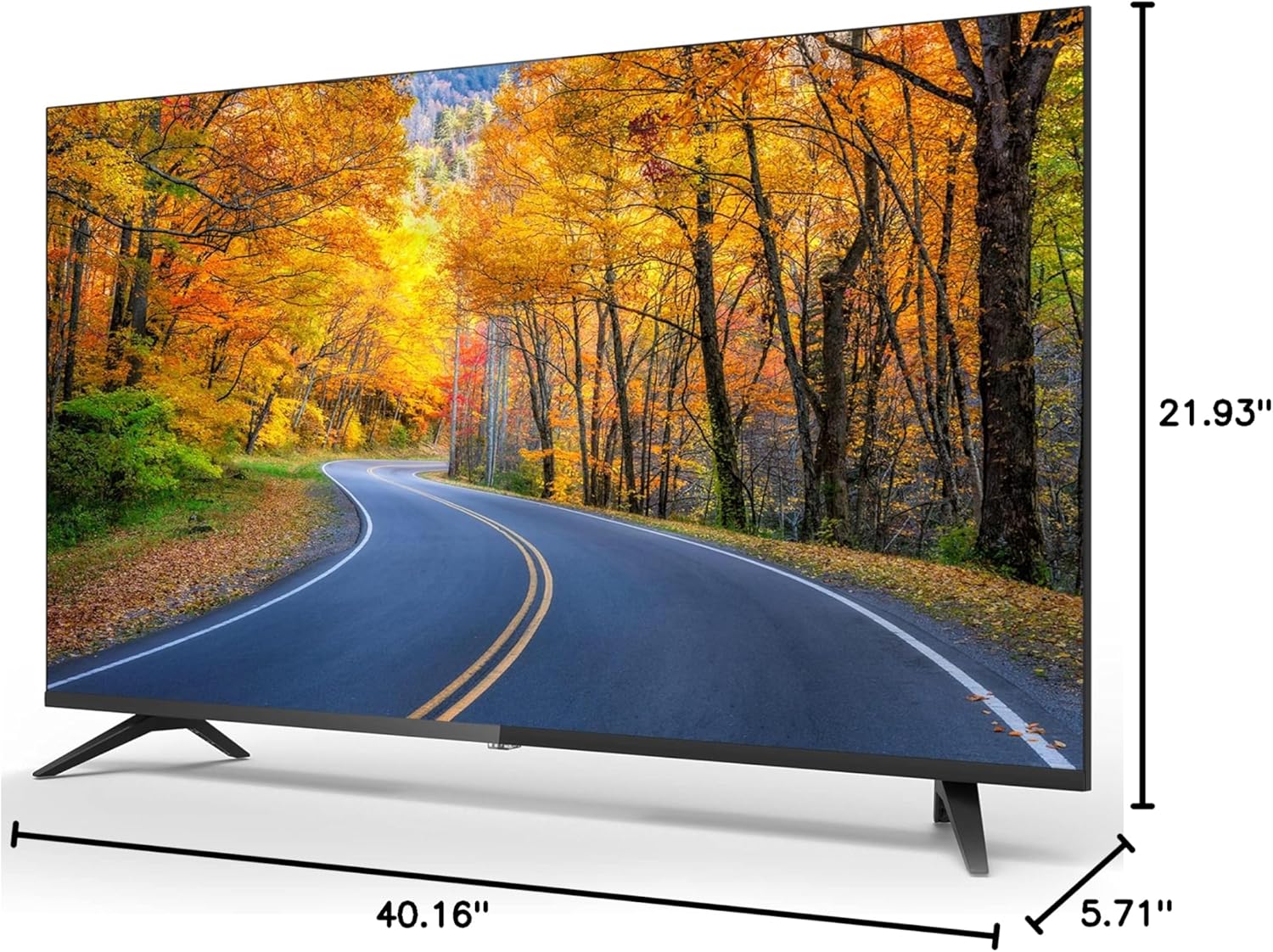
Dimensions of the Impecca 43-inch TV.
| Feature | Specifikation |
|---|---|
| Skærmstørrelse | 43 tommer |
| Displayteknologi | LED |
| Opløsning | 1080p (1920x1080) |
| Opdateringshastighed | 60 Hz |
| Aspektforhold | 16:9 |
| Lysstyrke | 180 cd/m² |
| Kontrastforhold | 1000:1 |
| Viewi vinkel | 178° x 178° |
| Svartid | 5 ms |
| Indbygget tuner | ATSC tuner |
| Højttalere | 2 x 6-Watts Stereo Speakers |
| Strømforbrug | ≤40W (operational), ≤0.5W (Standby) |
| Strømbehov | AC 100-240V, 50/60Hz |
| Produktmål (D x B x H) | 5.71 cm x 40.16 cm x 21.93 cm |
| Varens vægt | 13.09 pund |
| VESA-kompatibilitet | M4 100 x 100 |
11. Vedligeholdelse
11.1 Rengøring af tv'et
Before cleaning, unplug the power cord from the electrical outlet. Use a soft, dry cloth to wipe the screen and other surfaces. Do not use liquid cleaners, aerosol cleaners, or harsh chemicals, as they may damage the TV.
11.2 Pleje og opbevaring
Avoid exposing the TV to direct sunlight, extreme temperatures, or high humidity. When moving the TV, handle it carefully and ensure it is properly supported to prevent damage.
12. Garanti og support
For warranty information or technical support, please refer to the warranty card included with your product or visit the official Impecca website. You may also contact Impecca customer service directly for assistance with product registration, troubleshooting, or service requests.
Online support: www.impecca.com/support
Kontaktoplysninger: Refer to your product packaging or the Impecca webhjemmeside for de seneste kontaktoplysninger.