
1. Introduktion
Tak for købetasing the Westinghouse 32-Inch 720p LED HD TV, model WD32HX1201. This manual provides essential information for the safe and efficient operation of your television. Please read it thoroughly before using the product and retain it for future reference.
This television features a 32-inch 720p LED display, offering clear picture quality. It includes multiple connectivity options such as HDMI, USB, and VGA, making it suitable for various entertainment and computing needs. The built-in V-chip allows for parental control over content.

Figur 1.1: Forside view of the Westinghouse 32-Inch 720p LED HD TV.
2. Sikkerhedsoplysninger
Please observe the following safety precautions to prevent damage to the TV and ensure your safety:
- Strømkilde: Tilslut kun tv'et til en AC 120V, 60Hz strømforsyning.
- Ventilation: Ensure proper ventilation. Do not block ventilation openings. Maintain a minimum distance of 4 inches (10 cm) around the TV for air circulation.
- Vand og fugt: Udsæt ikke tv'et for regn eller fugt. Placer ikke genstande fyldt med væsker, såsom vaser, oven på tv'et.
- Varmekilder: Keep the TV away from heat sources such as radiators, heat registers, stoves, or other apparatus (including ampløftere), der producerer varme.
- Rensning: Tag stikket til tv'et ud af stikkontakten før rengøring. Brug en blød, tør klud. Brug ikke flydende rengøringsmidler eller sprayrengøringsmidler.
- Lyn: Tag stikket ud af tv'et under tordenvejr eller når det ikke bruges i længere perioder.
- Service: Forsøg ikke selv at servicere dette produkt. Overlad al service til kvalificeret servicepersonale.
- Montering: When mounting the TV on a wall, ensure the wall mount is VESA compliant (100 x 100 mm) and installed by qualified personnel.
3. Pakkens indhold
Carefully unpack your new television and ensure all items are present:
- Westinghouse 32-Inch 720p LED HD TV
- TV-bord (2 stk.)
- Fjernbetjening (med batterier)
- Strømledning
- Brugervejledning (dette dokument)
- Skruer til stativmontering
4. Opsætning
4.1 Montering af stativet
If you are not wall-mounting the TV, you will need to attach the included stand. Place the TV face down on a soft, clean surface to prevent screen damage.
- Juster hvert stativstykke med de tilsvarende riller i bunden af tv'et.
- Fastgør hvert stativstykke med de medfølgende skruer. Sørg for, at de er spændt godt fast.
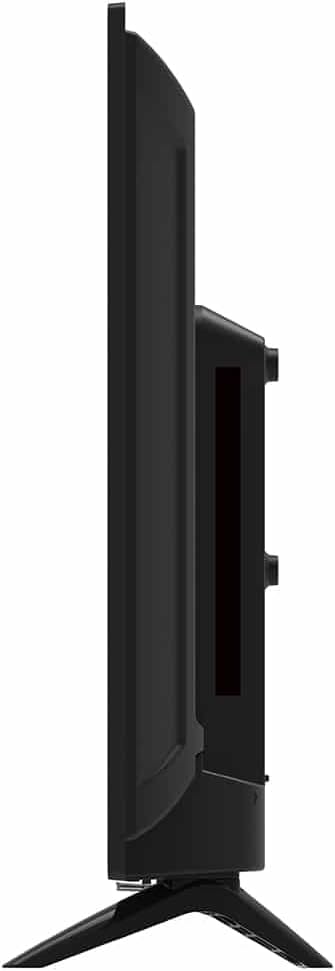
Figur 4.1: Side view of the TV, illustrating the slim profile and stand attachment points.
4.2 Tilslutning af strøm
After assembling the stand or mounting the TV, connect the power cord to the TV's power input and then to a standard AC 120V, 60Hz wall outlet.
4.3 Tilslutning af eksterne enheder
Your Westinghouse TV offers various ports for connecting external devices. Refer to the images below for port locations.

Figur 4.2: Bagside view of the TV, displaying all available input and output ports.
HDMI-forbindelser
Connect devices such as Blu-ray players, gaming consoles, or streaming devices using HDMI cables. The TV has multiple HDMI inputs.
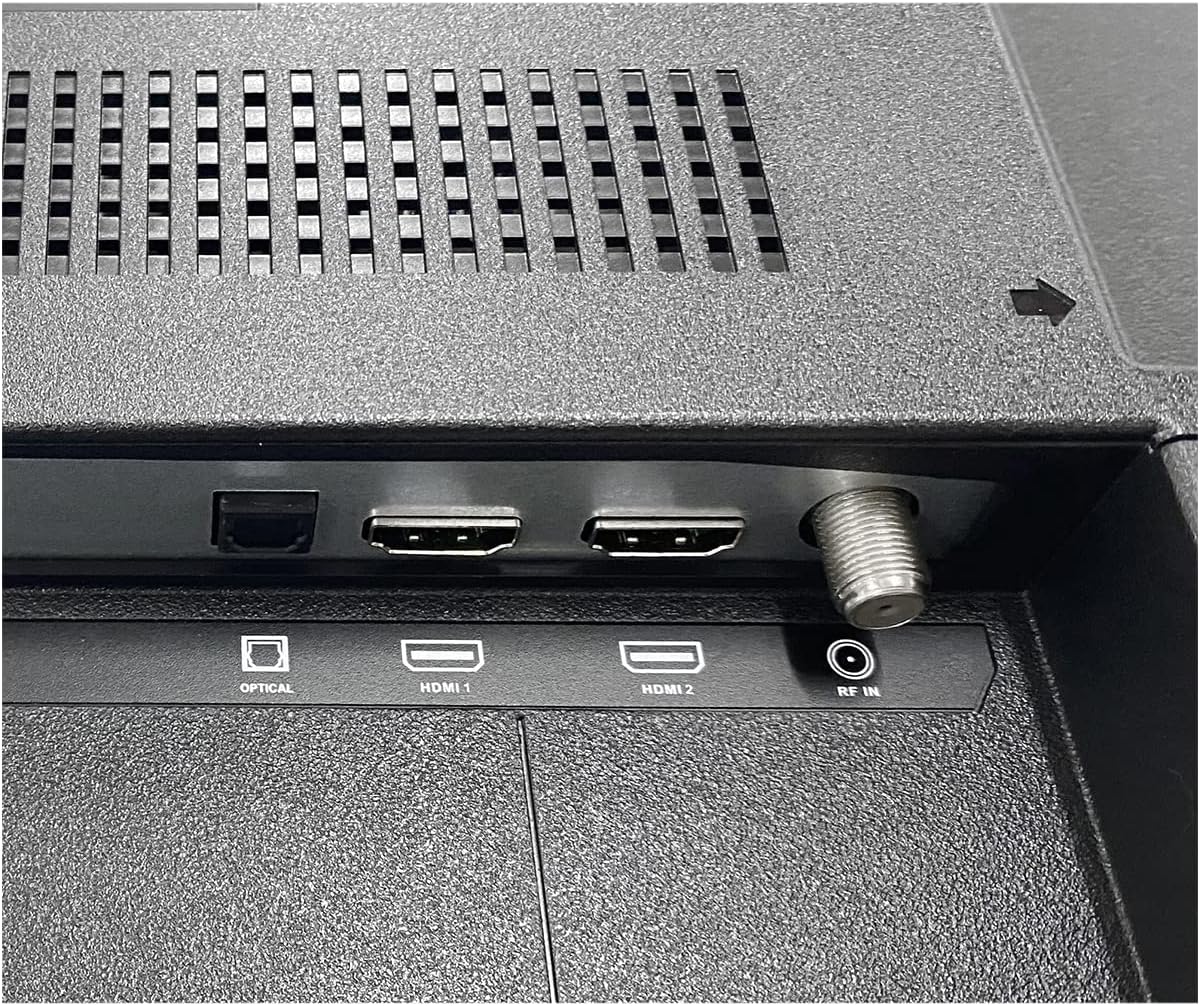
Figure 4.3: Close-up of HDMI 1, HDMI 2, Optical Audio Out, and RF (Antenna) input ports.
USB-forbindelse
Tilslut et USB-drev til view photos, play music, or watch videos. This port can also power compatible streaming sticks.
VGA and Composite Video Connections
Use the VGA port to connect a computer. The Composite Video (AV) inputs (yellow for video, red/white for audio) are for older devices like VCRs or DVD players.
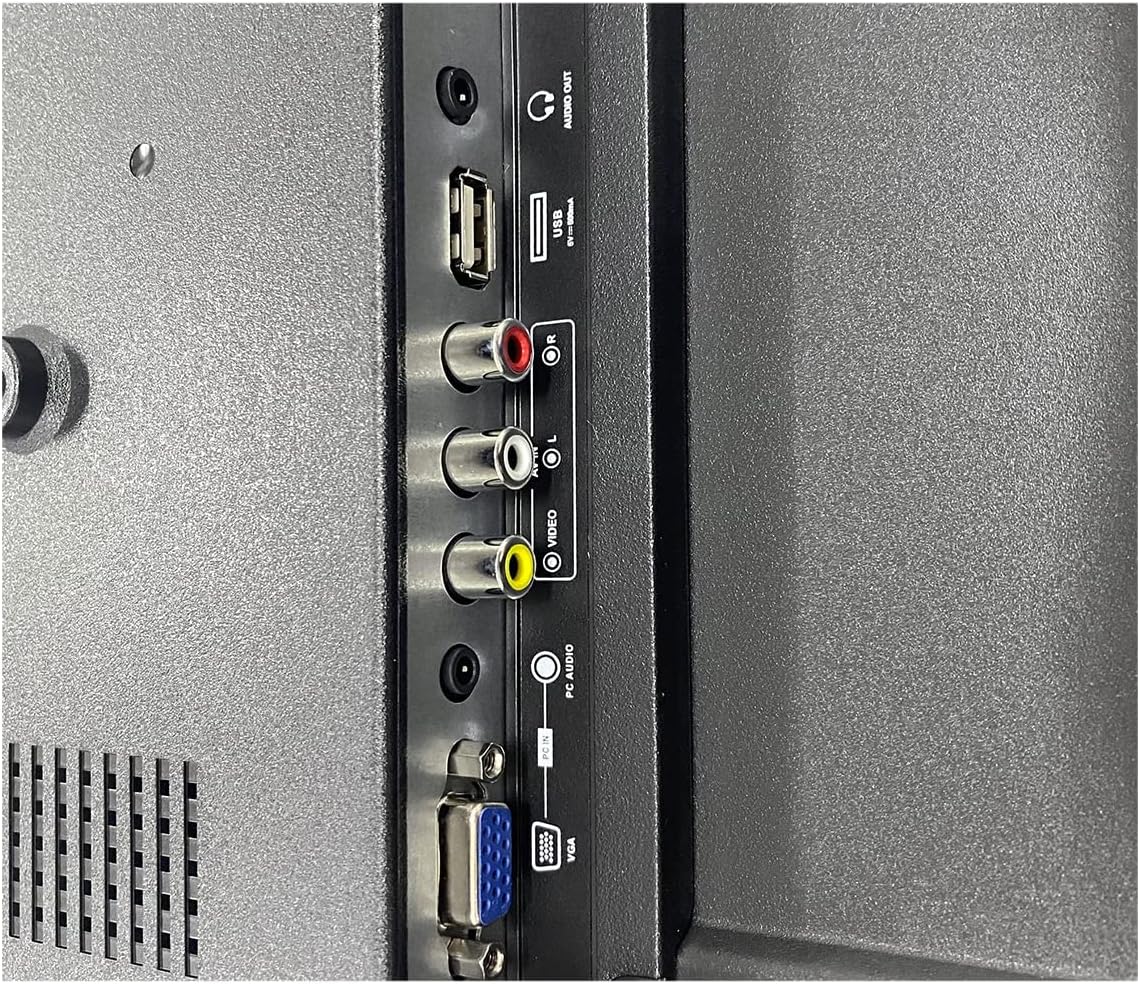
Figure 4.4: Close-up of USB, Composite Video (Video, L Audio, R Audio), and VGA input ports.
Antenna/Cable (RF) Connection
Connect an outdoor antenna or cable TV feed to the RF input for over-the-air or basic cable channels.
4.4 Indledende opsætning
After connecting power and any desired devices, turn on the TV. The first-time setup wizard will guide you through language selection, channel scanning, and basic picture/sound settings.
5. Betjeningsvejledning
5.1 Fjernbetjening overview
The included remote control allows you to access all TV functions. Familiarize yourself with the buttons:
- Magt: Tænder eller slukker for tv'et.
- Input/kilde: Selects the input source (HDMI 1, HDMI 2, VGA, AV, TV).
- Volumen +/-: Justerer lydstyrken.
- Kanal +/-: Skifter tv-kanaler.
- Menu: Åbner hovedmenuen for indstillinger.
- Navigation (Arrows/OK): Navigerer gennem menuer og bekræfter valg.
- Udgang: Closes the current menu or screen.
- Stum: Slår lyden fra eller til.
5.2 Tænd/sluk
Tryk på Magt knappen på fjernbetjeningen eller på selve tv'et for at tænde eller slukke tv'et.
5.3 Valg af indgangskilde
Tryk på Input or Kilde button on the remote control to cycle through available input sources (HDMI 1, HDMI 2, VGA, AV, TV Tuner). Select the source corresponding to your connected device.
5.4 Menunavigation
Tryk på Menu button to access the TV's settings. Use the arrow buttons to navigate through options and the OK button to select. Common menu categories include Picture, Sound, Channel, Time, and Setup.
5.5 Parental Control (V-Chip)
The built-in V-chip allows you to block content based on program ratings. Access the Parental Control settings through the main menu to configure these options. A password may be required to access and modify these settings.
6. Vedligeholdelse
6.1 Rengøring af skærmen
To clean the TV screen, first unplug the power cord. Gently wipe the screen with a soft, lint-free cloth. For stubborn marks, lightly dampRengør kluden med vand eller en specialiseret skærmrens (sørg for, at den er sikker til LED-skærme), og tør den forsigtigt af. Sprøjt ikke væske direkte på skærmen.
6.2 Rengøring af kabinettet
Wipe the TV cabinet with a soft, dry cloth. Avoid using abrasive cleaners, waxes, or solvents as they can damage the finish.
6.3 Generel pleje
- Undgå at placere tunge genstande oven på tv'et.
- Udsæt ikke tv'et for direkte sollys eller ekstreme temperaturer.
- Hvis du flytter tv'et, skal du sørge for, at det er korrekt understøttet og håndteret for at forhindre skader.
7. Fejlfinding
Før du kontakter kundesupport, kan du prøve følgende løsninger på almindelige problemer:
Ingen strøm
- Sørg for, at netledningen er korrekt tilsluttet både tv'et og stikkontakten.
- Kontroller om stikkontakten virker ved at tilslutte en anden enhed.
- Tryk på tænd/sluk-knappen på selve tv'et, ikke kun på fjernbetjeningen.
Intet billede, men der er lyd
- Kontroller, at den korrekte inputkilde er valgt (f.eks. HDMI 1, AV).
- Kontroller kabelforbindelserne mellem tv'et og den eksterne enhed.
- Try connecting a different device to the same input or the same device to a different input.
Ingen lyd, men billedet er til stede
- Sørg for, at tv'et ikke er slået fra, og at der er skruet op for lydstyrken.
- Check audio cable connections for external devices.
- Hvis du bruger eksternt lydudstyr, skal du sørge for, at det er tændt og korrekt konfigureret.
Fjernbetjeningen virker ikke
- Udskift batterierne i fjernbetjeningen.
- Sørg for, at der ikke er nogen forhindringer mellem fjernbetjeningen og tv'ets IR-sensor.
- Ret fjernbetjeningen direkte mod tv'et.
Dårlig billedkvalitet
- For antenna connections, adjust the antenna position or rescan for channels.
- Check cable connections for external devices; ensure they are secure.
- Juster billedindstillingerne (lysstyrke, kontrast, skarphed) i TV-menuen.
- Ensure the source device is outputting a compatible resolution.
8. Specifikationer
| Feature | Beskrivelse |
|---|---|
| Mærke | Westinghouse |
| Model | WD32HX1201 |
| Skærmstørrelse | 32 tommer |
| Displayteknologi | LED |
| Opløsning | 720p |
| Opdateringshastighed | 60 Hz |
| Forbindelsesteknologi | HDMI, VGA, USB, Composite Video, RF (Antenna) |
| HDMI -indgange | 2 |
| Lydudgangstilstand | Digital (optisk) |
| Forældrekontrol | V-chip |
| Monteringstype | Table Mount, VESA Wall Mount (100 x 100 mm) |
| UPC | 657768265464 |
9. Garanti og support
9.1 Garantioplysninger
This Westinghouse TV comes with a 90 dages begrænset garanti. This warranty covers defects in materials and workmanship under normal use. For specific terms and conditions, please refer to the warranty documentation included with your product or contact Westinghouse customer support.
9.2 Kundesupport
If you encounter issues that cannot be resolved using the troubleshooting guide, or if you require further assistance, please contact Westinghouse customer support. Have your TV model number (WD32HX1201) and purchase information ready when you call.
For the most up-to-date contact information, please visit the official Westinghouse webwebsted.