
Sigma SG60600L
Sigma 60-600mm F4.5-6.3 DG DN OS for L-Mount Instruction Manual
Model: SG60600L
1. Introduktion
This manual provides detailed instructions for the safe and effective use of your Sigma 60-600mm F4.5-6.3 DG DN OS Sports Lens for L-Mount. Please read this manual thoroughly before using the product and retain it for future reference. This lens is designed for mirrorless cameras and offers a versatile 10x zoom range, suitable for various photographic applications from landscapes to wildlife.
2. Hvad er der i æsken
Når du åbner pakken, skal du sørge for, at alle følgende varer er til stede:
- Sigma 60-600mm F4.5-6.3 DG DN OS Sports Lens
- Modlysblænde
- Frontlinsedæksel
- Bageste objektivdæksel
- Tripod Socket (removable)
- Instruktionsmanual (dette dokument)
3. Nøglefunktioner
- Versatile 10x Zoom: Covers a broad focal length range from 60mm to 600mm.
- High-response Linear Actuator (HLA) AF Motor: Provides fast and precise autofocus performance.
- Dust and Splash-Resistant Structure: Designed for durability in various shooting conditions.
- Maximum Magnification Ratio of 1:2.4: Allows for detailed close-up shots.
- Dual Action Zoom Function: Offers both rotary and push-pull zoom mechanisms for flexible operation.
- Optisk stabilisering (OS): Minimizes camera shake for sharper images, especially at longer focal lengths.
- Manual Focus Override: Enables manual focus adjustments even when using autofocus.
- Zoomlås-knap: Secures the lens at a desired focal length to prevent accidental extension.
4. Opsætning
4.1 Montering af objektivet på dit kamera
- Sørg for, at både kameraet og objektivet er slukket.
- Fjern det bagerste objektivdæksel fra objektivet og kamerahusdækslet fra kameraet.
- Juster monteringsindeksmærkerne på objektivet og kamerahuset.
- Insert the lens into the camera's lens mount and rotate it clockwise until it clicks into place.
4.2 Montering af modlysblænden
The included lens hood helps to block stray light and protect the front element of the lens. Align the red dot on the lens hood with the red dot on the front of the lens, then twist the hood clockwise until it locks securely.
4.3 Using the Tripod Socket
For stable shooting, especially at longer focal lengths, attach the lens to a tripod using the integrated tripod socket. The tripod collar can be rotated for optimal balance and composition. Loosen the locking knob on the tripod collar to rotate the lens, then tighten it to secure the position.
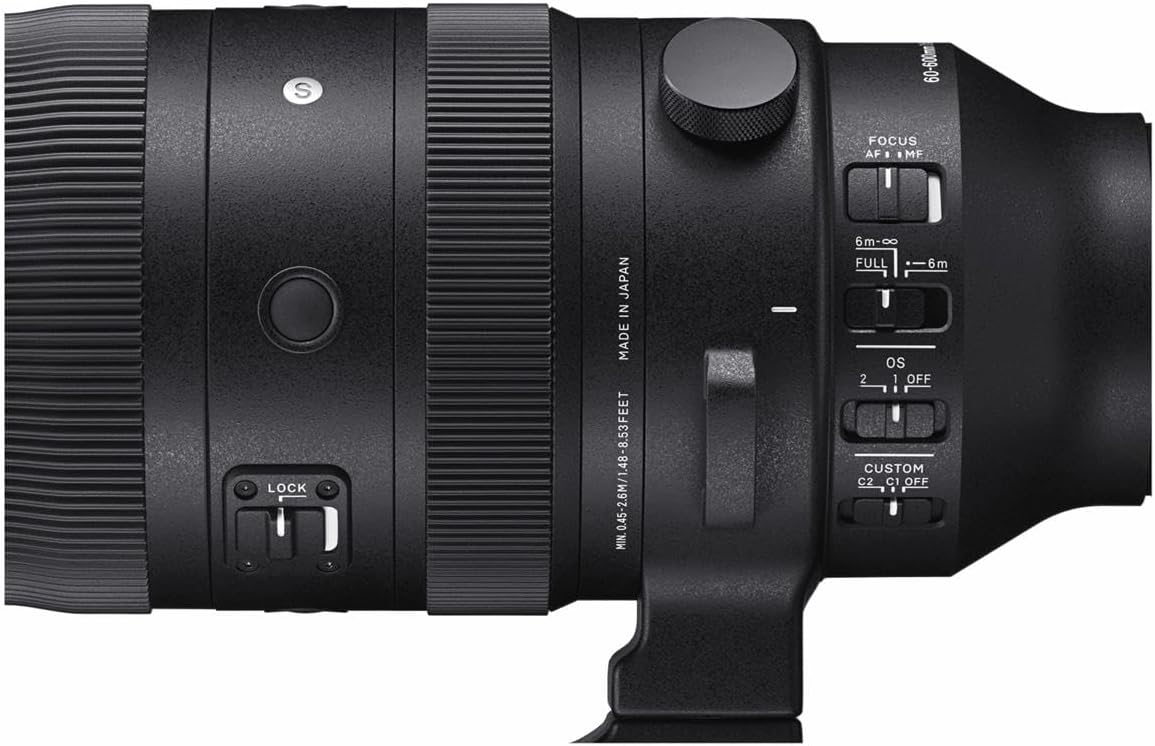
Image: Sigma 60-600mm lens securely mounted on a tripod, demonstrating its use for stable photography.
5. Driftstilstande
5.1 Fokustilstande (AF/MF)
The lens features a switch to select between Autofocus (AF) and Manual Focus (MF). In AF mode, the camera automatically focuses on the subject. In MF mode, you manually adjust the focus ring on the lens. The Manual Override (MO) function allows for fine-tuning focus manually even when AF is engaged.
5.2 Optical Stabilizer (OS) Modes
The Optical Stabilizer (OS) system helps reduce blur caused by camera shake. The lens offers different OS modes:
- Tilstand 1: General-purpose stabilization for static subjects.
- Tilstand 2: Optimeret til panorering, stabiliserer lodret bevægelse, samtidig med at horisontal bevægelse tillades.
- OFF: Deaktiverer optisk stabilisering.
5.3 Zoom Lock Switch
The zoom lock switch prevents the lens barrel from extending or retracting unintentionally, which is useful during transport or when shooting at a fixed focal length.

Billede: Detaljeret view of the lens control panel, highlighting the various switches for focus, optical stabilization, and zoom lock.
6. Specifikationer
| Feature | Specifikation |
|---|---|
| Mærke | Sigma |
| Modelnavn | SG60600L |
| Brændvidde | 60-600 mm |
| Linsetype | Telezoom |
| Kompatible monteringer | Leica L-Mount |
| Maksimal blænde | F4.5-6.3 |
| Minimum blænde | F22-32 |
| Billedstabilisering | Optical (OS) |
| Fokus Type | Autofocus (HLA) with Manual Focus Override |
| Antal membranblade | 9 (Rounded) |
| Minimum fokuseringsafstand | 45 cm (17.7 inches) at 200mm |
| Maksimal forstørrelsesforhold | 1:2.4 (at 200mm) |
| Filterstørrelse | 105 mm |
| Varens vægt | 2500 gram (5.5 pund) |
| Vandmodstandsniveau | Vandtæt |
7. Vedligeholdelse
7.1 Rengøring af linsen
- Brug en blæsebørste til at fjerne støv fra linsens overflade.
- For smudges or fingerprints, use a clean, soft microfiber cloth specifically designed for optics, along with a lens cleaning solution.
- Never use harsh chemicals or abrasive materials, as these can damage the lens coatings.
7.2 Opbevaring
Store the lens in a cool, dry place away from direct sunlight and extreme temperatures. Use the front and rear lens caps to protect the glass elements. If storing for an extended period, consider using a dehumidifying agent to prevent mold growth.
8. Fejlfinding
8.1 Image Blur
- Check OS setting: Ensure the Optical Stabilizer is set to an appropriate mode (Mode 1 or Mode 2) for your shooting conditions, or OFF if using a tripod.
- Lukkerhastighed: Use a faster shutter speed, especially when shooting handheld at longer focal lengths.
- Fokus: Verify that the lens is properly focused on your subject.
8.2 Problemer med autofokus
- AF/MF-knap: Confirm the lens is set to AF mode.
- Lysforhold: Autofocus may struggle in very low light. Consider using manual focus or a brighter light source.
- Kameraindstillinger: Check your camera's autofocus settings to ensure they are appropriate for your subject.
9. Garanti og support
The Sigma 60-600mm F4.5-6.3 DG DN OS Sports Lens comes with a 4-year warranty. For warranty claims, technical support, or service inquiries, please contact Sigma customer service or visit their official webwebsted. Gem din købsbevis for at validere garantien.
For mere information, besøg den officielle Sigma Global webwebsted.
Ask a question about this manual
Ask about setup, troubleshooting, compatibility, parts, safety, or missing instructions. Manuals+ will review the question and use this page’s manual context to help answer it.