
Indledning
This manual provides essential instructions for the safe and efficient use of your Olympia 2298 foldable 4G mobile phone. Please read it thoroughly before operating the device and keep it for future reference.
1. Opsætning
1.1 Pakkens indhold
- Olympia 2298 Mobile Phone
- Batteri (lithium-ion)
- USB-C ladekabel
- Charging Cradle (if included)
- Brugermanual
1.2 Inserting the Battery and SIM Card
- Open the phone: Gently open the phone to access the battery compartment.
- Fjern bagdækslet: Fjern forsigtigt telefonens bagcover.
- Indsæt SIM-kort: Locate the SIM card slot(s). Insert your 4G compatible SIM card(s) into the designated slot(s) with the gold contacts facing down, ensuring it clicks into place.
- Indsæt batteri: Place the Lithium-ion battery into the battery compartment, aligning the contacts.
- Udskift bagdækslet: Securely attach the back cover until it clicks.
 Billede: Forside view of the Olympia 2298 foldable phone, showing the main display with time and date.
1.3 Opladning af batteriet
Oplad telefonens batteri helt før første brug.
- Connect charger: Plug the USB-C cable into the phone's USB-C port or place the phone in the charging cradle. Connect the other end of the cable to a suitable power adapter.
- Opladningsindikator: The phone will display a charging indicator on the screen.
- Fuld opladning: Allow the phone to charge until the battery indicator shows a full charge. This may take several hours for the initial charge.
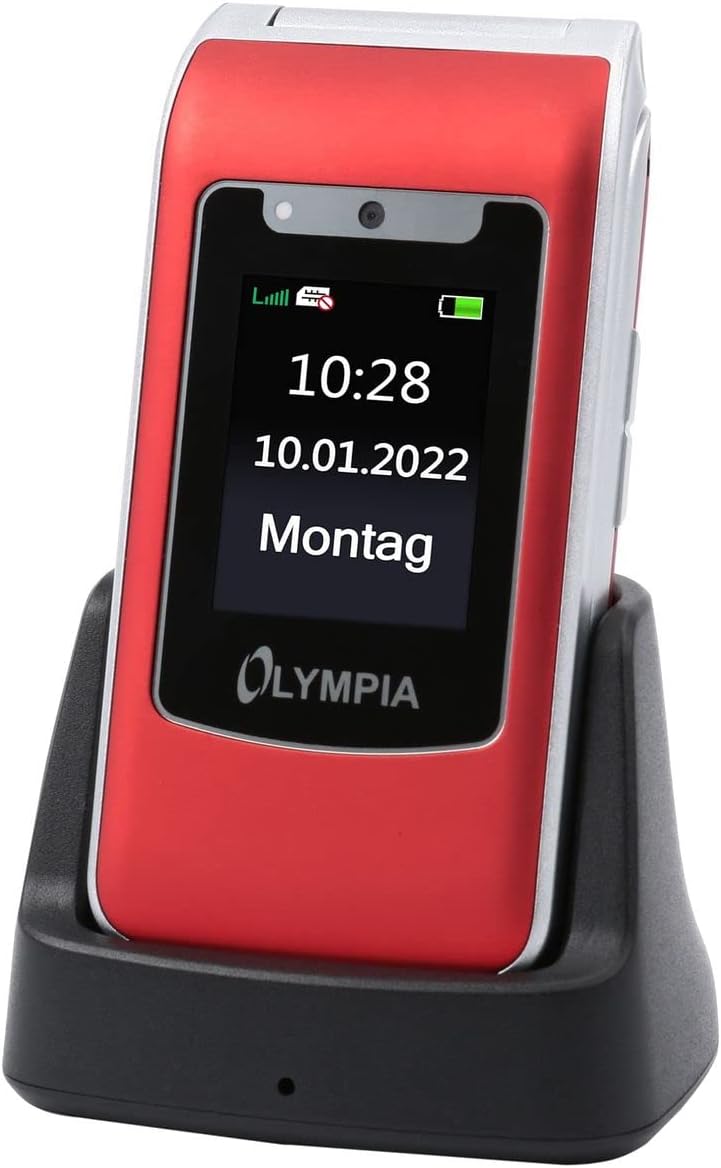 Image: The Olympia 2298 phone placed in its charging cradle, indicating ease of charging.
1.4 Tænd/sluk
- For at tænde: Tryk på tænd/sluk-knappen/afslut opkald, og hold den nede, indtil skærmen lyser.
- For at slukke: Tryk og hold tænd/sluk-knappen nede, og vælg derefter "Sluk" fra indstillingerne på skærmen.
2. Betjeningsvejledning
2.1 Grundlæggende opkaldsfunktioner
- Foretag et opkald: Dial the number using the keypad and press the Green Call button.
- Besvare et opkald: Når telefonen ringer, skal du trykke på den grønne opkaldsknap.
- Afslutning af et opkald: Tryk på den røde Afslut opkald-knap.
- Justering af lydstyrke: Use the volume buttons on the side of the phone during a call.
2.2 Emergency Call Button (SOS)
The Olympia 2298 features a dedicated SOS button for emergencies.
 Billede: Bagside view of the Olympia 2298 phone, highlighting the prominent SOS emergency call button.
- Setup Emergency Contacts: Before using, configure up to 5 emergency contacts in the phone's settings. Refer to the "Settings" section in the menu for details.
- Aktivering af SOS: In an emergency, press and hold the SOS button on the back of the phone for several seconds.
- Automatic Dialing: The phone will automatically dial the pre-set emergency contacts one by one until a connection is made. It will also send an emergency SMS message to these contacts.
Vigtig: Ensure emergency contacts are regularly updated and aware they are listed as such.
2.3 Menunavigation
Use the navigation keys (up, down, left, right) and the central "OK" button to browse the phone's menu. The "Back" button typically returns to the previous screen.
- Kontaktpersoner: Store and manage phone numbers.
- Beskeder: Send og modtag SMS-beskeder.
- Opkaldsliste: View missed, dialed, and received calls.
- Indstillinger: Customize phone preferences, including sound, display, and emergency contacts.
- Kamera: Access the integrated camera.
- Værktøjer: Includes features like alarm, calendar, and calculator.
2.4 Afsendelse og modtagelse af beskeder
- To Send: Go to "Messages" -> "Write Message". Enter the recipient's number or select from contacts, type your message, and send.
- At modtage: New messages will appear as a notification. Go to "Messages" -> "Inbox" to read them.
3. Vedligeholdelse
3.1 Rengøring
- Brug en blød, tør klud til at rengøre telefonens yderside.
- Avoid using liquid cleaners, aerosols, or harsh chemicals.
- Hold USB-C-porten fri for støv og snavs.
3.2 Pleje af batterier
- Udsæt ikke batteriet for ekstreme temperaturer.
- Undgå at aflade batteriet helt ofte for at forlænge dets levetid.
- Hvis telefonen ikke skal bruges i længere tid, skal den oplades til ca. 50%, inden den lægges væk.
4. Fejlfinding
| Problem | Mulig årsag | Løsning |
|---|---|---|
| Telefonen tænder ikke. | Batteriet er afladet eller ikke isat korrekt. | Oplad batteriet. Sørg for, at batteriet er korrekt isat. |
| Kan ikke foretage eller modtage opkald. | Intet netværkssignal, SIM-kort ikke isat, eller problem med SIM-kort. | Kontroller netværkssignalets styrke. Sæt SIM-kortet i igen. Kontakt din tjenesteudbyder. |
| SOS-knappen virker ikke. | Emergency contacts not set up or incorrect. | Verify and update emergency contacts in settings. |
| Dårlig opkaldskvalitet. | Svagt netværkssignal eller interferens. | Flyt til et område med bedre signal. Undgå forhindringer. |
5. Specifikationer
- Modelnummer: 2298
- Mærke: OLYMPIA
- Skærmstørrelse: 2.4 tommer
- Mobilteknologi: 4G (LTE)
- Forbindelse teknologi: USB (USB Type C)
- Trådløs operatør: Alle udbydere
- Batteri: 1 litium-ion-batteri (inkluderet)
- Varens vægt: 105 gram
- Taletid: 6 timer
- Dimensioner: 5.3 x 2.1 x 10.5 centimeter
6. Garanti og support
For warranty information and technical support, please refer to the documentation provided with your purchase or visit the official OLYMPIA webwebsted. Gem din købsbevis til garantikrav.
Note: Garantier for reservedele og softwareopdateringer er ikke specificeret i de medfølgende produktoplysninger.