
1. Introduktion
Thank you for choosing the DELTACO Gaming PM80 Wireless Optical Gaming Mouse. This manual provides essential information for setting up, operating, and maintaining your new gaming mouse. Please read these instructions carefully before use to ensure optimal performance and longevity of your device.
2. Pakkens indhold
- DELTACO Gaming PM80 Wireless Optical Gaming Mouse
- USB trådløs modtager
- USB opladningskabel
- Brugermanual
3. Produktet er slutview
The DELTACO Gaming PM80 is a high-performance wireless optical gaming mouse designed for precision and comfort. It features 7 programmable buttons, adjustable DPI up to 4800, and customizable illumination. The mouse is rechargeable, ensuring uninterrupted gaming sessions.
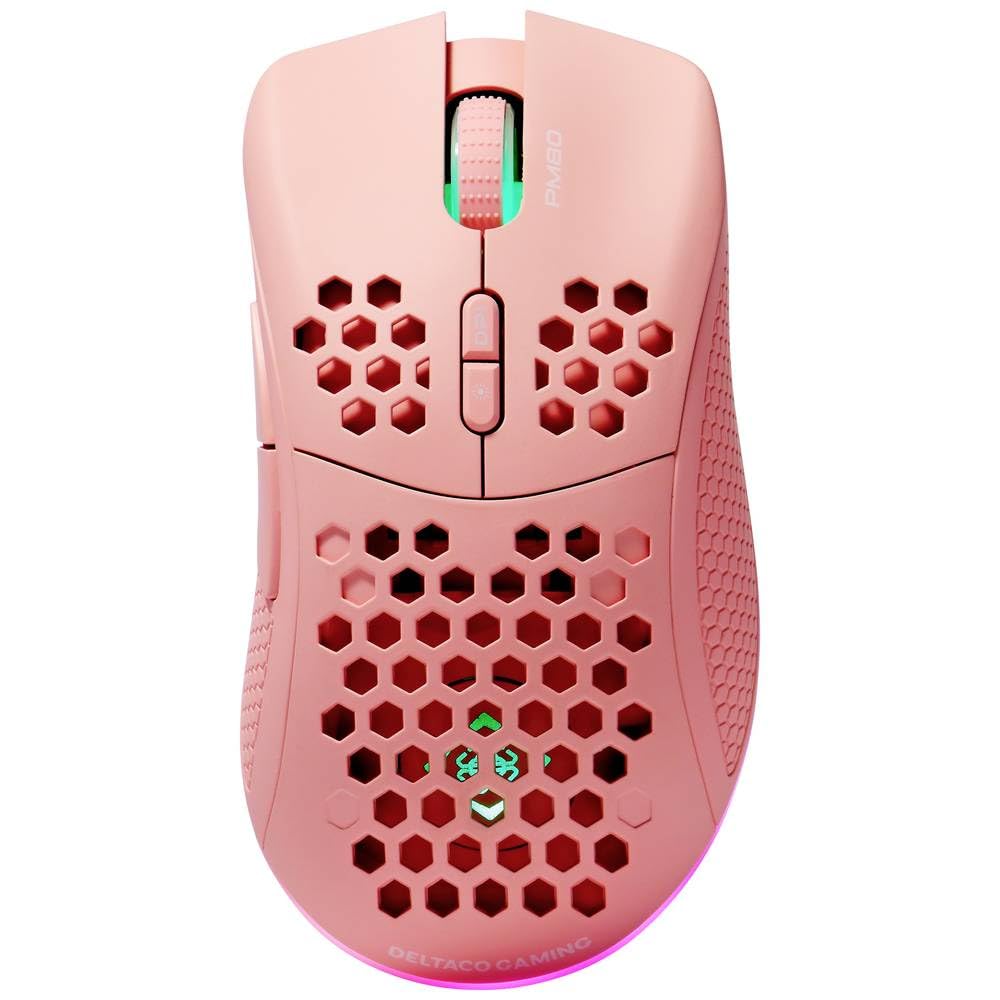
Image: DELTACO Gaming PM80 Wireless Optical Gaming Mouse. This image displays the mouse from a top-down perspective, highlighting its ergonomic design, the central scroll wheel, and the arrangement of its seven buttons.
Knap funktioner:
- Venstreklikknap: Standard primær klikfunktion.
- Højreklik-knap: Standard sekundær klikfunktion.
- Scrollhjul: Rul op/ned og fungerer som en midterste klikknap.
- DPI-cyklusknap: Changes the mouse's sensitivity (DPI).
- Frem-knap: Navigerer fremad i web browsere eller file opdagelsesrejsende.
- Baglæns knap: Navigerer baglæns i web browsere eller file opdagelsesrejsende.
- Illumination Mode Button: Cycles through different lighting effects or turns illumination on/off.
4. Opsætning
4.1. Opladning af musen
- Connect the small end of the USB charging cable to the charging port on the front of the mouse.
- Connect the larger end of the USB charging cable to an available USB port on your computer or a USB wall adapter.
- The mouse's illumination will indicate charging status (e.g., breathing effect, specific color). A full charge typically takes 2-3 hours.
- Once fully charged, the illumination may change or turn off. Disconnect the charging cable.
4.2. Tilslutning af den trådløse USB-modtager
- Find den trådløse USB-modtager, som normalt opbevares i et rum på undersiden af musen.
- Tag modtageren ud af dens opbevaringsplads.
- Sæt den trådløse USB-modtager i en ledig USB-port på din computer.
- Din computer burde automatisk registrere og installere de nødvendige drivere. Dette kan tage et par øjeblikke.
4.3. Tænd/sluk
- Find afbryderen på undersiden af musen.
- Slide the switch to the 'ON' position to power on the mouse. The illumination will light up.
- To conserve battery life, slide the switch to the 'OFF' position when the mouse is not in use for extended periods.
5. Betjeningsvejledning
5.1. Grundlæggende brug
Once connected and powered on, the mouse is ready for use. Move the mouse on a flat surface to control the cursor on your screen. Use the left and right click buttons for primary and secondary actions, and the scroll wheel for navigation.
5.2. DPI-justering
The DPI (Dots Per Inch) setting determines the sensitivity of your mouse. The DELTACO Gaming PM80 offers multiple DPI levels up to 4800 DPI. To adjust the DPI:
- Tryk på DPI -cyklusknap (typically located behind the scroll wheel).
- Each press will cycle through the available DPI settings. The mouse's illumination may change color or flash to indicate the current DPI level.
- Select the DPI setting that best suits your preference for gaming or general use.
5.3. Belysningskontrol
The DELTACO Gaming PM80 features customizable illumination. To change the lighting effects:
- Tryk på Illumination Mode Button (se Produktoversigt)view for placering).
- Each press will cycle through different lighting modes, such as static colors, breathing effects, or off.
6. Vedligeholdelse
6.1. Rensning
- Sørg for, at musen er slukket, inden den rengøres.
- Brug en blød, tør og fnugfri klud til at tørre musens overflade af.
- Til genstridigt snavs, let dampRengør kluden med vand eller et mildt, ikke-slibende rengøringsmiddel. Undgå for meget fugt.
- Do not use harsh chemicals, solvents, or abrasive materials, as these can damage the mouse's finish.
- Brug en vatpind eller trykluft til at rengøre området omkring scrollehjulet og knappernes sprækker.
6.2. Opbevaring
When not in use for extended periods, store the mouse in a cool, dry place away from direct sunlight and extreme temperatures. Ensure the power switch is in the 'OFF' position to preserve battery life.
7. Fejlfinding
- Musen svarer ikke:
- Sørg for, at musen er tændt.
- Check if the USB wireless receiver is securely plugged into a working USB port.
- Verify the mouse battery is charged. Connect the charging cable and try again.
- Prøv at tilslutte receiveren til en anden USB-port.
- Genstart din computer.
- Forsinket eller intermitterende forbindelse:
- Ensure the mouse is within close proximity to the USB receiver (ideally within 10 meters).
- Avoid placing the receiver near other wireless devices or sources of interference (e.g., Wi-Fi routers, cordless phones).
- Sørg for, at musen er fuldt opladet.
- Markørbevægelsen er uregelmæssig eller upræcis:
- Rengør den optiske sensor på undersiden af musen med en blød, tør klud.
- Sørg for at bruge musen på en passende overflade (f.eks. en musemåtte). Undgå meget reflekterende eller gennemsigtige overflader.
- Adjust the DPI setting to a lower sensitivity if the cursor is too fast.
- Illumination not working:
- Sørg for, at musen er tændt.
- Press the Illumination Mode Button to cycle through modes, ensuring it's not set to 'off'.
- Check battery level; low battery might disable illumination.
8. Specifikationer
| Feature | Detalje |
|---|---|
| Mærke | DELTACO GAMING |
| Modelnummer | GAM-120-P |
| Forbindelse | Trådløs (USB-modtager) |
| Sensortype | Optisk |
| DPI | Op til 4800 DPI (justerbar) |
| Antal knapper | 7 |
| Håndorientering | Højre |
| Belysning | Ja |
| Genopladelig | Ja |
| Batterier påkrævet | No (Internal Rechargeable) |
9. Garanti og support
For warranty information and technical support, please refer to the warranty card included with your product or visit the official DELTACO Gaming webwebsted. Gem din købsbevis i tilfælde af garantikrav.