
1. Introduktion
Thank you for choosing the Gevi 12 Cup Programmable Drip Coffee Maker. This manual provides essential information for the safe operation, maintenance, and troubleshooting of your new coffee maker. Please read it thoroughly before first use and retain it for future reference.

Image: The Gevi 12 Cup Programmable Drip Coffee Maker, showcasing its sleek design and digital display, ready to brew coffee.
2. komponenter
Your Gevi coffee maker includes the following components:
- Main Coffee Maker Unit
- Glaskaffekande (karaffel)
- Kaffe Scoop
- Permanent filter
- Brugervejledning (dette dokument)

Image: An illustration showing the individual components of the Gevi Drip Coffee Maker, including the filter, filter basket, glass carafe, and coffee scoop, alongside the main unit.
3. Opsætning
- Udpakning: Fjern forsigtigt al emballage fra kaffemaskinen.
- Beskyttende film: Remove the protective film from the control panel before use.
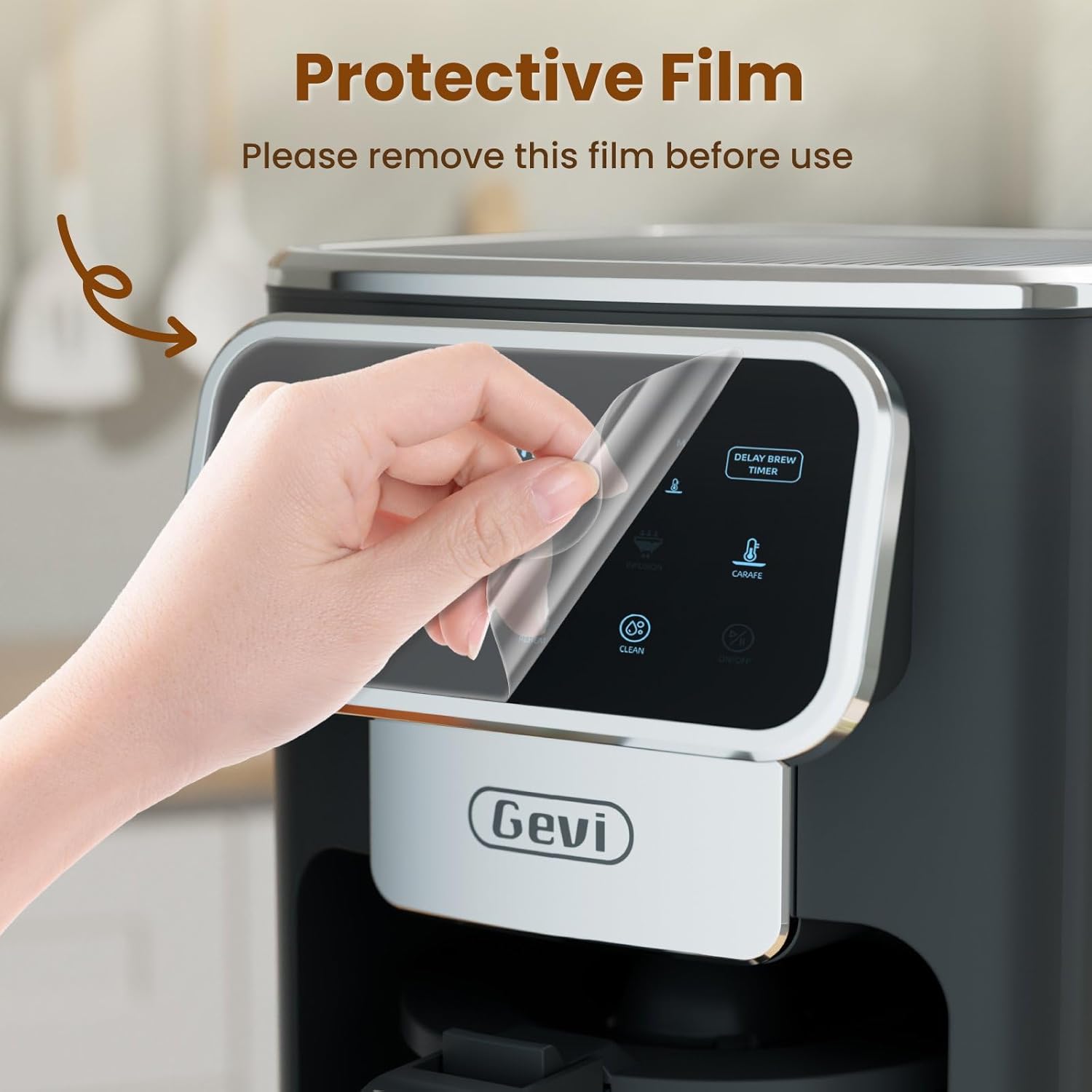
Image: A hand gently peeling off the protective film from the touchscreen control panel of the coffee maker.
- Indledende rengøring: Before first use, wash the permanent filter, glass carafe, and coffee scoop with warm, soapy water. Rinse thoroughly.
- Første brygcyklus (rengøring): Fill the water reservoir to the maximum level with clean water. Do not add coffee grounds. Run a full brew cycle to clean the internal components. Discard the water.
4. Betjeningsvejledning
4.1 Indstilling af uret
- Press the "ON/OFF" button to turn on the coffee maker.
- When the timer display blinks, press the "Hour" and "Minute" buttons to adjust the time.
- Press the "ON/OFF" button again to confirm the clock time.
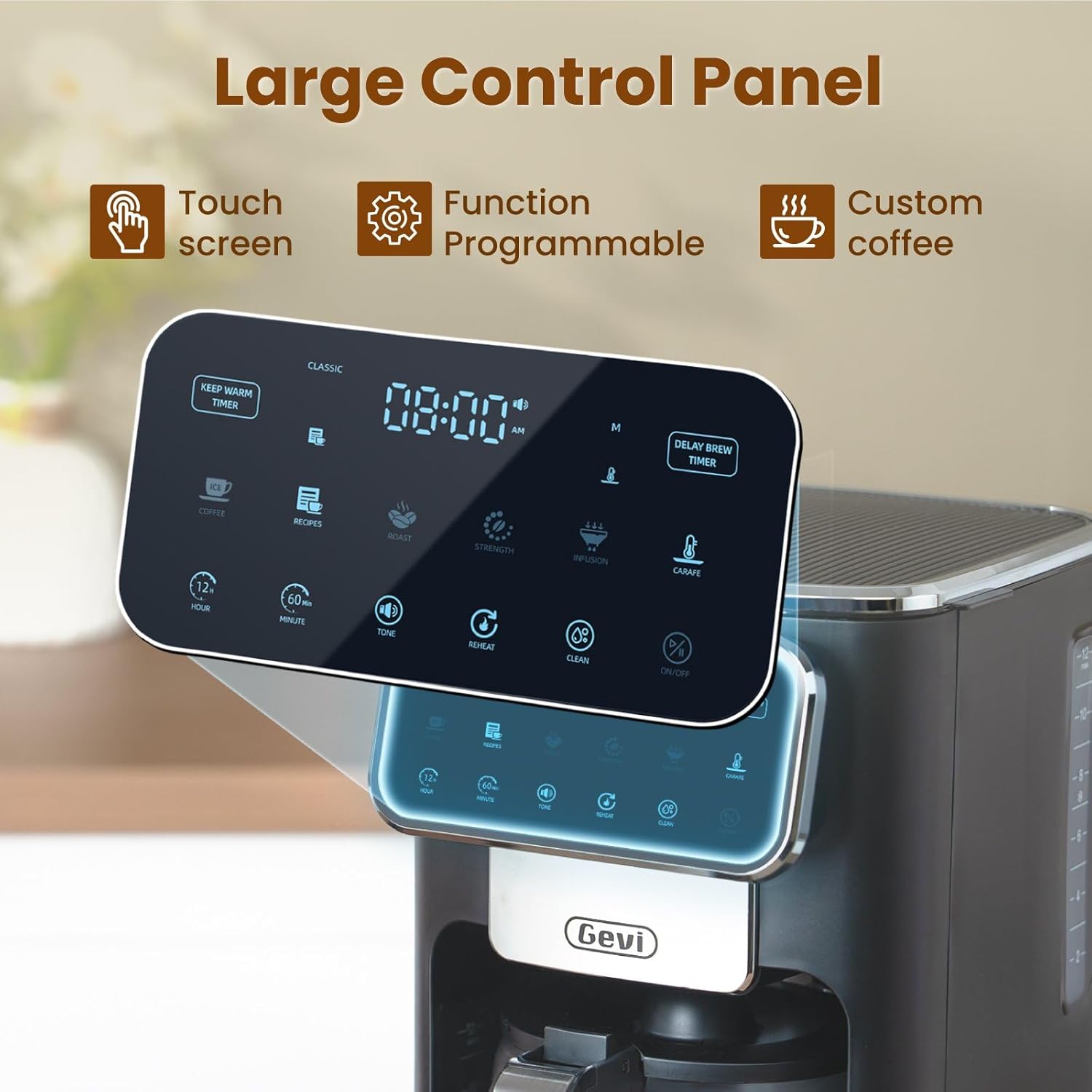
Billede: En detaljeret view of the coffee maker's large touch control panel, showing various settings and the digital clock display.
4.2 Setting the Delay Brew Timer
- After setting the current clock time, press the "Delay Brew Timer" button.
- When the timer display blinks, use the "Hour" and "Minute" buttons to set your desired delay brewing time.
- Press the "Delay Brew Timer" button again to confirm the delay brewing time.
- Note: Pressing the "ON/OFF" button after setting the delay brew timer will cancel the delay brew setting.
- The machine will automatically begin brewing at the preset time.
4.3 Brygning af kaffe
- Fyld vandbeholder: Open the top lid and pour fresh, cold water into the water reservoir. Use the water level markings on the side of the coffee maker as a guide.

Image: A hand pouring water into the transparent water tank of the coffee maker, showing the water level indicators.
- Tilsæt kaffegrums: Place the permanent filter (or a paper filter) into the filter basket. Add your desired amount of ground coffee using the provided scoop. Close the top lid.

Image: A hand scooping coffee grounds into the reusable filter basket, which is placed inside the coffee maker.
- Vælg brygstyrke: Use the touch screen to select your preferred coffee strength: Klassisk, Intens, eller Rig.

Image: Four different coffee preparations: Classic, Intense, Rich, and Iced, demonstrating the various brewing strengths and options.
- Begynd at brygge: Press the "ON/OFF" button to begin the brewing process. The coffee maker features a pre-infusion system for optimal flavor extraction.

Image: A cutaway diagram showing the pre-infusion process, where water is evenly distributed over coffee grounds for deep extraction.
- Hold varm funktion: The coffee maker includes an adjustable keep-warm timer, typically ranging from 5 minutes to 3 hours and 59 minutes, to maintain coffee temperature after brewing.

Image: The coffee maker's warming plate, glowing red, indicating the keep-warm function is active, with a cup of hot coffee nearby.
4.4 Iced Coffee Function
To brew iced coffee, select the "Ice" option on the touch screen. This function is designed to provide a concentrated brew suitable for pouring over ice, ensuring a flavorful iced coffee experience.
4.5 videoguide
For a visual demonstration of the coffee maker's features and operation, please watch the official product video below:
Video: An official product video demonstrating the Gevi 12 Cup Programmable Drip Coffee Maker's features and brewing process.
5. Vedligeholdelse og rengøring
Regelmæssig rengøring sikrer optimal ydeevne og forlænger din kaffemaskines levetid.
- Filter and Carafe: The permanent filter and glass carafe can be easily cleaned with warm water and mild soap. Rinse thoroughly after washing.
- Ydre: Tør ydersiden af kaffemaskinen af med adamp klæde. Nedsænk ikke hovedenheden i vand.
- Afkalkning: Periodically descale your coffee maker to remove mineral buildup. Refer to a general coffee maker descaling guide or contact customer support for specific instructions.
6. Fejlfinding
| Problem | Mulig årsag | Løsning |
|---|---|---|
| Kaffemaskine tænder ikke. | Ikke tilsluttet; strømmen er slukkettage. | Sørg for, at netledningen er sat korrekt i en stikkontakt, der virker. Kontroller din boligs afbryder. |
| Clock loses time or runs fast. | Internal clock mechanism variation. | Reset the clock periodically as needed. If the issue persists significantly, contact customer support. |
| Brewing less than expected amount of coffee. | Water reservoir not filled sufficiently; clogged filter/drip system; carafe not properly seated. | Ensure water reservoir is filled to the desired level. Clean the filter and drip system. Verify the carafe is correctly positioned on the warming plate. |
| Kaffen smager svagt eller for stærkt. | Forkert forhold mellem kaffe og vand; forkert kværnstørrelse; forkert indstilling for styrke. | Adjust the amount of coffee grounds. Use a medium grind for drip coffee. Select a different brew strength setting (Classic, Intense, Rich). |
7. Specifikationer
| Feature | Detalje |
|---|---|
| Mærke | gevi |
| Modelnavn | DCMA0-BK0A1 |
| Kapacitet | 12 Cups (60 oz / 1.8 L) |
| Farve | Sort |
| Produktmål (D x B x H) | 12.1 cm x 8 cm x 13.8 cm |
| Vægt | 7.48 pund |
| Særlige funktioner | Iced Coffee, Keep Warm Timer, Permanent Filter, Programmable, Touchscreen |
| Kaffemaskine type | Dryp kaffemaskine |
| Driftstilstand | Fuldautomatisk |
| Wattage | 1100 watt |
| Voltage | 120 volt |
| Human Interface Input | Touchskærm |
| Kaffe input type | Malet kaffe |
| Strømkilde | AC adapter |
| Tåler opvaskemaskine | Nej (for hovedenhed) |

Image: The Gevi coffee maker with its physical dimensions (depth, width, height) clearly indicated.
8. Garanti og support
Gevi values your satisfaction. Every Gevi product purchased via official or authorized channels includes a 12-month warranty and lifetime technical support.
If you encounter any issues with your Gevi coffee maker, please refer to the operation videos on the official Gevi store or contact customer service directly for assistance.
For yderligere support, besøg Gevi Store on Amazon.