K420

Admark K420 Class D Professional Power Amplivligere brugervejledning

Model: K420

1. Introduktion

This manual provides essential information for the safe and efficient operation of your Admark K420 Class D Professional Power Amplifier. Please read this manual thoroughly before installation and use to ensure optimal performance and to prevent damage to the unit or other equipment. The Admark K420 is a high-performance, four-channel Class D amplifier designed for professional audio applications, delivering 2000 Watts per channel at 8 Ohms.

2. Sikkerhedsinstruktioner

Følg altid disse grundlæggende sikkerhedsforanstaltninger for at mindske risikoen for brand, elektrisk stød og personskade:

  • Strømkilde: Tilslut kun enheden til en strømforsyning af den type, der er beskrevet i denne manual og markeret på enheden.
  • Jording: Sørg for, at enheden er korrekt jordforbundet for at forhindre elektrisk stød.
  • Ventilation: Bloker ikke ventilationsåbninger. Installer i overensstemmelse med producentens anvisninger. Sørg for tilstrækkelig plads omkring enheden for korrekt luftgennemstrømning.
  • Vand og fugt: Udsæt ikke enheden for regn eller fugt. Brug den ikke i nærheden af ​​vand.
  • Varme: Må ikke installeres i nærheden af ​​varmekilder såsom radiatorer, varmeapparater, komfurer eller andre apparater (inklusive ampløftere), der producerer varme.
  • Service: Forsøg ikke selv at servicere dette produkt. Overlad al service til kvalificeret servicepersonale.
  • Kabler: Beskyt netledningen mod at blive trådt på eller klemt, især ved stik, stikkontakter og det sted, hvor de kommer ud af apparatet.

3. Pakkens indhold

Upon opening the package, please verify that all components are present and in good condition. If any items are missing or damaged, contact your dealer immediately.

  • Admark K420 Professional Power Amplivligere
  • AC strømledning
  • Brugervejledning (dette dokument)

4. Produktfunktioner

  • Klasse D topologi: High efficiency and compact design.
  • Fire kanaler: Uafhængig amplification for versatile audio setups.
  • Høj udgangseffekt: 2000 Watts per channel at 8 Ohms.
  • Kompakt 1U design: Saves rack space in professional installations.
  • Omfattende beskyttelse: Built-in safeguards against overheating, short circuits, and DC output.
  • Balancerede indgange: XLR connectors for professional audio signals.
  • SpeakON Outputs: Secure and reliable connections for loudspeakers.

5. Opsætning

5.1 Rackmontering

The Admark K420 is designed for standard 19-inch rack mounting and occupies 1U of rack space. Ensure the rack is stable and has adequate ventilation. Secure the amplifier using appropriate rack screws.

5.2 Bagpaneltilslutninger

The rear panel provides all input and output connections. Refer to the image below for a visual guide.

Rear panel of Admark K420 amplifer, der viser input- og output-forbindelser

Image: Rear panel of the Admark K420 amplifier, displaying four XLR input connectors, four SpeakON output connectors, and the power inlet.

5.2.1 Strømtilslutning

Connect the supplied AC power cord to the power inlet on the rear panel and then to a suitable grounded AC power outlet. Ensure the amplifier's power switch is in the OFF position before connecting power.

5.2.2 Indgangsforbindelser

Use balanced XLR cables to connect your audio source (e.g., mixer, audio processor) to the XLR input connectors (CH A, CH B, CH C, CH D) on the rear panel. Ensure correct polarity.

5.2.3 Udgangsforbindelser

Connect your loudspeakers to the SpeakON output connectors (OUTPUT CH A, OUTPUT CH B, OUTPUT CH C, OUTPUT CH D) using appropriate SpeakON cables. Ensure the impedance of your loudspeakers matches the amplifier's specifications (minimum 8 Ohms per channel for full power output). Observe correct wiring for stereo or bridged modes if applicable (refer to specific wiring diagrams on the unit or in advanced documentation).

6. Betjeningsvejledning

The front panel of the Admark K420 provides controls and indicators for monitoring and adjusting the amplifiers drift.
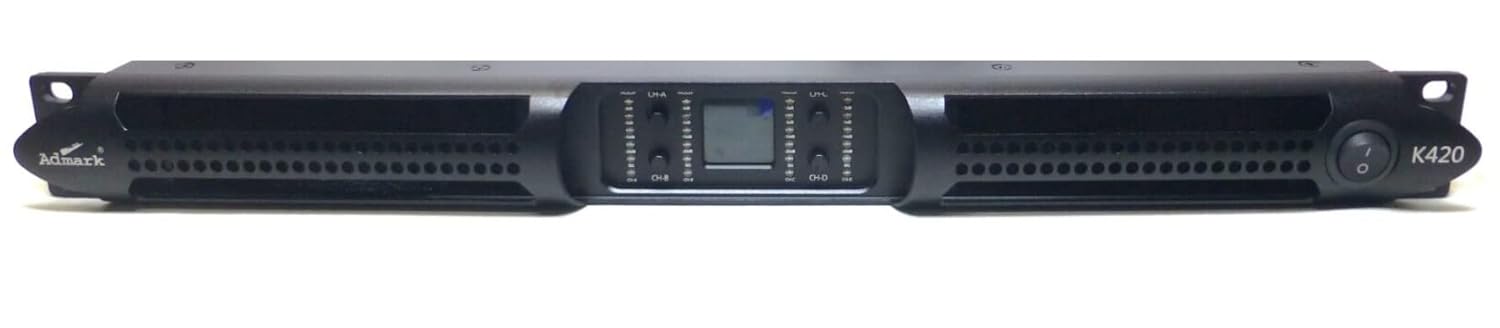
Front panel of Admark K420 amplifier showing power button, level controls, and LED indicators

Image: Front panel of the Admark K420 amplifier, featuring the power switch, individual channel level controls, and LED indicators for signal, clip, and protection status.

6.1 Tænd/sluk

  • Tænd: Ensure all connections are secure and input levels are turned down. Press the power switch on the front panel. The power indicator LED should illuminate.
  • Sluk: Turn down all input levels, then press the power switch to turn off the amplivligere.

6.2 Kontrol og indikatorer på frontpanelet

  • Afbryderen: Skifter mellem amplivligere til eller fra.
  • Channel Level Controls: Individual rotary controls for adjusting the output level of each channel (CH A, CH B, CH C, CH D). Start with these controls fully counter-clockwise (minimum) and gradually increase to the desired level.
  • Signal LED: Lyser, når der er et lydsignal på den tilsvarende kanal.
  • Clip LED: Illuminates when the output signal is clipping (distorting). Reduce the input level or channel level control immediately to prevent damage to speakers and the amplivligere.
  • Protect LED: Lyser, når amplifier's protection circuitry is activated due to fault conditions (e.g., overheating, short circuit). The amplifier will mute its output. Turn off the unit, resolve the issue, and then power it back on.

6.3 Grundlæggende betjening

  1. Ensure all audio sources and speakers are connected correctly.
  2. Turn down all channel level controls on the amplivligere.
  3. Power on your audio source equipment first, then the Admark K420 amplivligere.
  4. Gradually increase the channel level controls on the amplifier to achieve the desired volume. Monitor the Signal and Clip LEDs.
  5. Når du er færdig, skal du skru ned for amplifier's channel level controls, then power off the amplifier, followed by your audio source equipment.

7. Vedligeholdelse

  • Rensning: Disconnect power before cleaning. Use a soft, dry cloth to clean the exterior of the unit. Do not use liquid cleaners or aerosols.
  • Ventilation: Regularly check that the ventilation openings are clear of dust and debris. Ensure proper airflow around the unit to prevent overheating.
  • Kabelinspektion: Periodically inspect all audio and power cables for damage. Replace any damaged cables immediately.

8. Fejlfinding

If you encounter issues with your Admark K420 ampLifier, se følgende almindelige problemer og løsninger:

ProblemMulig årsagLøsning
Ingen strømNetledning ikke tilsluttet; Stikkontakt defekt; Amplifier power switch off; Internal fuse blown.Check power cord connection; Test power outlet; Ensure power switch is ON; Contact service for fuse replacement.
Ingen lydudgangInput cables disconnected; Speaker cables disconnected; Channel level controls too low; Audio source not playing; Protect LED illuminated.Check all input and output cable connections; Increase channel level controls; Verify audio source; See Protect LED solution below.
Forvrænget lydInput signal too high (Clipping); Speaker impedance mismatch; Damaged speaker.Reduce input level from source or amplifier channel level; Ensure speaker impedance is compatible; Test with different speakers.
Protect LED illuminatedOverheating; Short circuit in speaker cable/speaker; DC voltage på output.Sluk amplifier, allow to cool; Check speaker cables for shorts; Disconnect speakers and power cycle. If issue persists, contact service.

9. Specifikationer

FeatureSpecifikation
ModelAdmark K420
FabrikantAdmark K420
Antal kanaler4
Udgangseffekt (pr. kanal)2000 Watt @ 8Ω
Maximum Output Power (Total)8000 watt
Monteringstype1U Rack Mount
IndgangsstikXLR afbalanceret
Output StikTal PÅ
OverholdelseFCC
UPC653753252662
ASINB0BRDCL1SP

10. Garanti og support

For warranty information and technical support, please refer to the documentation provided at the point of purchase or contact your authorized dealer. Keep your purchase receipt as proof of purchase.

© 2023 Admark. All rights reserved.

Ask a question about this manual

Ask about setup, troubleshooting, compatibility, parts, safety, or missing instructions. Manuals+ will review the question and use this page’s manual context to help answer it.