
1. Produktet er slutview
The Dangbei DBX3 Pro is an infrared remote control designed for seamless interaction with compatible Dangbei devices, primarily televisions. It features an ergonomic design for comfortable handling and intuitive button placement for easy navigation and control.
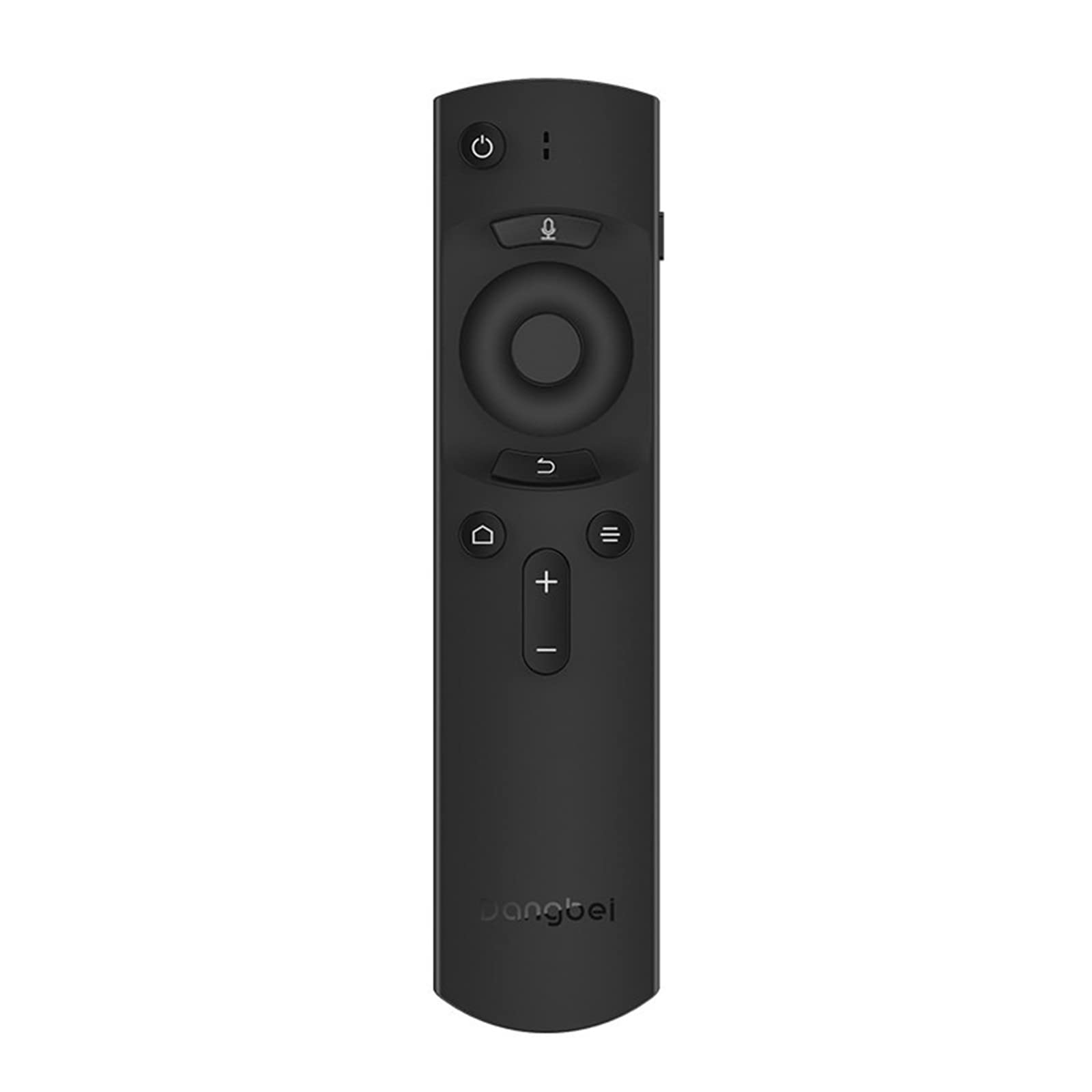
Figur 1: Dangbei DBX3 Pro Remote Control. This image displays the remote control from an angled perspective, highlighting its ergonomic shape and the layout of its primary control buttons, including power, navigation, volume, and home.
Knap funktioner:
- Tænd/sluk-knap (⏻): Tænder eller slukker den tilsluttede enhed.
- Mikrofonknap (🎙): Activates voice control or voice search features (if supported by the connected device).
- Navigationstastatur (op, ned, venstre, højre): Bruges til at navigere i menuer og vælge elementer.
- OK knap: Bekræfter valg eller åbner menuer.
- Tilbage knap (↩): Vender tilbage til den forrige skærm eller menu.
- Menu/Options Button (☰): Giver adgang til yderligere indstillinger eller kontekstmenuer.
- Hjemknappen (🏠): Returns to the main home screen of the connected device.
- Volume Up/Down Buttons (+/-): Justerer lydstyrken.
2. Opsætning
2.1. Batteriinstallation
- Find batterirummets dæksel på bagsiden af fjernbetjeningen.
- Skub dækslet nedad, eller tryk på låsen for at åbne det.
- Isæt to AAA-batterier (medfølger ikke), og sørg for, at de positive (+) og negative (-) poler er justeret korrekt med markeringerne inde i batterirummet.
- Sæt batteridækslet på plads, indtil det klikker sikkert på plads.
2.2. Førstegangsbrug
The Dangbei DBX3 Pro remote control operates using infrared (IR) technology. For the remote to function, ensure there is a clear line of sight between the remote's IR emitter (located at the front tip) and the IR receiver on your compatible Dangbei device. Point the remote directly at the device you wish to control.
3. Betjeningsvejledning
3.1. Grundlæggende navigation
- Brug Navigationsplade (Up, Down, Left, Right arrows) to move through menus, lists, and content on your screen.
- Tryk på OK knap to select a highlighted item, confirm an an action, or open an application.
- Tryk på Tilbage knap for at vende tilbage til den forrige skærm eller afslutte en menu.
- Tryk på Hjem-knap to quickly access the main interface of your device.
3.2. Strøm- og lydstyrkekontrol
- Tryk på Power knap once to turn your device on or off.
- Brug Lydstyrke op (+) og Skrue ned (-) knapper for at justere lydniveauet.
3.3. Voice Control (If Supported)
If your connected Dangbei device supports voice control, press and hold the Mikrofon knap. Speak clearly into the remote control's microphone. Release the button when you have finished speaking. Refer to your device's manual for specific voice command capabilities.
4. Vedligeholdelse
4.1. Rensning
For at rengøre fjernbetjeningen skal du forsigtigt tørre dens overflade af med en blød, tør klud. Ved genstridigt snavs skal du let tørre den af.ampRengør kluden med vand eller et mildt, ikke-slibende rengøringsmiddel. Undgå at bruge skrappe kemikalier, opløsningsmidler eller slibende materialer, da disse kan beskadige fjernbetjeningens overflade eller interne komponenter.
4.2. Udskiftning af batteri
Replace batteries when the remote's response becomes sluggish or stops working. Always replace both batteries simultaneously with new AAA batteries. Do not mix old and new batteries, or different types of batteries, as this can lead to leakage or malfunction. Dispose of used batteries according to local regulations.
4.3. Opbevaring
Store the remote control in a cool, dry place away from direct sunlight, extreme temperatures, and high humidity. If the remote will not be used for an extended period, it is recommended to remove the batteries to prevent potential leakage.
5. Fejlfinding
| Problem | Mulig årsag | Løsning |
|---|---|---|
| Fjernbetjeningen svarer ikke. |
|
|
| Knapperne reagerer ikke eller er klistrede. |
|
|
| Kort driftsrækkevidde. |
|
|
6. Specifikationer
- Model: DBX3 Pro
- Mærke: Danbei
- Forbindelse teknologi: Infrarød (IR)
- Kompatible enheder: Television (specifically compatible Dangbei devices)
- Strømkilde: 2 x AAA batterier (medfølger ikke)
- Produktdimensioner: 1.5 x 9.06 x 3.94 tommer (ca. 3.8 x 23.0 x 10.0 cm)
- Varens vægt: 4.6 ounce (ca. 130 gram)
- Speciel funktion: Ergonomisk design
7. Garanti og support
7.1. Garantioplysninger
This Dangbei product is covered by a limited manufacturer's warranty. The specific terms and duration of the warranty may vary by region and purchase date. Please retain your proof of purchase for warranty claims. For detailed warranty information, refer to the documentation provided with your primary Dangbei device or visit the official Dangbei webwebsted.
7.2. Kundesupport
For technical assistance, troubleshooting, or inquiries regarding your Dangbei DBX3 Pro remote control, please contact Dangbei customer support. Contact information can typically be found on the official Dangbei website or within the support section of your primary Dangbei device's user interface.
Officiel Webwebsted: www.dangbei.com (Tjek venligst for regionale variationer)