
1. Introduktion
This manual provides detailed instructions for the installation, operation, and maintenance of your Naifay Single Din Car Stereo with a 7-inch flip-out touchscreen. This unit supports Apple CarPlay, Android Auto, Bluetooth connectivity, FM radio, and various media inputs, enhancing your in-car entertainment and navigation experience.
2. Sikkerhedsoplysninger
- Professionel installation anbefales: På grund af kompleksiteten af bilers elektriske systemer anbefales professionel installation for at forhindre skader på enheden eller dit køretøj.
- Strømforsyning: Ensure your car's power supply is 16V or below. Incorrect voltage kan beskadige enheden.
- Ledningsføring: Always connect the yellow wire to the positive pole of the battery (12V+ constant), the black wire to the negative pole of the battery (ground), and the red wire to the ACC (car keyhole) for proper power supply. Ensure all positive and negative wires are correctly insulated to avoid short circuits.
- Kørselssikkerhed: Betjen ikke enheden på en måde, der distraherer dig fra kørslen. Prioritér altid trafiksikkerhed.
- Skærmbetjening: The screen is manually operated. Ensure it is securely positioned when in use and folded away when not needed to avoid obstruction or damage.
3. Pakkens indhold
Bekræft at alle varer er til stede i pakken:
- Naifay Single Din Car Stereo Unit
- Strømkabel
- HD Camera (Backup Camera)
- Kamerakabler
- Fjernbetjening
- Brugermanual
- Disassembly Keys

Image: Package contents and wiring diagram for the Naifay Single Din Car Stereo.
4. Produktet er slutview
4.1. Front Panel and Screen
The unit features a 7-inch LCD flip-out touchscreen for interactive control and display. The screen can be manually pulled out for use and folded back when not required. The front panel includes essential controls and a USB port.

Billede: Forside view of the Naifay Single Din Car Stereo with its 7-inch manual flip-out screen extended.
4.2. Rear Ports and Connections
The rear of the unit provides various ports for connectivity, including:
- Antenna Input (ANT)
- Audio Outputs (L-OUT, R-OUT)
- Video Outputs (V-OUT1, V-OUT2)
- CVBSIN (Video Input)
- CAMIN (Camera Input)
- Strømkabelstik
- USB-port
- AUX-indgang
- Ekstern mikrofonindgang

Billede: Bagside view of the Naifay Single Din Car Stereo, detailing the various input and output ports for audio, video, and power connections.
5. Opsætning
5.1. Installation Size Check
Before installation, confirm that the unit's dimensions (178mm L x 50mm H / 7in L x 1.97in H) match your car's dashboard opening. If the size is incompatible, a mounting kit may be required. Søg efter a compatible dash kit using your vehicle's year, make, and model.

Image: Diagram illustrating the dimensions of the Naifay Single Din Car Stereo, including the main unit and the extended 7-inch screen.
5.2. Ledningsinstruktioner
Refer to the wiring diagram for correct connections. Improper wiring can prevent the unit from powering on or saving settings.
- Gul ledning (B+): Connect to the positive pole of the car battery (12V+ constant).
- Sort ledning (GND): Connect to the negative pole of the car battery (ground).
- Rød ledning (ACC): Connect to the car's ignition power wire.
- Højttalerkabler: Connect the corresponding speaker wires (Green/Green-Black, White/White-Black, Gray/Gray-Black, Purple/Purple-Black) to your car's speakers.
- Blå ledning (ANT): Connect to the auto antenna or ampfjernbetjening til lifer.
- Brown Wire (KEY): For steering wheel controls.
- Orange Wire (ILL): For illumination (headlight control line).
- Pink Wire (REVERSE): Connect to the reversing light positive electrode for backup camera activation.

Image: Comprehensive wiring diagram for connecting the Naifay Single Din Car Stereo to the vehicle's electrical system and speakers.
5.3. Montering af bakkamera
The unit includes a 12-lamp high-definition reversing camera with night vision and a 170-degree wide-angle view. Connect the camera's video cable to the CAMIN input on the stereo and the power wire to the reversing light positive electrode. The unit will automatically display the reverse image when the vehicle is in reverse gear.

Image: Diagram illustrating the connection and functionality of the rear view camera, showing its wide-angle view and automatic activation.
6. Betjeningsvejledning
6.1. Power On/Off and Screen Operation
Press the power button to turn the unit on or off. The 7-inch screen is manually operated; gently pull it out to extend and push it back to retract. The unit will continue to function even with the screen retracted.
Video: Demonstrates the manual flip-out screen mechanism of the Naifay Single Din Car Radio, showing how it extends and retracts.
6.2. Radiofunktion
Access the FM radio function from the main menu. The unit supports full digital electronic control for searching radio stations and automatically scans for available frequencies. It can store up to 18 stations in memory.

Image: The FM Radio interface, displaying frequency tuning and preset station options.
6.3. Bluetooth-forbindelse
To connect your smartphone via Bluetooth, navigate to the Bluetooth menu on the car stereo. On your phone, search for available Bluetooth devices and select 'Carkit'. Enter the PIN '0000' if prompted. Once connected, you can make hands-free calls and stream music.

Image: The Bluetooth calling interface on the car stereo, showing a dial pad and call options.
6.4. Apple CarPlay og Android Auto
Connect your iPhone or Android phone to the stereo via a USB data cable. The unit will automatically launch Apple CarPlay or Android Auto, allowing access to navigation, music, calls, and messages through the touchscreen or voice commands.

Image: The car stereo displaying both Apple CarPlay and Android Auto interfaces, showing various app icons and navigation.
Video: Overståetview of the Naifay Flip Out Single Din Car Stereo, highlighting its Apple CarPlay and Android Auto compatibility and features.
6.5. Spejllinkfunktion
The Mirror Link function allows you to display your smartphone's screen content directly on the car stereo. Connect your phone via USB and select the Mirror Link option. This enables viewing of online GPS navigation, videos, and other apps from your phone.

Image: The Mirror Link feature in use, showing a smartphone's display mirrored onto the car stereo's screen for navigation.
6.6. USB/SD/AUX Input
The unit supports media playback from USB drives, SD cards, and auxiliary input devices. Insert your media into the respective ports to access music and video files.

Image: Close-up of the car stereo's inputs, highlighting support for USB, SD card, and AUX connections for media playback.
6.7. Ratbetjening
The unit supports steering wheel control. After connecting the brown KEY wire, you can configure the steering wheel buttons to control functions like volume, track skipping, and station changes directly from your steering wheel.
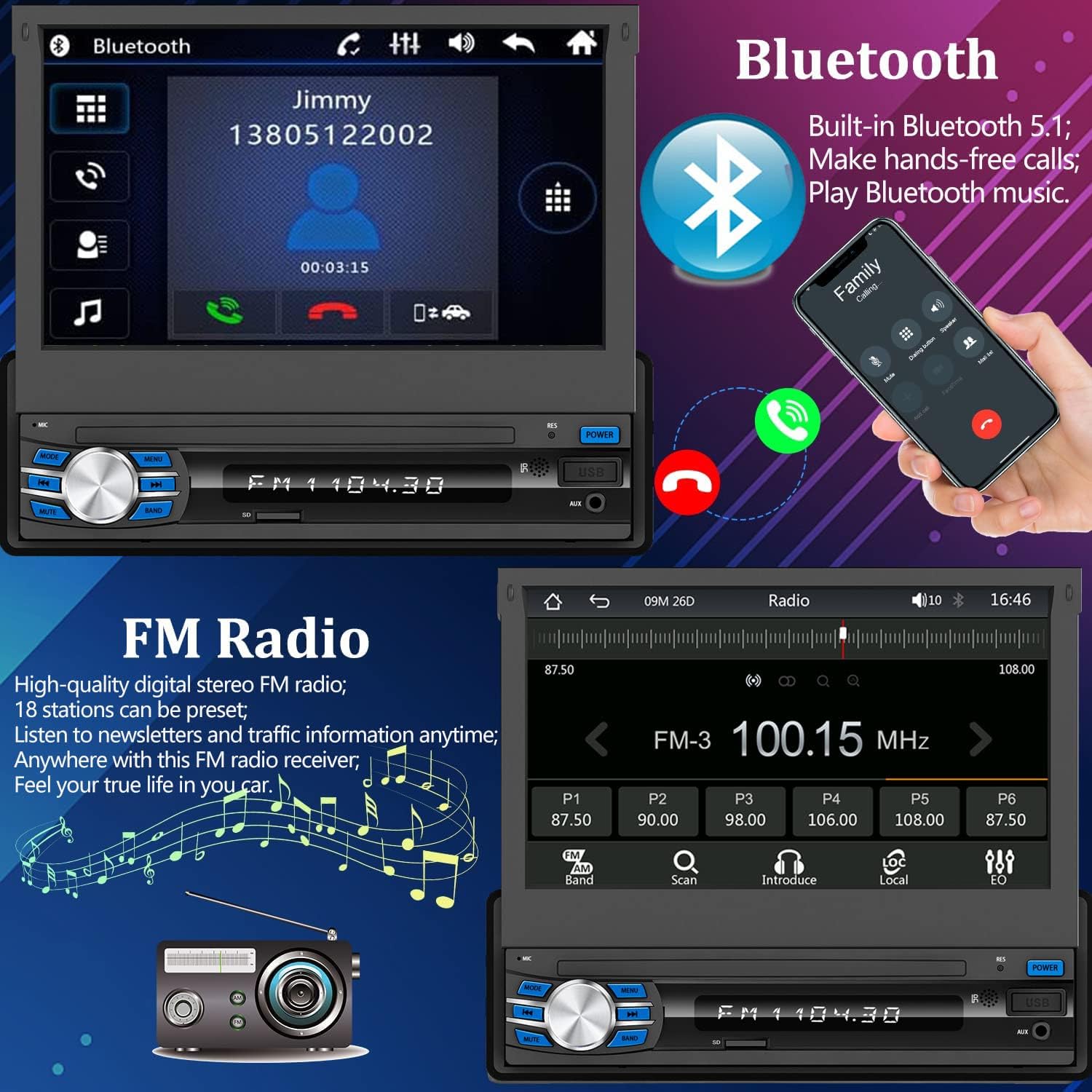
Image: The steering wheel control setup screen on the car stereo, showing options to learn and assign functions to vehicle steering wheel buttons.
6.8. Lydindstillinger (EQ)
Customize your audio experience using the built-in 10-band equalizer (EQ). Adjust frequency bands to suit your preferences for different music genres (e.g., Jazz, Classic, Rock, Pop, Soft).
Image: The audio equalizer interface, showing a 10-band graphic EQ for fine-tuning sound output.
7. Vedligeholdelse
- Rengøring af skærmen: Use a soft, dry cloth to clean the touchscreen. Avoid abrasive cleaners or solvents.
- Generel rengøring: Hold enheden fri for støv og snavs. Brug en blød børste eller trykluft til svært tilgængelige områder.
- Undgå væsker: Udsæt ikke enheden for overdreven fugt eller væsker.
8. Fejlfinding
8.1. Unit Does Not Power On / Settings Not Saved
Mulig årsag: Incorrect wiring of power cables.
Løsning: Verify that the yellow (B+), black (GND), and red (ACC) wires are connected correctly as per the wiring diagram. Ensure the yellow wire has constant 12V power and the red wire has switched 12V power.
8.2. Ingen lyd efter installation
Mulig årsag: Wiring error or short-circuited speaker wires.
Løsning: Check all speaker wire connections for proper polarity and ensure no wires are short-circuited to the car's metal frame. If an external amplifier is used, ensure it is powered on and correctly connected.
8.3. Kan ikke oprette forbindelse via Bluetooth
Mulig årsag: Incorrect pairing procedure or phone settings.
Løsning: Sørg for, at Bluetooth er aktiveret på din telefon og bilstereoen. Søg efter 'Carkit' on your phone and pair. No need to open Bluetooth settings on the car stereo, only operate on the mobile phone.
8.4. Cannot Søg efter FM stationer
Mulig årsag: Antenna not properly connected or damaged.
Løsning: Ensure the antenna plug is fully inserted. Check for any disconnections in the antenna line. If issues persist, try inserting a metal strip into the antenna port to test for reception.
9. Specifikationer
| Feature | Specifikation |
|---|---|
| Mærke | Naifay |
| Modelnummer | D1 |
| Skærmtype | 7-inch Flip Out Touchscreen |
| Forbindelsesteknologi | Auxiliary, Bluetooth, USB |
| Controller type | Android, iOS |
| Kompatible enheder | Smartphone, højttaler |
| Lydudgangstilstand | Stereoanlæg |
| Surround Sound Kanalkonfiguration | 4.0 |
| Antal kanaler | 4 |
| Videokodning | H.264, H.265/HEVC, MPEG-4 osv. |
| Understøttede internettjenester | Kort |
| Kontrolmetode | Fjern |
| Lydudgangstype | Højttalere |
| Trådløs teknologi | Bluetooth |
| Understøttede lydformater | WAV, WMA |
| Varedimensioner (D x B x H) | 7.48" D x 2.44" B x 7.3" H |
10. Garanti og support
The Naifay Single Din Car Stereo (Model D1) comes with a 1 års producentgaranti. Replacement is available within 12 months of purchase.
For technical support, troubleshooting assistance, or warranty claims, please contact Naifay customer service. You can typically find contact information by clicking on "Sold by Naifay" on the product page and selecting "Ask a question." Naifay aims to provide quick replies within 24 hours and offers lifetime after-sales consultation and technical support.

Image: Naifay customer support details, including response times, return policy, replacement period, and lifetime technical support.