

1. Introduktion
This manual provides essential information for the safe and efficient operation of your Sygonix Built-in Thermostat SY-5044424. This device is designed as a built-in solution for regulating and monitoring heat generators within heating, climate, and ventilation technology systems. Please read these instructions thoroughly before installation and use, and retain them for future reference.
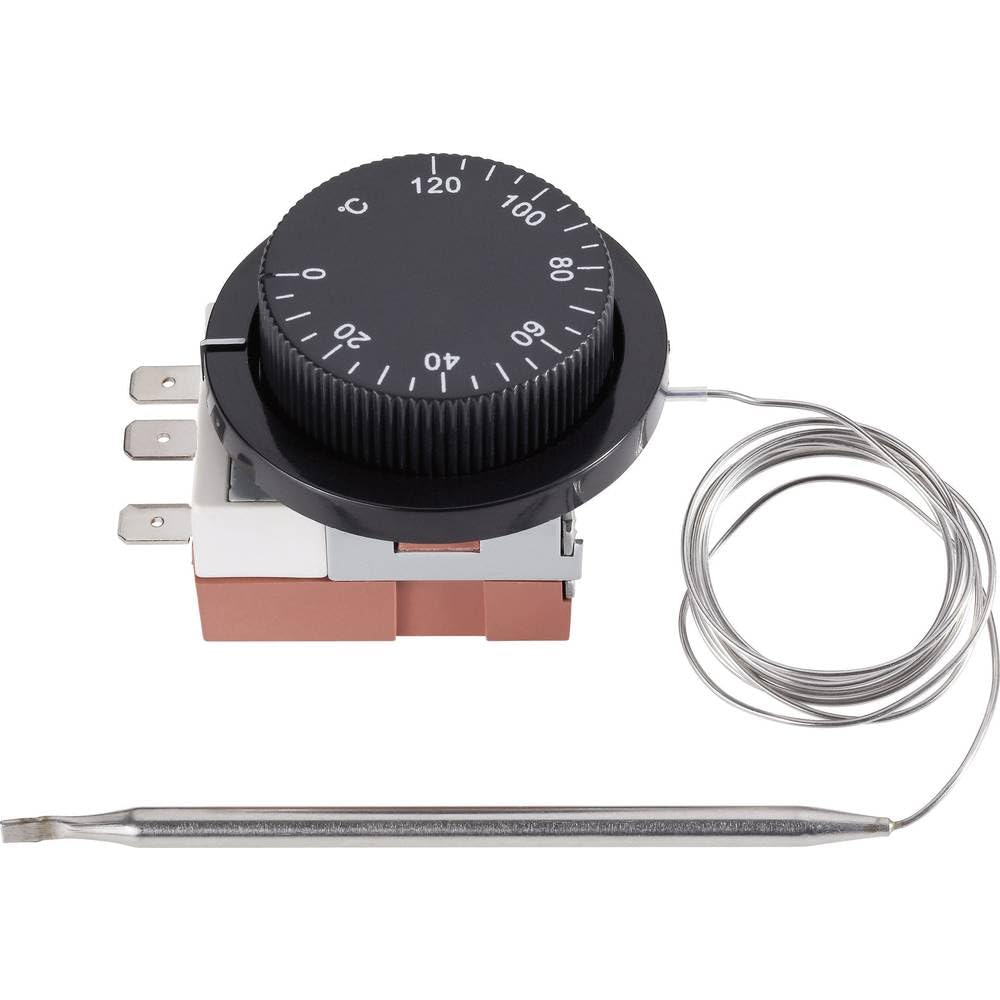
Image 1.1: The Sygonix Built-in Thermostat SY-5044424. This image shows the compact design of the thermostat, ready for integration into a control panel or wall unit.
2. Sikkerhedsinstruktioner
Advarsel: Manglende overholdelse af disse sikkerhedsinstruktioner kan resultere i brand, elektrisk stød, personskade eller beskadigelse af produktet eller ejendom.
- Installationen skal udføres af en kvalificeret elektriker i overensstemmelse med alle lokale og nationale el-forskrifter.
- Sørg for, at strømforsyningen er afbrudt før installation, vedligeholdelse eller fejlfinding.
- Udsæt ikke enheden for fugt, ekstreme temperaturer eller direkte sollys.
- Forsøg ikke selv at modificere eller reparere enheden. Kontakt kvalificeret servicepersonale.
- Hold emballagemateriale væk fra børn.
3. Produktfunktioner
- Setting range: 0 - 120 °C
- Switching differential: 3 ± 1.5 °C
- Indbygget design til problemfri integration
- Suitable for heating, climate, and ventilation systems
- Remote control capability (via RF connectivity)
4. Opsætning og installation
The Sygonix Built-in Thermostat is designed for integration into existing control systems or panels. Professional installation is highly recommended.
4.1. Kontroller før installation
- Verify that the power supply matches the thermostat's requirements (230V).
- Ensure the installation location is free from excessive vibration, moisture, and direct heat sources.
- Confirm that all necessary mounting hardware is available.
4.2. Ledninger
- Afbryd strømmen: Turn off the main power supply to the circuit where the thermostat will be installed. Use a voltage tester to confirm that power is off.
- Montering: Secure the thermostat in its designated built-in location using the provided mounting hardware.
- Tilslut ledninger: Follow the wiring diagram provided with the product packaging. Connect the power input, load output, and sensor wires to the appropriate terminals. Ensure all connections are secure.
- Sensorplacering: Position the temperature sensor in an area that accurately reflects the ambient temperature to be controlled, away from drafts or direct heat sources.
- Gendan strøm: Når alle forbindelser er sikre og verificerede, skal strømmen til kredsløbet genoprettes.
5. Betjeningsvejledning
The Sygonix Built-in Thermostat is designed for straightforward temperature control. Specific operation details may vary based on the integrated system and any connected remote control unit.
5.1. Første opstart
- Upon first power-on, the thermostat may display a default temperature or enter a calibration mode. Refer to the specific display indicators in your product packaging.
5.2. Indstilling af temperatur
- Use the integrated controls (if any) or a compatible remote control unit to adjust the desired temperature. The setting range is 0 to 120 °C.
- The thermostat will activate or deactivate the connected heating/cooling device to maintain the set temperature within the specified switching differential.
5.3. Fjernbetjeningsfunktionalitet
- The thermostat supports RF connectivity for remote control. Pair your compatible remote control or smart system according to its specific instructions.
- Ensure the remote control unit is within the effective range and has fresh batteries (if applicable).
6. Vedligeholdelse
The Sygonix Built-in Thermostat requires minimal maintenance.
- Rensning: Gently wipe the surface of the thermostat with a soft, dry cloth. Do not use abrasive cleaners, solvents, or excessive moisture.
- Regelmæssig kontrol: Periodically inspect the wiring connections for any signs of wear or damage. Ensure the temperature sensor is clean and unobstructed.
- Power Cycle: If the device behaves unexpectedly, try disconnecting and reconnecting the power supply for a few minutes.
7. Fejlfinding
Hvis du støder på problemer med din termostat, kan du se følgende almindelige problemer og løsninger:
| Problem | Mulig årsag | Løsning |
|---|---|---|
| Termostaten tænder ikke | Ingen strømforsyning; forkert ledningsføring | Check circuit breaker; verify wiring connections (ensure power is off first). |
| Forkerte temperaturmålinger | Sensor obstructed or misplaced; faulty sensor | Ensure sensor is clean and in an appropriate location; contact support if suspected faulty. |
| Heating/cooling device not responding | Incorrect wiring; thermostat setting issue; device malfunction | Verify wiring; check thermostat settings; test the heating/cooling device independently. |
| Fjernbetjening virker ikke | Remote not paired; batteries low; out of range | Pair remote as per its instructions; replace batteries; ensure remote is within RF range. |
Hvis problemet fortsætter efter at have forsøgt disse løsninger, bedes du kontakte kundesupport.
8. Specifikationer
| Feature | Detalje |
|---|---|
| Mærke | Sygonix |
| Modelnummer | SY-5044424 |
| Farve | Sort |
| Produktdimensioner | 7 x 5 x 18 cm; 14 kg (or 17D x 6W x 5H cm) |
| Kapacitet | 10 liter |
| Power/Voltage | 280 |
| Voltage | 230 V |
| Støjniveau | 1 decibel |
| Særlige funktioner | Fjernbetjening |
| Fabrikant | Sygonix |
| Varenummer | SY-5044424 |
| ASIN | B0BPX282HB |
| Controller type | Håndholdt controller |
| Specifikke produktanvendelser | Building heating and air conditioning |
| Temperaturkontrol type | Smart/Remote Control |
| Forbindelsesteknologi | RF |
| Inkluderede komponenter | Monteringshardware |
| Indstillingsområde | 0-120 °C |
| Skiftende differentiale | 3 ± 1.5 °C |
9. Garanti og support
For warranty information and technical support, please refer to the documentation included with your purchase or visit the official Sygonix webwebsted. Gem din købsbevis til garantikrav.